
Object Lock: WORM Storage and Immutability Across Cloud Providers
September 2026 · 26 min read · Surya
- Object lock is a write-once flag with a retention date behind it
- Locking the destination before copying a byte is the only order that works
- You cannot copy into a bucket that refuses the copy
- Wasabi, Cloudflare R2 and MinIO each answer the lock question differently
- Retention dates do not travel, so the copy has to reconstruct them
- Here is where rclone genuinely beats us
- Who should not use Storafleet for object lock work
Object lock is a write-once flag with a retention date behind it, and that changes your migration order
Object lock is a promise you make to a regulator, a court, or your own future self that a specific byte will not change and will not disappear before a specific date. It is not encryption. It is not versioning, though it depends on it. It is a flag on the object plus a date, and the storage system enforces both.
That is the whole idea. Everything painful about it follows from the fact that the enforcement lives in the storage layer, not in your application. Your code cannot be trusted to keep the promise, so the provider keeps it for you, and the provider is not interested in your excuses.
Two modes. GOVERNANCE mode lets a user with s3:BypassGovernanceRetention delete or shorten the retention. COMPLIANCE mode does not. Nobody can shorten it. Not you, not your root account, not a court order in most cases. The object sits there until the clock runs out. That distinction is the single most important thing to understand before you enable anything, because COMPLIANCE is the mode people reach for when they are scared and the mode they regret when they get the retention date wrong.
Then there is the second axis, which trips people up constantly: retention period versus legal hold. A retention period is a date. It expires on its own, with no action from anyone. A legal hold is a boolean with no expiry. It stays until a human clears it, and it can be cleared by anyone with the right permission regardless of mode. They stack. An object can have a retention date in 2031 and a legal hold set today, and it will not be deletable until both conditions clear.
The reason this post is about sequence and not about copying is that the lock lives on the destination bucket, and the destination bucket has to exist, with the lock configured, before the first object arrives. You cannot retroactively lock a bucket in AWS S3. You cannot flip a live bucket from unlocked to locked. You cannot decide halfway through a migration that actually you did want immutability. The decision is made at bucket creation and then it is made forever.
So a migration into a WORM target is not a copy job. It is a sequence of steps where the order is load-bearing, and getting the order wrong means starting over. Which is what happened to us. Twice.
Order of operations is the whole migration, and the first two attempts are where we learned it
The first attempt died on a retention rule nobody had read closely enough. We created the destination bucket, enabled object lock, set a default retention of seven years in COMPLIANCE mode, and started the migration. The migration ran for a while and then the writer role started getting access denied on every PUT. Not a permissions problem on the bucket policy. A permissions problem on the retention itself: the default retention we had set was longer than the maximum retention the writer role was permitted to set, so S3 rejected the writes. We had configured a policy that made it impossible for our own tooling to do its job.
That is the failure nobody warns you about, because it looks like an IAM problem and it is not. You check the role. You check the bucket policy. You check the trust relationship. All of it is fine. The thing that is broken is the interaction between two settings that live in different consoles and were written by two different people on two different days.
The second attempt got further and failed on liveness. We dropped the default retention to something the writer could set, and ran for eighteen hours. At around the 60% mark we noticed the object count on the destination was lower than the source. Not by much. The missing objects were the ones written to the source bucket in the hours before the migration started. We had snapshotted the source listing at a moment in time, and the source kept receiving writes throughout the migration because it was a live bucket. Standard problem. We knew it. We had planned to catch it with a second pass. But we had also enabled default retention on the destination, so the objects we were copying in were being locked the moment they landed, and the second pass needed to overwrite some of them because the source had newer versions. Overwrite was blocked. Immutable means immutable.
The interesting cost was not the money. It was the realization, sitting in a call late at night, that we had built a migration pipeline that could not do its job by design. Nobody had caught it because the design was spread across four people's heads and two config files.
This is the honest version of how WORM migrations go. The lock is doing exactly what it promised. The problem is that you promised the wrong thing.
Locking the destination before copying a byte is the only order that works
Here is the correct sequence and the reason each step has to be in this position.
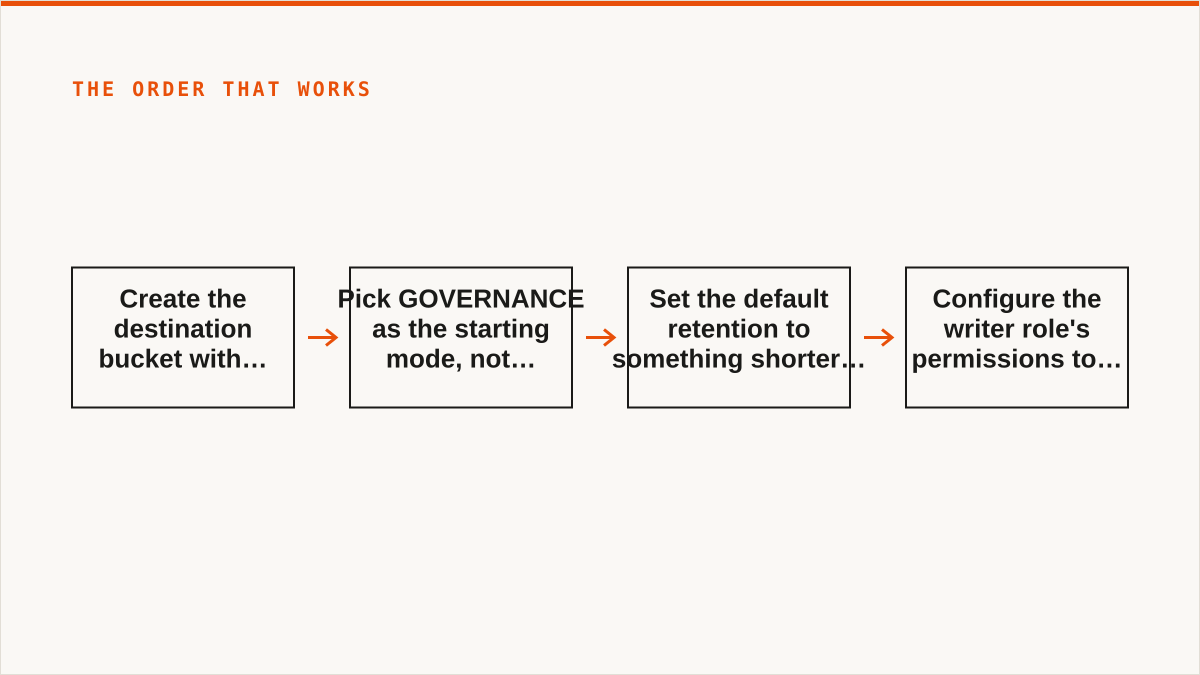
Step one: create the destination bucket with object lock enabled at creation time. Not after. At creation. On AWS S3, MinIO and Wasabi this is a hard requirement. The bucket is created with the lock flag on, and there is no API to turn it on later. You can see the enablement in the console or via PutObjectLockConfiguration, but only as a confirmation, not as a setting.
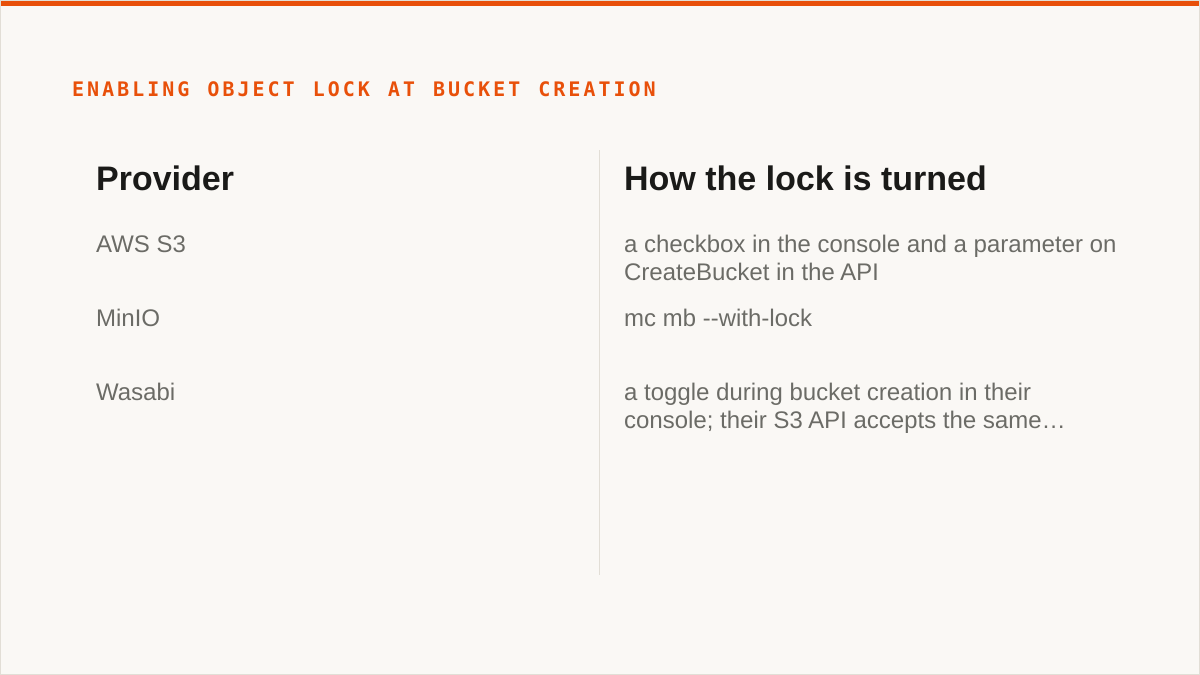
On S3 this is a checkbox in the console and a parameter on CreateBucket in the API. On MinIO it is mc mb --with-lock, and if you forget the flag you delete the bucket and start over because there is no path forward. On Wasabi it is a toggle during bucket creation in their console; their S3 API accepts the same ObjectLockEnabledForBucket header. The mechanism is uniform across the S3 family, which is a small mercy.
Step two: pick GOVERNANCE as the starting mode, not COMPLIANCE. This is the part that hurts to say because COMPLIANCE is the mode with teeth, and customers asking for WORM usually want teeth. But you are not locking your production data. You are locking the destination of a migration, and the migration has bugs. GOVERNANCE gives you the ability to shorten retention or delete objects if a run goes wrong. It gives you a way out. You can move to COMPLIANCE later, per object, by re-applying retention with the stricter mode, and that transition is one-way. You cannot go from COMPLIANCE back to GOVERNANCE. So start loose and tighten.
We do the opposite of what most guides recommend here, and we have been wrong about it once already, so take the advice with the appropriate weight. Start GOVERNANCE. Verify. Then tighten. If you have a regulator who insists on COMPLIANCE from day one, that is a different conversation and you should have a written retention schedule before you create the bucket.
Step three: set the default retention to something shorter than your target. If your compliance obligation is seven years, set the default retention to one year during the migration. Then, after the migration verifies clean, apply the full seven-year retention per object via a batch job. This gives you a window where a mistake is recoverable. It costs you one extra pass over the metadata, which on a few million objects is minutes, not hours.
Step four: configure the writer role's permissions to allow setting retention, and set a maximum retention. This is the mistake that killed our first attempt. The role that writes objects needs s3:PutObjectRetention and the retention it sets must be within whatever maximum you have configured on the bucket. If you set a default retention longer than the maximum the writer can set, the writer cannot write. Read that sentence again, because it is the exact error that cost us a full run.
Flipping a live bucket's lock configuration is a dead end. If you have a bucket you have been using for two years and you now need WORM, the answer is: create a new locked bucket, copy into it, and delete the old one when the copy verifies. There is no in-place conversion. Every provider we have worked with enforces this, and it is enforced for good reason: allowing retroactive locking would be a way for an attacker with bucket admin to weaponize immutability against the owner, and the providers know it.
If you want the exact API surface for each provider, our object lock guide covers the request shapes and the console paths side by side. Read it before you create the bucket, not after.
You cannot copy into a bucket that refuses the copy, and that is the whole point
The failure mode is not subtle and the error is not friendly. You get an HTTP 403 with a body that mentions AccessDenied and, if you are lucky, a hint about the retention configuration. If you are unlucky you get a generic AccessDenied and you spend an hour checking bucket policies and IAM roles and wondering why your perfectly valid credentials are being rejected.
Two distinct ways this happens.
Case one: the destination bucket was created without object lock. You started the copy, it ran, it succeeded, and then you tried to apply retention to the objects. The bucket rejects the retention call because the bucket was never lock-enabled. Every object is now in the destination, unlocked, and the only path to WORM is a fresh bucket and a fresh copy. This is the more expensive case because you have already paid the egress.
Case two: the destination bucket is locked, but the writer role cannot satisfy the retention requirement. This is what happened to us on attempt one. The bucket has a default retention of seven years in COMPLIANCE mode. The writer role's IAM policy allows s3:PutObject but the maximum retention it can set is, say, one year. When the writer PUTs an object, S3 applies the bucket default retention (seven years), then checks whether the writer is permitted to set that retention. The writer is not. The PUT fails.
Here is the code that produced the error. It is a Python snippet using boto3, and it is the smallest reproduction of the failure.
import boto3
from botocore.exceptions import ClientError

s3 = boto3.client("s3")

# The destination bucket was created with object lock enabled and a
# default retention of 7 years in COMPLIANCE mode. The writer role
# has s3:PutObject but its maximum retention is 1 year.
try:
    s3.put_object(
        Bucket="worm-archive-2026",
        Key="records/2026/case-001.pdf",
        Body=open("case-001.pdf", "rb").read(),
        ObjectLockMode="COMPLIANCE",
        ObjectLockRetainUntilDate="2033-01-01T00:00:00Z",
    )
except ClientError as e:
    # AccessDenied. The error does not say "your retention exceeds
    # the maximum your role permits". It says AccessDenied, and you
    # spend an hour on IAM before you find the real cause.
    print(e.response["Error"]["Code"])
    print(e.response["Error"]["Message"])
The error you get is AccessDenied, and the message is generic. There is nothing in the response that tells you the retention date is the problem. You have to know to look at the bucket's default retention and the writer role's maximum, and compare them, and realize that the bucket is enforcing a lock the writer cannot set.
Fix: either lower the bucket default retention to something within the writer's maximum, or raise the writer's maximum retention in the IAM policy. On a migration we usually do the first, because the writer role is shared across tooling and raising its maximum has a wider blast radius than lowering a bucket default that we are going to raise again after verification.
The deeper point is that the bucket is doing its job. It refused a write that violated the retention contract. That is exactly what you want from WORM storage, and it is why you cannot treat this as a generic copy. The destination is not a passive sink. It has opinions, and its opinions are enforced.
Wasabi, Cloudflare R2 and MinIO each answer the lock question differently, and the differences bite on cutover day
People search for these three by name because they are the three S3-compatible providers where the object lock story is materially different from AWS, and the differences matter when you are planning cutover.
Wasabi supports object lock natively on its S3 API. The bucket has to be created with lock enabled, same as AWS, and the API surface is the same PutObjectLockConfiguration and PutObjectRetention calls. Wasabi's pricing model is flat-rate storage with no egress charges, which changes the economics of a migration significantly: the transfer cost that dominated our S3 exit does not exist on the Wasabi side. What you pay for is storage and the API operations. For a WORM archive that sits still for years, that is a different shape of bill than AWS. The catch is that Wasabi is a single provider with its own retention semantics on things like minimum storage duration, and you should read their terms before you assume the lock behaves identically to AWS in edge cases. The API is compatible. The billing and retention corner cases are theirs.
Cloudflare R2 exposes object lock on its S3-compatible surface with its own constraints. R2's object lock support has arrived later than AWS's and the feature set has been narrower in places. The bucket creation step is the same idea, the retention calls are the same names, but you should verify the specific mode and retention behaviors against R2's current documentation before you commit, because R2 has been closing gaps over time and anything we write here will date. The bigger R2 story is that egress is free, which for a WORM archive is close to the perfect billing model: you pay for storage, you pay for operations, and the locked bytes cost you nothing to read back when legal asks for them. That is a real advantage and it is why we see R2 in a lot of new WORM designs.
MinIO implements object lock and is the only one of the three you can run on your own hardware. This is the distinction that matters most for a specific class of customer. If your compliance obligation says the data cannot leave hardware you control, MinIO is the answer and AWS, Wasabi and R2 are all disqualified. MinIO uses mc mb --with-lock to create a locked bucket, supports GOVERNANCE and COMPLIANCE modes, supports legal hold, and speaks the S3 API so your existing tooling works. You run it on your own metal, you own the keys, you own the disks, you own the retention. The tradeoff is that you also own the durability, the capacity planning, the upgrades, and the person who gets paged at 3am when a drive fails. MinIO is not free in the sense of costing nothing. It is free in the sense of not paying a vendor, and you pay in operations instead.
All three speak the S3 API, which is the reason a single control plane can drive all three. That compatibility is also the reason the differences are easy to miss: the API calls look the same, and the semantics underneath are not always identical. Test the retention behavior on the actual target before you commit a real archive to it.
Retention dates do not travel, so the copy has to reconstruct them from the source's metadata
This is the section that matters most technically and the one most guides skip.
A plain S3 copy does not carry object lock metadata. When you call CopyObject or run an aws s3 cp, the destination object gets the body, the content type, and a subset of user metadata. It does not get the source's retention mode, retention date, or legal hold status. Those are bucket-level and object-level lock attributes, and they are not part of the copy payload.
So if you migrate a bucket full of locked objects with a naive copy, every object lands in the destination unlocked. You have moved the bytes and lost the contract. If the source bucket was under a compliance obligation and the destination is now the system of record, you have just broken your retention guarantee on the way through.
What you have to do instead is read the lock metadata from the source and reapply it on the destination. The read is a HeadObject or a GetObjectRetention call per object. The write is a PutObjectRetention call per object, plus PutObjectLegalHold where a hold is set.
Here is the shape of it in Python. The interesting part is not the copy. It is the metadata pass.
import boto3

src = boto3.client("s3")
dst = boto3.client("s3", endpoint_url="https://s3.us-west-1.wasabisys.com")

def migrate_with_lock(bucket, key):
    head = src.head_object(Bucket=bucket, Key=key)

    # Copy the body first. The destination object arrives unlocked.
    dst.copy_object(
        Bucket="worm-archive-2026",
        Key=key,
        CopySource={"Bucket": bucket, "Key": key},
    )

    # Reconstruct retention if the source had one.
    mode = head.get("ObjectLockMode")
    until = head.get("ObjectLockRetainUntilDate")
    if mode and until:
        dst.put_object_retention(
            Bucket="worm-archive-2026",
            Key=key,
            Retention={"Mode": mode, "RetainUntilDate": until},
        )

    # Legal hold is a separate call and does not expire on its own.
    if head.get("ObjectLockLegalHoldStatus") == "ON":
        dst.put_object_legal_hold(
            Bucket="worm-archive-2026",
            Key=key,
            LegalHold={"Status": "ON"},
        )
Three things about this that are not obvious.
First, the copy and the retention application are two operations, and they are not atomic. Between the copy and the retention call, the destination object is unlocked. If the process dies in that window, you have an unlocked object in a bucket that is supposed to be WORM, and nothing will tell you. You need a verify pass that re-reads the destination and confirms every object has the retention you expected. We run this as a separate step and it has caught real misses.
Second, the retention date you reapply is the source's date, not a fresh one. If the source object was locked until 2031-06-15, the destination object must be locked until 2031-06-15. Not 2031-06-15-plus-seven-years. Not the migration date plus seven years. The original date. This is the part people get wrong when they set a default retention on the destination bucket and assume it will handle the rest. A default retention applies to objects that do not specify their own. The moment you call PutObjectRetention with the source's date, you are overriding the default, which is what you want.
Third, legal holds are the ones that get forgotten. Retention dates expire. Legal holds do not. If the source has holds set on a subset of objects, those holds have to travel, and there is no default mechanism that will. The ObjectLockLegalHoldStatus field on the head response is the only place to find them.
Where our console does this for you, and where it does not. Storafleet's migration paths read the source's lock metadata and reapply it on the destination as part of the job. That covers retention mode, retention date and legal hold status on the S3-compatible family. What we do not do is guarantee atomicity between the copy and the retention call, because no S3 API gives you that. What we do instead is run a verification pass at the end of the migration that re-reads the destination and reports any objects whose lock state does not match the source. If the verify pass is clean, you are good. If it is not, you have a list, and you re-run the retention application on the misses.
The honest limit: if you are migrating from a source that exposes lock metadata in a non-standard way, or from a provider whose S3 implementation varies from the AWS surface, we may not read it correctly. Test on a sample before you run the full migration. Do not find out at the end.
Here is where rclone genuinely beats us, and it is not a close call
We are going to spend real words on this because it is true and because pretending otherwise would waste your time.
rclone is free, permanently, with no account and no vendor. You download a binary. You run it. There is no subscription, no seat count, no tier that gates the migration feature, no dashboard that stops working if you stop paying. For a lot of people reading this post, that is the end of the conversation, and it should be.
rclone supports over 70 backends. We connect the S3-compatible family and any custom S3 endpoint. That is it. No Google Drive. No Dropbox. No OneDrive. No SFTP. No WebDAV. No Box. If your migration involves any of those on either end, rclone can do it and we cannot. Full stop.
rclone mounts. There is a rclone mount command that makes a remote bucket appear as a local filesystem. We do not have a FUSE surface. We do not mount anything. If you want your WORM archive to show up in Finder or Explorer as a drive letter, that is rclone, or Mountain Duck, or ExpanDrive, and it is not us.
rclone is scriptable. It composes with cron, systemd, CI pipelines, shell scripts, Makefiles, and anything else that runs a command. A migration into a locked bucket is exactly the kind of job that wants to live in a scheduled script with logging and alerting that you already own. We are a console. A console does not compose with a shell the way a binary does, and we are not going to pretend a web UI is the right tool for a job that wants to run at 2am under a systemd timer.
rclone runs inside your own security boundary. This is the one that matters most for compliance work. With rclone, your credentials never leave your machine. They sit in a config file on a host you control, and the data moves directly from source to destination through that host. With Storafleet, your credentials are encrypted at rest in our database with AES-256-GCM and per-namespace HKDF keys, and AWS can be connected keylessly via IAM role assumption, which is genuinely good. But "the keys never left my laptop" is a stronger statement than "the keys are encrypted in someone else's database", and it is dishonest to pretend otherwise. If your compliance framework requires that credentials never touch third-party infrastructure, rclone is the correct answer and we are not.
rclone has been maintained for over a decade. It has a track record, a community, years of bug fixes, and a reasonable expectation that it will still exist in five years. We are a small team and Storafleet started in 2026. On the question of durability, a decade-old open-source project has a better answer than we do, and you should weigh that.
So: if your budget is zero, if you need to mount, if you need the consumer clouds, if your workflow is code, or if credentials must never leave hardware you control, use rclone. It is the right tool and we will say so every time. That is not a soft recommendation, and nothing later in this post takes it back. If you are in one of those groups, stop reading here and go install the binary.
What we do that rclone does not, in the specific context of object lock migrations: a console that reads the source's lock metadata and reapplies it on the destination as a first-class part of the job, with a verify pass at the end and a UI that shows you which objects did not match. rclone can do this too, with a script, and if you are the kind of engineer who is comfortable writing that script, you should write it. The people who get value from us are the ones who do not want to write it, or who want a second set of eyes on the retention metadata because getting it wrong has legal consequences.
That is a narrow value proposition, and we would rather state it honestly than pretend it is wider.
What the sequence looks like when it works
Here is the order that actually holds up, step by step.
Create the destination bucket with object lock enabled, GOVERNANCE mode, and no default retention. No default retention at all. Every object's retention gets set explicitly from the source's metadata, which means full control and no hidden interaction between the bucket default and the writer role's maximum. That single choice eliminates the failure mode from attempt one.
Run a metadata-only pass first. Before copying a single byte, walk the source bucket and pull the lock metadata for every object: mode, retain-until-date, legal hold status. Write it to a local file. This gives you a complete picture of what the destination needs to look like, and it lets you verify the numbers before you start moving data. If the metadata pass reveals something you did not expect, you find out for free.
Do the copy in two stages: bulk, then delta. The bulk copy moves everything that existed at the moment the metadata pass completed. Then schedule a sync that catches anything written to the source since the last run. If the source bucket is live and stays live until cutover, the delta sync is not optional. This is the part attempt two got wrong: we assumed a single pass would be enough because we had planned a second pass, but the second pass could not overwrite the locked objects. This time the delta sync only adds new objects, never overwrites, because the objects already copied have their retention set and cannot be changed. New writes to the source become new objects on the destination with their own retention dates.
Apply retention as a separate pass after the copy. Copy first, then retention. Not interleaved. This gives you a clean window where the destination has all the bytes but no locks, so if you need to fix something you can. Then the retention pass runs, object by object, reading from the metadata file and writing to the destination. This pass takes longer than the copy, which surprises people. A few million PutObjectRetention calls, each a round trip, is not fast. Budget for it.
Run a verify pass that compares the destination's lock state to the source's. Every object, every attribute. This is the step that catches the failures you cannot see. It found a couple of hundred objects where the retention had not been applied, all of them from a single interrupted batch. We reapplied retention to those and re-verified. Clean.
Then tighten. Run the migration in GOVERNANCE mode. After verification is clean and you have lived with it for a while, re-apply retention in COMPLIANCE mode for the objects that need it. That transition is one-way, so do it deliberately and only after the destination has proven correct.
What we would do differently next time. Three things. Run the metadata pass before creating the destination bucket, not after, because knowing the shape of the retention data tells you immediately that a default retention is the wrong approach. Set up the verify pass as a scheduled job from day one, not as an end-of-migration step, so misses get caught in the first hour instead of at the end. And write the migration as a script and run it with rclone. No, really. For a one-time migration, a shell script and rclone is faster to build, easier to debug and cheaper. The reason we did not is that we are Storafleet and we use our own product, which is a legitimate reason but not an engineering reason. If you are reading this and you are not us, reach for the script.
Who should not use Storafleet for object lock work, and what they should use instead
Six cases. Plain words. If you are in one of them, we are not the right tool and we would rather say so now than sell you a subscription you will cancel.
Your budget is zero. Then the conversation is over and rclone wins. It is free, it will always be free, and it does object lock migrations correctly if you write the script. There is no version of this where paying us makes sense if the budget line does not exist.
You need storage mounted as a filesystem. We have no FUSE surface. Nothing in Storafleet will make a bucket appear in Finder or Explorer. Use rclone mount, Mountain Duck, or ExpanDrive. Those tools do this and we do not.
You need to move data from Google Drive, Dropbox, OneDrive, or SFTP. We do not connect any of those. We speak S3 and only S3. Use rclone, which handles all of them, or MultCloud or CloudFuze if you want a UI for the consumer clouds. This is a deliberate limit on our part and it is not going to change.
Your credentials must never leave hardware you control. Our credentials are encrypted at rest with AES-256-GCM and per-namespace HKDF keys, and AWS can be connected keylessly via IAM role assumption, which is the strongest answer we have. But it is still weaker than "the keys never left my laptop", and if your compliance framework requires that, use rclone. Our IAM role path is a real option if the source is AWS only, and you should take it if it fits, but it does not cover the general case.
Everything lives in one cloud and always will. If your entire object storage estate is in AWS and you have no plans to leave, the AWS console is free, always current with AWS's newest features, and authoritative in a way we cannot be. Use it. The value we add is in the cross-provider case, and if you do not have a cross-provider case, there is nothing for us to add.
Your workflow is entirely code and always will be. If the migration lives in a CI pipeline, runs from a Makefile, and is monitored by a script you already own, a CLI composes with that and a console does not. Use rclone. It will be a better fit for your existing tooling than anything with a web UI.
And one more, not a disqualifier but a real consideration: we are a small team and we started in 2026. If your migration is going to run for years and the tool needs to be maintained for the life of the data, a decade-old open-source project is a safer bet than we are. We would rather you factor that in than be surprised by it.
If none of those apply, and you have a cross-provider object lock migration, and you want a console that reads the source's retention metadata and reapplies it on the destination with a verify pass at the end, that is what we built. It is a narrow tool for a narrow job, and the job is one where getting the order wrong costs you a second migration and the egress you did not need to spend.
Create the destination bucket with lock enabled before you copy a byte. Set GOVERNANCE as the starting mode. Read the retention metadata before you create anything. Verify at the end. And if the honest answer is rclone, take it.