
Download an S3 Folder as a Zip with Storafleet
September 2026 · 32 min read · Surya
Someone on the marketing team asks for every image from last year's campaign, all of it, in one file they can open on a laptop, and the bucket has tens of thousands of objects under campaigns/2025/. You open the AWS console, right-click the folder, and there is no download button, because there is no folder and there never was.
So you search for "download s3 folder" and you get two flavours of answer. A decade-old Stack Overflow thread that begins with "install the AWS CLI". And a content-farm post that says you should "simply" write a Lambda that streams a zip. Both are correct in their own way. Neither tells you which one you want, or when the whole question has an answer that is not us.
We are Storafleet. We sell a console that will download an S3 prefix as a zip, so we have an obvious bias, and we are going to spend roughly as much of this post telling you to leave as telling you to stay. The short version: rclone plus zip solves this problem permanently, for free, on your own hardware, and for a lot of readers that is the correct answer. The long version is below, and it is long because "download s3 folder as zip" is really three jobs stacked on top of each other, and the interesting question is where each job should live.
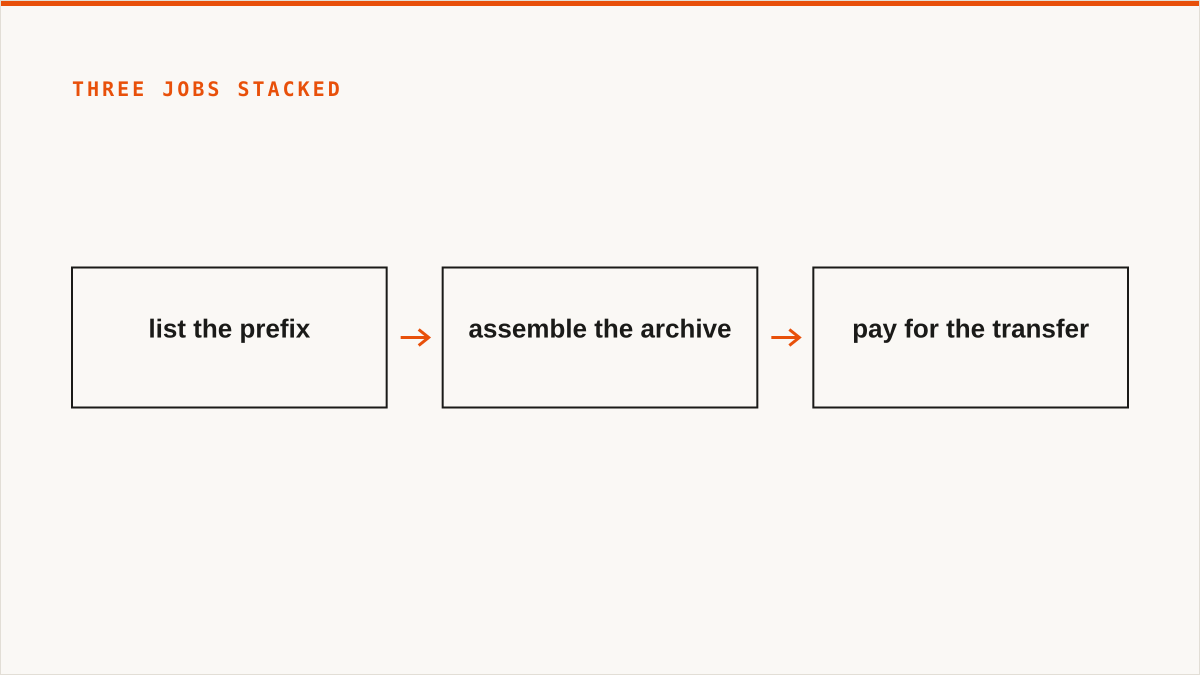
Those three jobs are: list the prefix, assemble the archive, pay for the transfer. Different tools put them in different places, and that placement decides whether a folder pull takes minutes or hours, whether it costs nothing or a surprising amount, and whether it works at all when the prefix holds two million keys.
A word on what this post will not do. We have no case studies and no named customers, because we are a small team and Storafleet started in 2026. If you need a logo wall before you trust a tool, we cannot give you one, and rclone has been maintained for over a decade by people who have never met you and never will. That is a genuinely better answer to "will this exist in five years" than anything we can offer. Keep that in your pocket while you read the rest.
Contents
- A folder in S3 is a lie your console tells you
- Zipping happens where the CPU is, and S3 has no CPU for you
- What actually happens after you click Download as zip
- Presigned URLs do not solve this, and everyone tries them first
- The shell version, written out in full
- Ten thousand 4 KB files is a different job from ten 4 GB files
- Where zips break: 4 GB, 65,535 entries, and browser memory
- A table: six ways to get a prefix down to a laptop
- rclone beats us on this, and it is not close
- Where your credentials sit, and the honest comparison
- The bytes are unmetered on our side; your provider still bills
- Who should not use us for this, and what to use instead
A folder in S3 is a lie your console tells you
S3 has no directories. It has a keyspace, and buckets are a flat mapping from a key string to a pile of bytes. There is no inode for campaigns/, no parent pointer, no rename that moves a subtree, no directory entry that knows how many children it has. When the console draws a folder, it is drawing the result of a query, not a thing that exists.
The query is ListObjectsV2 with Delimiter=/, and that single parameter is the entire trick. Ask for the prefix campaigns/ with a delimiter and the response comes back in two buckets: Contents, which holds keys directly under that prefix, and CommonPrefixes, which holds the distinct strings up to the next slash. The console renders CommonPrefixes as folders and Contents as files. That is it. That is the whole magic. Every object browser you have ever used, including ours, is doing some version of this.
Drop the delimiter and the same request returns every key under the prefix, all the way down, no grouping. This is why "download a folder" is really "download everything matching a prefix", and why the folder abstraction collapses the moment you stop rendering it.
Here is the key you are actually dealing with:
campaigns/2025/spring/hero-shot-final-v3.jpgThat whole string is the key. There is no hero-shot-final-v3.jpg object sitting inside a spring object inside a 2025 object. There is one key, and it happens to contain slashes. Those slashes have no meaning to S3 at all. They mean something because every tool in the ecosystem agreed to treat them as separators, and that agreement is the entire basis of the "folder" you see.
The trailing slash is the other half of the lie. A prefix of campaigns/2025/ and a prefix of campaigns/2025 are different strings and can match different sets of keys. If you have ever seen a folder that looks empty but will not delete, it is usually a zero-byte key like campaigns/2025/ that exists only to make the console render something. Deleting a "folder" in S3 is a bulk delete over every key matching a prefix, and a zero-byte marker key is what makes that folder look empty while refusing to go away.
Now the part that actually hurts at scale: pagination. A single ListObjectsV2 call returns at most a thousand keys, and you cannot raise that ceiling. To walk a prefix with 200,000 keys you make 200 sequential requests, each with its own round trip, each returning a NextContinuationToken you must pass to the next call. There is no way to parallelise this meaningfully, because page two is only addressable after you have read page one. You can shard by prefix if the key space allows it, and that is worth doing, but with plain pagination the listing alone can take longer than fetching the bytes.
So when someone asks you for a folder, what they are really asking for is a list. Everything downstream depends on getting that list right, and on big prefixes the list is the expensive part.
Two footguns worth naming, because they bite in production. First, a prefix listing is not a snapshot. Keys can be added, overwritten or deleted while you are paging, so a long download can miss objects that appeared after page one or produce duplicates if the sort order shifts under you. Second, if the bucket has versioning on, ListObjectsV2 gives you current versions only, and ListObjectVersions will happily return you a number several times larger, including delete markers. If the prefix has ten thousand live objects and a hundred thousand versions, those are very different downloads and you should decide which one you meant before you start.
Zipping happens where the CPU is, and S3 has no CPU for you
There is no server-side zip on S3. There is no query parameter, no header, no API call and no console checkbox that returns you an archive of a prefix. Nobody is hiding it from you. The feature does not exist.

This is worth pausing on, because the search "s3 download folder as zip" carries a hidden assumption: that the zip is something S3 could just produce, the way a web server produces a directory index. It cannot, for a simple reason. S3 stores bytes and serves bytes. It does not run your code, it does not hold your objects in memory, and it has no place to put an assembled archive that is not itself an object you would then have to download anyway.
And that last point is the one worth internalising. Even if a provider offered a magic zip URL, the archive would have to be built somewhere and then stored somewhere, and you would still be downloading the result. The only thing that changes between a "magic" implementation and a homemade one is who runs the compute. The bytes have to flow through a machine that can hold them. That machine is either a browser, a laptop, or a function you wrote.
Placement one: the browser
The user clicks a button, and bytes stream from the bucket, through whatever is serving the page, into a zip writer running in the tab, and out to a save dialog. No infrastructure on your side beyond the app itself. The user's own machine does the compression and the storing, which is where the archive was going to end up regardless.
The cost is that the tab has to stay alive for the whole job, and the practical ceiling is disk space on the user's laptop plus whatever memory the implementation refuses to give up. Get it right and it works for very large archives, because nothing is buffered. Get it wrong and you have built a page that dies on a 2 GB folder on a five-year-old MacBook Air. We will come back to how the streaming works, because it is the whole ballgame.
Placement two: a laptop or a desktop
aws s3 sync into a local directory, then zip -r. Or rclone, or Cyberduck, or a mounted bucket and Finder's own Compress command. The compute is a machine you own, the credentials are on your disk, the archive lands next to the source, and there is no third party in the loop at all.
The cost is that someone has to install a tool and know a command, and the download temporarily needs room for both the raw objects and the archive unless you are clever about it. This is the category where the honest answer usually lives, and we will write the commands out in full later so this page is useful to the person who will never open a web console.
Placement three: a function you wrote
A Lambda, a Cloud Run job, a small ECS task, a droplet, whatever. It lists the prefix, pulls the objects, writes a zip, and puts the zip somewhere the user can fetch it, or streams it straight back. Usually someone builds this because they want a button for other people.
Now you own infrastructure. Lambda has a hard timeout ceiling of fifteen minutes, so a large archive does not fit unless you are chunking and juggling state. You have a memory ceiling to size around. You are paying for the function's compute on top of the provider's egress. You have to write retry logic for throttling. And the whole thing has to stream to S3 or to the client, because writing a 20 GB zip to /tmp is not a plan. None of this is impossible. It is a day of work and a small permanent maintenance tax, and the reason to pay it is that you want the button to exist for other people without buying a product.
Three placements, three cost profiles, and no fourth option where the work disappears. That is the honest answer to the core question in the search. If someone tells you there is a URL that just returns a zip of your prefix, they are describing one of these three things with the compute conveniently hidden.
What actually happens after you click Download as zip
We should be concrete here, because this is the moment you are deciding whether to trust a button, and the details are the trust. This is the shape of what happens in our console when you point it at campaigns/2025/ and ask for a zip. It is also, more or less, the shape of any competent implementation.
First: credentials are decrypted in memory, used, and not written anywhere else. They sit encrypted at rest with AES-256-GCM under per-namespace HKDF keys, and they are decrypted for the duration of the job so the worker doing the fetching can sign requests. If you connected AWS by IAM role assumption instead of pasting keys, there is nothing to decrypt at all, because we are assuming a role you control rather than holding a secret. More on that later, including why it is a smaller win than it sounds.
Second: the prefix is listed, paginated, to the end. That means ListObjectsV2 with the prefix you gave us, following NextContinuationToken until the responses stop. For folder downloads we generally list without a delimiter, because you asked for everything under a prefix and the folder structure is a rendering we are about to reconstruct inside the archive anyway. Each page gives us key, size and ETag, which means we never have to issue a HEAD per object just to learn how big it is. That one detail matters more than it sounds like it should.
What comes out of this phase is a manifest: every key, its size, and the path it will occupy inside the zip. The path is where you get a choice. Most people want campaigns/2025/spring/hero.jpg to appear as spring/hero.jpg, so the archive opens to something sensible rather than to four levels of prefix. Some people want the full key preserved because it round-trips. We default to stripping the shared prefix and let you keep it if you need it.
Third: the fetches start, with a bounded worker pool. Not one at a time, because at 10,000 objects that is a coffee break. Not two hundred at once, because most providers will throttle you, and a throttled request is slower than a request you never sent. A pool of concurrent GetObject calls with a queue behind it, and the pool doubles as backpressure: when the writer is behind, workers block on the write instead of pulling the next object.
Retries are not optional. 503 SlowDown is a normal thing for S3 to say under load. Providers that are not AWS rate limit differently, some with 429s, some by simply being slow. A download that treats the first failure as fatal is a download that fails.
Fourth: the bytes go into a Zip64 writer as a stream, and never into a buffer. This is the line that separates an implementation that works on a 40 GB folder from one that works on a 400 MB folder. Each object's bytes arrive as a stream, get written into a local file header, have a CRC32 computed on the fly, and leave again. Memory stays flat regardless of whether the archive is 200 MB or 200 GB, because at no point does anything hold the whole thing.
Compression is a decision, and the default should be smarter than it usually is. JPEG, PNG, MP4, HEIC, most PDFs and most modern archive formats are already compressed. Running deflate over them burns CPU on every worker and buys you roughly nothing. For a folder of photos, store mode is the right call, and it is dramatically faster. For a folder of JSON, logs, CSV or source, deflate earns its keep. A tool that always compresses is a tool that is slow exactly when you need it not to be.
Fifth: the archive streams to the browser's save dialog while it is still being built. This is the part people do not expect. The download does not wait for the zip to finish. The response begins, the browser opens a save dialog (or writes to a file handle you picked in advance), and objects keep arriving behind it. That is what makes a large archive possible in a tab at all. If the implementation buffered the whole archive before handing it over, memory would blow up somewhere around a few gigabytes and the tab would die.
If you want the clickable version of this, the feature page is at https://storafleet.com/features/folder-download, and that is the page to read if you have decided you want a browser to do the work and you are now checking whether ours does it properly.
The practical ceiling is real, and it is your laptop's disk. We stream, so our memory is not the constraint. The archive has to land somewhere, and it is as large as the objects plus a little overhead. If the folder is 80 GB, the person clicking the button needs 80 GB free. There is no way around that, and any tool that tells you otherwise is buffering somewhere it should not be.
Then there is the failure case, and we should be blunt about it. If the tab closes at 80 percent, you do not have a zip. The stream is severed, the worker pool stops, in-flight requests are abandoned, and the file on disk is a fragment. A zip's index lives at the end of the file, in the central directory, and a fragment has no index, so nothing can open it. The zip format has no native resume. Not ours, not anybody's.
Compare that to the command-line path, where rclone copy re-run after a failure skips everything already on disk and picks up from where it stopped, because it is copying files and not assembling an archive. If a download is likely to be interrupted, or likely to take longer than a laptop lid stays open, that difference is the whole decision.
Presigned URLs do not solve this, and everyone tries them first
Before anyone writes a zip writer, they find the Stack Overflow answer that says: generate a presigned URL per object and hand the browser a list. It is a reasonable first instinct. It requires no server code beyond signing, and signing is a few lines.
It falls apart at about 500 keys, and it falls apart in a way that has nothing to do with S3. You have not built a download. You have built a download manager, and a bad one, and you have handed it to a browser that was never designed to fetch five hundred files in one gesture. Firefox and Chrome will ask you whether you want to save each file or open it, or they will quietly dump everything into ~/Downloads, flattened, with any name collisions resolved by appending (1) to the second hero-shot-final-v3.jpg. Popup blockers get involved. The tab becomes unresponsive. At 5,000 keys it is a denial of service against the user's own machine.
Then there is the operational half. A presigned URL is a bearer token with an expiry, and a folder download can outlast it. Under SigV4 you can sign for up to seven days, which sounds generous until someone starts a 300 GB pull on hotel wifi. When the URLs expire mid-flight, the downloads fail one by one, and the user has a partially populated folder and no obvious way to tell which files are missing.
You also cannot list with a presigned URL, or at least not usefully. Signing grants access to one exact key. To build the list of URLs you had to list the prefix yourself first, with real credentials, on a server. So the "no backend" version of this idea has a backend. It just has a backend that does the hardest part and pretends it does not.
And the moment you decide to fix the browser's behaviour by producing a single zip, you are back to writing a script that fetches each presigned URL and streams it into an archive. At which point the presigned URLs are a strange indirection: you took credentials that were already on a machine, turned them into temporary URLs, and then used those URLs from a different machine to do the same fetches. It works. It is just more moving parts than copying from the bucket directly with a proper tool.
Here is where it is genuinely the right answer, and we use it for this ourselves. You have one object, or a handful, and a recipient who should not have credentials. A big export file, a database dump, a single 30 GB video. You sign a GET for exactly that key, expiring in an hour, and you paste the URL into a message. The recipient gets the file, gets no access to anything else, and the link dies on its own. Handing someone a presigned URL is enormously better than handing them an access key, and it is one of the genuinely good ideas in the S3 ecosystem. It just does not scale to a folder, and it never claimed to.
The shell version, written out in full
This section exists for two reasons. The first is that a large number of people who search for a way to download an S3 folder should never open a browser console at all, and a page that only sells them a button has failed them. The second is that we are about to tell you to use rclone, and it would be a bit rich to do that without showing you the two commands.
Start with the AWS CLI, because it is the one you already have if you are anywhere near AWS. sync is the command you want most of the time: it copies what is missing and skips what is already there, which makes re-runs cheap and makes an interrupted transfer recoverable by simply running it again.
# the whole folder into a local directory
aws s3 sync s3://my-bucket/campaigns/2025/ ./campaigns-2025/

# see what it would do, without doing any of it
aws s3 sync s3://my-bucket/campaigns/2025/ ./campaigns-2025/ --dryrun

# copy everything, every time, instead of skipping unchanged files
aws s3 cp --recursive s3://my-bucket/campaigns/2025/ ./campaigns-2025/

# only the images
aws s3 sync s3://my-bucket/campaigns/2025/ ./campaigns-2025/ \
  --exclude "*" --include "*.jpg" --include "*.png" --include "*.webp"

# then, and only then, build the archive
zip -r campaigns-2025.zip campaigns-2025/
Two things worth knowing about the filters, because they get people every time. --exclude "*" --include "*.jpg" works, but only in that order, and only because the CLI applies rules in sequence and lets later ones win. Reverse them and you get everything. And the trailing slash on the source matters. s3://bucket/campaigns/2025/ means the contents of that folder. Drop the slash and behaviour changes depending on what else matches the key campaigns/2025. Write the slash.
Now rclone, which is the tool we would actually reach for. It is one binary, it supports far more backends than we do, it is scriptable, and it has been maintained for over a decade. If the AWS CLI is the S3 tool, rclone is the object-storage tool.
# configure a remote once
rclone config

# copy the prefix down
rclone copy my-s3:my-bucket/campaigns/2025 ./campaigns-2025 \
  --progress --transfers 16 --checkers 32

# always dry run first
rclone copy my-s3:my-bucket/campaigns/2025 ./campaigns-2025 --dry-run

# filters, evaluated left to right, last match wins
rclone copy my-s3:my-bucket/campaigns/2025 ./campaigns-2025 \
  --include "*.jpg" --include "*.png" --exclude "*"

# mount the prefix instead and let Finder or Explorer think it is a drive
rclone mount my-s3:my-bucket/campaigns/2025 /mnt/campaigns \
  --vfs-cache-mode full --read-only

# same thing, but in the background, on macOS and Linux
rclone mount my-s3:my-bucket/campaigns/2025 /mnt/campaigns \
  --vfs-cache-mode full --read-only --daemon
On Windows, rclone mount needs WinFsp installed first. That is the only setup wrinkle worth flagging, and after it you get a drive letter in Explorer pointing at a prefix, which is a genuinely different way of working: no download step at all, nothing to zip if the application can read files directly, and the archive problem simply disappears because nobody needs an archive.
Do not skip --dry-run and --dryrun. Both tools will happily pull a terabyte into the wrong directory if you typo a prefix, and the dry run costs you ten seconds.
On the zip itself, two flags earn their place. The first is -0, which stores files without compressing them:
# store only: much faster, and JPEGs and MP4s do not compress anyway
zip -0 -r campaigns-2025.zip campaigns-2025/

# if the archive has to fit through an upload form, split it
zip -r -s 2g campaigns-2025.zip campaigns-2025/
Split archives work, but the recipient needs every part in the same directory to extract, and that is a conversation you will have to have with whoever asked for the file. For anything genuinely huge, a zip is the wrong delivery mechanism and you should be talking about a shared prefix, a signed URL, or a physical disk.
One thing the shell path cannot do well: pipe directly into zip without staging the raw files. You can be clever with rclone cat and a loop, and people do, but you end up with either the raw files on disk or the archive being rebuilt from scratch on every retry. Budget for both existing at once, or accept the retry cost. This is a real limitation of the approach and no amount of clever shell fixes it completely.
Ten thousand 4 KB files is a different job from ten 4 GB files
The size of a folder tells you almost nothing about how long it will take to download or what it will cost. The object count tells you almost everything. This is the single most useful thing in this post, and it is the thing most articles about folder downloads skip entirely.
Consider two folders, both of which a normal person would describe as "a folder of a few gigabytes".
Folder A: ten thousand thumbnails, roughly 4 KB each, so about 40 MB total. Folder B: ten video files, roughly 4 GB each, so about 40 GB total. Folder B is a thousand times larger in bytes.
Folder A is the harder download.
It is harder because of request count. Every object is a separate HTTP request with its own signature, its own TLS connection or its own ride on a pooled one, its own round trip, its own response headers. Ten thousand of those, spread across a bounded worker pool, is a lot of round trips. Even with sensible concurrency, ten thousand small requests does not take a tenth of a second. It takes minutes, and the bytes moved during those minutes would fit on a floppy disk in an unkind metaphor.
Folder B is ten requests. Each one takes a while because the object is large, but ten requests overlap beautifully, bandwidth saturates, and the whole thing is limited by your pipe rather than by protocol overhead. Forty gigabytes down a decent connection is a coffee break. Forty megabytes in ten thousand pieces is not, and the reason is entirely per-request cost.
Now the billing side, which inverts depending on your provider. Providers charge for folder downloads in two currencies: bytes leaving their network, and requests. Which one dominates your bill depends entirely on their pricing model, and the models genuinely differ.
AWS charges for egress to the internet by volume, and charges for requests by the thousand, with list operations typically priced higher per thousand than get operations. In that model, a large folder of big files is an egress bill, and a large folder of small files is an egress bill plus a request bill that is smaller but not nothing.
Cloudflare R2 charges nothing for egress and instead counts operations in two classes, with list and write operations in the more expensive class and reads in the cheaper one. In that model, bytes leaving cost you nothing, and the object count is the entire bill. Ten thousand thumbnail GETs on R2 is a line item. Ten 4 GB GETs on R2 is close to free. Same data volume, wildly different answer, because the pricing model is different, not because the provider is better or worse.
Backblaze B2 gives you a free egress allowance that scales with how much you store, and charges per download beyond it. Wasabi has a flat storage model where egress is free up to a ratio of your stored volume and billed beyond that. Read the model, not the marketing page, because "no egress fees" means three different things at three different providers.
So the practical advice is boring and correct: before a large folder pull, spend five minutes on the provider's pricing page, and estimate both the bytes and the request count. If you are on R2 and the folder is a hundred thousand small objects, the operation count is your cost and you should care about it. If you are on S3 and the folder is a few hundred large videos, the egress is your cost and the object count is noise.
Two more habits that pay for themselves. First, take sizes and ETags from the ListObjectsV2 response rather than issuing a HEAD per object. A list of ten thousand keys gives you ten thousand sizes for free, and a HEAD per key doubles your request count for information you already had. That is the difference between a ten-thousand-request job and a twenty-thousand-request job, and on a provider that bills operations it is the difference between one line item and two.
Second, shard the listing if the key space allows it. Pagination is sequential, so a single walk of a two-million-key prefix is two thousand round trips in a row. If your keys have a natural partition, a date, a customer id, a shard prefix, you can list the partitions in parallel and cut the wall-clock time roughly by the number of shards. It only works if the key layout cooperates, and if it does not, you live with the sequential walk. But it is the one lever you have on listing time, and it is worth checking whether your key schema gives it to you.
The headline: measure the object count before you estimate the job. Bytes tell you the transfer time on a fat pipe. Count tells you the request time, the retry overhead, the list time and, depending on your provider, the bill. A folder described as "about 40 GB" can be ten requests or ten thousand, and those are different days.
Where zips break: 4 GB, 65,535 entries, and browser memory
The zip format is older than most of the people using it, and it carries limits that a folder download will eventually hit. Most of the time you never meet them. When you do, the failure is confusing enough that it is worth knowing they exist before you blame the network.
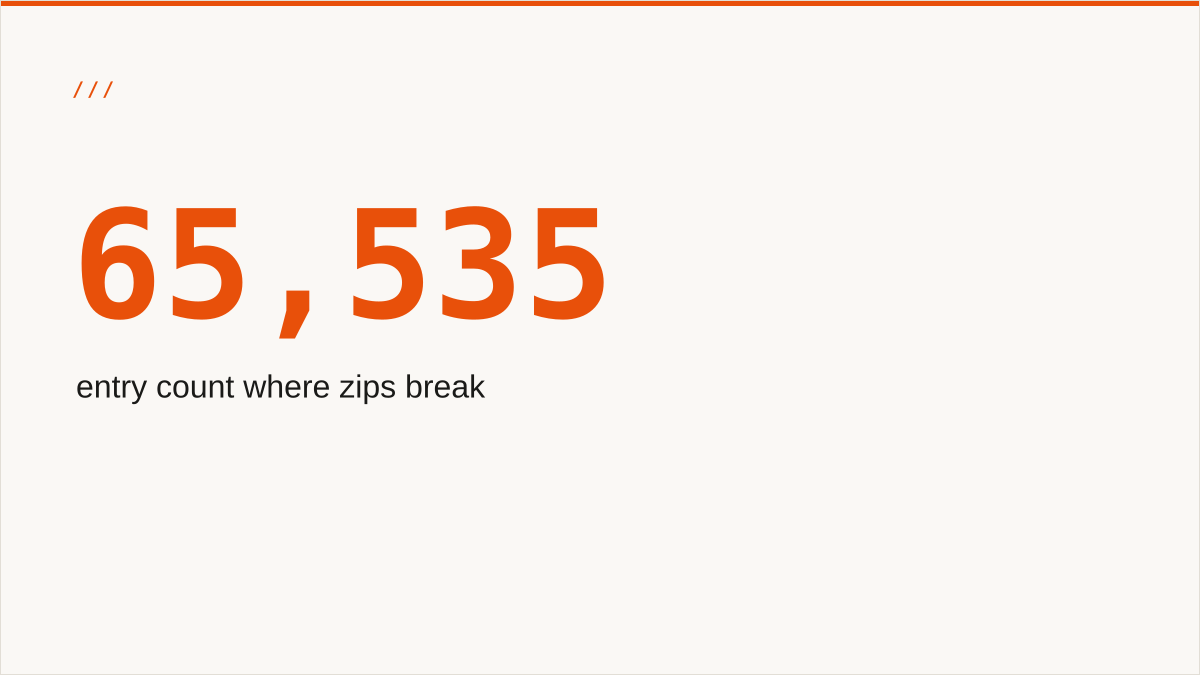
The first limit: the classic zip format caps an archive at 4 GB and 65,535 entries. Not 4 GB per file, 4 GB for the whole archive. Not 65,535 per folder, 65,535 entries in the archive, total. Both numbers come from 32-bit fields in the original format, written when a big file was something you carried on a stack of floppies.
Zip64 lifts both, and it is not new. It dates from the late 1990s and every modern tool writes it. But "every modern tool" is doing a lot of work in that sentence. Windows Explorer's built-in extractor only learned to read Zip64 in the last few years. Some older macOS tools, some Java libraries, some appliances and some corporate upload forms still do not. Writing Zip64 is the right default. Assuming everyone can read it is how a support ticket starts.
Here is the uncomfortable part: the 65,535 entry limit is exactly the failure mode of Folder A from the previous section. A folder of 70,000 thumbnails does not just take minutes to download. It also does not fit in a classic zip. A tool that does not write Zip64 will either fail outright or, worse, truncate, and you find out when a customer's archive is missing a few thousand images and nobody notices for a week.
The second limit, and the one that produces the strangest bug reports: filename encoding. The original zip spec never defined an encoding for names, and a lot of historical tooling wrote CP437. If your keys contain accented characters, Cyrillic, CJK or emoji, a zip writer that does not set the UTF-8 flag writes names that extract to mojibake on someone else's machine. The file is fine. The name is garbage. It is a small fix in the writer and it is an afternoon of confusion if you do not know it is a known thing.
The third limit explains why a killed download gives you nothing at all: the zip central directory lives at the end of the file. A zip is not a sequence of files with headers you can read from the top. It is a sequence of local file headers, then a central directory indexing all of them, then an end-of-central-directory record. Every extractor reads that directory at the end to find out what is inside. A truncated zip has no end-of-central-directory record, so it is not a partial archive. It is a file with a zip extension and no way to open it, which is why resuming a zip is not a matter of seeking to an offset and carrying on.
The fourth is about the implementation rather than the format: browser memory. A zip writer that accumulates the archive in memory before handing it to the save dialog works fine at 200 MB and dies at 2 GB, and the tab dies with it. The fix is streaming, which we covered earlier, and it is the difference between a toy and a tool. It is worth naming because "it worked on my test folder" is how this bug ships. The test folder was small.
None of this bites on a normal folder. A few hundred images, a couple of gigabytes, plain ASCII names, and every tool on the table handles it without thinking. These limits matter when the folder is unusual, and unusual folders are exactly the ones that get escalated to the person reading a blog post at eleven at night.
A table: six ways to get a prefix down to a laptop
Here is the whole decision in one table, and then the paragraph that makes it useful. Every method puts the compute somewhere different, and where the compute lives decides almost everything else: who holds the credentials, what happens when it fails, and who can run it.
| Method | Compute runs on | Credentials live | Best for | Falls over when | Re-run after failure |
|---|---|---|---|---|---|
aws s3 sync + zip |
Your laptop | ~/.aws/credentials |
A one-off pull by someone with a terminal | Needs room for raw files and the archive | Resumes; skips what is already local |
rclone copy + zip |
Your laptop or a server | rclone.conf, on your disk |
Repeatable, scriptable, any backend | Same disk-space story as the CLI | Resumes; skips what is already local |
rclone mount, no archive |
Your laptop | rclone.conf |
When an app can read files directly | Slow random access; wants a local cache | Nothing to resume; files stay virtual |
| Desktop GUI client | Your laptop | The app's keychain | Point and click, archive not required | Thousands of objects; no zip output | Depends on the client; often re-lists |
| Browser console zip (Storafleet) | The worker and the user's tab | Encrypted at rest, or an assumed role | Handing a button to someone non-technical | Tab closes; laptop runs out of disk | Restart; a zip has no resume |
| Serverless zip function | A function you wrote | Its execution role | A repeatable button for other people | Timeouts; the 15-minute Lambda ceiling | Whatever you built; usually restart |
Read the "compute runs on" column first, because it decides the rest. If it says your laptop, you are trading convenience for control, and you keep your credentials on your own disk. If it says someone else's machine, you are trading control for convenience, and you are trusting a third party with access to your bucket. There is no row where you get both without a trade, and any pitch that says otherwise is hiding one of the columns.
The "re-run after failure" column is the one people ignore until it bites them at the worst possible moment. The two command-line rows resume because they are copying files, and a file already on disk is a file they skip. The two zip rows do not, because a zip is a single stream with an index at the end, and there is no clean way to resume a stream you did not finish. If your transfer is likely to be interrupted by a laptop lid, a flaky connection or a tab someone closes by accident, that column is the only one that matters.
The "best for" column is deliberately narrow, because the honest answer usually is. Five of the six rows are fine for an engineer with a terminal. One of them exists because the person who needs the folder often cannot run any of the other five, and that is the whole reason a product like ours is on the list at all.
rclone beats us on this, and it is not close
Let us do the concession properly, because it is the whole reason this post is worth reading. On the job of getting an S3 prefix onto a disk, rclone is better than we are, and it is not close.
It is free, and we are not. There is no account, no subscription, no seat, no trial that expires. You download one binary and you are done, forever.
It resumes. A file-copy tool that is interrupted picks up where it left off, because it is copying files and a file half-copied is a file it redoes. A zip cannot do that. If your transfer is long enough to be interrupted, rclone is not just better on price, it is better on outcome.
It has no browser in the path. No tab to keep alive, no save dialog, no memory ceiling, no lid that closes. You can start it, disconnect, and come back hours later to find it finished.
It works headless. Cron, CI, a server with no display. A browser console cannot help you at 3am in a pipeline, and it does not pretend to.
It keeps your credentials on your machine. Nothing is pasted into a website. The secret never leaves your disk, and that is a real security property you give up when you use a hosted console.
It supports more backends than we ever will. S3, R2, B2, Wasabi, Google Cloud Storage, Azure, SFTP, WebDAV, your own laptop, and a long list we have not bothered to type out. We do S3 and S3-compatible. rclone does S3 and