
Amazon S3 Transfer Acceleration: How It Works
September 2026 · 11 min read · Surya
aws s3api put-bucket-accelerate-configuration \
  --bucket my-uploads \
  --accelerate-configuration Status=Enabled
That call returns nothing. No JSON, no confirmation, just a prompt. And then get-bucket-accelerate-configuration shows you the only artifact that matters:
{
  "Status": "Enabled"
}
That one field silently bills you for every byte that crosses an AWS edge location from then on. Not every byte you store. Every byte you move — up, down, retried, resumed, re-uploaded because your client gave up at 90%. Amazon S3 Transfer Acceleration is a per-bucket switch, not a global setting, and turning it on is the easy half.
What the Accelerate status field actually changes
Amazon S3 Transfer Acceleration routes your requests to the nearest AWS edge location, then carries them from that edge to your bucket over the AWS backbone instead of the public internet. Your client stops talking to my-uploads.s3.us-east-1.amazonaws.com and starts talking to my-uploads.s3-accelerate.amazonaws.com. Same bucket. Same objects. Same IAM policy. Different physical path.
The mechanics are less magic than the name suggests. AWS operates a lot of edge capacity for CloudFront, and Transfer Acceleration borrows it. You connect to whichever edge is closest in network terms, and AWS decides the rest of the route internally. For a client in Singapore uploading to us-east-1, that can mean the difference between a TCP session that spends its life fighting packet loss across the Pacific and one that gets a clean, well-provisioned path most of the way.
What it does not change: your bucket location, your lifecycle rules, your encryption settings, your latency at the application layer, or anything about how the object is stored. It accelerates transport, not storage. If your problem is that reads are slow from a bucket in the wrong region, acceleration is the wrong lever.
Also worth knowing before you flip it: enabling acceleration changes the endpoint hostname your clients must use. Code with the regional endpoint hardcoded keeps working — and keeps not being accelerated. That is a genuinely common way to pay for the feature and never use it.
The bill line nobody reads until month two
Accelerated transfer is a separate per-gigabyte charge, billed on top of your normal request charges and your normal data transfer charges. It is not a replacement for either. You pay the accelerated rate for the bytes that moved through the edge, and you pay whatever you already paid for the storage and requests underneath.
The rate differs by direction. Uploads and downloads are priced separately, and both are distinct from the standard internet transfer rates that apply to the ordinary endpoint. The exact numbers live on AWS's pricing page and they change; what does not change is the structure. Extra charge per gigabyte, both directions, on top of everything else.
The comparison that matters most is the boring one. The same bytes moved to the ordinary regional endpoint cost nothing extra. Acceleration is opt-in per bucket, so the default posture should be off, and the burden of proof sits with whoever wants it on.
Put a shape on it, because "per gigabyte" hides the scale. If you push a few hundred gigabytes a month into a bucket from another continent, the accelerated surcharge is a line item you will notice but survive — call it the price of a decent lunch, monthly. If you are running nightly migrations of several terabytes, the same rate stops being a rounding error and starts being a budget conversation of its own. The rate is the same either way. Your volume is what turns it from noise into a decision. Do the multiplication for your own byte count before you decide the feature is cheap, because "it's only a few cents a gigabyte" is exactly how a five-figure annual line item gets approved without anyone noticing.
Run the speed test you already have credentials for
AWS ships a comparison tool specifically for this. It measures your actual connection against both endpoints and tells you what the delta looks like from where you are sitting. You can also just do it by hand, which I prefer because you learn something.
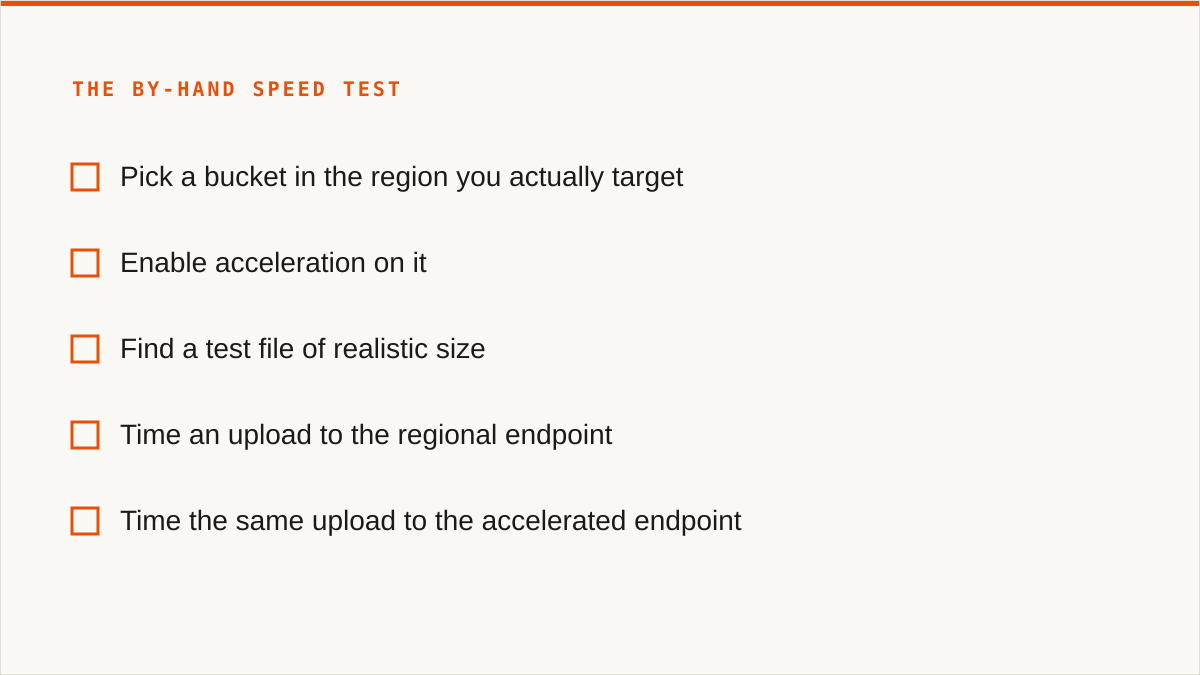
- Pick a bucket in the region you actually target. Testing acceleration against a bucket you do not use tells you nothing useful.
- Enable acceleration on it. That is the
put-bucket-accelerate-configurationcall at the top of this post. Note that the bucket name must be DNS-compatible — no dots — or the call fails. - Find a test file of realistic size. This is where most people get it wrong. A 10 MB file tells you nothing. If your real workload is 4 GB video masters, test a 4 GB video master.
- Time an upload to the regional endpoint.
time aws s3 cp big.bin s3://my-uploads/ --region us-east-1and write the number down. - Time the same upload to the accelerated endpoint.
time aws s3 cp big.bin s3://my-uploads/ --endpoint-url https://my-uploads.s3-accelerate.amazonaws.com - Repeat both a few times. One run is noise. Long-haul links vary by time of day, and a single fast run at 3am is not a result.
- Do the arithmetic. Take the percentage improvement and multiply it by the accelerated per-GB rate. If the upload got meaningfully faster and you move enough bytes for that to matter, keep it. If it moved 5% and you are paying per gigabyte for it, turn it off.
- Turn it off if the delta is not real.
Status=Suspended. Same call, different value. There is no partial mode, no per-prefix acceleration, no "only accelerate the big uploads" setting.
The honest expectation: acceleration helps most when the client is far from the bucket and the public path is bad. Same-continent traffic often sees little or nothing, because the ordinary path was already fine. And if your bottleneck is your own uplink, no amount of AWS edge capacity fixes that — you are the constraint.
You do not have to use the AWS CLI to get the accelerated path
Any client that lets you point at the accelerated endpoint works. The command line is convenient, not required. The browser console has an acceleration toggle in the bucket properties panel, and the console's own uploader will use the accelerated path once it is on. Third-party clients — Cyberduck, S3 Browser, Transmit, and others — generally accept a custom endpoint URL, and my-bucket.s3-accelerate.amazonaws.com is just a URL.
Some SDKs also expose a per-request acceleration flag, so you can accelerate a specific transfer without touching bucket configuration. That is genuinely useful when you want the fast path for one big migration and the cheap path for everything else. It also means acceleration can be turned on at the bucket level and still only used by the code that asks for it, which is a billing surprise waiting to happen if you are not paying attention.
Where we fit: Storafleet is a console for object storage you already own, and it connects to S3-compatible endpoints including accelerated ones — you can register a bucket by its accelerated hostname and use it like any other. There is more on how we handle that at our transfer acceleration page. What we do not do is make acceleration optional per transfer inside a scheduled migration — the endpoint you configure is the endpoint you get.
Acceleration, CloudFront and Global Accelerator are three different products
People conflate these constantly, and the confusion costs money because they are priced and scoped differently.
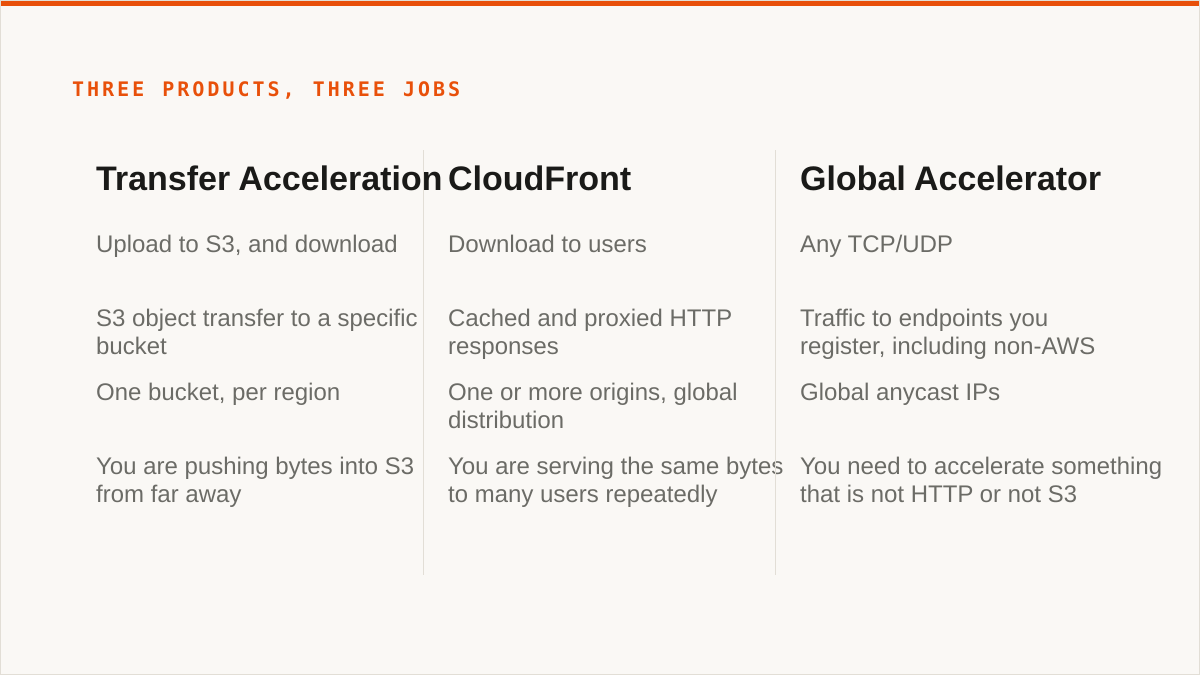
| Transfer Acceleration | CloudFront | Global Accelerator | |
|---|---|---|---|
| Primary direction | Upload to S3, and download | Download to users | Any TCP/UDP |
| What it accelerates | S3 object transfer to a specific bucket | Cached and proxied HTTP responses | Traffic to endpoints you register, including non-AWS |
| Scope | One bucket, per region | One or more origins, global distribution | Global anycast IPs |
| Right answer when | You are pushing bytes into S3 from far away | You are serving the same bytes to many users repeatedly | You need to accelerate something that is not HTTP or not S3 |
CloudFront is about caching and distribution; Transfer Acceleration is about ingress. If your problem is that a thousand users in Europe are downloading the same 200 MB installer from a US bucket, CloudFront is the correct product and acceleration is not. CloudFront caches that object at the edge and most of those downloads never touch your bucket again. Acceleration has no cache. Every byte still comes from S3.
Global Accelerator is the general-purpose one. It gives you anycast IP addresses and routes TCP or UDP traffic to whatever endpoints you register — an ALB, an EC2 instance, an IP in your own data centre. It is not S3-specific and it does not know what an object is. If you are accelerating a database connection or a game server, that is your product. If you are accelerating object uploads to S3, it is not.
One real overlap worth naming: if you put CloudFront in front of an S3 bucket and use it as an upload path, you can get some of the accelerated-ingress benefit plus caching, sometimes at a different cost profile. That is a legitimate architecture. It is also more moving parts, and the caching behaviour you wanted for downloads becomes a thing you have to reason about for uploads.
Where the honest answer is not us
rclone is the real alternative and it is very good. It is free, permanently, with no account and no vendor. It supports over 70 backends — far more than we do, including the consumer clouds we deliberately do not touch. It mounts remote storage as a filesystem. It is scriptable, it composes with cron and systemd and CI, and it runs entirely inside your own security boundary. Your credentials never leave your hardware. It has been maintained for over a decade, which means it will almost certainly still exist when a lot of the SaaS tools around it do not.
For a large number of people reading this, rclone is simply the better answer. If you are comfortable in a terminal, if your transfers are already scripted, if the keys must never leave your laptop, if you want to mount a bucket in Finder — rclone does all of that and we do none of it. We do not have a FUSE surface at all. We cannot make a remote bucket look like a local drive, and no amount of product roadmap changes that today.
If your workflow is entirely code and always will be, the CLI is the better tool and we will say so plainly. A binary composes with cron, systemd, CI pipelines and Makefiles in a way a web console does not and cannot. If your transfer logic belongs in a shell script, put it there — aws s3 sync, aws s3 cp, or rclone if you need the multi-backend reach. We are a console, not a command. That is a real limit, not a positioning statement.
We also started in 2026. We are a small team with no published case studies and no named customers, and we are not going to invent either. On the question "will this still exist in five years", a decade-old open-source project has a better answer than we do. That is a real risk and you should price it in.
The honest case for us is narrower than a marketing page would suggest. If you are moving data between two or three providers, if you want scheduled sync without writing a systemd unit, if you want a UI where a colleague can see per-bucket cost and duplicate objects without installing anything, and if you would rather pay a flat subscription than think about per-gigabyte egress math — that is where we earn our keep. Storafleet never charges per gigabyte to move data, on any tier, including Free. That is a deliberate choice and it is the reason some teams pick us over a metered tool.
Who should close this tab and use something else
If your budget for this is zero, the conversation is over and rclone wins. Free forever, no account, more backends, better scripts. Go use it.
If you need storage mounted as a filesystem — buckets in Finder or Explorer, a drive letter, an ls that hits S3 — use rclone mount, Mountain Duck or ExpanDrive. We have no FUSE surface and will not pretend otherwise.
If your data lives in Google Drive, Dropbox, OneDrive, Box or an SFTP server, use rclone or MultCloud. We connect the S3-compatible family and custom S3 endpoints, and nothing else. Drive-to-bucket is not a job we can take.
If your credentials must never leave hardware you control, use rclone. Our credentials sit encrypted in our database — AES-256-GCM with per-namespace HKDF keys, and AWS can be connected keylessly via IAM role assumption — but "the keys never left my laptop" is a stronger answer than ours, and it would be dishonest to pretend otherwise.
If everything lives in one cloud and always will, use that provider's own console. It is free, it is always current with that provider's newest features, and it is authoritative in a way we cannot be.
If your workflow is entirely code and always will be, use the CLI. We are a console, not a command. We do not compose with cron, systemd, CI pipelines or Makefiles the way a binary does, and a web UI never will. If your transfer logic belongs in a shell script, put it there.
And if you tested acceleration and it did nothing for you — good. Turn it off, keep the ordinary endpoint, and spend the savings on the problem that was actually slowing you down.