
WORM Compliant Cloud Storage: What It Means for Your Data
September 2026 · 10 min read · Surya
WORM compliant cloud storage is storage where individual objects cannot be overwritten or deleted until a date you set, enforced by the storage provider's API rather than by a policy document in a filing cabinet. That is the whole definition. No audit trail in a PDF counts. No checkbox on a vendor's security page counts. If the provider's DELETE call would still succeed, you do not have WORM, you have a promise.
Most of what gets sold as "compliant storage" is the fuzzy version — a procurement form, a SOC 2 logo, a sentence in a contract. The actual mechanism is narrower and much more boring. It lives on one bucket, attached to one object version, with one date.
Here is where we sit in that story, because it matters before you read another word: Storafleet is not a vault. We never store your file contents. We are a control plane for object storage you already own — we connect to your bucket via API, configure the object-lock policy, and report back what is actually set. The lock is enforced on the provider's side. Our job is turning it on and proving it stayed on.
Object lock does not stop the write — it stops the delete
People assume WORM means "you cannot change this file." That is not what S3 Object Lock does. You can write a new version of an object all day. What you cannot do is remove the version that is locked.
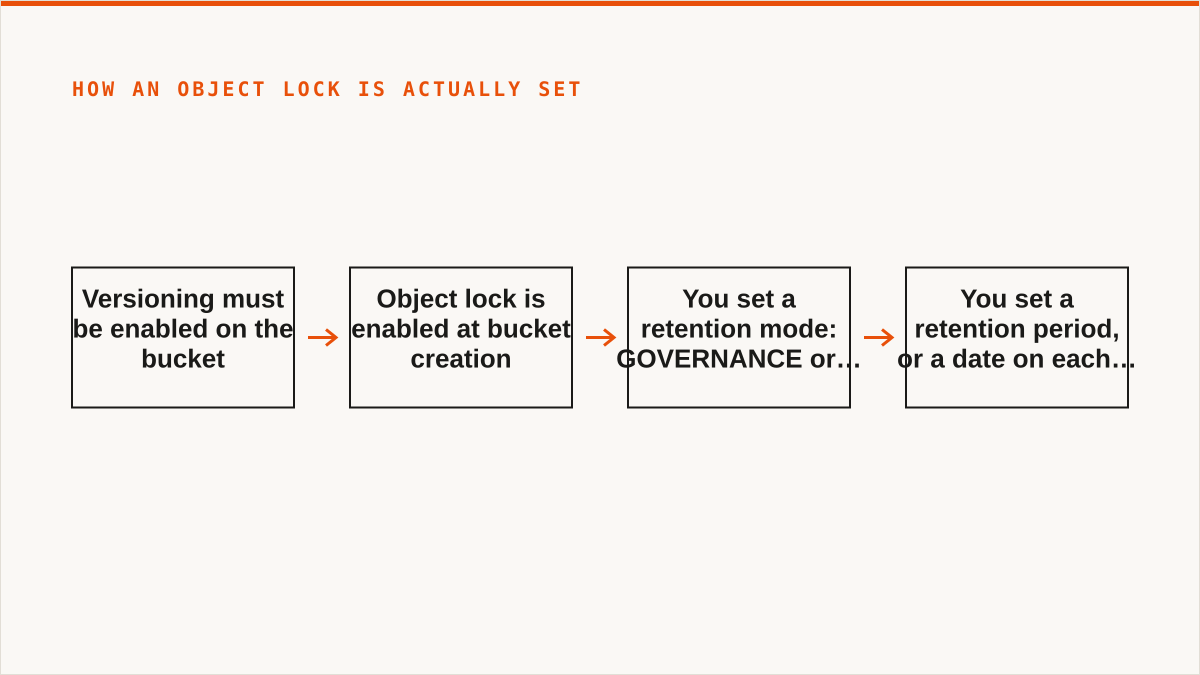
The mechanism, in order:
- Versioning must be enabled on the bucket. Object lock cannot be turned on without it. This is not optional and it is not retroactive on existing buckets in most implementations — you enable object lock at bucket creation.
- You set a retention mode.
GOVERNANCEmeans a user with the right IAM permission (s3:BypassGovernanceRetention) can shorten or remove the retention.COMPLIANCEmeans nobody can — not you, not the account root, not the provider's support desk. - You set a retention period, either a default on the bucket or a date on each individual PUT.
- Optionally, a legal hold, which has no expiry date and is independent of the retention period.
WORM is per-object and per-bucket, not per-account. A locked object in one bucket says nothing about the bucket next to it. That is the part procurement forms miss. "We have WORM storage" is meaningless without naming the bucket, the mode and the date.
Storafleet configures object lock and reads back the current configuration so you can see which buckets are actually locked and which are still wide open. We do not hold the bytes and we cannot override a compliance-mode lock. Nobody can, which is the point.
CPAS, ITAR and TAA are not storage settings you can toggle
This is where the search terms and the technology part company, and we would rather tell you that than sell you a feature that pretends otherwise. Storage vendors love these three acronyms because they sound like features. They are not. They are regimes, and regimes do not ship as configuration flags.
CPAS is a UK accreditation scheme for law firms — the Conveyancing Protocol and the Law Society's associated practice standards, run by the Law Society of England and Wales. It governs how a practice handles client money, files and records. It has opinions about retention. It has no opinion about S3 API parameters. If you arrived here searching for "CAP compliance," you are almost certainly looking for CPAS, and the storage answer is the same either way: no bucket setting makes a firm accredited.
ITAR is a US export-control regime about who may access controlled technical data. It is about nationality of persons and physical and logical access, not about which checkbox you ticked. If your data is ITAR-controlled, the question is not "is this storage ITAR compliant" — it is "who can reach this bucket, from where, and can I prove it."
TAA is about where goods and services originate. It is a trade-agreement question about country of origin, and it applies to the service provider and the region, not to the retention mode.
So what does a storage vendor actually give you? A retention mode and a retention period. You pick the mode and the period that satisfies your regime — a seven-year compliance-mode lock for a regulated records bucket, say — and Storafleet shows you which provider and which region you are writing to, because "where does this data physically sit" is a real ITAR and TAA question that no configuration toggle answers. Our compliance page walks through the mapping between regime, mode and region.
No vendor can make you compliant by configuration alone. We can make the lock real and show you where the data is. The rest is your policy, your people and your auditor.
Where the lock actually lives: the provider, not the console
Trace it end to end, because the location of enforcement is the whole ballgame. A lock that is enforced by the same system that displays the lock is a lock you cannot independently verify.
The bucket is created with object lock enabled. Versioning is on. Every PUT returns a version ID. A retention date is attached to that version — either from the bucket default or passed explicitly. From that moment, a DELETE for that version returns an error until the date passes. In governance mode, a caller with s3:BypassGovernanceRetention can shorten it. In compliance mode, the provider's own API refuses, including for the root account.
aws s3api put-object-retention \
  --bucket records-archive \
  --key 2026/contract-4471.pdf \
  --version-id 3HL4kqtJlcpXroDTDmJ+rmSpXd3dIbrHY+MTRCxf3vjVBH40Nr8X8gdRQBpUMLUo \
  --retention '{"Mode":"COMPLIANCE","RetainUntilDate":"2033-01-01T00:00:00Z"}'
Storafleet makes those API calls for you across whichever provider you connected, sets the bucket-level object-lock configuration, and reports the resulting state back in one view. Enforcement is the provider's job, and it happens inside their infrastructure, not ours. If you want the practical checklist for verifying a lock rather than trusting it, it is on the compliance page.
One thing worth saying out loud: because we are a control plane, a mistake we make can lock something you did not mean to lock, in compliance mode, where nobody can undo it. That is why our object-lock configuration is explicit and previewed rather than a "protect everything" button. There is no such button. There should not be.
Retention that outlives your subscription is the only retention that counts
Here is the honest failure mode nobody puts on a slide: a lock is only as durable as the billing relationship behind it. If you stop paying your storage provider, the bucket is eventually deleted. In compliance mode, the provider cannot delete an object early either — but they can delete the whole account once the commercial relationship ends, and the retention dates go with it. WORM protects against deletion by you. It does not protect against deletion by non-payment.
This is exactly why we chose bring-your-own-storage. Your credentials. Your bucket. Your billing. Your lock. Storafleet is a control plane over storage you own, and if we disappear tomorrow, the retention dates you set are still enforced by the provider, because we were never in the enforcement path. We configured the policy. We did not become the custodian.
Every managed "compliance vault" that stores your bytes is asking you to bet your retention on their solvency. Sometimes that bet is fine. Make it deliberately.
rclone beats us here, and you should use it if it fits
Now the part where we argue against ourselves, properly. rclone is free, permanently, with no account and no vendor. It supports 70-plus backends to our 50-plus. It mounts. It is scriptable. It runs inside your own security boundary, so your credentials never leave your hardware. It has been maintained for over a decade. It composes with cron, systemd and CI pipelines in ways a web console never will.
If your WORM workflow is code — a script that locks objects on a schedule, a CI job that verifies retention dates, a systemd timer that audits buckets nightly — rclone is the correct answer and Storafleet is not. We are a console. A console does not belong in a pipeline. We are not going to pretend a web UI composes like a binary, because it does not and never will.
If you are one person managing a few buckets and want no subscription, look at S3 Browser, Cyberduck or Mountain Duck — desktop clients, one-time licence or free, files stay on your machine, and they mount. Better than us for that job.
If your work is Google Drive to bucket, or Dropbox to S3, we deliberately do not do it. MultCloud and CloudFuze cover the consumer clouds we refuse to touch. And if everything lives in one cloud forever, that provider's own console is free, always current with their newest features, and more authoritative than we are.
We also have no published case studies and no named customers. We will not invent them. We are a small team and Storafleet started in 2026, so on "will this still exist in five years," a decade-old open-source project has a better answer than we do.
Who should not buy Storafleet for compliance, and what to use instead
Most people reading a post about WORM compliance should not buy our product. That is not modesty, it is arithmetic: the tool that fits most WORM jobs is a free binary, and we are not going to pretend otherwise to make a sale.
Be honest about which of these you are before you read the list, because the wrong answer here costs real money. If you are a regulated firm trying to satisfy CPAS, ITAR or TAA with a storage purchase, you are solving the wrong problem — the regime is answered by your policy, your access controls and your auditor, and the storage layer only has to make the lock real and the region visible. If you are a team trying to make object lock work across several providers without writing the same script three times, you are solving the right problem, and that is the only problem we solve.
- Budget is zero → rclone. The conversation is over and rclone wins.
- You need storage mounted as a filesystem → rclone mount, Mountain Duck or ExpanDrive. We have no FUSE surface and will not have one.
- You need Google Drive, Dropbox, OneDrive or SFTP → rclone or MultCloud. We speak the S3-compatible family and custom S3 endpoints, and nothing else.
- Credentials must never leave hardware you control → rclone, or our IAM-role connect if your target is AWS only. Our AES-256-GCM encryption with per-namespace keys is real, but "the keys never left my laptop" is a stronger answer than ours and we will not pretend otherwise.
- Your compliance driver is CPAS, ITAR or TAA specifically → rclone or the provider's own console. No storage product, ours included, makes you compliant with a regime. Use the free tooling to enforce the lock and spend your budget on the policy and audit work that actually satisfies the regime.
- Everything lives in one cloud and always will → that provider's own console is free and more current than we are.
- The workflow is entirely code and always will be → a CLI composes and a console does not.
Storafleet is for teams running WORM across multiple S3-compatible providers who want one console to configure object lock, see per-bucket cost, and prove the lock is on. If you have a compliance-mode bucket on Wasabi, a governance-mode bucket on R2, and a third provider you inherited from an acquisition, and you need to see all three retention states on one screen without writing three sets of scripts, that is the job. We charge a flat subscription and never per gigabyte moved.
If that is not you, one of the tools above is, and we would rather you used the right one.