
Bucket Explorer: Browse S3 Storage in the File Browser
September 2026 · 16 min read · Surya
- Why a bucket explorer exists at all: the S3 API is a list call that lies to you about scale
- Listing objects is not mounting a filesystem, and the choice changes what the tool can be
- Connecting a bucket and finding one object: the numbered procedure, including the credentials and region step people get stuck on
- What Storafleet does not do, who should use rclone, Cyberduck or Mountain Duck instead, and where we lose
It is 11pm and someone is squinting at a terminal, trying to reconstruct the exact aws s3 ls incantation that will tell them whether a single Parquet file lives in one of four buckets spread across three providers. They know the object name, roughly. They do not know the prefix. They do not know which account it landed in after the migration that nobody documented. They try aws s3 ls s3://logs-prod-1/2024/ --recursive and watch the cursor blink while the CLI walks a million keys to find one.
That is the moment a bucket explorer earns its existence. Not as a prettier upload form. As a way to ask a question of storage you already own without writing a script to ask it for you.
We build one. It is called the file browser, and this post is about what a bucket explorer actually is under the hood, why ours is a control plane rather than another place to put files, and, importantly, when you should close the tab and use rclone instead.
The S3 API is simple until you try to browse a million objects
The S3 API is a dozen verbs and one of them, ListObjectsV2, is the reason bucket explorers exist.
Everything else in the API is a point operation. GetObject fetches a thing you already named. PutObject stores a thing you already have. HeadObject tells you about a thing. You need to know the key. The key is the whole game.
Listing is different. Listing is a scan with no index behind it. S3 stores objects in a flat keyspace that is sorted lexicographically, and it will hand you up to 1000 keys per response, then a continuation token, then the next 1000. If you want a directory tree, you are the one who builds it, by splitting keys on / and pretending the result is a hierarchy. The server does not know what a folder is. It knows logs-prod-1/2024/06/14/app.log is a string that sorts before logs-prod-1/2024/06/14/app2.log.
That design is a feature at scale and a problem at the human scale. A billion objects in a bucket is normal. A prefix listing that returns 1000 keys at a time is the only way to walk them. The CLI exposes this honestly, which is exactly why the CLI is painful for browsing. aws s3 ls with no prefix is a paginated crawl. With --recursive it is a longer crawl. There is no server-side full-text search. There is no "find me the file with invoice-2024-03 in the name" call. You either know the prefix or you enumerate.
So the operator at 11pm has three bad options. Enumerate and wait. Guess the prefix. Or open a web console, click into a bucket, and scroll.
The provider consoles are fine for one cloud. They fall apart the moment the question spans providers. Four buckets across three vendors means four consoles, four logins, four different ideas of what a folder looks like, and no single search box that knows about all of them. That is the gap. A bucket explorer is the layer that holds credentials for many endpoints at once and answers cross-provider questions about keys.
Two things distinguish a good one from a bad one, and they are both about restraint. It should not copy your bytes anywhere it does not have to. And it should not pretend the object store is something it is not.
A bucket explorer is not a file manager, and that distinction matters
There are two architectural ways to put object storage in front of a human, and they produce very different tools.
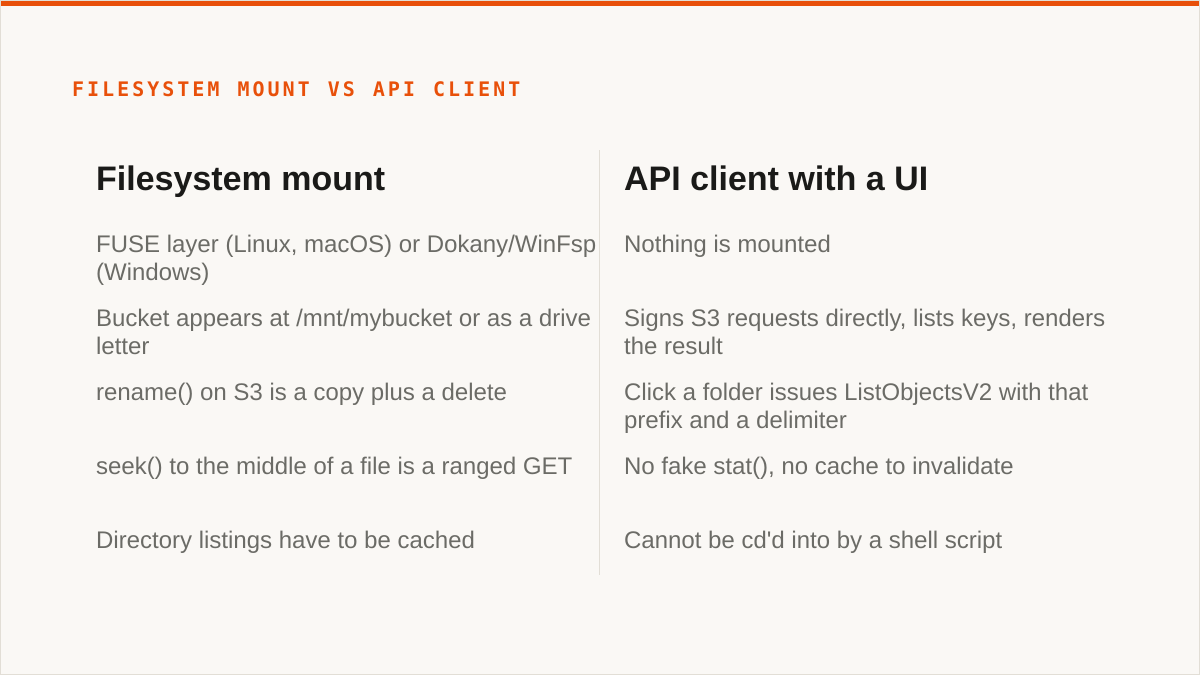
The first is a filesystem mount. You run a FUSE layer (Linux, macOS) or a Dokany/WinFsp layer (Windows) that intercepts open(), read(), stat(), readdir() and translates them into S3 calls. The bucket appears at /mnt/mybucket or as a drive letter. Your editor, your grep, your build tooling, your backup software all see a directory. This is what rclone mount, Mountain Duck and ExpanDrive do. It is genuinely powerful, and we will come back to it, because for some of you it is the correct answer and we are not it.
The second is an API client with a UI on top. Nothing is mounted. The tool signs S3 requests directly, lists keys, and renders the result. Every action in the interface maps to one or a handful of API calls. There is no local filesystem in the loop unless you download a file, and even then it goes to a temp path you chose.
We chose the second. Here is the honest reasoning.
A mount lies to the application about what storage is. rename() on S3 is a copy plus a delete, which is why renames of large objects over a mount are slow and sometimes surprising. seek() to the middle of a file is a ranged GET, which is fine until the file is small and the round trip dominates. Directory listings have to be cached or every ls is a network call. None of this is broken; it is a translation layer doing its best. But the semantics leak, and when they leak, the person debugging is now debugging a filesystem that is not a filesystem.
A client does not have that problem because it never made the promise. When you click a folder in our file browser, we issue a ListObjectsV2 with that prefix and a delimiter, and we render exactly what came back. When you see 1000 objects and there are more, we show you that there are more and fetch the next page. There is no fake stat(), no cache to invalidate, no divergence between what the OS thinks exists and what the bucket contains.
The trade is real and we should name it. An API client cannot be cd'd into by a shell script. If your workflow is cd /mnt/bucket && make, a mount wins and we lose, full stop. We are not going to build a FUSE surface to chase that use case. It is a different product with a different failure mode, and doing it badly would be worse than not doing it.
What the API-client model buys is reach. Because we are not mounting anything, we can hold connections to fifty-plus S3-compatible providers at once without the operating system caring. Amazon S3, Cloudflare R2, Backblaze B2, Wasabi, MinIO, DigitalOcean Spaces, Oracle Cloud, IBM Cloud Object Storage, Scaleway, Linode, Vultr, Storj, IDrive e2, Hetzner. Plus any custom endpoint that speaks S3. One interface, many endpoints, and the operations that matter when you have many endpoints: copy between them, sync on a schedule, search across them, compare what is duplicated.
That is the control plane framing. Storafleet does not store your file contents. It stores connection metadata and instructions. The bytes move provider-to-provider or browser-to-provider; they do not sit in a Storafleet bucket waiting for you. We are the thing that knows where everything is and how to move it, not another place files go to be forgotten.
It is worth being precise about the credential side, because "control plane" is a phrase that hides a lot. Your provider credentials are encrypted at rest with AES-256-GCM, using per-namespace keys derived via HKDF. For AWS specifically, you can connect without a long-lived key at all, by IAM role assumption. That is the strongest connection model we offer and we recommend it for AWS.
But here is the concession, and I want it stated plainly rather than buried: those credentials sit in our database, not on your laptop. The encryption is real. The keyless path for AWS is real. Neither of them makes the statement "the keys never left hardware I control" true about us, and rclone running on your own machine makes that statement true. If that sentence is a hard requirement for your threat model, we are the wrong tool and no amount of AES-256-GCM changes it.
Step-by-step: connect a bucket and find one object without writing a script
Here is the whole procedure. It takes a few minutes if your credentials are in order, and the part where people get stuck is step 4, not step 1.
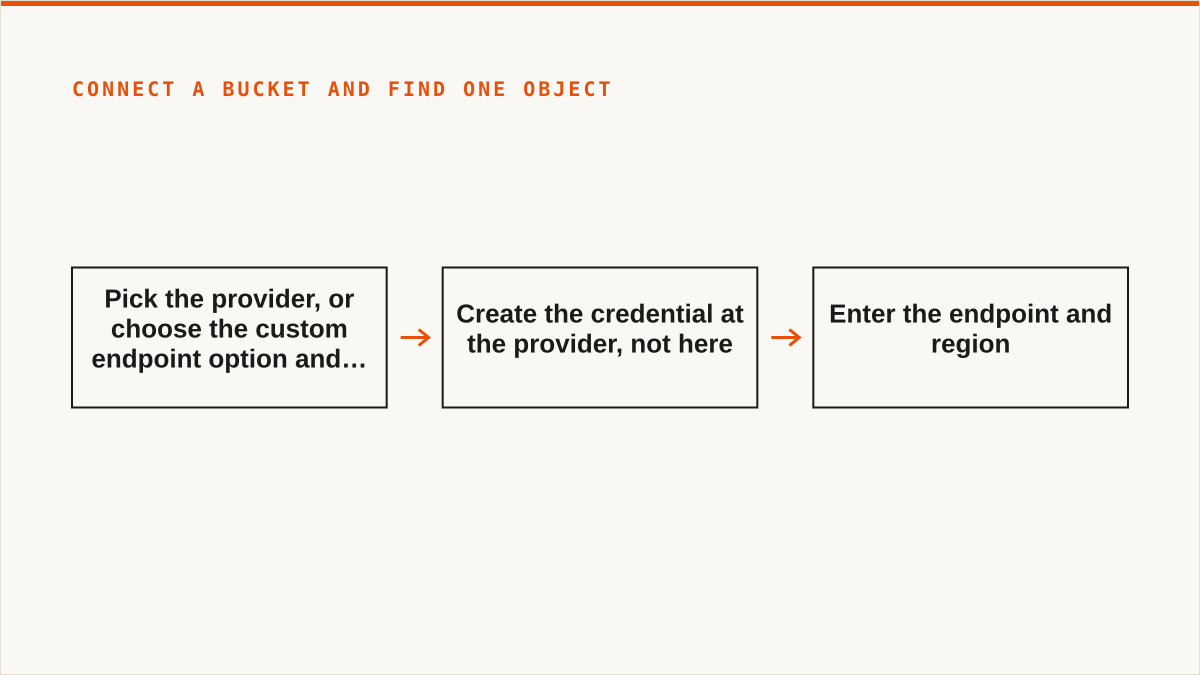
- Pick the provider. If it is one of the named ones, select it from the list. If it is something internal (Ceph, a self-hosted MinIO, a storage appliance), choose the custom endpoint option and supply the endpoint URL. S3-compatible is the bar. If it does not speak the S3 API, we cannot connect to it, and that includes Google Drive, Dropbox, OneDrive, SFTP, WebDAV and Box.
- Create the credential at the provider, not here. For AWS this is an IAM user or, better, a role you can assume. For R2 it is an API token scoped to the bucket. For B2 it is an application key. The rule that saves you pain: scope the credential to the buckets you actually want browsed, and grant read and list at minimum. A key with account-wide admin is not necessary for browsing and you should not hand it over just because the form accepts it.
- Enter the endpoint and region. The endpoint is a URL. The region is a string like
us-east-1oreu-central-1orautodepending on the provider. Get both from the provider's own documentation, not from memory. - This is where people get stuck: the region and the endpoint do not match, or the credential is scoped to a different account than the endpoint points at. The symptom is a 403 with a message about signatures, or a redirect that the client does not follow. It is almost never the secret key being wrong. It is the signature being computed against the wrong region, because SigV4 signs the region into the request and the server on the other end checks it. R2 uses
auto. Some providers use a region that does not correspond to any physical location. Some MinIO deployments accept any region string but reject a mismatched one at the signature layer. If you get a 403 and the keys are definitely correct, suspect the region before you regenerate anything. Second most common cause: the endpoint has a path or a port you dropped. Third: the credential is valid but lackss3:ListBucketon that specific bucket, so listing returns 403 while a directGetObjecton a known key would succeed. That last one confuses people because the credential "works" for one operation and not another. - Save the connection. Credentials are encrypted before they are written. You should see the bucket list populate, which is the first real proof the credential can list. If the bucket list is empty and you know buckets exist, that is the permissions problem from step 4, not an empty account.
- Open the bucket and navigate by prefix. Clicking a "folder" issues a list with that prefix and a delimiter, so the response contains only the immediate children, not the whole subtree. This is why opening a bucket with a million objects is fast: you are never listing a million objects, you are listing one level. The deep listing only happens if you ask for a recursive view, and we tell you when there is more to fetch.
- Find the object. If you know the prefix, navigate to it. If you do not, use search. Global cross-bucket search is the feature that replaces the 11pm
--recursivecrawl, because it queries across the buckets you have connected rather than making you guess which one holds the key. Type the fragment you remember. "invoice". "2024-03". The part of the path you are sure about. - Act on it. Download it. Copy it to another connected bucket without downloading it to your machine and re-uploading (the transfer runs provider-to-provider). Check its metadata. Set a lifecycle rule on the prefix if it is the kind of thing that should expire. Configure CORS if it is served to a browser. Turn on versioning if it is not on and should be. These are configuration actions against the bucket, which is the other half of what a control plane does: not just moving objects, but changing the rules that govern them.
One more thing on step 4, because it is the single most common support question and it deserves its own paragraph. The region field is not a hint. It is part of the cryptographic signature. Every request is signed with SigV4, and the canonical request includes the region string. The server recomputes the signature with the region it believes it is in and compares. Mismatch, request rejected. This is why "it works in the CLI" and "it fails here" can both be true: the CLI may have a default region configured in ~/.aws/config that you forgot about, and you typed something else into our form. Check the config. Copy the exact string.
If you are on AWS and want to skip the long-lived key entirely, connect by IAM role assumption. It is more setup on the AWS side and less secret material on ours, which is the right trade for production accounts.
What we do not do, and who should use rclone or Cyberduck instead
Now the part that costs us money.
rclone beats us for a large number of people and I would rather say so than have you find out after subscribing. It is free, permanently, with no account and no vendor. It supports more backends than we do, well over seventy, including the consumer clouds we deliberately do not touch. It mounts. It is scriptable in the way a binary is scriptable, which is the way that actually composes with cron, systemd, CI pipelines, shell scripts and Makefiles. It runs entirely inside your own security boundary, so the credential-never-leaves-your-hardware answer is just true. And it has been maintained for over a decade, which means the question "will this still work in five years" has a better answer than anything a 2026 startup can give you.
That last point is not a throwaway. Storafleet started in 2026. We are a small team. We have no published case studies and no named customers, and we are not going to invent any to fill this paragraph. If your organization's procurement process requires a vendor with a decade of history and references you can call, rclone has that and we do not. Use it. Genuinely.
Cyberduck beats us for the single operator with a few buckets. It is a desktop client. One-time licence or free depending on the flavour. Your files stay on your machine because it is an application, not a service. It mounts, via Mountain Duck if that is what you want, and S3 Browser covers the Windows side. If you are one person managing three buckets and you do not want a subscription for the privilege, a desktop client is the correct shape of tool and we are the wrong one.
MultCloud and CloudFuze beat us on the consumer clouds. We connect the S3-compatible family and any custom S3 endpoint, and nothing else. There is no Google Drive connector here, no Dropbox, no OneDrive, no Box, no SFTP, no WebDAV. If your job is Drive-to-bucket, we are not a worse tool for it, we are not a tool for it. They are.
The provider's own console beats us when everything lives in one cloud and always will. It is free. It is always current with that provider's newest features, sometimes on the day they ship, while we are integrating the API changes on our own schedule. It is authoritative in a way a third party cannot be. If you have one AWS account and no intention of ever adding a second provider, close this tab and use the AWS console. You will not miss us.
And if your budget for this is zero, the conversation is over and rclone wins. Not "rclone is a good option to consider". rclone wins. We charge a flat subscription. There is no free tier that does everything, and we are not going to pretend the paid product is the right call for someone who has decided not to pay for this category of software. That is a legitimate decision and rclone is an excellent answer to it.
Where we are the right tool is narrower and I would rather describe it precisely than broadly.
- You have many S3-compatible endpoints and want one place to see them. Four providers, a dozen buckets, one search box. This is the core case.
- You move data between providers regularly. One-time or scheduled sync. And the pricing model matters here: we charge a flat subscription and never per gigabyte. Migrated bytes are unmetered on every tier, including Free. If you are moving terabytes between providers on a schedule, per-gigabyte egress-style pricing on a tool is the thing that makes you stop using it, and we do not do that. Tiers differ on concurrent migration jobs and whether scheduled sync is available, not on how much data you move.
- You want to configure lifecycle, CORS, versioning, object lock and public-access settings across buckets without learning four consoles. That is the control-plane half of the product and it is where a cross-provider view is genuinely better than four separate ones.
- You want cost visibility per bucket and duplicate detection. Finding the same object stored three times across two providers is not something a single provider's console can tell you, because it cannot see the other provider.
- Your team is not all terminal people. A console is usable by someone who will never write an
aws s3command, and that is a real organizational reason to have one.
And the verdict on who should not use us, one more time, in plain words, because it is the whole point of writing this section:
- Budget is zero. rclone. Done.
- You need buckets mounted as a filesystem. rclone mount, Mountain Duck or ExpanDrive. We have no FUSE surface and no plans for one.
- You need Google Drive, Dropbox, OneDrive or SFTP. rclone or MultCloud. We only speak S3-compatible.
- Credentials must never leave hardware you control. rclone, or our IAM-role connect if AWS is the only provider in play. Otherwise the keys are in our database, encrypted, and that is not the same guarantee.
- Everything lives in one cloud forever. That provider's console is free and more current than we are.
- The workflow is entirely code and always will be. A CLI composes with cron, systemd and CI. A web console does not, and no amount of API behind it changes the fact that the interface is a browser tab. Use the CLI.
What a bucket explorer should be, in the end, is a control plane for storage you already own. Not a place you upload files to. Not a filesystem pretending to be local. Not a replacement for the CLI in your pipeline. The thing that holds the map of where your data lives across providers and lets you ask questions and issue instructions without writing a script to do it.
If that describes a problem you have, the file browser is where it lives. If it does not, you now know which of the alternatives is the right one, and we would rather you used the right one than the one we sell.