
Should Your Storage Fleet Use Threshold Alerts at All?
October 2026 · 8 min read · Surya
A threshold alert on a storage fleet is a number you wrote down in advance plus a promise about what happens when that number is crossed. Most teams have the first half. They quietly abandoned the second, usually around week three.
Here is the fuzzy version, corrected: a threshold alert is not a monitoring feature. It is a decision you are pre-committing to. If you cannot name the person who gets it and the action they take, you have not built an alert. You have built decoration that happens to page someone at 3am.
We have a stake in this argument, which is exactly why we will tell you most fleets should run fewer alerts than they do. And we will tell you, before the end, which fleets should not use us at all.
A threshold alert is a commitment to act, not a notification
Watch how people talk about alerts. "I set one up on bucket size." Set it to what? "500 GB, I think." And when it fires? A long pause. Maybe a ticket. Maybe it goes to #infra, where somebody reads it between two other things and forgets.
An alert earns its place only if you can complete this sentence: when this fires, [named person] does [specific thing] within [a real window]. Everything else is a log line pretending to be operational rigour.
Run that test on your current alert set. In our experience running a control plane over other people's buckets, maybe a third survive. The rest are numbers somebody set on a quiet afternoon because setting them felt like doing work. It was not. The work was the decision, and the decision never got made.
The test has teeth because it is cheap to apply. Take each alert. Name the action. If the action is "look at it", delete the alert. Looking is not an action. If the action is "someone will probably notice", delete it. Probability is not an owner.
An alert with no named owner is a notification, and notifications are what people mute. Not maliciously. Gradually, then completely.
The alerts that survive contact with a real storage fleet
Some thresholds do hold up, and they share a property: crossing them changes what you are allowed to do next, not just what you know.
Capacity against a provider's hard limit is the one alert almost everyone should keep. Not a soft "we are getting full" number. The actual limit: the bucket quota, the account cap, the point where writes start failing. That alert fires, and someone's action is unambiguous, because the alternative is a failed upload path.
Per-bucket spend moving against a baseline survives because it has a fix attached. If one bucket's storage cost has drifted well above where it sat last month, somebody can go look at what grew. That is a real action with a real owner, usually whoever owns the workload writing to that bucket.
Object-count ceilings are worth watching because listing is the operation that tends to degrade first. A bucket holding tens of millions of small objects is where ListObjectsV2 calls get slow and tooling gets unhappy, typically well before the byte count is anywhere near a quota. We will not hand you a precise object count as a universal cliff, because there isn't one; it depends on your key distribution, your tooling and your provider. But it is a real operational edge, and one worth a number and an owner.
Egress and request spikes are conditional. They earn their place if you have a provider that bills per request or per byte out and you have a person who owns that bill. If neither is true, the alert is theatre.
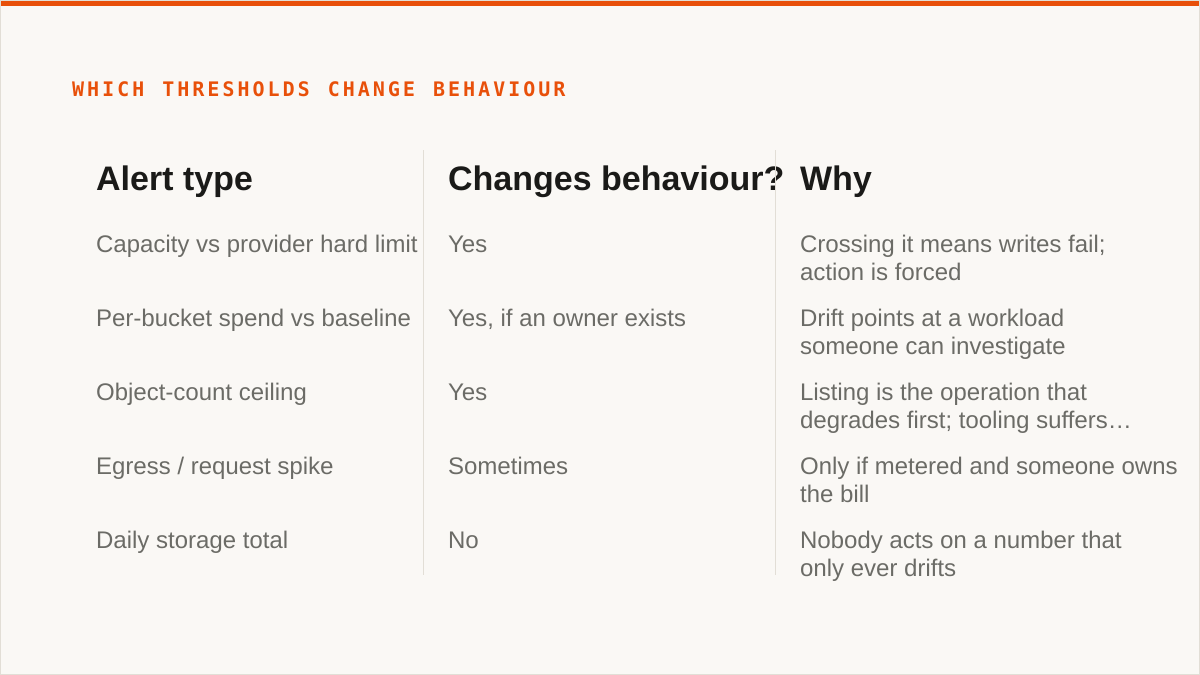
| Alert type | Changes behaviour? | Why |
|---|---|---|
| Capacity vs provider hard limit | Yes | Crossing it means writes fail; action is forced |
| Per-bucket spend vs baseline | Yes, if an owner exists | Drift points at a workload someone can investigate |
| Object-count ceiling | Yes | Listing is the operation that degrades first; tooling suffers before bytes do |
| Egress / request spike | Sometimes | Only if metered and someone owns the bill |
| Daily storage total | No | Nobody acts on a number that only ever drifts |
| "Bucket over X GB" set by feel | No | No action mapped; muted within weeks |
Notice the bottom two rows. They are the majority of what people configure.
Most fleet alerts fail because the number has no owner
This is the part we care about most, and it is where we think most storage fleets get it wrong.
An alert routed to a shared channel has no owner, and an alert with no owner is noise with extra steps. A shared channel is where accountability goes to diffuse. Everyone sees it. Nobody owns it. The first time it fires and nothing happens, the alert has taught the whole team that alerts do not require response. That lesson is expensive and hard to unlearn.
Cost thresholds are the worst offenders. A cost alert at fleet granularity fires on a number nobody can fix at that granularity. "Spend is up 20 percent this month" is true and useless. Which provider? Which bucket? Which workload? The alert reports; it does not point. So it gets muted, and the next real cost event goes unnoticed because the channel is dead.
The fix is not better alerting. It is fewer alerts, each with a name attached. One person per alert. A specific bucket, a specific provider, a specific action. Per-bucket cost visibility changes the number you are alerting on from "the fleet" to "this bucket, owned by this person", and that is the difference between an alert that gets actioned and one that gets filtered.
This is the thinking behind the per-bucket cost visibility we build: costs scoped to a bucket you can name, with duplicate detection alongside so that when a cost number moves, the first thing you check is whether something got copied twice. That turns the number into a lead rather than a siren. It is still your job to attach the owner. We cannot do that part for you. When you are ready to wire the number to a person, our threshold alerts are where the routing lives.
Fewer alerts. Named owners. Numbers you would actually change behaviour for. If a threshold does not clear that bar, it is not an alert, it is a dashboard.
Where threshold alerts lose to things that are not alerts at all
Now the honest part. Threshold alerting is not always the right answer, and for a lot of people reading this, something else is.
rclone plus a cron job and a shell script is genuinely better than us for a large number of storage fleets. This is not a hedge. rclone is free, permanently, with no account and no vendor. It supports more backends than we ever will. It runs inside your own security boundary, on your hardware, with your credentials never leaving it. It is scriptable, so your "alert" can be a size check piped into whatever you already use for paging. It has been maintained for over a decade. If your team lives in cron and shell, rclone composes with that natively and our console never will. We are a console, not a command. A web UI does not belong in a Makefile.
The providers' own consoles beat us on currency and on price when everything lives in one cloud. They are free, they are authoritative, and they ship that provider's newest features the day they exist. We are always slightly behind on any single provider's edge cases. If your fleet is one cloud and will stay one cloud, use their console.
For a single operator managing a few buckets, Cyberduck or Mountain Duck is the better call. One-time licence or free, files stay on your machine, and Mountain Duck mounts. No subscription, no shared database holding your keys.
And on credentials, we will say the uncomfortable thing: your keys sit encrypted in our database, not on your hardware. The encryption is real, AES-256-GCM with per-namespace keys, and AWS can be connected keylessly via IAM role assumption. But "the keys never left my laptop" is a stronger answer than ours, and pretending otherwise would be dishonest.
We are also a small team, and Storafleet started in 2026. On "will this still exist in five years", a decade-old open-source project has a better answer than we do. If that question matters to you, it should. We have no customer case studies to wave at you, because we are too young to have a shelf of them, and we are not going to invent any. That is a real risk you are taking on, and you should price it in.
So here is the verdict, plainly. If your budget for this is zero, the conversation is over and rclone wins. If you need buckets mounted as a filesystem, use rclone mount or Mountain Duck; we have no FUSE surface and never will. If you need Google Drive, Dropbox, OneDrive or SFTP in the mix, use rclone or MultCloud, because we speak the S3-compatible family and nothing else. If your credentials must never leave hardware you control, use rclone, or our IAM-role connect if it is AWS only. If everything lives in one cloud forever, that provider's console is free and more current than we are. And if what you actually want is threshold alerting as a first-class product, go and check whether your provider's console or your existing monitoring stack already does it, because plenty do, and we are not going to claim we invented the idea.
If none of those apply, and you are running an S3-compatible fleet across two or more providers, and you want per-bucket cost visibility and duplicate detection, that is the case we built for. Set fewer alerts than you think you need. Put a name on every one.