
S3 File Browser: How to Access an S3 Bucket From Your Browser
October 2026 · 17 min read · Surya
Someone pastes this into a support thread, or into a Slack channel at 11pm, and then stares at it:
Access to fetch at 'https://mybucket.s3.eu-west-1.amazonaws.com/?list-type=2'
from origin 'https://files.example.com' has been blocked by CORS policy:
No 'Access-Control-Allow-Origin' header is present on the requested resource.
That error is not a bug in the browser, and it is not a misconfiguration you can wish away with a wildcard on the bucket policy. The browser was never allowed to talk to S3 directly. It still isn't, not really.
Everything people call an "S3 file browser" is a proxy around that single fact. A server somewhere holds your keys, signs or forwards the request, adds the CORS header the browser insists on, and hands the browser a view of a bucket. The interesting questions are not "does it have a nice file tree" but: where do the keys sit, what backends does the tool actually speak, and what does it flatly refuse to do?
This post answers those, in order, and it tells you when the answer is "use something else". Search intent for "s3 file browser" is mostly people who half-know what S3 is and hit a wall. We would rather explain the wall than sell a subscription past it.
What this post covers:
- Why a bucket is not a folder, and what a file browser is actually doing under the tree
- What the AWS console gives you, and the exact point where it stops being enough
- The three real categories of tool, with names, prices and what each costs you in trust
- Why where your credentials live is the only decision that matters
- The CORS trap, worked through, for a bucket you do not own
- Who should not use us, and what to use instead, in plain words
A bucket is not a folder, and every file browser is lying to you a little
An S3 bucket is a flat keyspace. That is the whole thing. There are objects, each with a key that is just a string, and there is no directory inode anywhere in the system. The key logs/2026/03/app.log is one object whose key happens to contain slashes. It is not an object in logs/ sitting inside 2026/. There is no logs/.
What every S3 file browser does is call ListObjectsV2 with a Prefix and a Delimiter, then draw a tree from the result. Set Delimiter=/ and S3 will stop recursing at the first slash after your prefix and hand back a CommonPrefixes list. The browser takes those common prefixes and renders them as folders with a little chevron. That chevron is UI fiction. It is a convenient lie, and it is the same lie the AWS console tells, which is why nobody notices until something breaks.
The fiction bites in the two operations people assume are cheap:
- Rename. On a filesystem, a rename is a metadata update. On S3, there is no rename. To "rename a folder" the tool must list every object under the prefix, copy each to a new key, then delete each original. A "folder" with 40,000 objects is 40,000 copy operations and 40,000 deletes. A browser that makes this look like a right-click is doing a lot of work behind a spinner, and if it fails halfway you now have half a renamed tree and half a deleted one.
- Move between prefixes. Same story. Copy plus delete. S3 has no atomic move. If the tool is honest it shows you a progress bar and warns you; if it is not, you find out when the tab closes.
One more consequence that trips people up: a prefix is not a boundary and listing is not free. A bucket with ten million objects lists in pages of 1,000 by default. A browser that "just shows you the bucket" is paging through ListObjectsV2 calls, and every one of those is a billed request. For a shallow browse of a well-partitioned prefix it is nothing. For an unpaginated "show me everything" on a huge bucket it is a slow, billable crawl, and a tool that hides that from you is not doing you a favour.
The vocabulary to hold onto: key, prefix, delimiter, continuation token. No folders. Every tool in the rest of this post is a different opinion about how to present that flat list, and where to keep the keys that sign the requests.
If you want to see how we render that flat keyspace, the file browser is the part of Storafleet where it becomes concrete.
What the AWS console gives you, and where it stops
To answer "open S3 bucket in browser" directly: for your own AWS account, you go to https://s3.console.aws.amazon.com/s3/home, sign in, and click the bucket. That is the fastest path and it is free. It is also, for a single account, quite good. It shows versions, it shows object metadata, it lets you set a bucket policy, it is always current with whatever AWS shipped last week.
Without an AWS account in the picture, you are down to a presigned URL or a public object. A presigned URL is a signed link with an expiry, generated by someone who does hold credentials. A public object is an object whose ACL or bucket policy allows anonymous GetObject. If neither exists, "open the bucket in a browser" with no credentials is not a thing that can happen, and any tool that implies otherwise is really asking you to hand it credentials.
Where the AWS console stops is the point where your storage stops being one AWS account:
- It is one account at a time. If you have three AWS accounts and an R2 bucket and a MinIO box in the office, the console sees one of them. Switching is a sign-out and a sign-in, or a role assumption dance, every time.
- It does not speak other providers. Cloudflare R2, Backblaze B2, Wasabi, DigitalOcean Spaces, MinIO, Hetzner, OCI, IBM COS: none of these appear in the AWS console, and each has its own weaker console. The AWS console only speaks AWS.
- No cross-bucket search. You can search within a bucket's prefix. You cannot ask "where is every object named like this invoice across all my buckets and all my accounts" from the console. That is a copy-through-everything job.
- No migration. The console browses. Moving a terabyte from one provider to another is not a console operation, and doing it by hand through a UI is a mistake you only make once.
People searching "aws storage browser" are usually looking for the console and don't know its name. It is fine. It is authoritative for AWS. It is not a multi-cloud tool and never will be, because AWS has no incentive to make R2 look as easy as S3.
Your three options: provider console, desktop client, or web console over the API
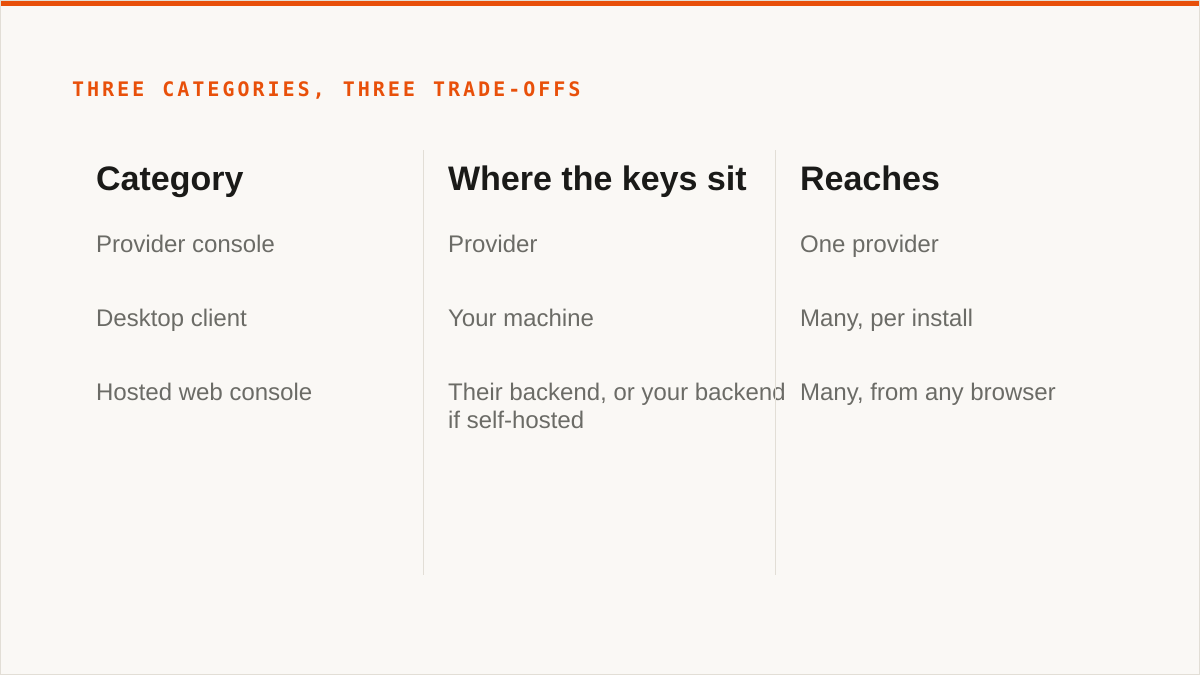
"What is S3 Browser" and "S3 web browser" get conflated constantly. S3 Browser is a specific product (a Windows desktop client). "S3 web browser" describes a category (anything that runs in a tab). Let's separate the categories, because they differ on the thing that matters: where the keys live and what the tool can reach.
Category one: the provider's own console
Free, always current, authoritative for that provider's newest features. AWS, R2, B2 and the rest all ship one. They are the right answer when everything you own lives in one cloud and always will. The cost is that you get one isolated view per provider, no cross-provider anything, and the smaller providers' consoles range from decent to barely functional.
Category two: desktop clients
Cyberduck (free, donationware), Mountain Duck (paid, mounts a bucket as a drive), S3 Browser (Windows, free for personal use, paid for commercial), ExpanDrive (paid, mounts). These run on your machine. Your keys sit in your local keychain or config file, which is a real security advantage over anything hosted. Several of them mount storage as a filesystem, which we do not do at all.
The desktop client is the right answer for one person managing a handful of buckets who wants no subscription and wants the keys on their own hardware. The cost is per-machine setup, no shared team view, no scheduled migration or automation, and the mounting clients are doing a lot of fragile work that a flaky network will expose.
Category three: web console over the API
A hosted tool: you sign in to a website, it holds credentials to your buckets in its backend, and it calls the S3 API on your behalf. That is the category Storafleet is in. It is the only category that gives you one view across every bucket and every provider from any machine with a browser, with no install. The cost is exactly the trust question, which is the next section.
Hosted consoles also include things like Filestash and various open-source projects you can self-host, which is worth knowing: if you want the hosted-console convenience but not the trust-a-third-party part, self-hosting one of the open-source web consoles is a legitimate middle path. You run it, you hold its database, you own the keys. That is a real option and we will not pretend it isn't.
| Category | Example tools | Cost model | Where the keys sit | Reaches |
|---|---|---|---|---|
| Provider console | AWS console, R2 dashboard, B2 web UI | Free, included | Provider | One provider |
| Desktop client | Cyberduck, Mountain Duck, S3 Browser, ExpanDrive | Free or one-time licence | Your machine | Many, per install |
| Hosted web console | Storafleet, Filestash (self-host), others | Subscription, or self-hosted free | Their backend, or your backend if self-hosted | Many, from any browser |
No ranking fluff. The categories are not good, better, best. They are different answers to "where do the keys live and who runs the server", and the next section is why that question beats every feature comparison.
Where the credentials live is the whole decision
A browser tab cannot hold your S3 keys safely, so any web-based S3 file browser has to keep them somewhere else and act on your behalf. That "somewhere else" is the entire security model of the tool, and no amount of UI polish changes it.
There are three honest places the keys can sit:
- On your own hardware. A desktop client, a self-hosted web console, or a CLI. The key never leaves a machine you control. This is the strongest answer and it is not close.
- In someone else's database, encrypted. A hosted console. The tool encrypts the credentials at rest and decrypts them only to sign requests. Storafleet does this: AES-256-GCM, with per-namespace keys derived using HKDF, so one customer's encrypted blob is not decryptable with another's key material. This is real, and it is also strictly weaker than option 1, because there is now a server that holds the plaintext key in memory at request time and a team that operates that server.
- Nowhere, because you assume a role instead. For AWS specifically, the console can be given a principal that is allowed to assume an IAM role in your account, and then it holds no long-lived key at all: it receives short-lived, scoped credentials and they expire. Storafleet supports this keyless path for AWS via IAM role assumption. It is the best of the hosted options, and it still means a third-party principal has a trust relationship into your account.
Here is the concession, and we mean it: "the keys never left my laptop" is a stronger security answer than ours, and it is dishonest to pretend otherwise. If the credentials that can read and write your bucket cannot, under any circumstances, be held by a company you don't operate, then a hosted console like Storafleet is the wrong architecture for you regardless of how good our encryption is. Cyberduck, Mountain Duck, or a self-hosted console running inside your own boundary is the correct answer. Full stop.
What we will say for the hosted model, and only this: the encryption has to be real and the operational story has to be honest about the residual risk. AES-256-GCM with per-namespace HKDF keys means a database dump is not a plaintext key dump. IAM role assumption means the AWS case needs no stored key at all. But "encrypted at rest" does not mean "we cannot ever see it", and any vendor that implies it does is either lying or has not thought it through. If you are choosing a hosted console, ask where the keys are, how they are encrypted, and whether there is a keyless path. If the answer is vague, walk.
For teams that have decided the hosted trade is acceptable, the practical question becomes scope: give the tool a key that can do only what it needs. A key that can GetObject and ListBucket on one prefix is a very different risk from a root-equivalent admin key, whether it is encrypted in our database or sitting in your ~/.aws/credentials. Least privilege applies harder, not less, when the key is somewhere you don't control.
Connecting a bucket you do not own, and the CORS trap
This is the case people actually hit when they search "how to access s3 bucket from browser", and it is where the opening error comes from.
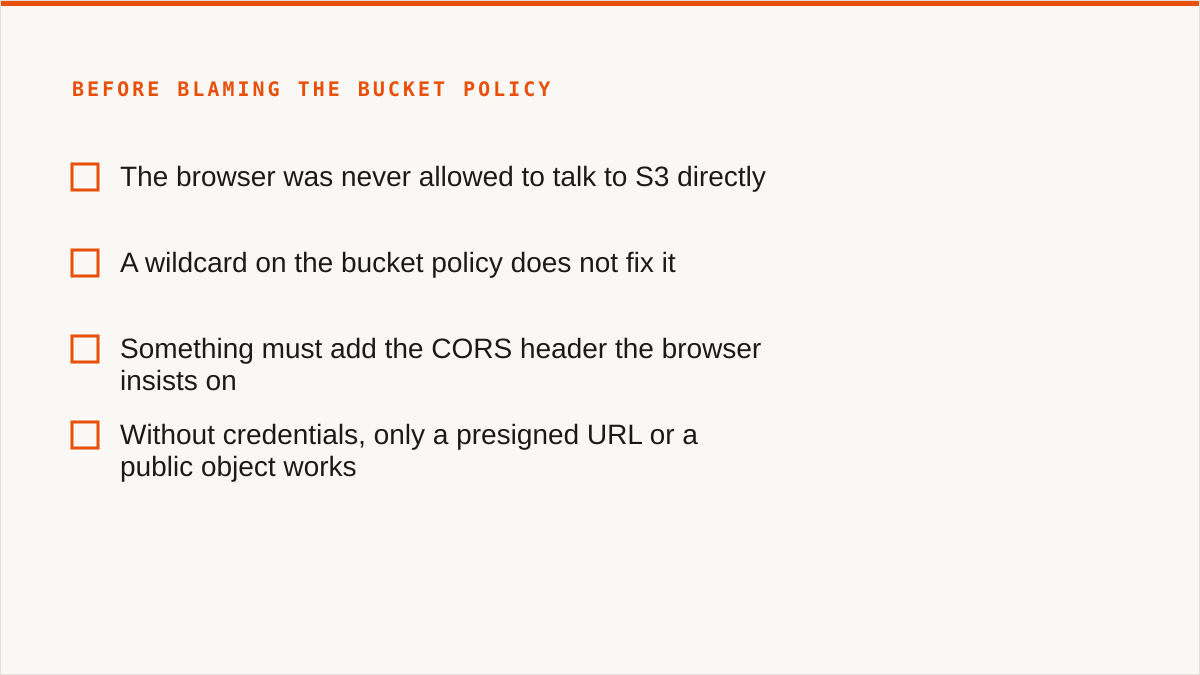
Say a teammate owns the bucket. They have given you a key, or a role, and you have pointed a browser-based tool at it. The tool's server can list the bucket fine, because server-side requests are not subject to CORS. But the moment the browser tries to fetch an object directly from the bucket, or the tool tries to do a direct-to-S3 upload from the browser to save bandwidth, the browser enforces same-origin policy and blocks it. A CLI never hits this, because CORS is a browser rule, not an S3 rule. That is the whole reason the error exists and the CLI just works.
The fix is a CORS configuration on the bucket. The bucket owner runs this, not you, which is the first friction point:
aws s3api put-bucket-cors \
  --bucket mybucket \
  --cors-configuration '{
    "CORSRules": [
      {
        "AllowedOrigins": ["https://files.example.com"],
        "AllowedMethods": ["GET", "PUT", "HEAD"],
        "AllowedHeaders": ["*"],
        "ExposeHeaders": ["ETag"],
        "MaxAgeSeconds": 3000
      }
    ]
  }'
Three things about that snippet that people get wrong:
AllowedOriginsmust match the exact origin, scheme and all.https://files.example.comis nothttp://files.example.comand is nothttps://www.files.example.com. A wildcard*works but means any site can make cross-origin requests to your bucket, which combined with a permissive policy is how buckets leak.ExposeHeadersmatters for uploads. A direct-to-S3 upload that returns anETagthe browser code wants to read will silently fail to read it unlessETagis inExposeHeaders. The upload succeeds and your code thinks it failed. Classic.- The rule lives on the bucket, so it is the owner's job. If you are the one with the error and you are not the bucket owner, you cannot fix it yourself. You need the owner to run that command. Say so in the ticket instead of spending an hour on your side.
The debugging mistake to avoid: do not "fix" it by turning off public access block. The Block Public Access settings on a bucket are not what is causing your CORS error, and disabling them to chase it is how buckets end up publicly listable. CORS and public access are orthogonal. CORS is about which browser origins may read responses; public access block is about whether anonymous principals can reach the bucket at all. If the tool is calling S3 from its own server, it does not need public access and it does not need a wildcard origin. If it is doing browser-direct calls, it needs the CORS rule and still not public access block changes. Turn the block off to debug CORS and you have traded a cosmetic error for a data exposure.
The other trap: a hosted tool calling S3 server-side sidesteps CORS entirely, because the request originates from the tool's server, not the browser. So if a hosted console tells you to go add a CORS rule, ask why. Sometimes it is legitimate (direct browser uploads for large files). Sometimes it means the tool is doing the wrong thing and making you open a hole to compensate. In Storafleet's case the S3 calls are server-side, so a plain browse and download of a bucket you have connected does not require you to touch the bucket's CORS config. Direct browser-to-bucket paths do, and that distinction is worth knowing before you paste a wildcard origin into a production bucket.
Then there is the bucket-policy side. A connection that can list but not read usually means the policy allows s3:ListBucket on the bucket ARN but not s3:GetObject on the object ARN. Those are two different resources: arn:aws:s3:::mybucket and arn:aws:s3:::mybucket/*. Forgetting the /* is the single most common "I connected it but it's empty" cause. Check the policy before you suspect the tool.
Who should not use us for this, and what to use instead
We would rather lose the sale than have you subscribe and be wrong. So, plainly:
If your budget for this is zero, the conversation is over and rclone wins. It is free, permanently, with no account and no vendor. It supports more backends than we do, it mounts, it is scriptable, and it has been maintained for over a decade. For a large number of people that is simply the correct answer and we will say so in the first sentence.
If you need storage mounted as a filesystem, we cannot do it. Use rclone, Mountain Duck or ExpanDrive. There is no FUSE surface in Storafleet, no drive in Finder or Explorer. rclone mount is the free answer and it works. That is a real capability we don't have and won't fake.
If you need Google Drive, Dropbox, OneDrive or SFTP, we are the wrong tool. Use rclone or CloudFuze. We speak the S3-compatible family and any custom S3 endpoint, and nothing else. Drive-to-bucket is a real job and it is not ours. rclone handles it for free; CloudFuze covers the enterprise consumer-cloud cases.
If your credentials must never leave hardware you control, use a desktop client or a self-hosted console. Cyberduck, Mountain Duck, or a self-hosted web console. Our encryption is real but the model is a server holding the key, and if that is a line you cannot cross, you are right and we are not the answer. The one exception: AWS-only, connected keylessly via IAM role assumption, gets you most of the way there, and we'll tell you honestly it is still a trust relationship into your account.
If everything lives in one cloud and always will, that provider's console is free and more current than we are. The AWS console will have AWS's newest feature on day one. We won't. If you never leave AWS, you are paying us for a second view of one thing.
If the workflow is entirely code and always will be, use a CLI. rclone again. A binary composes with cron, systemd, CI and Makefiles. A web console does not, and never will. If your pipeline is rclone sync in a shell script, that is the right shape and we won't pretend a UI fits it.
So what is Storafleet actually for? It is a control plane for object storage you already own, and it earns its keep when the problem is many buckets across many providers, seen by a team, from any machine. Bring your own storage; we never hold your file contents. Browse, upload, download, migrate and sync between 50+ S3-compatible providers and any custom endpoint, one-time or scheduled. Global cross-bucket search, so "where is that object" stops being a per-bucket hunt. Lifecycle, CORS, versioning, object-lock and public-access configuration in one place. Duplicate detection and per-bucket cost visibility. Flat subscription; we do not charge per gigabyte to move data, and migrated bytes are unmetered on every tier including Free. The tiers differ on concurrent migration jobs and scheduled automation, not on a meter running against your bytes.
That is a specific job: a team that has spread across R2, B2, S3 and a MinIO box, needs one view, needs to move data between them without a bespoke script, and has accepted that a hosted console holding encrypted keys is an acceptable trade for that view. If that is you, the file browser is where to start.
If it isn't you, the honest answer is one of the above, and we would rather you take it.
One last thing, because it is the question we get and dodge least gracefully: we are a small team and Storafleet started in 2026. If your question is "will this still exist in five years", a decade-old open-source project has a better answer than we do. rclone is the safe bet on longevity. We are the bet on the multi-provider control plane existing at all. Those are different bets and you should make the one that matches your risk, not ours.