
Scoping AWS IAM credentials for an S3-compatible endpoint
October 2026 · 12 min read · Surya
Conventional wisdom says the right way to hand an S3-compatible endpoint to a third-party tool is to scope the IAM key down to one bucket and one prefix, and never let it touch anything else. That advice is mostly correct, and we follow it ourselves, but it answers the wrong question.
The question people think they are asking is "how do I limit what this key can do?" The question that actually matters is "why does a long-lived key exist at all?" Narrowing a policy changes the blast radius. It does not change the fact that a durable credential now lives in somebody else's database, and that is the failure mode that has burned every team I have watched get burned.
So let's do the mechanics first, because most published examples get them wrong, and then let's talk honestly about what scoping actually buys you.
Every IAM policy on your S3-compatible endpoint starts with s3:GetBucketLocation and s3:ListBucket, and most published examples omit both
An S3 policy that grants only s3:GetObject and s3:PutObject will fail in ways that look like a permissions bug but are not. Before any SDK does anything useful, it calls GetBucketLocation to figure out which regional endpoint to talk to. If that call is denied, the SDK either falls back to a default region or errors out with something unhelpful depending on the client. You then spend an afternoon adding actions one at a time until the tool stops complaining.
The console is worse. It calls ListBucket to render the bucket view, and if that is denied you get an empty bucket that looks like it does not exist. Which brings us to the single most annoying thing about debugging S3 permissions.
AccessDenied and NoSuchBucket are deliberately conflated by S3 for buckets you cannot see. This is a security feature, not a bug: if you had permission to distinguish "denied" from "does not exist," you could enumerate other people's bucket names. So a tool that lacks ListBucket reports a bucket as missing, you go check the bucket, the bucket is obviously there, and you start questioning your own sanity. You are not going mad. You are missing one action.
A minimal, correct policy for a tool that needs to read and write one prefix looks like this. Note the two statements, not one.
{
  "Version": "2012-10-17",
  "Statement": [
    {
      "Sid": "BucketLevel",
      "Effect": "Allow",
      "Action": [
        "s3:GetBucketLocation",
        "s3:ListBucket"
      ],
      "Resource": "arn:aws:s3:::my-bucket",
      "Condition": {
        "StringLike": {
          "s3:prefix": ["uploads/*", "uploads/"]
        }
      }
    },
    {
      "Sid": "ObjectLevel",
      "Effect": "Allow",
      "Action": [
        "s3:GetObject",
        "s3:PutObject",
        "s3:DeleteObject"
      ],
      "Resource": "arn:aws:s3:::my-bucket/uploads/*"
    }
  ]
}
The Condition block is the part people skip, and it is the part that actually enforces the prefix. Without it, ListBucket on the bucket ARN lets the holder enumerate every key in the bucket, even though they cannot read a single byte of the ones outside their prefix. Key names leak. If your key names contain customer identifiers, project names, or anything you would not paste into a public ticket, that is a real disclosure.
Two details that catch people repeatedly. First, you need both uploads/* and uploads/ in the prefix condition, because listing a "directory" in S3 is a request with a delimiter and a prefix that ends at the slash. Second, the bucket-level statement uses the bucket ARN with no trailing /*, and the object-level statement uses the ARN with /*. Mixing those up is a rite of passage.
That is the unglamorous core of it. Two actions before anything works, a condition block to stop key enumeration, and a debugging experience where every failure looks like the same failure.
A scoped IAM key is a permission boundary, not a containment boundary, and confusing the two is how credentials end up in somebody else's database
Here is the myth-check verdict: the advice is mostly right, and it is answering a narrower question than the one that keeps people up at night.
Scoping a key to one bucket and one prefix genuinely limits what that key can do if it leaks. That matters. A leaked key scoped to uploads/ cannot delete your production bucket, cannot read your backups, cannot spin up expensive compute if the policy is tight enough to exclude other services. This is real mitigation and you should do it. We do it. Every connection you create in Storafleet should use the narrowest policy that makes the tool work.
But a permission boundary is not a containment boundary. Scoping tells you what the credential can touch. It tells you nothing about where the credential lives, who can read it, how long it stays valid, or whether anyone will notice if it is used from an IP address you have never seen before. The credential itself is now an asset sitting in a third party's control plane, in their config file, in their container environment, in their logs if they are careless, in their backups.
The biggest single risk in this whole area is not that a credential is over-permissioned. It is that a long-lived credential exists somewhere you do not control. A perfectly scoped key still has these properties: it does not expire, it does not come with an audit trail you own, and it keeps working until somebody notices and revokes it. If it leaks, the attacker gets whatever that scope allows, for as long as it takes you to find out. Narrow scope reduces the damage. It does not reduce the window.
Now the concession, and I want to be genuinely fair here rather than perform fairness and then take it back.
rclone keeps your credentials on hardware you own. You run it. The config file with the keys is on your machine or your server, inside your security boundary. It does not phone home to a vendor database. It has been maintained for over a decade, it supports more backends than we ever will, and it costs nothing forever. On the specific question "where do the keys physically live," rclone's answer is strictly better than ours. Not marginally. Strictly.
Desktop clients like Cyberduck, Mountain Duck and S3 Browser have the same property. The credential is in a keychain on your laptop. There is no third party holding it. For one person managing a handful of buckets from one machine, that is a cleaner security story than a hosted console, and I am not going to pretend otherwise.
And then the structural one. Keyless IAM role assumption removes the long-lived credential entirely, and we only support it for AWS. When you connect an AWS account that way, there is no secret to leak because no secret was handed over: we assume a role, short-lived STS credentials get issued, and they expire on their own. That is the correct answer to the containment problem. But it is an AWS answer. The other 50-plus S3-compatible providers we connect, R2, B2, Wasabi, MinIO, Spaces, OCI, Scaleway and the rest, mostly have no equivalent, or have something that is not quite equivalent, so for those you are back to a long-lived key. We are not going to dress that up.
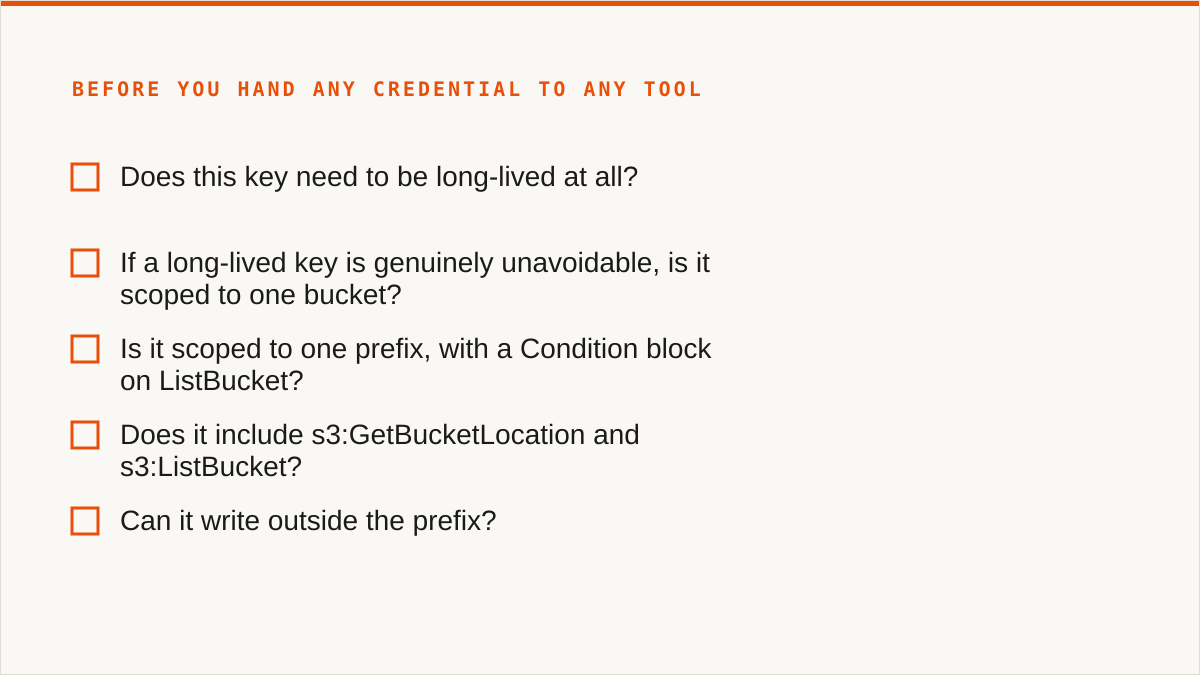
So here is the practical takeaway. Before you hand any credential to any tool, hosted or local, walk this list. It is boring and it catches most of the real mistakes.
- Does this key need to be long-lived at all? If the provider supports role assumption, STS, or short-lived tokens, issue those instead of a static key and skip the rest of this list. On AWS, connect by IAM role: we assume it, STS hands out credentials that expire, and there is no secret sitting in anyone's config file. This is the recommendation, not a footnote to it.
- If a long-lived key is genuinely unavoidable, is it scoped to one bucket? Not "a few buckets." One, unless there is a written reason.
- Is it scoped to one prefix, with a
Conditionblock onListBucket? If listing is unrestricted, key names leak. - Does it include
s3:GetBucketLocationands3:ListBucket? If not, expect confusing failures that look like the bucket is missing. - Can it write outside the prefix?
PutObjectoutside your scope is how you get surprise objects and surprise bills. - Can it change bucket configuration? No
PutBucketPolicy, noDeleteBucket, no lifecycle changes unless the job genuinely needs them. - Is there an expiry date written down? Not "we'll rotate it." A date, in a calendar, owned by a named person.
- Do you have access logging turned on for the bucket? If you cannot answer "when was this key last used and from where," you cannot detect a leak.
- Does the recipient actually need the key, or do they need the data? Often you can hand over a signed URL or a one-time transfer instead of a credential. This is the one people forget.
Run that list and you will catch the over-permissioned key, the unrestricted list, and the key nobody remembers creating. You will not catch the credential that is scoped perfectly and quietly leaked six months ago.
The policy that survives a breach is not the narrowest one, it is the one with a short life
Shaving actions off a policy has diminishing returns. Rotation cadence, session limits, and log-based verification are what actually change the outcome.
Think about what a leaked credential does to you. If it is scoped perfectly and lives forever, the attacker has a low-privilege foothold that never closes. They can read your prefix indefinitely, at a trickle, in a way that does not trip any alarm you have configured. If it is scoped broadly and expires in an hour, the attacker has an hour. Broad-and-brief beats narrow-and-permanent in almost every scenario I have seen, and nobody writes blog posts about that because "rotate your keys" is not as satisfying as a clever JSON snippet.
Rotation is the unglamorous control. A quarterly rotation that actually happens beats a perfect policy that has been in place, unexamined, since the integration was written. Most teams do not rotate. They set a key up, it works, and it sits there until something breaks or something leaks.
STS session limits are the better version of the same idea, where the provider supports them. Instead of a key that is valid until revoked, you issue credentials that are valid for an hour or a day and then stop working on their own. The failure mode changes from "we have to notice and revoke" to "it expires whether we notice or not." That is a much better failure mode.
And verification is the control nobody sets up until after the incident. Access logging on the bucket, with somebody actually looking at it. You want to be able to answer: when was this credential last used, from which IP, and does that match the tool that is supposed to be using it? If the answer is "we would have to go dig," you have no detection, and detection is what turns a leak into an incident with a start time.
Nothing in this post is an argument that scoping is pointless. It is an argument about ordering. Scope first because it is cheap and it works. Then rotate, because a scoped key that never dies is still a key that never dies. Then log, because you cannot respond to what you cannot see. If you only do the first one, you have done the easy third of the job and told yourself you are finished.
Now, who should not use us for this. I would rather lose the sale than have somebody sign up for the wrong reason.
If your budget for this is zero, the conversation is over and rclone wins. Not "rclone is a good option," it wins, permanently, with no account and no vendor, and it runs inside your own security boundary. Go use it.
If you need storage mounted as a filesystem, we cannot help you. We have no FUSE surface, nothing appears in Finder or Explorer. Use rclone mount, Mountain Duck or ExpanDrive. That is a capability we simply do not have.
If the data lives in Google Drive, Dropbox, OneDrive, Box or SFTP, we are the wrong tool. We connect the S3-compatible family and custom S3 endpoints, and nothing else. rclone or MultCloud cover those clouds; we deliberately do not.
If credentials must never leave hardware you control, use rclone, or use our IAM-role connect if the target is AWS only. Your credentials sit encrypted in our database otherwise. The encryption is real, AES-256-GCM with per-namespace HKDF-derived keys, and AWS can be connected keylessly. But "the keys never left my laptop" is a stronger answer than ours and it would be dishonest to blur that.
If everything lives in one cloud and always will, that provider's own console is free and more current than we are. It knows about that provider's newest features the day they ship. We have to catch up.
If the workflow is entirely code and always will be, use a CLI. We are a console, not a command. We do not compose with cron, systemd units, CI pipelines, shell scripts or Makefiles the way a binary does. A CLI fits that workflow natively. A web UI never will.
And one more, said plainly because it is true. We are a small team and Storafleet started in 2026. If your question is "will this still exist in five years," a decade-old open-source project has a better answer than we do. I am not going to pretend a young company is the safe choice. It is not. It is a bet on us.
So where does that leave the scoped-key advice? Mostly intact, and mostly beside the point. Scope the key. Then ask why it has to be long-lived, and fix that, because that is the part that decides whether a leak stays a footnote or becomes the week you lose.