
S3 Versioning, Object Lock and Block Public Access: How They Interact
November 2026 · 10 min read · Surya
We mapped how S3 versioning, Object Lock and Block Public Access stack on top of each other, because we ship configuration controls for all three and we wanted to know what the damn things actually do when you turn them on in the wrong order. The combination that cost us the time was a bucket with Object Lock in compliance mode and a public-read bucket policy we wanted to remove. The policy came off cleanly. The objects did not. They sat there, still there, still under retention, and no amount of clicking made them go away.
Here is what we learned, in the order we learned it.
Versioning is the precondition. Object Lock is versioning plus a veto.
You cannot turn on Object Lock for a bucket that never had versioning enabled. Not "should not". Cannot. The API refuses it. Object Lock works by pinning a specific version of an object, and if the bucket has no version history there is nothing to pin. So versioning is the floor, and Object Lock is the room you build on top.
The sequence, from an empty bucket:
aws s3api put-bucket-versioning \
  --bucket my-bucket \
  --versioning-configuration Status=Enabled

aws s3api put-object-lock-configuration \
  --bucket my-bucket \
  --object-lock-configuration '{
    "ObjectLockEnabled": "Enabled",
    "Rule": {
      "DefaultRetention": {
        "Mode": "GOVERNANCE",
        "Days": 30
      }
    }
  }'
That second call sets a default retention of 30 days on every object written afterwards. Existing objects are not retroactively locked. New ones are. Get the order wrong, or try to set lock config first, and you get an error rather than a bucket.
Once a retention period is in force, deleting a version is refused at the API layer, even for the bucket owner. This is the part people underestimate. The bucket owner is not a god account in S3 semantics. The storage layer checks the retention date on the version and returns a refusal before any IAM evaluation matters. Your root credentials don't help.
Governance vs compliance: who is allowed to break the rule
The two modes differ in exactly one way, and it is the only way that matters.
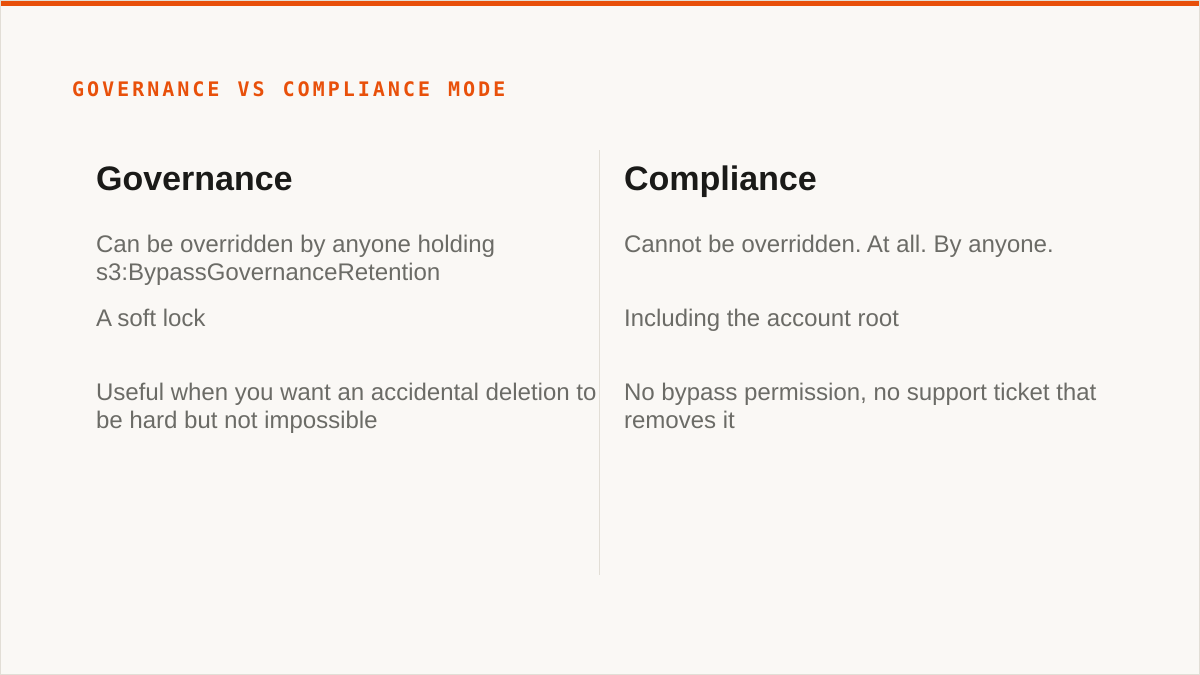
Governance mode can be overridden by anyone holding s3:BypassGovernanceRetention. That permission, in a policy, on a role, lets the holder delete a version before its retention date expires. It is a soft lock. Useful when you want an accidental deletion to be hard but not impossible, and when you trust the people with that permission not to use it casually.
Compliance mode cannot be overridden. At all. By anyone. Including the account root. There is no bypass permission. There is no support ticket that removes it. The object is stuck until the clock runs out, and then it is deletable. That is the entire feature. If you set compliance mode for 365 days on a bucket, you have made a one-year commitment to storing those bytes whether or not you still want them.
We chose to expose both modes in the console with the mode as an explicit dropdown and a warning on compliance. We did not hide compliance behind a confirmation dialog with a checkbox, because hiding it made it feel more dangerous than it is, and it is already dangerous enough when you read the description.
The cost profile of the bucket changes the moment you enable versioning, before Object Lock even enters the picture. Noncurrent versions accumulate. Every overwrite is a new version, and the old one stays until something deletes it. Add a 30-day retention and now those noncurrent versions are guaranteed to sit for at least 30 days. A bucket that held 500 GB of live data can quietly drift past a terabyte of billed storage because someone re-uploaded a directory twelve times. This is not a Storafleet problem, it is an S3 problem, and it is the reason lifecycle rules exist. But it bites people who enable Object Lock for compliance and then wonder why the bill moved.
Block Public Access is not a child of versioning, and that trips people up
Block Public Access is a separate switch, applied through PutPublicAccessBlock, and it has nothing to do with versioning or Object Lock. It is a bucket-level and account-level setting that overrides public access grants. Four flags: block public ACLs, ignore public ACLs, block public policy, restrict public buckets. Set them at the account level and they cover every bucket under it. Set them at the bucket level and they cover that bucket.
The two features are orthogonal. A bucket can have Object Lock on and Block Public Access off. A bucket can have Block Public Access on and no versioning at all. There is no ordering constraint between them, no precondition, no dependency. Which is exactly why people assume there is one, and get surprised.
The interaction that actually matters: an object under legal hold or retention cannot be deleted to fix an accidental public exposure. Read that again. The normal reflex when you discover a bucket is public is to delete the objects, or move them, or overwrite them with something harmless. All three of those are writes or deletes. All three are refused if the version is locked.
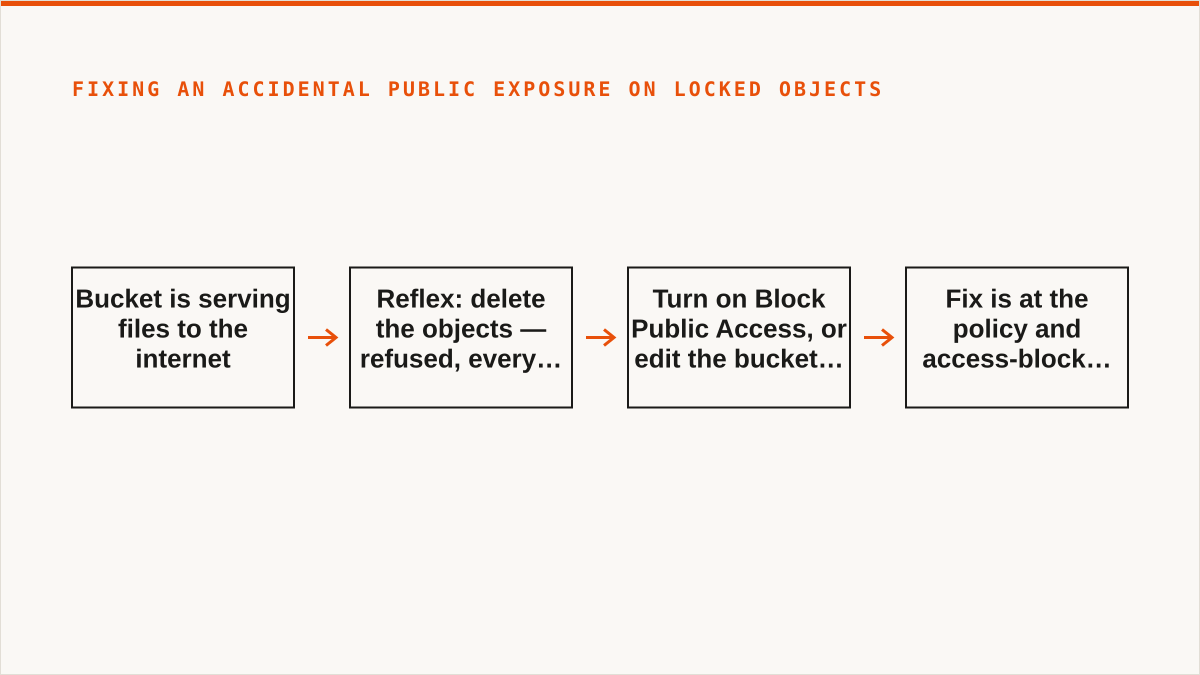
Concrete example. A bucket has a public-read bucket policy and 30-day retention on every object, set through the default retention rule. Someone notices the bucket is serving files to the internet. The reflex is to delete. It fails, because every version is inside its retention window.
What actually works: turn on Block Public Access. That stops new public reads without touching a single object. Or edit the bucket policy to remove the public grant. Either way, the fix is at the policy and access-block layer, not the object layer. Deleting the objects is not an option, and if you have built a runbook that assumes it is, the runbook is wrong.
We have watched this play out enough times that we now surface the Block Public Access state next to the Object Lock state in the bucket view, rather than leaving them in separate tabs. It is a small thing. It has saved us from writing the wrong instructions in a support reply more than once.
The combination that will bite you: public bucket, locked objects, and a policy change you cannot reverse
Here is the failure mode in plain words, because it deserves plain words.
Someone enables Object Lock in compliance mode on a bucket. Not maliciously, not carelessly, just doing what the compliance requirement said to do. Later, a public bucket policy on that bucket needs to be removed, or a broad principal needs to lose a permission. The policy change itself is fine. Policy changes are always possible. The trap is what the policy was granting and what happens when you try to use it.
The real trap is a bucket policy that grants s3:DeleteObjectVersion to a broad principal. Maybe it was there to let a CI role clean up old builds. Maybe it was there because someone copied a policy from a tutorial. With Object Lock in compliance mode, that permission is useless. The principal calls delete, the storage layer checks retention, and the call returns AccessDenied.
That is the point of Object Lock. It is supposed to be useless. That is the whole design. But it surprises people who assume bucket policy always wins, and it surprises them at the worst possible moment, which is when they are trying to clean something up in a hurry.
When a delete fails on a locked version, the response says access denied. It does not say "this version is under compliance retention until a date". You have to go look. If you do not know to look, you spend an hour checking IAM policies that were never the problem.
Callout: check lock status before you debug the wrong thing. When a delete fails on a version you believe should be deletable, run this before touching any policy:
aws s3api head-object \
  --bucket BUCKET \
  --key KEY \
  --query 'ObjectLockMode,ObjectLockRetainUntilDate,ObjectLockLegalHoldStatus'
Three fields come back.ObjectLockModeisGOVERNANCEorCOMPLIANCE.ObjectLockRetainUntilDateis the date the veto lifts.ObjectLockLegalHoldStatusisONorOFF, and a legal hold has no expiry date at all, which is a separate trap:ONmeans the object is held indefinitely until someone withs3:PutObjectLegalHoldturns it off. If the mode is COMPLIANCE and the date is in the future, stop debugging IAM. The storage layer is doing exactly what you told it to.
We built the lock status into the object detail view in the console for the same reason. It is not a clever feature. It is the thing that stops you from chasing a 403 into the wrong layer of the stack.
Where we are honest about the limits
We are a console, not a command, and that is a real limitation for this work. If your retention policy needs to be applied and audited as part of a CI pipeline, or driven from a Makefile, or composed with jq and a shell loop across a thousand buckets, a web UI is the wrong surface. rclone doesn't do Object Lock configuration, but the AWS CLI does, and it composes natively with everything else in a pipeline. If your workflow is code and always will be, use the CLI. We won't pretend a console beats a binary at being a binary.
rclone beats us on several axes we cannot argue with. It is free, permanently, with no account and no vendor. It supports 70-plus backends against our 50-plus S3-compatible ones, including consumer clouds we deliberately do not touch. It runs inside your own security boundary, which is a stronger answer than our encrypted credentials-at-rest model (AES-256-GCM, per-namespace HKDF keys, and AWS keyless via IAM role assumption, but still in our database and not on your laptop). It has been maintained for over a decade against a company that started in 2026. On the question of whether the tool will still exist in five years, rclone has the better answer, and we are not going to insult you by pretending otherwise.
If your budget for this is zero, the conversation is over and rclone wins. Genuinely. Go use it.
Who should not use Storafleet for this
We are not the right tool for everyone, and this specific work, setting up and auditing retention and public access posture across providers, has clear lines.
- If your retention configuration must run in CI, from a shell script, or from a Makefile, use the AWS CLI. It composes. We don't. A console cannot be piped into
jq. - If credentials must never leave hardware you control, use rclone or the provider's own console. Our encryption is real, but "the keys never left my laptop" is a stronger claim than "the keys are encrypted at rest in our database", and it is dishonest to blur the two.
- If everything lives in one provider and always will, use that provider's own console. It is free, it is always current with that provider's newest retention and access-block features, and it is authoritative in a way we cannot be. We are a control plane across providers. Inside one provider, we are a layer of indirection.
- If you need storage mounted as a filesystem so you can inspect files with normal tools while auditing retention, use rclone mount or Mountain Duck. We have no FUSE surface. We will not have one.
- If the audit is really a Drive-to-bucket or Dropbox-to-bucket job, we are not it. We connect the S3-compatible family and custom S3 endpoints. Nothing else. rclone or MultCloud cover the consumer clouds.
Where we do earn our keep: when the same retention and public-access policy has to be applied and verified across buckets on several different providers, and the person doing it wants to see them all in one view without writing a script. That is the job we built for. The combination testing behind this post is the reason the console shows lock mode, retain-until date, legal hold status and public access block state in the same panel. We paid for that lesson. You don't have to.
The order you turn these on determines whether you can turn them off. Versioning first, always. Object Lock on top, with the mode chosen deliberately and the retention window read out loud before you click. Block Public Access as a separate switch, flipped early, because it stops public reads without touching a single locked object. And before you debug a 403, check the lock status. The error won't tell you. It never does.