
Configuring custom S3-compatible endpoints and regions per provider
November 2026 · 13 min read · Surya
It is 11pm and someone has just pasted a Backblaze B2 key into a script that worked fine against R2 an hour ago. The bucket exists. The key is correct. The script returns SignatureDoesNotMatch and nothing else, which is S3's way of saying "you are wrong and I will not tell you how."
The bug is not the credentials. The bug is that they changed the endpoint URL and left the region string on auto, because R2 and B2 disagree about what a region even is. R2 treats it as a formality it will ignore. B2 treats it as a namespace that has to be spelled correctly or the signature is computed against the wrong scope.
This is the single most common failure mode in S3-compatible land, and it is not going away. So let us take it apart.
The endpoint and the region are two different lies, and providers disagree about which one to tell
An S3 request carries two separate facts about "where": the host it is sent to, and the region string it is signed against. They travel together but they are not the same value, and nothing in the protocol forces them to agree. AWS invented both and then let the world fork them.
Start with the host. AWS supports two ways to name a bucket in the URL. Virtual-hosted style puts the bucket in the DNS name: mybucket.s3.us-west-2.amazonaws.com. Path style puts it in the path: s3.us-west-2.amazonaws.com/mybucket/key. AWS has been pushing virtual-hosted style for years because TLS certificates for *.s3.amazonaws.com are cheaper to manage than a wildcard per bucket, and because path style makes caching and DNS tricks awkward.
Now the signature. SigV4 does not sign "the host." It signs a canonical request that includes a credential scope, and that scope contains a region: 20240115/us-east-1/s3/aws4_request. That region string is hashed into the signature. If the server computes the signature with a different region string than your client did, the signatures do not match, and you get SignatureDoesNotMatch.
Here is the fork in the road: some providers validate the region string, some ignore it, and some use it as a routing key. That is the whole source of the confusion.
- Cloudflare R2 wants
auto. It is not a real region. It is a sentinel that says "I have no regions, do not make me pretend." R2 will accept other strings in some paths butautois the documented value and the one that behaves. - Backblaze B2's S3 endpoint is region-shaped. The endpoint host encodes a region like
s3.us-west-004.backblazeb2.com, and the region string you sign with has to match that suffix. Get the suffix wrong and the signature is computed against a scope the server does not recognise. - MinIO genuinely does not care. A default MinIO install answers to
us-east-1because that is what the SDKs default to, and it will happily accept almost anything you sign with. This is why MinIO is the easiest thing to develop against and the worst thing to test your region logic on: it forgives the mistake that B2 will punish. - Wasabi will silently accept a wrong region. It routes on the endpoint host, not the signature scope, so a mismatched region string sails through. You find out months later when you point the same code at a provider that validates, and it breaks in production.
Which brings us to the framing that makes all of this tractable. A provider profile is not a URL. It is four fields.
- The endpoint: the host your request is actually sent to.
- The region: the string baked into the SigV4 credential scope.
- The addressing style: virtual-hosted or path. This determines whether the bucket name goes in the DNS label or the path.
- The signature: SigV4, and whether the provider needs anything unusual in the canonical request (most do not, a few do).
Every "S3-compatible" provider is arguing about some subset of those four. Get all four right and the provider is interchangeable with every other. Get one wrong and you get a 403 with no body, or a signature mismatch, or a connection that resolves to the wrong data centre entirely.
Now the inventory.
What each provider actually wants in the four fields
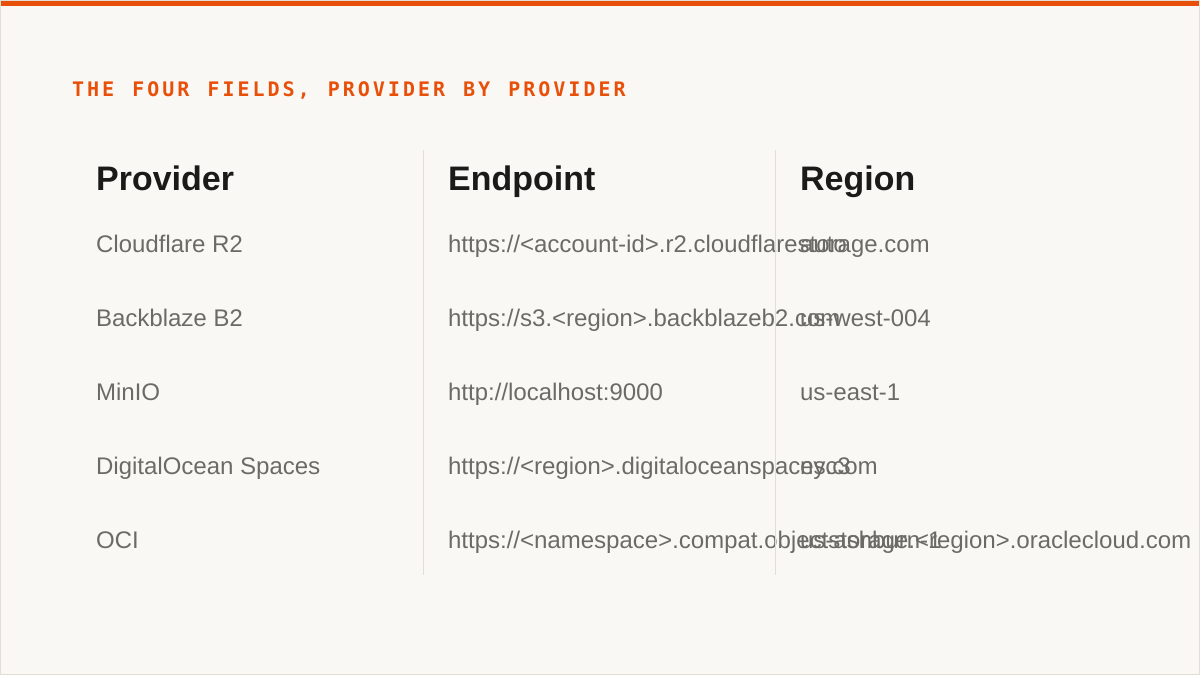
The fastest way to understand the four fields is to see them filled in wrong and right, side by side, for providers you actually use. Here is what we have found, provider by provider. These are the values that work, not the values in a marketing page.
Cloudflare R2
Endpoint https://<account-id>.r2.cloudflarestorage.com. Region auto. Path style off (R2 supports virtual-hosted). SigV4 standard. The account ID is in the host, which is the one thing people forget: the endpoint is not a generic R2 URL, it is your R2 URL.
Backblaze B2
Endpoint https://s3.<region>.backblazeb2.com, for example s3.us-west-004.backblazeb2.com. Region is the same us-west-004. Path style off. The region string is not optional and not cosmetic. This is the provider that punishes the R2 habit hardest.
MinIO
Endpoint whatever you deployed it on, typically http://localhost:9000 or https://minio.internal. Region us-east-1 unless you configured otherwise, and MinIO will mostly let you get away with anything. Path style on in most deployments, because MinIO is usually reached by IP or a bare hostname where virtual-hosted style cannot work (you cannot do mybucket.localhost without DNS). This is the field people get wrong when they point at MinIO and hit a DNS error for a bucket that exists.
DigitalOcean Spaces
Endpoint https://<region>.digitaloceanspaces.com, for example https://nyc3.digitaloceanspaces.com. Region is the same nyc3, because it is baked into the hostname. Path style off. Straightforward once you notice the region is in the endpoint, which means you cannot reuse a DigitalOcean endpoint from one region against a bucket in another.
Oracle Cloud Infrastructure (OCI)
Endpoint https://<namespace>.compat.objectstorage.<region>.oraclecloud.com. Region is the OCI region identifier like us-ashburn-1. The namespace is in the endpoint and is not the same as your tenancy name. This is the provider where people most often paste the wrong identifier into the endpoint, because OCI has three names for everything and only one of them goes in the URL.
Scaleway, Linode (Akamai), Vultr, Storj, IDrive e2, Hetzner
These all follow the same shape, which is region-in-the-hostname plus region-in-the-signature, and they all break the same way when you get one of them wrong. Scaleway: https://s3.<region>.scw.cloud. Linode: https://<region>.linodeobjects.com. Vultr: https://<region>.vultrobjects.com. Storj is the odd one: https://gateway.storjshare.io with region us-east-1, because Storj's S3 gateway is a compatibility shim over a distributed network and it picked the AWS default to keep SDKs happy. IDrive e2 uses https://<region>.idrivee2.com. Hetzner uses https://<region>.your-objectstorage.com with a region like fsn1.
Here is a real ~/.config/rclone/rclone.conf with three of these, because rclone's config format is the closest thing the ecosystem has to a lingua franca and it makes the four fields visible:
[r2]
type = s3
provider = Cloudflare
access_key_id = <r2-access-key>
secret_access_key = <r2-secret>
endpoint = https://<account-id>.r2.cloudflarestorage.com
region = auto
acl = private
no_check_bucket = true

[b2]
type = s3
provider = Backblaze
access_key_id = <b2-key-id>
secret_access_key = <b2-app-key>
endpoint = https://s3.us-west-004.backblazeb2.com
region = us-west-004

[minio]
type = s3
provider = Minio
access_key_id = <minio-access-key>
secret_access_key = <minio-secret>
endpoint = http://localhost:9000
region = us-east-1
force_path_style = true
Note the field that flips: force_path_style = true on MinIO and absent on R2 and B2. That is the addressing-style knob, and it is the one that produces DNS errors rather than signature errors when it is wrong.
And the same three calls with the AWS CLI, because not everyone wants rclone in the loop and the CLI is the lowest common denominator:
# Cloudflare R2
aws s3api list-objects-v2 \
  --bucket my-bucket \
  --endpoint-url https://<account-id>.r2.cloudflarestorage.com \
  --region auto

# Backblaze B2
aws s3api list-objects-v2 \
  --bucket my-bucket \
  --endpoint-url https://s3.us-west-004.backblazeb2.com \
  --region us-west-004

# MinIO on localhost, path style
aws s3api list-objects-v2 \
  --bucket my-bucket \
  --endpoint-url http://localhost:9000 \
  --region us-east-1 \
  --no-verify-ssl
If these three commands work, your four fields are right and nothing else about the provider matters. If any of them fails, the error tells you which field is wrong: SignatureDoesNotMatch is the region or the keys, a DNS error is the endpoint or the addressing style, AuthorizationHeaderMalformed is usually a region string the server does not recognise. Read the error as a pointer, not a verdict.
Why we store the endpoint as data instead of hardcoding a provider list
We could have shipped a dropdown of providers, and for the first month that is roughly what we had. It was wrong, and we knew it, because the day we shipped a provider that was not in the list, a customer with a MinIO cluster behind a VPN, or a Wasabi account in a region we had not enumerated, or a startup running Ceph on their own metal, could not use us at all. A hardcoded list is a map that is wrong the day it is printed.
So the four fields are data. Endpoint, region, path-style flag, signature flavour. A provider we have never heard of works if the four fields are right, because S3 compatibility is a contract about those four fields and nothing else. When we added Hetzner it was a config entry, not a code change. When a customer pointed us at a Ceph gateway with an unusual endpoint we had never seen, it worked on the first try because they filled in the four fields and the request was well-formed.
The consequence is that our provider list is not a walled garden. It is a set of presets that save you typing. Anything that speaks S3 and lets you set an endpoint is in scope, and we do not gatekeep it.
Now the honest part.
For a lot of readers, rclone is the answer and we are not going to pretend otherwise. rclone is free, permanently, with no account and no vendor. It has more than 70 backends, including the consumer clouds we deliberately do not touch: Google Drive, Dropbox, OneDrive, Box, plus SFTP and WebDAV and a dozen things that are not object storage at all. It mounts. It runs inside your own security boundary with credentials that never leave your laptop. It has been maintained for over a decade by people who will still be shipping it in five years, which is a question we cannot answer about ourselves with the same confidence.
If your job is "sync this bucket to that bucket on a cron", rclone does that. If your job is "mount this bucket as a drive letter", rclone does that and we do not. If your job is "move data between two providers without a vendor in the loop", rclone does that and the only thing we add is a UI and a scheduler. That is a real value, but it is not worth a subscription to someone who is comfortable with a config file. We are not going to list the things rclone cannot do to make ourselves feel better. It does the core of this job, it does it well, and it has earned the trust we have not yet.
The same goes for the desktop clients. Cyberduck is free and runs on your machine. Mountain Duck and S3 Browser are one-time licences that mount remote buckets as local drives, with files that never pass through our database. For a single person managing a few buckets who wants no subscription and no third party holding their keys, they are better than us.
Who should not pay us for this
If your budget for this is zero, the conversation is over and rclone wins. Not "rclone wins for now." Rclone wins. Close the tab. The four fields above are all you need, rclone already has a config entry for every provider in this post, and a rclone sync in a crontab costs nothing and pages nobody. Paying us to wrap that in a console is a luxury, and luxuries are the first thing to cut.
If you are comfortable on the command line, rclone and the AWS CLI already do the job and do it with more control than we offer. The three aws s3api invocations above are a complete answer to "move data between these buckets." Rclone adds sync, copy, check, mount and a config file, and it runs anywhere a binary runs. A CLI composes into cron, systemd, CI pipelines, shell scripts and Makefiles. Our console does not. If your instinct on reading this is "I want to call this from a Makefile," you want rclone, and you are right. We are not going to argue that a web UI beats a pipe, because it does not.
If you need storage mounted as a filesystem, we cannot help you and we will not pretend we can. There is no FUSE surface in Storafleet. We do not appear in Finder or Explorer. Use rclone mount, Mountain Duck, or ExpanDrive. This is a design choice, not a roadmap item: a mount is a local filesystem, and we are a control plane that never touches your file contents.
If your job involves Google Drive, Dropbox, OneDrive, SFTP, WebDAV or Box, we are the wrong tool. We connect the S3-compatible family and any custom S3 endpoint, and nothing else. Use rclone or MultCloud. MultCloud in particular covers the consumer clouds properly and we do not, on purpose.
If your credentials must never leave hardware you control, use rclone, or use our IAM-role connect if it is AWS only. Our encryption is real: AES-256-GCM with per-namespace HKDF keys, credentials encrypted at rest, and AWS can be connected keylessly via IAM role assumption so no long-lived key ever touches us. But "the keys never left my laptop" is a stronger answer than "the keys are encrypted in a database we operate," and it would be dishonest to pretend the two are equivalent. If your threat model requires the former, rclone gives you the former and we do not.
If everything lives in one cloud and always will, that provider's own console is free and more current than we are. The AWS console will always know about the newest AWS feature before we do. The same is true of every provider. We are useful when you have more than one and need to move between them; we are overhead when you have one.
Then who is this for?
Someone moving data between two or three providers on a schedule, who does not want to maintain a script. They have an R2 bucket and a B2 bucket and a MinIO cluster on their own metal, and they need a nightly sync between them with duplicate detection and a cost view per bucket, and they do not want to be the person who gets paged when the cron job silently starts failing because a key rotated. They know what they are giving up: the credentials sit encrypted in our database rather than on their laptop, the schedule lives in our console rather than their crontab, and the whole thing depends on a small team that started in 2026. They have decided that is a fair trade for not maintaining the script, and they are the person we built this for.
Everyone else has a better answer, and most of the time it is rclone. We would rather say that plainly than sell a subscription to someone who will churn in a month when they realise a config file would have done it. The four fields are the whole game. Get them right and any provider is interchangeable. Get them wrong and no UI will save you.