
OVH Object Storage: When It Fits and When It Doesn't
November 2026 · 19 min read · Surya
"Should I move my object storage to OVH?"
Yes, probably, if you are a European team with one region, one workload and no consumer-cloud needs. For that shape of team, OVH Object Storage is a defensible default and the migration is boring in the good way. A day of copying buckets, a week of planning, a bill that does not ambush you at the end of the month. That is a good outcome for infrastructure. You want infrastructure to be boring.
No, if what you actually want is a mounted drive, or a free tool, or a way to get files out of Google Drive. Then you do not have an OVH question at all. You have an rclone question, and we will say so at length further down.
The hard part is not the moving. The moving is a command and a wait. The hard part is working out which of OVH's products you mean when you type "ovh object storage" into a search box, and what you are quietly leaving behind when you pick one. That is what this post is about.
What is in here:
- Which OVH product you are actually buying, because three different things get called "object storage"
- The migration sequence, including the region mismatch and the big file that would not finish
- Where OVH genuinely wins against what you are leaving
- Where rclone beats us for this exact job, stated properly and not walked back
- What a control plane adds once you are past one bucket on one provider
- Who should not use us for this, named plainly, with what to use instead
First, work out which OVH product you are actually buying
"ovh object storage" is three searches wearing one coat. We see it in support threads and we see it in our own inbox. The people arriving on the phrase are not all looking for the same thing, and half of the confusion is that OVH sells products that sound adjacent to each other and behave nothing alike.
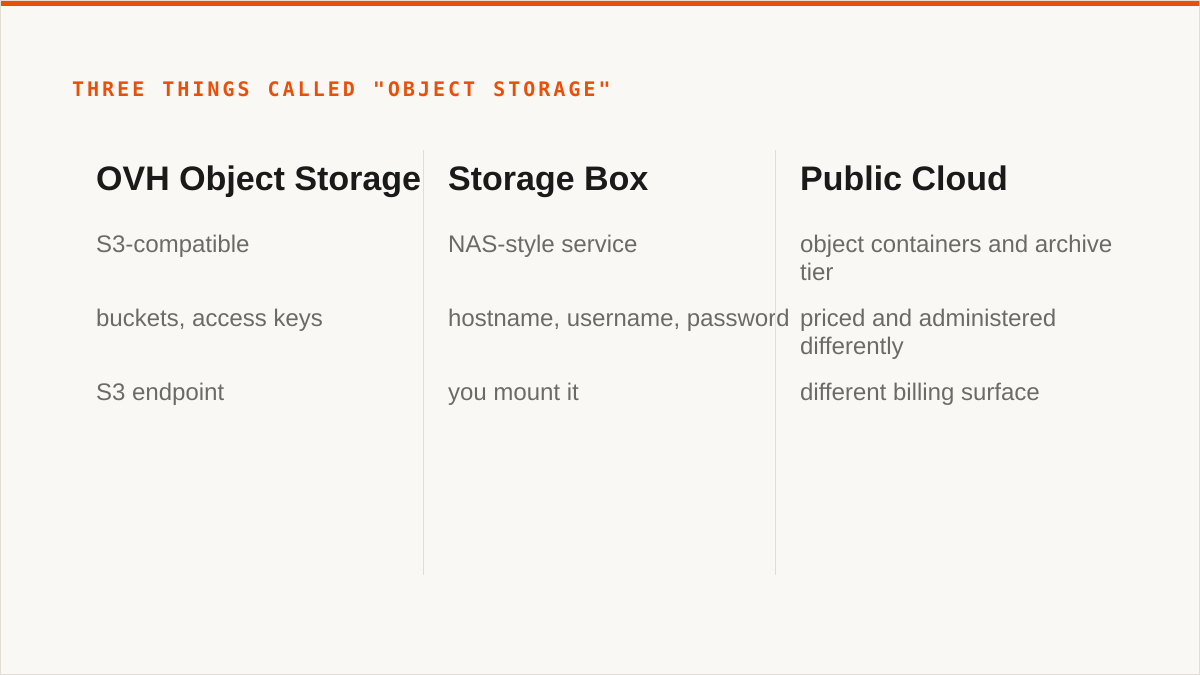
The first product is OVH Object Storage, the S3-compatible one. This is the thing that speaks the S3 API, has buckets, has access keys, and is what every S3 tool on earth will talk to. It is the product most people mean when they say "ovh s3 storage" or "ovh object storage s3". If you have an s3:// shaped hole, this fills it. Everything else in this post is about this product unless I say otherwise.
The second product is Storage Box, and it is not object storage at all. It is a NAS-style service. You get disk, you get protocols that look like a filesystem, you get something that behaves like a network share. It is not an S3 endpoint. You cannot point aws s3 cp at it. If you arrived on "ovh storage box" expecting buckets and access keys, you are on the wrong product page and the rest of this article will confuse you. Storage Box is a different decision with a different set of trade-offs, and honestly it is the right answer for a specific kind of customer: someone who wants a big chunk of European disk that mounts on a machine and does not want to rewrite anything. That is a filesystem question, not an object question. Go read about Storage Box directly.
The third is the Public Cloud side of things, containers and archive tier included. OVH has a Public Cloud product with object containers and an archive offering, and it is priced and administered differently from the standalone Object Storage product. If you are inside the Public Cloud console, you are buying a slightly different bundle than someone signing up for Object Storage on its own. Same broad idea, different billing surface, different mental model for who owns what.
Here is the practical test. Does the product give you an S3 endpoint, an access key and a secret key, and let you create a bucket with a name? If yes, you are on Object Storage and the rest of this applies. If it gives you a hostname, a username and a password and you are meant to mount it, that is Storage Box and you should stop reading here and go look at what that product actually offers, because none of the S3 tooling advice will land.
One more thing on disambiguation, because it burns people. The word "object" gets used loosely by every provider's marketing page. OVH's Object Storage is the S3-compatible one. Their archive tier is for cold data and comes with retrieval semantics you should read before you put your only copy of anything in it. Do not assume "object storage" on the pricing page means "hot, instantly readable, S3 PUT and GET". Read the tier you are actually ordering.
The copy is an afternoon; the planning is a week
Consider a migration of any real size. The copy is fast. The thinking is slow. If you budget one afternoon for the transfer, you have budgeted for the transfer and not for the inventory. That is the single thing people underestimate, every time.
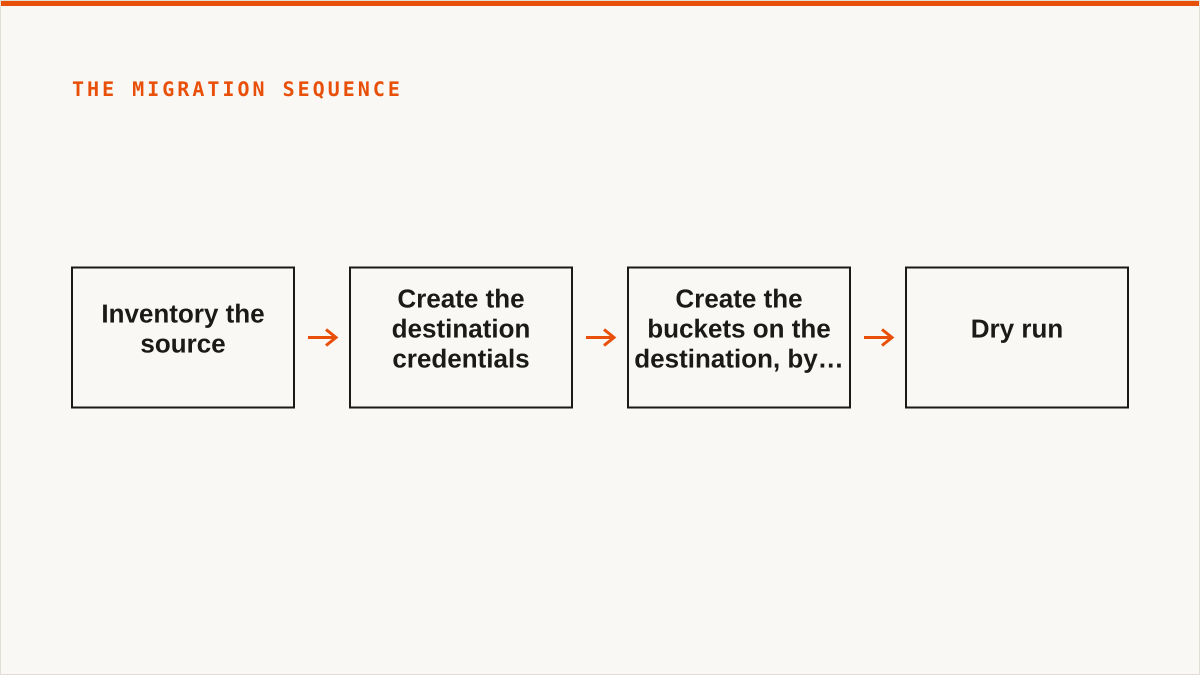
This is not a how-to. The connect docs live at https://storafleet.com/docs/connect/ovh and they are current. This is the sequence, in the order you should run it, and the mistakes after that.
The steps:
- Inventory the source. Every bucket, every prefix, total object count, total bytes, and crucially which buckets have versioning turned on and which have lifecycle rules that will keep deleting things while you copy. List the buckets, dump a manifest, flag the ones with non-current versions. A bucket with versioning and a 30-day expiry looks small until you realise you are copying three generations of every object.
- Create the destination credentials. In the OVH Object Storage console, create an S3 user, generate an access key and secret key, and note the region endpoint. This is the step where people pick the wrong region and find out later. Write the endpoint down. Do not trust memory.
- Create the buckets on the destination, by hand, with the right settings. Bucket names, and for anything public, the ACL or policy you intend. Do not let a tool guess. Create them explicitly and set access policy explicitly, because the defaults on the source and the destination are not the same and the difference is invisible until something 403s.
- Dry run. A copy with a check-only or dry-run flag, or a listing comparison, so you can see what the tool thinks it is about to move. This is where size and count disagreements surface. You will find a bucket you had forgotten was even in scope because it was created by a script years earlier.
- Real copy, small buckets first. Ordered by size ascending. That way the first failure happens on a bucket you can afford to redo, and you learn the failure mode before it costs you a night.
- Verify by count and by spot checksum. Object count per bucket, total bytes per bucket, and a sample of checksums on the files you actually care about. Counts match does not mean bytes match. Sample the bytes.
- Cutover. Repoint the application at the new endpoint, rotate the credentials in the app config, and leave the old provider read-only for a cooling-off window before you delete anything.
- Delete the source, slowly, after the window closes. Not before. Never before.
Now the parts that go wrong, because these will go wrong for you too.
The region mismatch. Create credentials against one region's endpoint, create buckets somewhere adjacent, and the first copy attempts fail with an error that does not say "wrong endpoint", it says something about the bucket not existing. The bucket exists. You are asking the wrong region for it. S3 error messages are not always honest about why a bucket is not found. That is an hour gone. The fix is boring: one endpoint string in one config file, corrected, and then everything works. Write the endpoint down. I said that already. I am saying it twice because it is the mistake that gets made.
ACL behaviour differs between providers. The source provider defaults new objects to private in a way your tooling relies on implicitly, and the destination has a slightly different story about how a public-read bucket and a private object interact. Objects copy fine. Access breaks for the bucket that serves static assets. The fix is to set the bucket policy explicitly on the destination rather than trusting inherited behaviour. If your migration plan contains the sentence "it should inherit", delete that sentence. Set it explicitly. It takes ten minutes and saves an afternoon of 403 debugging under pressure.
Multipart upload limits on one large file. One object large enough that the copy hits a multipart chunk limit and stalls. Not fails loudly. Stalls, which is worse. The tool retries, the retries do not help, and the job sits there looking busy. The fix is to lower the multipart chunk size so the object splits into more, smaller parts, and to raise the retry ceiling. If you have single objects in the tens of gigabytes, test one of those first, on its own, before you start the bulk job. Do not discover multipart behaviour mid-migration.
What it costs. The copy itself, for a modest volume, is a few tens of euros in egress from the old provider and a few hours of wall clock. The planning is roughly a week of someone's attention, spread across the inventory, the credential and bucket setup, the dry runs and the verification. That week is the real cost and it does not appear on any invoice. Skip it and you pay for it later, with interest, at 2am.
One honest note on how you might run the copy, because it matters for the argument later. You can do this migration through Storafleet, browsing the source, pointing at the OVH endpoint, and running the job. You can also do it with rclone and a config file and it will work. That is not a marketing line, it is true, and it is the subject of section four.
Where OVH Object Storage genuinely beats what you are leaving
Let me make the real case, not the brochure case.

European data residency is the headline and it is not a marketing abstraction. If your data has to sit in the EU, and increasingly that is a contractual requirement rather than a preference, OVH is a European provider with European datacentres and a straightforward story to tell your compliance people. That story matters. A US-hyperscaler-with-an-EU-region is a different conversation with a lawyer than a French infrastructure company with EU facilities. The conversation is shorter and cheaper when the answer is already yes.
Per-gigabyte pricing without egress surprises on the object tier is the sleeper benefit. Object storage pricing across the industry is a maze of storage rate, request rate, retrieval rate and egress rate, and the egress rate is where the bill ambushes you. OVH's object tier is priced in a way you can reason about before you deploy, which is a rarer property than it should be. Predictable beats cheap. A bill you can forecast is worth real money to a team that has been burned by a surprise at the end of a quarter.
S3 compatibility means most tools just work. This is not glamorous but it is the reason the migration is an afternoon. Any tool that speaks S3 speaks to OVH Object Storage. rclone, the AWS CLI, the SDKs, our console, the desktop clients. You are not rewriting your application's storage layer to move to OVH. You are changing an endpoint and a credential. That is the whole point of the S3 protocol and OVH implements it.
OVH is a large infrastructure provider with a decade-plus track record. They have been running metal and network for a long time. That matters for the question "will this still be here and will my data still be reachable in five years", which is the question every engineer eventually asks and no vendor likes answering. OVH has a better answer to that question than a startup does. Including us. I will come back to that.
For a single-region European workload, this is a strong default. I mean it. If your shape is: one region, EU residency required or preferred, S3 tooling, no need for consumer clouds, and a budget that can tolerate a real invoice, then OVH Object Storage is a defensible choice and you should probably make it. We are not here to talk you out of OVH. We are here to talk you out of assuming the move is the whole job.
Where rclone beats Storafleet for this exact job, and we mean it
This is the section where we lose the sale, so let us do it properly.
rclone is free. Permanently. No account, no vendor, no subscription, no seat count, no logo on your invoice. For a huge number of people reading this, that single fact ends the conversation, and it should. If your budget for this job is zero, rclone is the correct answer and we are not going to pretend otherwise. There is no clever argument that makes a paid control plane beat free software for a team that has no money for it. The conversation is over. Use rclone.
rclone supports far more backends than we do. We connect the S3-compatible family and any custom S3 endpoint, and that is it. The tool supports something north of seventy backends, including the consumer clouds we deliberately do not touch: Google Drive, Dropbox, OneDrive, Box, SFTP, WebDAV and a long tail of others. If your job touches any of those, rclone does it and we do not. That is not a limitation we are spinning. It is a boundary we chose, and on the other side of that boundary rclone is simply the better tool.
rclone mounts. It can present a remote as a filesystem, so buckets show up in Finder or Explorer or wherever you want them. We do not have a FUSE surface at all. If you need a mounted drive, rclone mount is the answer and we cannot follow you there. Mountain Duck and ExpanDrive do this too, with a nicer desktop experience and a one-time licence, and for a single person managing a few buckets they are a perfectly reasonable choice.
rclone runs inside your security boundary. It is a binary on your machine. Your credentials live in a config file on your disk. They do not go anywhere. In our product, your credentials sit encrypted in our database. The encryption is real, AES-256-GCM with per-namespace HKDF keys, and for AWS we can connect keylessly by IAM role assumption. But "the keys never left my laptop" is a stronger answer than ours and it is dishonest to pretend otherwise. If your credentials must never leave hardware you control, rclone is the right answer and we are not.
rclone is scriptable in a way we are not. It composes with cron, systemd, CI pipelines, shell scripts, Makefiles. It returns exit codes. It goes in a pipeline and behaves like a pipeline stage. We are a web console. We do not compose with your shell. If your workflow is code and always will be, rclone fits it natively and a console never will.
rclone has been maintained for over a decade. It has a track record that a project started in 2026 does not have. On the question "will this still exist and be maintained in five years", a decade-old open-source project with a large contributor base has a better answer than a small team with a young product. We started in 2026. We are a small team. We have no published case studies and no named customers to point at, and we will not invent them. When someone asks us to prove we will be around, the honest answer is that rclone's longevity is a real advantage and we cannot match it on that axis today.
So: if you have no budget, if your credentials must stay on your hardware, if you need a mount, if you need consumer clouds, or if your workflow is code, rclone is the correct answer for this job and you should go use it. We would rather say that plainly than sell you a subscription you do not need.
What a control plane adds once you have more than one bucket on more than one provider
Now the other half. The half where rclone stops being the obvious answer, not because rclone got worse, but because the job got bigger than a single command.
The moment you have buckets on more than one provider, the shape of the problem changes. One bucket on OVH is a copy command. Five buckets across OVH and S3 and Cloudflare R2 is a fleet, and a fleet has questions a single binary does not answer well: what is where, what changed, what is duplicated, what is costing what, and who can see it. That is a control-plane question, and it is the question we built Storafleet to answer.
Concretely, what we add once you are past the single-bucket stage:
- Multi-provider browse. One place to look across OVH, S3, R2, B2, Wasabi, MinIO, DigitalOcean Spaces, Scaleway, Hetzner and the rest of the 50+ S3-compatible providers we connect, plus any custom endpoint. You are not remembering five consoles and five sets of credentials.
- Migration and scheduled sync. One-time moves, and syncs that run on a schedule so the two sides stay aligned without you writing a cron wrapper and a lock file. This is the part a CLI makes you build yourself.
- Global cross-bucket search. Find an object by name across every bucket and provider you have connected, without opening five tabs and running five list commands.
- Configuration surfaces that are painful to get right: lifecycle rules, CORS, versioning, object lock, public access. These are the settings that break in production when they are subtly wrong, and a UI that shows you the current state beats a config file you edited from memory.
- Duplicate detection. Because after a migration, and after a year of syncs, you have copies you did not know about, and they cost money.
- Per-bucket cost visibility. Which bucket is the expensive one. You cannot manage a bill you cannot attribute.
- Flat pricing with unmetered migrated bytes. We never charge per gigabyte to move data. Migrated bytes are unmetered on every tier including Free. The tiers differ on concurrent migration jobs and automation, not on how much data you are allowed to shift. If you have ever watched an egress meter tick during a migration, you know why this matters.
- Credential handling that is better than a plaintext config file, with honest limits. AES-256-GCM at rest with per-namespace HKDF keys, and IAM-role connect for AWS so those credentials never touch us at all. For OVH and other S3 providers it is stored credentials, encrypted, and we told you above why rclone's local-config answer is stronger for some people.
If that list describes the job you actually have, the connect flow takes a few minutes and the docs are at https://storafleet.com/docs/connect/ovh. Create the OVH access key, paste it in, and you are browsing. If it does not describe your job, the next section is for you.
We should be clear about what a control plane is not. Storafleet never stores your file contents. It is a control plane over storage you already own. Your objects stay on OVH, or S3, or wherever you put them. We hold the configuration and the credentials and the view, not the bytes. That is the design, and it is why we can price flat and let you move as much data as you want.
Who should not use Storafleet for an OVH move, and what to use instead
Plain words. Each of these is a real disqualifier, and we would rather you hear it now than after a subscription.
Your budget is zero. Use rclone. The conversation is over and rclone wins. Free, permanent, no account, does the copy. There is nothing we can offer that beats free for a job with no budget line.
You need object storage mounted as a filesystem. Use rclone mount, Mountain Duck or ExpanDrive. We have no FUSE surface. We cannot make a bucket appear in Finder or Explorer, and we are not going to bolt one on to win this deal. If the requirement is "it shows up as a drive letter", we are the wrong tool and those three are the right ones.
Your scope includes Google Drive, Dropbox, OneDrive, Box, SFTP or WebDAV. Use rclone, or MultCloud if you want a hosted console for the consumer clouds. We connect the S3-compatible family and nothing else. We made that choice deliberately and we are not going to pretend a Drive-to-bucket job is our job. MultCloud and CloudFuze cover the consumer clouds we do not. rclone covers everything.
Your credentials must never leave hardware you control. Use rclone, or our IAM-role connect if and only if the provider is AWS. For OVH, the credential goes into our encrypted store, and no amount of AES-256-GCM changes the fact that it left your machine. If that is a hard requirement, rclone's local config is the only honest answer and we should not be in the conversation.
Everything lives in one cloud and always will. Use the OVH console itself. It is free, it is always current with OVH's newest features, and it is authoritative in a way a third-party console can never be. A control plane earns its keep on the multi part. One provider, one region, forever, and the provider's own console is the better answer.
Your workflow is entirely code and always will be. Use a CLI. rclone, the AWS CLI, whatever composes with your pipeline. We are a console, not a command. We do not go in a Makefile. If the job lives in your shell and your CI, a binary belongs there and a web UI never will.
If none of those describe you, and the job is several buckets across several S3-compatible providers, and you want the browse, the scheduled sync, the search, the config surfaces and the cost view in one place, then we are worth the subscription and the connect docs will have you running in a few minutes. That is the honest split. We would rather draw it clearly and lose the sales we should lose than pretend we are the answer to every query that starts with "ovh object storage".