
Creating a bucket on AWS S3: region, endpoint, and access keys
November 2026 · 12 min read · Surya
A bucket is a namespace inside one region of one provider. That is the whole of it. It is not a folder, it is not a directory, and it is not portable. You cannot drag it somewhere else. The name is globally unique across the entire S3 service, the region you choose at creation time is permanent, and every object you put inside it is bound to that combination for as long as the bucket exists.
People carry a fuzzy version of this in their heads. They think of a bucket as a folder that happens to live "in the cloud," the way a folder lives on a disk, and that if they pick the wrong region they can just move it later. You can't. There is no move operation. There is no rename that changes the region. If you picked us-east-1 and you needed eu-central-1, your options are to create a new bucket and copy every object across, or to live with the mistake. We have watched teams live with the mistake for years because the copy was expensive and nobody wanted to own it.
That single fact, that the region is baked in at birth and cannot be changed, is the reason the rest of this post exists. Because the console makes the decision look like a dropdown, and a dropdown feels reversible.
Region and endpoint are not synonyms, and the console hides the difference until it bites
The region is where the bucket physically lives. The endpoint is the URL your tool calls to reach it. These are two different things and conflating them is the most common way people get a 301 they cannot explain.
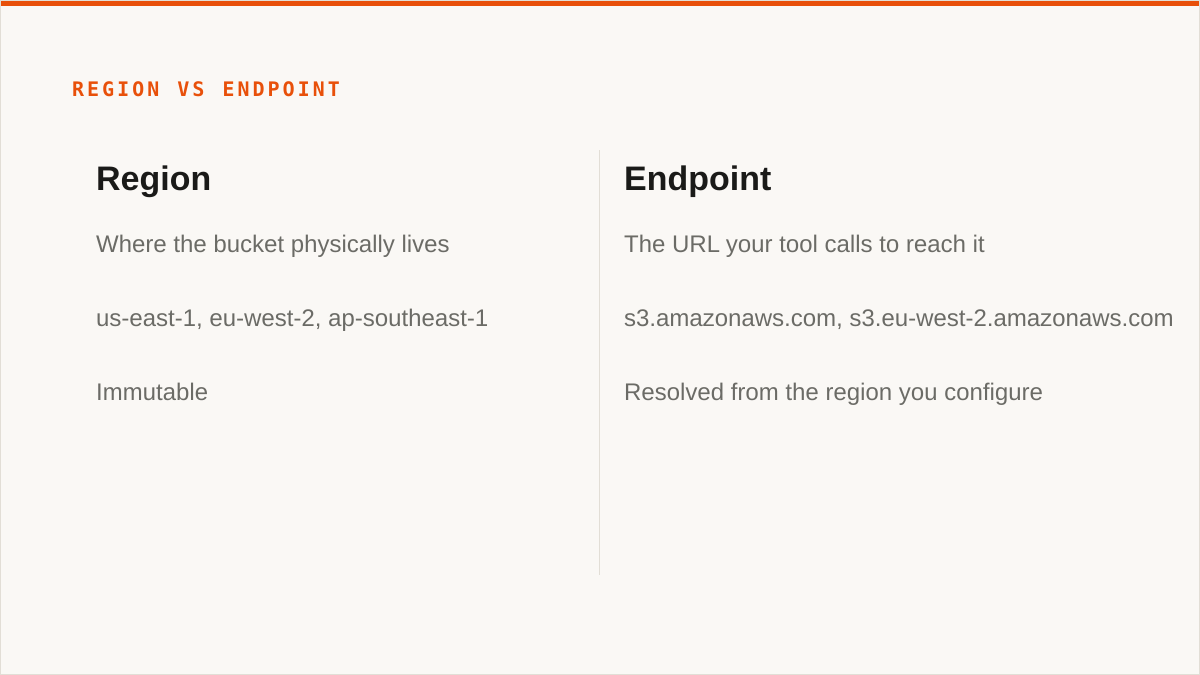
The region is a location: us-east-1, eu-west-2, ap-southeast-1. It determines where the bytes are stored, which data-residency rules apply, and how far your requests travel. It is immutable. The endpoint is an address: s3.amazonaws.com is the global one, s3.eu-west-2.amazonaws.com is the regional one. Your SDK or CLI resolves which regional endpoint to use from the region you configure, and most of the time it gets it right and you never think about it.
Then it gets it wrong, and the error is unhelpful. Point a client configured for eu-west-2 at a bucket that lives in us-east-1 and you get a 301 Moved Permanently with a x-amz-bucket-region header telling you where it actually is. Some clients follow it, some don't, and the ones that don't produce a redirect loop or a signature error that reads like an authentication failure. It isn't. Your key is fine. You are knocking on the wrong door.
The signature error is the one that wastes an afternoon. SigV4 signs the request against a specific region. If your signing region and the bucket's region disagree, AWS rejects the signature, and the error message points you at your credentials rather than your endpoint config. We have seen people regenerate access keys three times before realising the region string in their config was one character off.
Custom endpoints make this worse, not better. When you point at Cloudflare R2, Backblaze B2, MinIO or Wasabi, the endpoint is a concrete URL you supply, https://<account>.r2.cloudflarestorage.com or http://minio.internal:9000, and the region is often a dummy string like auto or us-east-1 that the provider ignores but the signature algorithm still needs. Get the pairing wrong and you get the same signature error with none of the helpful headers, because the provider is not going to tell you where a bucket "really" is. It's on their endpoint. That's where it is.
One concrete rule saves most of this: set the region and the endpoint from the same source of truth, and never let a tool infer one from the other. If you are on AWS, let the SDK resolve the endpoint from the region and stop passing an explicit endpoint. If you are on a custom provider, pass the endpoint explicitly and use whatever region string the provider's docs tell you to, even if it looks wrong.
The steps: create the bucket, then create a key that can do only what you meant
Here is the sequence, in order. The order matters because the policy in step 5 references the bucket from step 2.
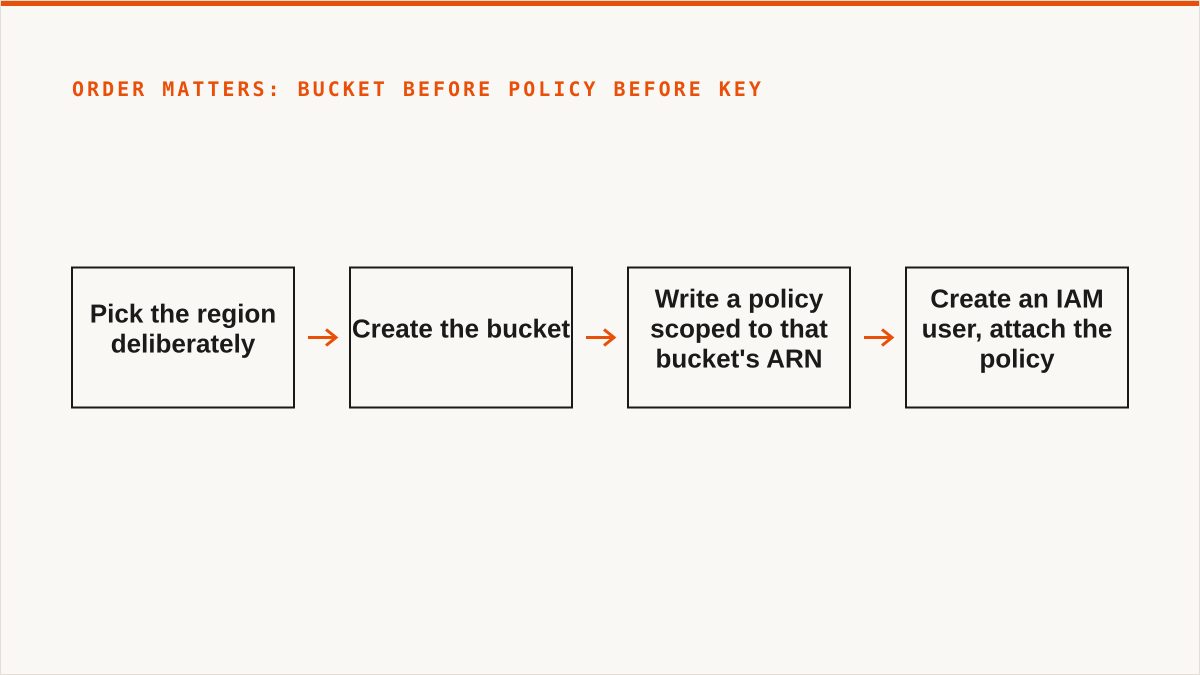
- Pick the region deliberately. Not the default. Ask where the data needs to live for latency, cost or legal reasons, and pick that. You get one shot at this.
- Create the bucket. Leave Block Public Access on. Turn on versioning if you might ever need to recover an overwrite. Turn on default encryption. Give it a name that says what it holds, because the name is global and you will be typing it in IAM policies for years.
- Write a policy scoped to that bucket's ARN. Not
s3:*on*. The ARN isarn:aws:s3:::your-bucket-namefor the bucket andarn:aws:s3:::your-bucket-name/*for the objects inside it. Both are needed and they are not the same resource. - Create an IAM user, attach the policy, then create the access key. In that order. The key inherits only what the policy grants.
- Store the secret immediately and treat the download as the only time you will see it. AWS shows the secret access key exactly once. If you lose it, you rotate. There is no recovery.
The thing not to do: generate an access key on the root account. Root keys have every permission on every resource in the account, they cannot be scoped by policy, and AWS itself tells you not to create them. If you already have one, deactivate it today and build a scoped user instead. A root key that leaks is not a bucket problem, it is an account problem, and the blast radius is your billing, your other services and your data.
A minimal policy that does the real work looks like this:
{
  "Version": "2012-10-17",
  "Statement": [
    {
      "Effect": "Allow",
      "Action": ["s3:ListBucket"],
      "Resource": "arn:aws:s3:::your-bucket-name"
    },
    {
      "Effect": "Allow",
      "Action": ["s3:GetObject", "s3:PutObject"],
      "Resource": "arn:aws:s3:::your-bucket-name/*"
    }
  ]
}
Note the split. s3:ListBucket applies to the bucket resource. s3:GetObject and s3:PutObject apply to the objects inside it, which is what the /* suffix means. People write both actions against /* and then wonder why listing returns Access Denied. The bucket is a thing; the objects are things inside it; they are different ARNs and the policy has to say so.
An access key is a password you cannot rotate quietly, so scope it to one bucket
Treat an access key as a password with a public half. The access key ID travels in every request header in plaintext. The secret is used to sign, and anyone who has both can do anything the attached policy allows, from anywhere, until you notice and deactivate. Rotation is not quiet: you create a new key, update every consumer, verify, then deactivate the old one, and if you miss a consumer something breaks. That is why keys accumulate and why the ones nobody remembers are the dangerous ones.
Least privilege is not a compliance checkbox here. It is the difference between a leaked key costing you one bucket and costing you an account. A key scoped to a single bucket means a leak has a known, bounded blast radius: someone can read and write that bucket, and nothing else. A key with s3:* means every bucket in the account, including the backups and the one with the customer exports in it.
Scope to one bucket per key, and use a separate key per consumer. The migration job gets its own key. The app gets its own key. The laptop gets its own key. When one is compromised you deactivate exactly one thing and the rest keep running. This costs you five minutes per consumer and it is the single highest-leverage thing in this post.
Where Storafleet sits: we encrypt stored credentials at rest with AES-256-GCM under per-namespace HKDF keys, so a key you hand us is not sitting in a plaintext column. That is real and it is the minimum we would accept from anyone. But for AWS specifically, the better answer is not to hand over a key at all. We support connecting AWS keylessly via IAM role assumption, which means no long-lived secret exists to leak. If you are on AWS, use that path. If you are on a provider that only does static keys, scope the key to one bucket before it ever leaves your hands.
Where rclone genuinely beats us, and it is not a small place
We have to be honest about this or the rest of the post is marketing. rclone is a better tool than Storafleet for a large number of the people reading this, and here is exactly where.
rclone is free, permanently, with no account and no vendor. Not free tier. Free. It is a single binary you download and run. There is no subscription, no seat count, no namespace, no service that can change its pricing or shut down. We are a company with a subscription and a roadmap. rclone is a binary on your disk. For a lot of people that difference alone settles it.
It supports far more backends than we do. We speak the S3-compatible family and any custom S3 endpoint, which covers a lot of providers but is still one protocol family. rclone speaks 70-plus backends including the consumer clouds we deliberately do not touch: Google Drive, Dropbox, OneDrive, Box, SFTP, WebDAV, and a long tail of storage systems you have probably never heard of. If your job involves any of those, rclone does it and we do not.
It mounts. rclone mount puts a remote bucket in your filesystem where Finder or Explorer can see it. We have no FUSE surface. We cannot do this and we are not going to pretend a web console is a substitute for a mounted drive.
It runs inside your own security boundary. Your credentials stay on your hardware. They are read from a config file on your machine and never sent anywhere else. That is a stronger confidentiality answer than ours, because ours involves your credentials sitting encrypted in our database. The encryption is real. But "the keys never left my laptop" beats "the keys are encrypted at rest on someone else's server," and it is dishonest to pretend otherwise.
It is scriptable and it has been maintained for over a decade. It composes with cron, systemd, CI pipelines, Makefiles and shell scripts because it is a command, not a console. On the question of whether it will still exist in five years, a decade-old open-source project has a better answer than a company that started in 2026. We are a small team. We will not invent a customer list to make that feel safer than it is.
So say it plainly: if your credentials must never leave hardware you control, rclone wins. If you need a mount, rclone wins. If your job involves Drive or Dropbox or SFTP, rclone wins. If your budget is zero, the conversation is over and rclone wins. We are not going to walk any of that back.
What that costs us, concretely. Every one of those wins is a customer we do not get. The single-cloud team with a laptop and a shell script is the easiest person to onboard and we send them to a binary instead. The person who wants a bucket in Finder is a demo we cannot give. And the honest reason we still write the section this way is that the alternative is worse: a user who picks us for a job rclone does better, discovers it in a week, and never trusts a word on this blog again. We would rather lose the signup than the credibility. That is the trade, and we are making it on purpose.
Who should not use Storafleet for this, and what to use instead
If your budget for this is zero, use rclone. Not a trial, not a free tier, rclone. It does the job, it is free forever, and we are not going to talk you out of it.
If you need storage mounted as a filesystem, use rclone mount, Mountain Duck or ExpanDrive. We have no mount. A web console is not a drive and we will not describe it as one.
If you need Google Drive, Dropbox, OneDrive, Box or SFTP, use rclone or MultCloud. We connect the S3-compatible family and custom S3 endpoints, and nothing else. If the job is Drive-to-bucket, we are the wrong tool and you should not spend time evaluating us.
If everything lives in one cloud and always will, use that provider's own console. The AWS console is free, it is always current with AWS's newest features, and it is authoritative in a way a third-party control plane can never be. If you are never going to touch a second provider, we add a layer between you and the source of truth for no reason.
If your workflow is entirely code and always will be, use a CLI. A binary composes with your pipeline. A console does not. If you are going to script it, script it, and don't route it through a web UI that your CI cannot call.
Where we do earn the subscription: you have buckets across several providers and you are tired of five consoles and five sets of credentials, you want cross-bucket search and duplicate detection and per-bucket cost visibility in one place, you want migrations and scheduled syncs between providers without writing the orchestration yourself, and you want the credentials encrypted at rest rather than scattered across laptops. That is a real problem and it is the one we built for. It is not everyone's problem.
The bucket you created in step 2 will outlive most of the tools pointed at it. Pick the region carefully, scope the key to one bucket, and use whichever tool actually fits the job, even when it isn't ours.