
S3 Compatible Storage Providers and Intelligent Tiering
October 2026 · 27 min read · Surya
- S3 compatibility is a protocol, not a product
- The real bill is egress and API calls, and only one of those is on your storage invoice
- What S3 Intelligent-Tiering actually does, and what it does not
- What vendors call "tier 0", and why the name tells you nothing
- WORM and CAP: the two acronyms that decide whether you can use tiering at all
- An illustrative example: a 40 TB research archive across three provider archetypes
- What Storafleet does, and where a cross-provider control plane earns its keep
- Where rclone genuinely wins, and you should use it instead
- The code section: composing rclone with tiering when you refuse a console
- Who should not use Storafleet for this, and what to use instead
You have probably been told that s3 compatible storage providers make tiering easy, and that choosing one is just a matter of comparing the API. That is backwards.
The API is the easy part. Every serious provider ships the same verbs: PutObject, GetObject, ListObjectsV2, multipart upload, presigned URLs. Your SDK does not care. Your code does not care. The hard part is the bill you get six months later when your access pattern changes and the tiering rules you wrote move data in a direction you did not expect, on a provider whose pricing model does not match the one you imagined when you signed up.
When engineers search for s3 compatible storage providers, they are usually comparing the wrong axis. They check whether the endpoint accepts SigV4, whether the SDK works, whether boto3 connects without a fight. All of that matters and all of it is table stakes. What actually decides whether tiering is cheap or catastrophic is egress, request pricing, and whether the provider will even let you move a locked object. That is what this post is about.
S3 compatibility is a protocol, not a product
S3-compatible means the HTTP API and the authentication scheme, and almost nothing else. That is the whole definition. A provider is S3-compatible if it accepts a request signed with AWS Signature Version 4, routes it by bucket and key, and returns XML or JSON in roughly the shape the AWS documentation describes. If your client can do that, it is S3-compatible.
What that gives you is a stable wire protocol. You can point boto3, aws-cli, rclone, the Go SDK, the Java SDK, MinIO's client, and a dozen other tools at https://some-provider.example.com and they will all mostly work. You can write an application against the S3 API and not rewrite it if you move. That is genuinely valuable and it is why the phrase exists.
What it does not give you, and this is where people get hurt:
- Feature parity. No provider implements the entire AWS S3 surface. Some skip
SelectObjectContent. Some skip object lock. Some skip versioning. Some implement versioning but not delete markers the way AWS does. Some support lifecycle rules only in a subset. Some support multipart but with a different minimum part size than AWS enforces. - Consistent consistency semantics. S3 itself is now strongly consistent for new writes, but "S3-compatible" says nothing about the read-after-write behaviour of the provider you chose. Some are eventually consistent in specific paths. Some are strongly consistent everywhere. Some are consistent for metadata and eventually consistent for listing in ways that will bite a sync job.
- The same pricing shape. Two S3-compatible providers can agree on every byte of the protocol and disagree completely on how they charge. One bills egress per gigabyte. One does not. One bills per request at four decimal places. One has a minimum storage duration for objects in cold tiers that will charge you for 90 days even if you delete after two hours.
- The same tiering model. "Intelligent tiering" on AWS is a specific product with specific mechanics. On another provider the same phrase might mean something close, something loose, or nothing at all. The phrase is not part of the protocol.
So the first correction is this: stop treating "S3-compatible" as a single category. It is a family of providers that all speak the same language and mean different things by it. The protocol is the floor. The pricing model and the feature set are the building.
If you take nothing else from this section, take this: compatibility is a claim about syntax, not about semantics. Your code will run against two providers that both pass the compatibility test and get two different bills, two different latency profiles, and two different answers about whether object lock is available. The API check is the first five minutes of the evaluation. The other six months are the rest of it.
The real bill is egress and API calls, and only one of those is on your storage invoice
Storage is cheap. Moving storage is not. That is the single most useful sentence in this entire post, and it is the reason the search "egress costs aws" exists as a query at all.
On AWS, the storage line item for S3 Standard is a per-gigabyte-per-month rate that most people find tolerable. The egress line item is a per-gigabyte rate for data leaving the region, and AWS publishes it as a rate roughly an order of magnitude higher per byte than the storage rate. If you store 1 TB at rest for a month you pay the storage rate once. If you move that same 1 TB out of AWS to another provider, you pay the egress rate, which is a larger number, and you pay it in a single hit. This is not a secret. It is also not something people internalise until the invoice arrives. Check the current numbers on the AWS pricing page before you model anything; the rates change, and I am not going to quote them at you as if they were fixed.
Most S3-compatible providers outside AWS either do not charge for egress at all, or charge a much smaller number, or bundle a generous allowance into the plan. Cloudflare R2 built its reputation on exactly this. Backblaze B2 has a free egress allowance and then charges. Wasabi has advertised no egress fees within limits. These are pricing models, not quotes, and you should read each provider's current page rather than trusting a blog post. The honest summary is: the providers that compete with AWS on price are usually competing on egress, not on storage. Storage rates across the industry have converged toward cheap. Egress rates have not.
Now the second, quieter line item: API calls. Every PUT, every GET, every LIST has a per-request price on AWS, and on most S3-compatible providers too. It is measured in tiny fractions of a cent. It is also the line item that tiering makes explode, because tiering is not a storage feature, it is a workflow of requests.
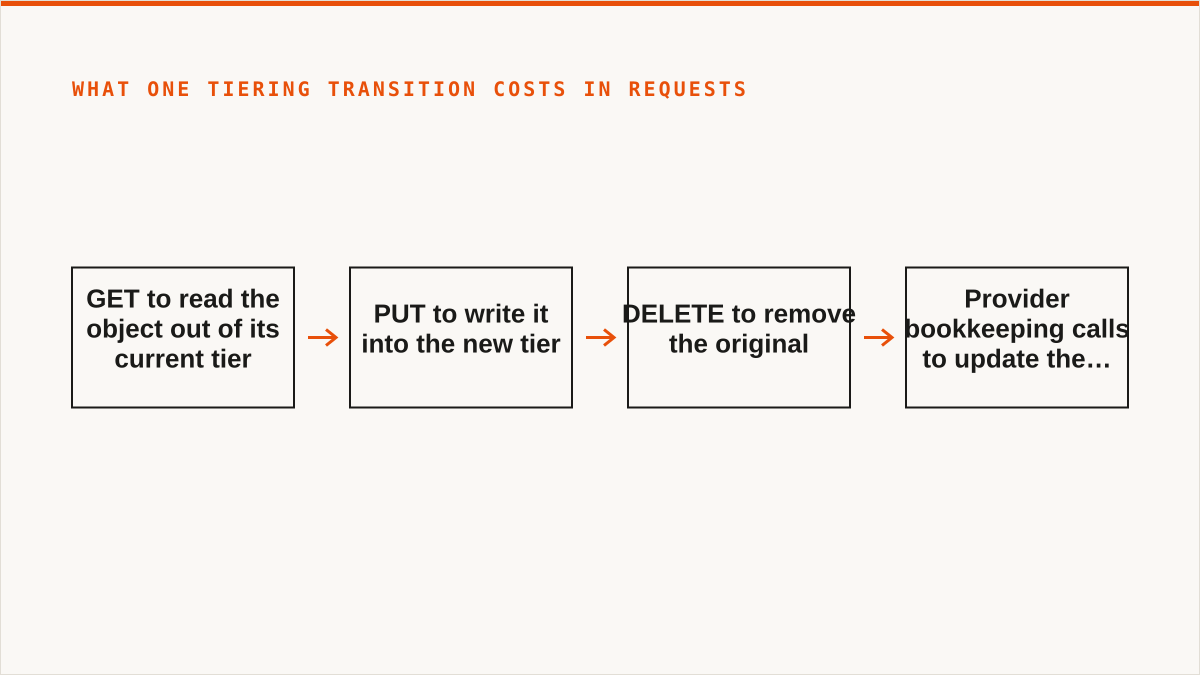
Think about what a single tiering transition costs in requests:
- A
GETto read the object out of its current tier (or a server-side copy, depending on provider). - A
PUTto write it into the new tier. - A
DELETEto remove the original, if it is a copy-and-delete rather than a move. - Whatever bookkeeping calls the provider makes internally to update the object's class, which you do not see but you may pay for.
Do that for a million small objects and the request line item is no longer a rounding error. Do it for a million small objects every time the tiering policy decides the access pattern changed, and you have a workflow whose cost is dominated by the number of objects, not the number of bytes.
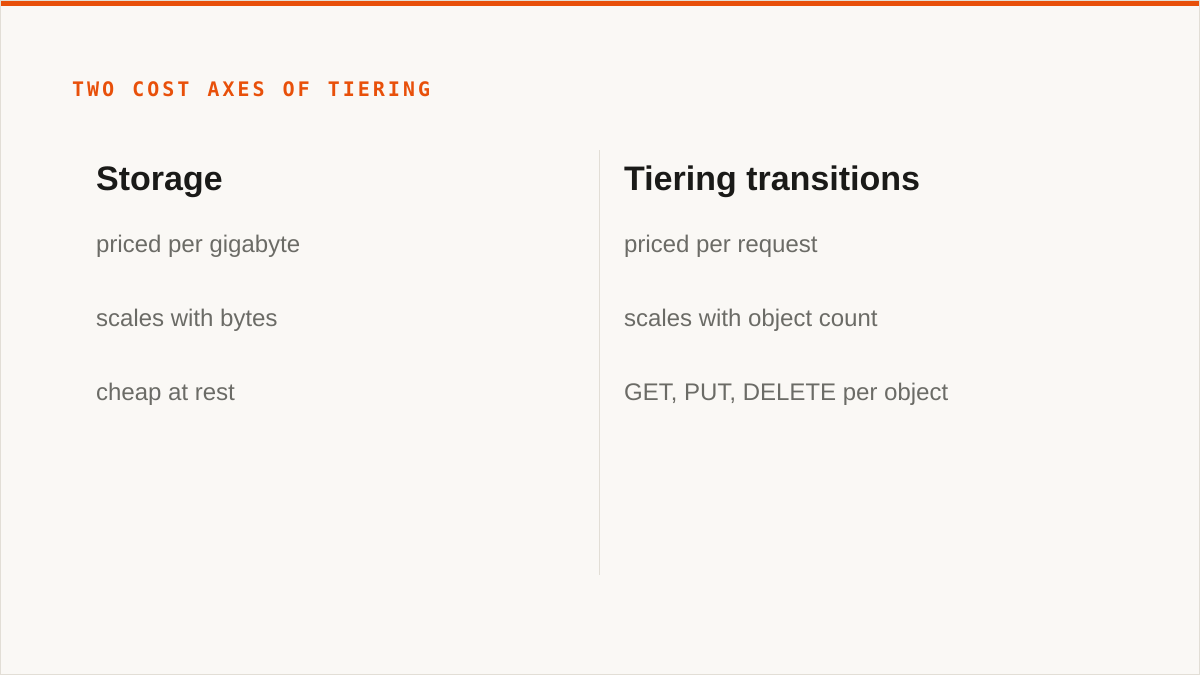
This is the trap: tiering prices scale with object count, and storage prices scale with bytes. If you have 40 TB in a few thousand large files, tiering is cheap and worthwhile. If you have 40 TB in tens of millions of small files, tiering is a request-priced machine that will happily cost more than the storage it is trying to save you. Nothing in the "S3-compatible" claim warns you about this. The provider console will happily let you configure a lifecycle rule that fires on forty million objects and generates forty million transitions.
There is a third hidden cost, which is minimum storage duration. Several providers, AWS included, charge a minimum billable period for objects in cold tiers. Move an object into a deep archive tier and delete it after an hour, and you may still be billed for 90 or 180 days. This is not a tiering bug. It is the provider amortising the cost of the transition, and it is worth reading the fine print on before you write the rule. A tiering policy that moves objects into cold storage and then a cleanup job deletes them a week later is a policy that generates minimum-duration charges on every object it touches.
What S3 Intelligent-Tiering actually does, and what it does not
AWS S3 Intelligent-Tiering is a storage class that moves objects between access tiers based on observed access patterns, without retrieval fees, in exchange for a per-object monitoring and automation charge. That is the precise description. It is worth unpacking because the marketing around it implies more than it delivers.
What it does:
- You assign objects to the
INTELLIGENT_TIERINGstorage class, either at upload time or via lifecycle rule. - AWS monitors access to each object. Objects that are not accessed move down to a lower-cost access tier. Objects that are accessed move back up.
- The transitions are automatic. You do not write the rules for when to demote a specific object; you delegate that to the service.
- There are no retrieval fees. This is the key difference from Glacier-style classes, where reading the data back costs you a retrieval charge on top of the request cost.
- There is a monitoring and automation fee per object per month, on top of the storage cost of whichever tier the object currently sits in.
What it does not do, and this is where the disappointment lives:
- It does not delete data. Intelligent-Tiering moves objects between tiers. It never removes them. If you want deletion, that is a lifecycle expiration rule, which is a separate thing and is subject to the same object-lock constraints we cover below.
- It does not make cold data free. Objects in the coldest tier still cost money per gigabyte. The tier is cheaper, not free. The monitoring fee applies to every object regardless of tier.
- It does not work on objects below a minimum size. AWS documents a minimum object size for automatic tiering (128 KB at the time of writing; check the docs, it has changed before). Objects below it are not eligible. You pay the monitoring fee on them and they never move. For a bucket full of small files, you are paying the automation charge for nothing.
- It does not know about your intent. It knows about access. If a backup job reads every object once a month to verify integrity, Intelligent-Tiering will see that access and pull everything back up to a hotter tier, defeating the purpose. Access-pattern tiering is only as good as your access pattern being honest.
- It does not exist on other providers in the same form. This is the crucial point for anyone evaluating S3-compatible storage providers. AWS Intelligent-Tiering is an AWS product. A competitor may offer tiering, may offer lifecycle rules, may offer something they call intelligent, and none of it is the same mechanism. The phrase "S3 intelligent tiering" describes an AWS feature, not a protocol feature.
So when you evaluate a provider for tiering, the question is not "do they have intelligent tiering." The question is: does the tiering they offer match the access pattern you actually have, and does the pricing model of that tiering (monitoring fees, minimum durations, request charges) beat simply leaving the data in one tier and paying the storage rate? For a lot of workloads, the honest answer is that one tier plus a lifecycle expiration rule is cheaper than any automatic tiering, and the automation is a convenience you are paying a per-object fee for.
What vendors call "tier 0", and why the name tells you nothing
There is no tier 0 in the S3 specification. The phrase "intelligent tier 0 storage" gets searched because different vendors use it to mean different things, and none of them is a standard.
On AWS, the implicit tier 0 is the absence of a storage class. When you upload an object without specifying a class, you get S3 Standard, and that is the hottest, most immediately available tier in the default lineup. It is not a special tier above Standard. It is Standard. The "tier 0" framing implies there is a tier hotter than the default, and usually there is not, unless you count the provider's own internal caching, which is not something you configure or pay for as a tier.
On some other providers, "tier 0" is marketing for the fastest access class, which may or may not be the default. On others it is a name for a caching layer in front of the storage. On a few it appears to mean nothing at all and exists to make a pricing page look like it has more options than it does.
The reason this matters for tiering is that tiering is a function that maps objects to tiers over time. If you do not have a precise definition of what each tier is, what it costs, what the transition cost is, and what the minimum duration is, you cannot reason about whether the tiering policy is saving you money. A vendor that invents a "tier 0" and does not publish its transition and minimum-duration rules has given you a name, not a cost model.
The practical rule: for any tier a provider offers, demand four numbers. Storage rate per gigabyte per month. Transition cost (in requests and in any per-byte charge). Minimum billable duration. Retrieval cost, if any. If a tier does not come with all four, treat it as a label rather than a product. This applies to tier 0, tier 1, archive, deep archive, and whatever the provider calls the cold one. The names are marketing. The four numbers are the contract.
WORM and CAP: the two acronyms that decide whether you can use tiering at all
WORM means write once, read many. Object lock is the S3 mechanism that enforces it. When you put an object under a retention policy, the provider will refuse to delete or overwrite that object until the retention period expires, or forever if you used a legal hold. This is what makes a bucket "worm compliant cloud storage," and it is the feature that regulated industries ask about before anything else.
The interaction with tiering is where people get surprised. Tiering moves objects between tiers. Deletion removes them. These are different operations, and object lock constrains them differently.
- A locked object can usually still be tiered. Moving an object from Standard to a colder tier is a movement, not a destruction, and most providers permit it. The object's bytes are still there, still readable, still under retention.
- A locked object cannot be deleted, not by lifecycle expiration, not by a delete call, not by the console, until the retention period ends. If your lifecycle policy has an expiration rule on a bucket that also has object lock, the expiration silently does nothing on locked objects.
- Some compliance regimes treat tiering as movement you must be able to prove. This is the part that catches people. If you are subject to a retention regime that requires an auditable chain of custody, a tiering transition is a change in where the data lives, and you may need to log it, prove it was not a deletion, and show that the object remained intact and readable throughout. A provider that tiers objects without exposing transition events in an audit log is a provider that cannot help you demonstrate compliance.
Now CAP. CAP compliant storage is a phrase that shows up in regulated contexts, and it is worth being precise because it means different things in different industries. In some it refers to a specific compliance framework's requirements around data availability and protection. In others it is shorthand for a set of controls around retention, access, and auditability. It is not a technical property of object storage, and no S3-compatible provider can claim it as a protocol feature.
What matters for tiering is that CAP-style requirements usually include retention and auditability, which means the same constraints as WORM apply. You can tier, but you must be able to show what you did, when, and that nothing was lost. If your tiering policy is "move anything older than 30 days to cold," and your compliance requirement is "prove this record was not altered or removed for seven years," those two things can coexist, but only if the provider gives you a transition log and the object lock prevents deletion throughout.
The trap, and it is a real one: a tiering policy that moves objects into a cold tier with a minimum storage duration, on a bucket under WORM, can generate charges you cannot avoid. The object is locked. You cannot delete it to stop the charge. The minimum duration applies. You are paying for the cold tier for the full minimum period whether the data is accessed or not. That is the correct behaviour for compliance, and it is also a line item you need to have modelled before you turn the policy on.
An illustrative example: a 40 TB research archive across three provider archetypes
Numbers here are round and illustrative. They are meant to show the shape of the decision, not to be a quote, and this is a constructed scenario built from first principles, not a customer of ours.
Suppose you have a 40 TB research archive. It is a mix of large instrument captures and a long tail of small metadata files. Roughly 80 percent of the bytes are in a few thousand large objects. Roughly 20 percent of the bytes are in a few million small ones. Access pattern: the large objects are read heavily for the first 60 days after capture, then almost never. The small metadata files are read constantly by an indexing job.
Three provider archetypes, and how each handles this:
| Archetype | Storage pricing | Egress pricing | Tiering model |
|---|---|---|---|
| AWS-style hyperscaler | Per GB per month, tiered by class | Per GB charged on egress, historically high | Intelligent-Tiering with per-object monitoring fee; lifecycle rules to Glacier-style classes with retrieval fees |
| No-egress S3-compatible provider | Per GB per month, flat or near-flat | Zero or bundled allowance | Lifecycle rules only; tiering is manual or rule-driven, no automatic access-pattern service |
| Flat-subscription control plane over your own buckets | Whatever your underlying provider charges | Whatever your underlying provider charges | You configure lifecycle per bucket; the control plane does not meter bytes moved between providers |
Now the cost of tiering versus the cost of egress, on this archive.
If you enable AWS Intelligent-Tiering on the whole archive, you pay the monitoring fee on every object. That is a few thousand large objects plus a few million small ones. The small ones are under the minimum size for automatic tiering, so they never move, and you pay the monitoring fee on each of them for no benefit. The large ones move down after 60 days, which is good. So the tiering saves you storage cost on the bytes that matter and costs you monitoring fees on the objects that do not, and the net depends on the ratio. For a few million small files, the monitoring fee tends to dominate.
If instead you leave everything in one tier and rely on egress being free at a no-egress provider, you skip tiering entirely and pay the flat storage rate. For this archive, that is often the cheaper answer, because the storage rate difference between hot and cold is small relative to the monitoring and request overhead of tiering millions of small objects.
Now the egress side. If you decide to migrate this archive from one provider to another, the cost of that migration is dominated by egress from the source. On a provider that charges egress, moving 40 TB out is a real number, and it is the single largest cost in the migration. On a no-egress provider, the same migration costs essentially nothing in egress and is bounded by request pricing and time. This is why provider choice is an egress decision before it is a tiering decision. The provider you pick determines whether you can afford to leave later, which determines whether tiering is even worth setting up, because tiering only pays off if you are staying long enough to amortise the setup.
Where Storafleet fits: our subscription is flat, and we never charge per byte moved. So if you use us to orchestrate the migration between these providers, the bytes are unmetered on our side. What you still pay is whatever the source provider charges for egress and whatever either side charges for requests. We do not make egress free. We just do not add a second meter on top of it. That distinction matters and it is worth being blunt about: the control plane is not the cost, the provider is. Anyone selling you a tool that claims to eliminate egress charges is either eating them or lying about where they go.
What Storafleet does, and where a cross-provider control plane earns its keep
Storafleet is a control plane for object storage you already own. We do not store your file contents. We connect to buckets you control, on 50+ S3-compatible providers, plus any custom endpoint. Amazon S3, Cloudflare R2, Backblaze B2, Wasabi, MinIO, DigitalOcean Spaces, Oracle Cloud, IBM Cloud Object Storage, Scaleway, Linode, Vultr, Storj, IDrive e2, Hetzner Object Storage, and the long tail of anything that speaks the S3 API at a URL you can type.
What you can do through us:
- Browse, upload, download across every connected provider in one interface.
- Migrate and sync between providers, one-time or scheduled.
- Global cross-bucket search, which is the feature that provider consoles structurally cannot offer because each console only knows its own buckets.
- Configure lifecycle rules, CORS, versioning, object lock, and public access settings per bucket.
- Detect duplicates and see per-bucket cost visibility.
The edge over a provider console is not that we do anything a console cannot do on its own bucket. It is that we do it across buckets that live in different providers, and the console cannot. If your tiering policy needs to consider objects in an R2 bucket and an S3 bucket and a B2 bucket together, no single console can express that. We can. If you want to search for an object and you do not remember which provider it is on, no console can help. We can. If you want to migrate from one provider to another and keep the lifecycle rules consistent, we can encode that once.
On the tiering specifically: our intelligent tiering feature is where lifecycle configuration lives. You define the rules, we apply them across the providers you have connected, and we never meter the bytes that move as a result. The pricing model is a flat subscription, and migrated bytes are unmetered on every tier including Free. Tiers differ on concurrent migration jobs and on whether scheduled sync is available, not on how much data you move.
Credentials are encrypted at rest with AES-256-GCM using per-namespace HKDF keys, and AWS can be connected keylessly via IAM role assumption. That is the honest description. We are not claiming your keys never leave your control, because they do, into our database, encrypted. The encryption is real. The claim that it is equivalent to keys never leaving your laptop would be false, and we are not going to make it.
Where rclone genuinely wins, and you should use it instead
This is the section where we tell you not to use us, and we mean it.
rclone is free, permanently, with no account and no vendor, and it has been maintained for over a decade. It supports 70+ backends, including the consumer clouds we deliberately do not touch. It mounts. It scripts. It runs entirely inside your own security boundary. For a large number of people reading this post, the honest answer is: use rclone.
Where it beats us, concretely:
- It is free and always will be. No subscription, no tier, no account. If your budget for this is zero, the conversation is over and rclone wins. We are not going to pretend a paid control plane beats a free binary on price, because it does not.
- It mounts. rclone has a FUSE surface. Remote buckets appear as a local filesystem. We do not mount storage as a local drive. There is no FUSE surface in Storafleet. If you want a bucket to appear in Finder or Explorer, we cannot do it and rclone can.
- It covers backends we do not. We connect the S3-compatible family and any custom S3 endpoint, and nothing else. No Google Drive, Dropbox, OneDrive, SFTP, WebDAV, or Box. rclone covers all of those. If the job is Drive-to-bucket, we are the wrong tool and rclone is the right one.
- Your credentials stay on your hardware. rclone reads a config file on your machine and talks to the provider directly. Your keys never leave. Our credentials sit encrypted in our database, and encryption is not the same as never having left. "The keys never left my laptop" is a stronger answer than ours, and pretending otherwise would be dishonest.
- It composes with everything. rclone is a binary, so it drops into cron, systemd timers, CI pipelines, shell scripts, and Makefiles. We are a console. A console does not compose with a shell script the way a command does. If your workflow is code, a CLI fits it natively and a web UI never will.
- It has a decade of maintenance behind it. We are a young project. On the question "will this still exist in five years," a decade-old open-source project has a better answer than we do, and we are not going to pretend otherwise. That is a real risk and you should weigh it.
Where we beat rclone, and it is a narrower set of cases than our marketing would like: cross-provider search across buckets we do not own locally, a UI for people who are not going to write a shell script, scheduled sync without maintaining a cron host, per-bucket cost visibility across providers in one place, and lifecycle configuration as a first-class object rather than a set of flags you have to remember. These are real advantages for some teams. They are not advantages for everyone, and if you are in the rclone camp, stay there. We will still be here if the workflow changes.
The code section: composing rclone with tiering when you refuse a console
Here is the honest limitation of a console, demonstrated in one command.
Suppose you want a tiering-adjacent workflow: move objects older than 90 days from a hot bucket to a cold bucket, on a schedule, with a log. In rclone, that is a shell script and a cron entry, and it composes with everything else on the machine.
#!/usr/bin/env bash
# Move objects older than 90 days from hot bucket to cold bucket.
# Runs under cron. Logs to a file. Composes with anything else on the box.

set -euo pipefail

SOURCE="hotremote:research-hot"
DEST="coldremote:research-cold"
CUTOFF_DAYS=90
CUTOFF_EPOCH=$(( $(date +%s) - CUTOFF_DAYS * 86400 ))
LOG="/var/log/tier-move.log"

rclone lsf "$SOURCE" --recursive --files-only --format "tp" \
  | while IFS=';' read -r modtime path; do
      obj_epoch=$(date -d "$modtime" +%s)
      if [ "$obj_epoch" -lt "$CUTOFF_EPOCH" ]; then
        echo "$(date -Is) moving $path" >> "$LOG"
        rclone moveto "$SOURCE/$path" "$DEST/$path" \
          --log-file "$LOG" --log-level INFO
      fi
    done

echo "$(date -Is) tier sweep complete" >> "$LOG"
What this demonstrates is the thing a console structurally cannot do: a console is a place you go, and a script is a thing that runs. The script above runs whether or not anyone is looking at a UI. It logs to a file that your existing log pipeline already knows about. It fails loudly under set -euo pipefail. It can be unit-tested, dry-run with --dry-run, wrapped in flock to prevent overlapping runs, and checked into git alongside the rest of your infrastructure.
You can do the same tiering logic through Storafleet's lifecycle configuration, and for a lot of teams that is the right call because nobody has to own the script. But if you are the kind of team that already has a cron host and a log pipeline and a git repo full of infrastructure, the script above is more honest about what it does and it will outlive any UI. That is not a knock on us. It is a fact about the difference between a binary and a console, and you should pick the one that matches how your team actually works.
One note on the script: the moveto call does a copy and a delete under the hood for cross-provider moves, which means it pays request costs on both sides and egress on the source. On a no-egress provider that is cheap. On AWS it is the egress bill we talked about earlier. The script does not care. It will happily move 40 TB and hand you the invoice. Code composes, but code does not warn you about your pricing model. That is your job, and it is the job this whole post has been about.
Who should not use Storafleet for this, and what to use instead
Plainly, with no hedging.
- If your budget is zero, use rclone. Not a trial, not the free tier, rclone. It is free forever, it does everything the paid tools do for the core workflows, and paying us would be paying for convenience you have decided you do not need. That is a legitimate decision and we respect it.
- If you need storage mounted as a filesystem, use rclone mount, Mountain Duck, or ExpanDrive. We do not mount. There is no FUSE surface. A bucket will not appear in Finder or Explorer through us. If that is the requirement, we are the wrong tool and these are the right ones.
- If you need Google Drive, Dropbox, OneDrive, or SFTP, use rclone or MultCloud. We connect the S3-compatible family and custom S3 endpoints. We do not touch the consumer clouds. MultCloud and CloudFuze cover exactly the gap we leave, and if your job is Drive-to-bucket, they are the answer.
- If your credentials must never leave hardware you control, use rclone. Our credentials are encrypted at rest with AES-256-GCM and per-namespace HKDF keys, and AWS can be connected keylessly via IAM role assumption, but if the requirement is literally "the keys never left my laptop," that is a stronger guarantee than ours and only a local tool can give it. For AWS-only, our IAM role connect is the closest we get, and it is genuinely keyless. For everything else, rclone.
- If everything lives in one cloud and always will, use that provider's console. It is free, it is always current with that provider's newest features, and it is authoritative in a way we are not. We add value across providers. On a single provider, we are a middle layer, and you should not pay for a middle layer you do not need.
- If your workflow is entirely code and always will be, use a CLI. A binary composes with cron, systemd, CI, and Makefiles. A console does not. If you are not going to open a web UI, do not buy one.
We are a small team, and we have no published case studies and no named customers. We are not going to invent any to fill this section, because a fabricated logo wall would tell you nothing true about whether the product works on your buckets. If you need to see logos before you buy, we are not ready for you and that is a fair assessment.
What we are good at is the specific case where you have buckets in more than one provider, you want tiering and lifecycle and search and migration to be one configuration instead of four consoles and a shell script, and you want the bytes you move to not be metered by the tool you are using to move them. That is a real problem for a real set of teams. It is not everyone's problem. The ones it is not for should use the tools above, and we would rather say so than sell you something that does not fit.