
R2 S3 API: Endpoint, Region, and Credential Setup for Storafleet
October 2026 · 15 min read · Surya
- R2 is S3-shaped, not S3: the endpoint and region are the whole compatibility story
- What we typed into Storafleet, in order, and where the credential type trips people up
- R2 API tokens are not R2 S3 credentials, and mixing them up is the most common failure
- Where a managed control plane genuinely loses to rclone, and why we still use both
- What R2 in a control plane changes, in jobs finished rather than features listed
- Who should not do this, and what they should run instead
R2 is S3-shaped, not S3: the endpoint and region are the whole compatibility story
An R2 S3 endpoint is not a URL you invent and not a region you guess at. It is either https://<ACCOUNT_ID>.r2.cloudflarestorage.com for the default jurisdiction or the same host with .eu appended for the EU jurisdiction. That is the whole grammar. Everything downstream of that string, the credential type, the region value, the signing behaviour, breaks quietly if you got it wrong.
Quietly is the operative word. You will not get a helpful error. You will get a signature mismatch, or a bucket-not-found that is really a wrong-endpoint, or a credential-rejected that is really an account-ID-in-the-wrong-place. R2's S3 compatibility is real and it is also narrower than the marketing sentence "works with any S3 tool" implies.
S3 compatibility means the wire protocol, not the identity model. R2 speaks the S3 REST API: GET, PUT, DELETE, multipart uploads, presigned URLs, the usual headers, the usual XML. That is why aws s3, s3cmd, rclone and a long tail of SDKs will talk to it. But the thing authenticating you is not AWS IAM. It is a Cloudflare account and a Cloudflare-issued token pair, and that distinction is where most people lose an hour.
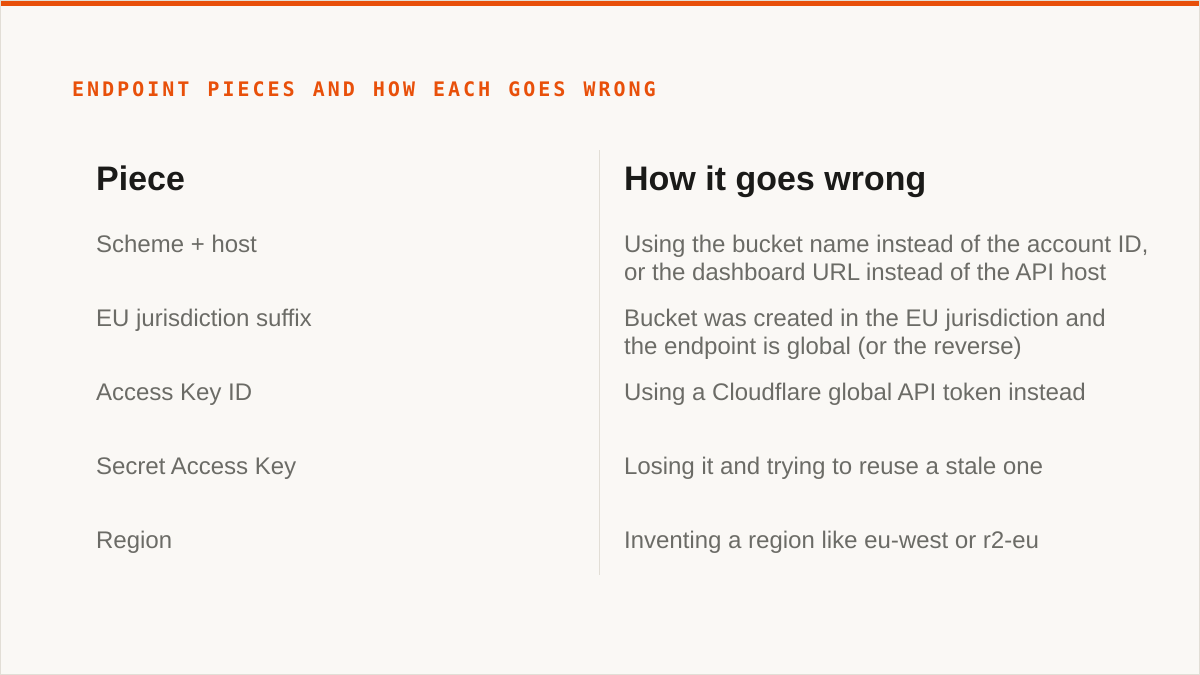
Take the endpoint, piece by piece, because each piece is a place to be wrong.
| Piece | Value | How it goes wrong |
|---|---|---|
| Scheme + host | https://<ACCOUNT_ID>.r2.cloudflarestorage.com |
Using the bucket name instead of the account ID, or the dashboard URL instead of the API host |
| EU jurisdiction suffix | https://<ACCOUNT_ID>.eu.r2.cloudflarestorage.com |
Bucket was created in the EU jurisdiction and the endpoint is global (or the reverse) |
| Access Key ID | From the R2 API token screen | Using a Cloudflare global API token instead |
| Secret Access Key | Shown once, at token creation | Losing it and trying to reuse a stale one |
| Region | auto in most tools; sometimes us-east-1 |
Inventing a region like eu-west or r2-eu |
| Bucket | Your bucket name, no path prefix | Assuming the endpoint is per-bucket. It is per-account |
The region string is a formality, right up until it is not. R2's endpoint is global. There is no us-east-1 versus eu-west-2 in the sense AWS means it. But the S3 protocol requires a region field in the signing process, every client has an opinion about what to put there, and R2 is tolerant of auto and us-east-1 and intolerant of your creativity. Put r2 in there because it feels right and you will get a signature error that says nothing about regions.
Then the jurisdiction thing, which is the part people skip. A bucket created in the EU jurisdiction lives at the .eu host. Point a tool at the global host and it will fail to find the bucket, and the error will look like a permissions problem. We have watched people rebuild credentials for forty minutes over this. The bucket is fine. The host is wrong.
Region matters the moment you point a tool at a bucket, because the tool will not tell you it disagrees with you. It signs the request with the region you gave it, sends it to the endpoint you gave it, and reports whatever comes back. Garbage in, unhelpful out. The endpoint and the region are not configuration trivia. They are the entire compatibility story. Get those two right and R2 behaves like S3 for almost everything you would want to do. Get them wrong and no amount of credential fiddling will save you.
What we typed into Storafleet, in order, and where the credential type trips people up
Moving R2 into a managed control plane is, mechanically, a credentials-and-endpoint job. Here is the sequence we actually ran, and the places where the credential type catches people out.
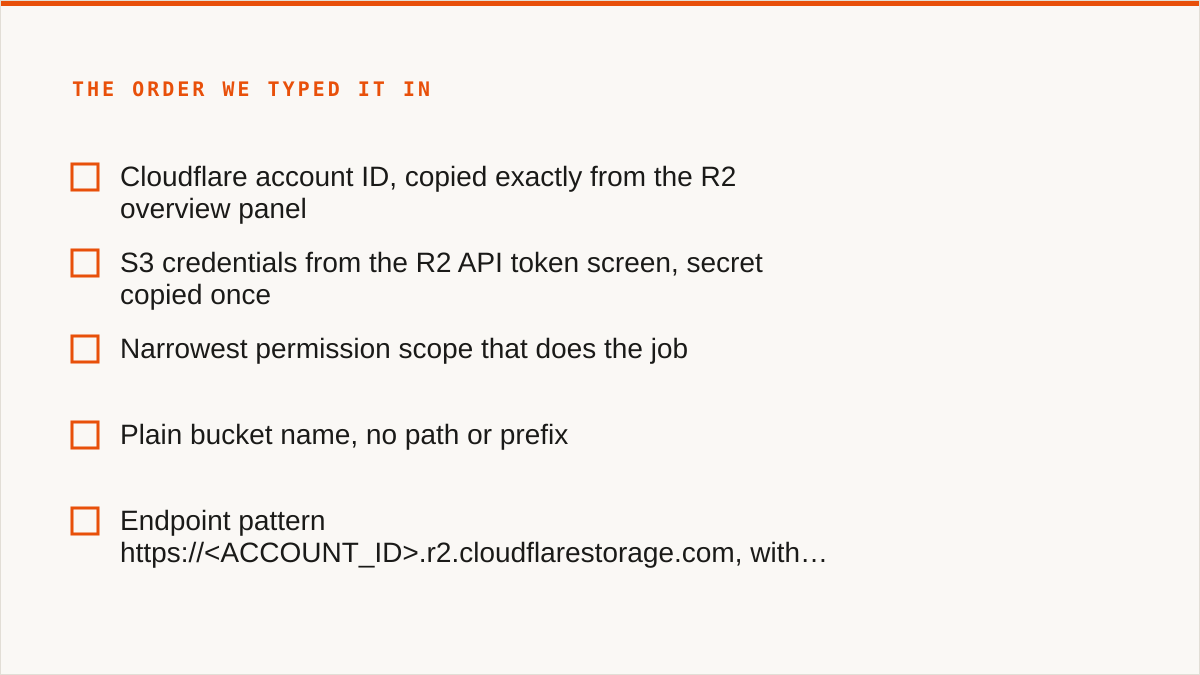
First, the Cloudflare account ID. Dashboard, R2, and the account ID is visible in the URL and in the R2 overview panel. It is a hex string. Copy it exactly. This is the <ACCOUNT_ID> in the endpoint host. Not the email, not the account name, not the zone ID on the same screen. The zone ID is a different hex string and it will look plausible right up until nothing works.
Next, S3 credentials from the R2 API token screen. This is the important one. In the Cloudflare dashboard, go to R2, then the API token area, and create a token. You want the R2 token that is explicitly for S3 access. Cloudflare will show you an Access Key ID and a Secret Access Key. The secret is shown once. Copy both immediately, into whatever you use for secrets, not into a scratch text file on the desktop.
The token also carries a permission scope. Read-only, read-write, or scoped to specific buckets. Pick the narrowest scope that does the job. We did not, the first time. We made a read-write token on the whole account because it was the default and the dropdown was right there.
Then the bucket name. Plain bucket name. No path, no prefix, no endpoint baked in. The endpoint is per-account; the bucket is a parameter.
The endpoint pattern comes next. https://<ACCOUNT_ID>.r2.cloudflarestorage.com. With .eu before r2 if the bucket lives in the EU jurisdiction. We typed this into the custom endpoint field. Storafleet takes custom S3 endpoints, which is how R2 connects at all.
Last, the region string. auto. That is what R2 expects in most clients, and it is what we use.
Now the two mistakes. Both of them cost us an afternoon, and both are worth naming because they are the two you will make.
Mistake one: we used a Cloudflare global API token instead of an R2 S3 token. The global token is the thing you use to talk to the Cloudflare API: zones, DNS, Workers, that ecosystem. It is a fine token. It is the wrong token. R2's S3 endpoint does not accept it, and the rejection is a signature or access error, not a "wrong token type" message. We went and re-checked the endpoint three times, re-copied the account ID twice, and rebuilt the credential once, before someone said "is that the S3 token or the API token" and the room went quiet. It was the API token.
Mistake two: the wrong region string for a jurisdiction-specific endpoint. We had a bucket in the EU jurisdiction and we were pointing at the global host. Then, once we fixed the host, we were still passing a made-up region string. Two separate errors stacked on top of each other, presenting as one. The fix was boring: .eu in the host, auto in the region, done.
The lesson we wrote on the wall: the endpoint and the region are one decision, made twice. If you change the jurisdiction, you change both. If you get one right and one wrong, the error tells you nothing and you will spend an afternoon proving you typed the account ID correctly.
R2 API tokens are not R2 S3 credentials, and mixing them up is the most common failure
Cloudflare has two credential systems in the R2 world and they look similar enough to be a trap. One is the Cloudflare API token, used against api.cloudflare.com. The other is the R2 S3 credential pair, used against the R2 S3 endpoint. They are issued from related screens, both are called "tokens" in casual conversation, and only one of them works against the S3 endpoint.
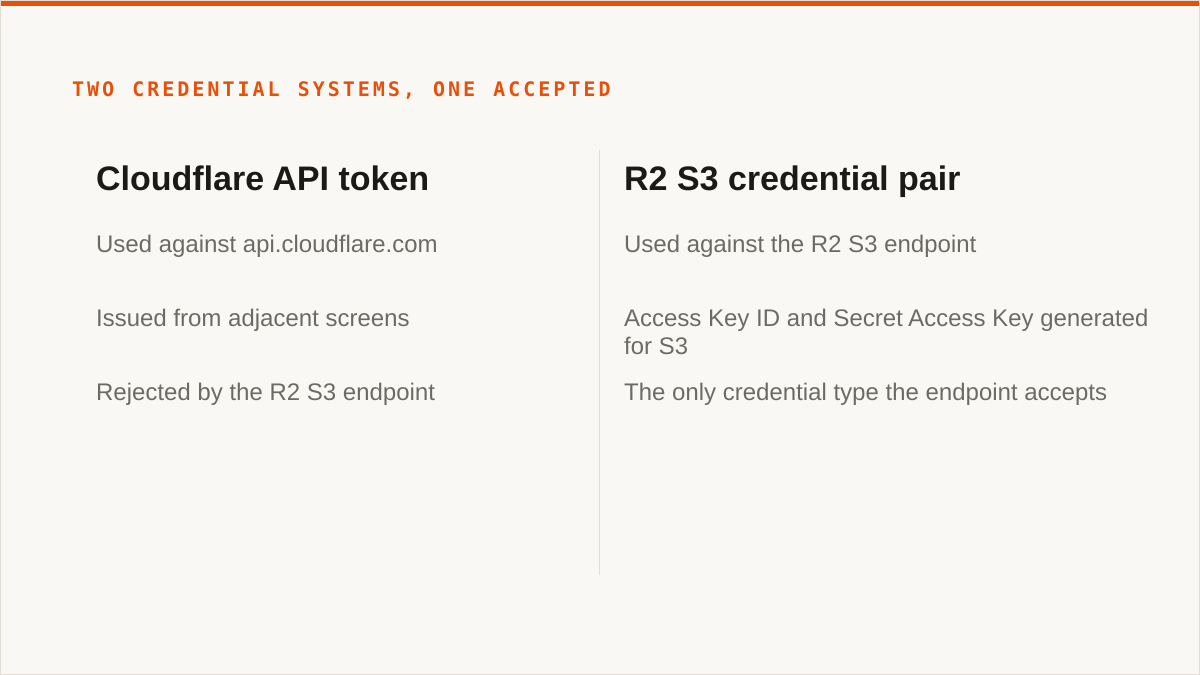
Callout: the R2 S3 endpoint accepts exactly one credential type, the Access Key ID and Secret Access Key generated for S3. A Cloudflare API token, however valid, however recently created, however broad its permissions, will be rejected. If your credentials are being refused and you are certain the endpoint is right, check which credential you pasted before you touch anything else. This is the single most common failure we see, and it is the one people spend the longest diagnosing, because the token looks correct in every other context.
Why the confusion is structural, not just careless. The Cloudflare dashboard issues both from adjacent places. Both are called tokens. Both are strings. Only one carries the S3 semantics R2's storage endpoint understands. When you are moving fast and you already have a Cloudflare API token in your password manager from some earlier Workers project, it is genuinely tempting to reuse it, and nothing about the R2 screens screams "no, not that one."
The failure mode is nasty because it is silent about its cause. You get a signature mismatch. You get an access-denied. You get something that reads like a bug in the client. Nothing says "wrong credential type." So you debug the endpoint, the account ID, the region, the clock skew, the TLS, and the SDK version, and the whole time the answer is one paste away.
Our rule now: the credential field gets its own screen in our flow, the label says S3 Access Key ID, and the guidance says where to generate it. That is a UI decision made specifically because of this failure. If you are wiring R2 into anything else, hold the same line. The credential that talks to api.cloudflare.com is not the credential that talks to r2.cloudflarestorage.com.
Where a managed control plane genuinely loses to rclone, and why we still use both
Now the concession, and it is a real one. rclone beats us for a large number of people, and we are not going to dress that up.
rclone is free, permanently, with no account and no vendor. It runs inside your own security boundary, on your hardware, under your control. It supports more backends than we do, seventy-plus, including the consumer clouds we deliberately do not touch. It mounts remote storage as a filesystem, which we cannot do at all. It is scriptable, so it composes with cron and systemd and CI pipelines and Makefiles in a way a console never will. And it has been maintained for over a decade, which is a better answer to "will this still work in five years" than anything a small team that started in 2026 can offer.
If your budget for this is zero, the conversation is over and rclone wins. If you need a filesystem mount, rclone wins. If you need the consumer clouds, rclone wins. We are not going to pretend otherwise in a paragraph and then spend three more trying to take it back.
So here is the verdict, stated plainly: if any of the above is your situation, stay on rclone. Not as a stopgap while you evaluate us. As the answer. It is free, it is yours, and it does those jobs better than our console ever will. If everything you have lives in one provider, stay on that provider's dashboard instead, because it is free and always current with that provider's newest features in a way we are not. Those are the two defaults, and you should need a specific reason to leave them.
The reason to leave them is narrow and we will name it exactly: the storage is spread across more than one provider, the sync has to run on a schedule without a workstation babysitting it, and you would rather see the whole estate in one place than maintain the script that used to do it. If that is not your situation, we are the wrong purchase.
What we are not is a replacement for a binary. We are a console, not a command. We do not compose with cron, systemd, CI pipelines, shell scripts or Makefiles the way a binary does. If your workflow is code, a CLI fits it natively and a web UI never will. That is a structural limit, not a roadmap item.
What R2 in a control plane changes, in jobs finished rather than features listed
Here is what actually changes when R2 moves into a control plane. No feature list. Just the jobs that finish that did not finish before.
Scheduled R2 to B2 sync that runs without a laptop open. This was the big one for us. Our backup from R2 to Backblaze B2 used to be an rclone sync on a workstation. It worked, when the workstation was awake and the shell was open and nobody had killed the terminal. Now it runs on a schedule in the control plane and the laptop's state is irrelevant. Migrated bytes are unmetered on every tier, including Free, so the size of that sync is not a billing event. It is just a job that runs.
Cross-bucket search you cannot do from the R2 dashboard. The R2 console shows you a bucket. It does not let you ask a question across all of them. We had a stale-object problem that spanned three buckets and we had been answering it by listing each bucket and eyeballing output. Now it is one search. This is not glamorous. It is the difference between a twenty-minute question and a two-minute question, and those add up faster than any feature.
Duplicate detection. We had accumulated the same file in more than one place through more than one bad script, and we did not know the shape of it until we could see it. Storage is cheap until it is not. Finding that a few hundred gigabytes are redundant is a round number, not a benchmark, but it is a real one, and it is the kind of thing a dashboard does not surface.
Per-bucket cost visibility. R2 has no egress fees, which is the whole reason a lot of us are here, but storage is still storage and operations still cost something. Seeing per-bucket numbers in one place meant we could stop guessing which bucket was the expensive one. It turned out to be the one nobody remembered creating.
And the quiet one: the credentials are encrypted at rest. AES-256-GCM with per-namespace HKDF keys. That is a real improvement over a plaintext config file on a workstation, and it is also not the same thing as "the keys never left my hardware," which is a stronger answer and one we do not have. More on that below.
None of this is a benchmark and we are not going to pretend it is. It is a list of jobs that now finish. That was the whole point of the move.
Who should not do this, and what they should run instead
If your budget for this is zero, use rclone. The conversation is over and rclone wins. Not a trial, not a freemium funnel. rclone is free forever, has no account, and runs where you put it. If zero is the number, stop reading and go write the config.
If you need storage mounted as a filesystem, we cannot help you and we will not pretend we can. There is no FUSE surface in Storafleet. Remote buckets do not appear in Finder or Explorer. Use rclone mount, Mountain Duck or ExpanDrive. This is not a gap we are planning to close; it is a different product category.
If you need Google Drive, Dropbox, OneDrive, SFTP, WebDAV or Box, we are the wrong tool. We connect the S3-compatible family and any custom S3 endpoint, and nothing else. If the job is Drive-to-bucket, use rclone or MultCloud. CloudFuze covers the consumer clouds too. We deliberately do not, and we would rather tell you now than after you have signed up.
If your credentials must never leave hardware you control, the honest answer is rclone. Our credentials sit encrypted in our database, not on your machine. The encryption is real, AES-256-GCM with per-namespace keys, and for AWS specifically we can connect keylessly via IAM role assumption so no long-lived key exists at all. But "the keys never left my laptop" is a stronger answer than ours, and it would be dishonest to pretend otherwise. If that is the constraint, run rclone. If your footprint is AWS-only and you want a managed console without long-lived keys, our IAM-role path is the one case where we close that gap.
If everything lives in one cloud and always will, use that provider's console. It is free, it is always current with that provider's newest features, and it is authoritative in a way we are not. We exist because your storage is spread across providers, not because we do a single provider's console better than the provider does.
If your workflow is entirely code and always will be, use a CLI. rclone, aws s3, s5cmd, whatever fits. A console does not compose with your pipeline and never will. We are the wrong shape for that job.
If you are a single person managing a few buckets and you do not want a subscription, use a desktop client. Cyberduck is free. Mountain Duck and S3 Browser are one-time licences. Files stay on your machine, some of them mount, and none of them bill you monthly. That is a better fit than we are for a lot of individuals, and we would rather say so than sell you a seat you do not need.
And one more, because it is true and it is uncomfortable. We are a small team and Storafleet started in 2026. We have no published case studies and no named customers to point at, and we are not going to invent them. On "will this still exist in five years," a decade-old open-source project has a better answer than we do. If that risk is disqualifying for you, it should be, and rclone is right there.
So who is this actually for? The case where the storage is spread across providers, the sync needs to run on a schedule without a workstation babysitting it, and you would rather see the whole estate in one place than maintain the script that used to do it. If that is you, the endpoint is https://<ACCOUNT_ID>.r2.cloudflarestorage.com, the region is auto, the credential is the S3 pair and not the API token, and the migration is a credentials-and-endpoint job with a security boundary at the end of it. That boundary is the real cost. The API is the easy part.