
Bucket hardening checklist: object lock, versioning, public access
October 2026 · 11 min read · Surya
The most common advice in bucket hardening is to turn on versioning and object lock and block public access, then sleep well. That advice is wrong because it treats three independent migrations as a checklist. Each one can break your data access in a way that takes hours to undo. When we moved a fleet of buckets between providers, the first thing we hardened was our rollback plan, not the buckets.
Hardening is a sequence. You do it in an order, you watch what cracks, and you keep the previous state recoverable until the new state has survived a real week. Anyone who tells you it is a toggle has not done it at scale.
Versioning is not a backup, and turning it on is effectively one-way
Versioning is sold as a safety net. It is closer to an append-only log with a bill attached. Turning it on protects you from a bad overwrite or a stray delete. It does not protect you from a compromised credential that deletes every version in turn, and it does not protect you from a lifecycle rule you wrote six months ago and forgot. It is a mechanism, not a policy, and the two get confused constantly.
The first thing versioning breaks is usually the application, not the data. Plenty of internal tools do a delete and re-put to "replace" an object. Without versioning that is one clean operation. With versioning it is a delete marker sitting in front of every old copy, and any reader that does not explicitly handle markers sees a 404 where a file used to be. Nothing is lost. Everything is invisible. We have seen a pipeline silently stop seeing half its inputs this way, and the failure looks like a missing file, not a versioning problem, which is what makes it expensive to diagnose.
The second thing versioning breaks is the invoice. Every PUT that would have overwritten an object now keeps the old copy. A bucket that had been quietly deduplicating itself by overwrite starts accumulating versions of files nobody has opened in months. Storage grows in a way that has nothing to do with new data. If you turn on versioning and walk away, you have built a cost problem with a delay fuse on it.
Versioning without lifecycle rules is how you turn a tidy bucket into an expensive archive of things you cannot see.
The third thing versioning breaks is replication. Versioning on the source does not automatically mean the destination handles markers and old versions the way you assume. Replication lag on versioned buckets is its own animal. A destination that looks caught up can be missing delete markers, which means your "replica" shows files the source has already removed. That is worse than no replica, because you trust it. Whether it actually breaks depends on how the destination is configured and which provider you are on, so test it against your own setup rather than taking anyone's word, ours included.
The real hardening move is lifecycle rules paired with versioning, never versioning alone. Expire noncurrent versions after a window you can defend. Abort incomplete multipart uploads, which pile up silently and cost real money. If a bucket holds data that must never be lost, versioning plus lifecycle plus a tested restore is the combination that actually works. Any one of them by itself is decoration.
And yes, turning versioning on is effectively a one-way door in practice. You can suspend it, but the versions you already created are still there and still billable, and cleaning them up is its own careful migration. Treat the moment you enable it as a deployment with a plan, because that is what it is.
Object lock without a retention policy is a compliance costume
Object lock is the part of bucket hardening that people enable because it sounds serious. It comes in two flavours: governance mode, where a sufficiently privileged identity can still bypass or shorten the retention, and compliance mode, where nobody can. Not the root account. Not support. Not you.
Governance mode is the sane default, and compliance mode is the trap. Governance mode gives you the audit trail and the "this is locked" signal while leaving an escape hatch for the day your retention math was wrong. Compliance mode is for the cases where the escape hatch is the thing you are trying to prevent. Most buckets are not that case. Reaching for compliance mode because it sounds stronger is how you lock yourself into a decision you cannot revise.
The failure mode of compliance mode is a retention period you set when it made sense and cannot change when it stops making sense. If the application writing to that bucket turns out to have a shorter real-world lifecycle than you thought, you cannot shorten the retention to clean up. The period is fixed until it expires, and the only thing that changes it is waiting. The cost of that mistake is simple and boring: you pay to keep data you did not want, for as long as the policy says, and there is no clever fix. There is no clever fix. That is the entire point of compliance mode.
We now treat object lock as a one-way migration that needs a written retention policy before the first PUT. Not a draft. Not a paragraph in a ticket. A document that says what data this bucket holds, how long the law or the contract requires it kept, and who signed off. Because once the first object lands under compliance mode, that document is no longer a plan. It is a constraint.
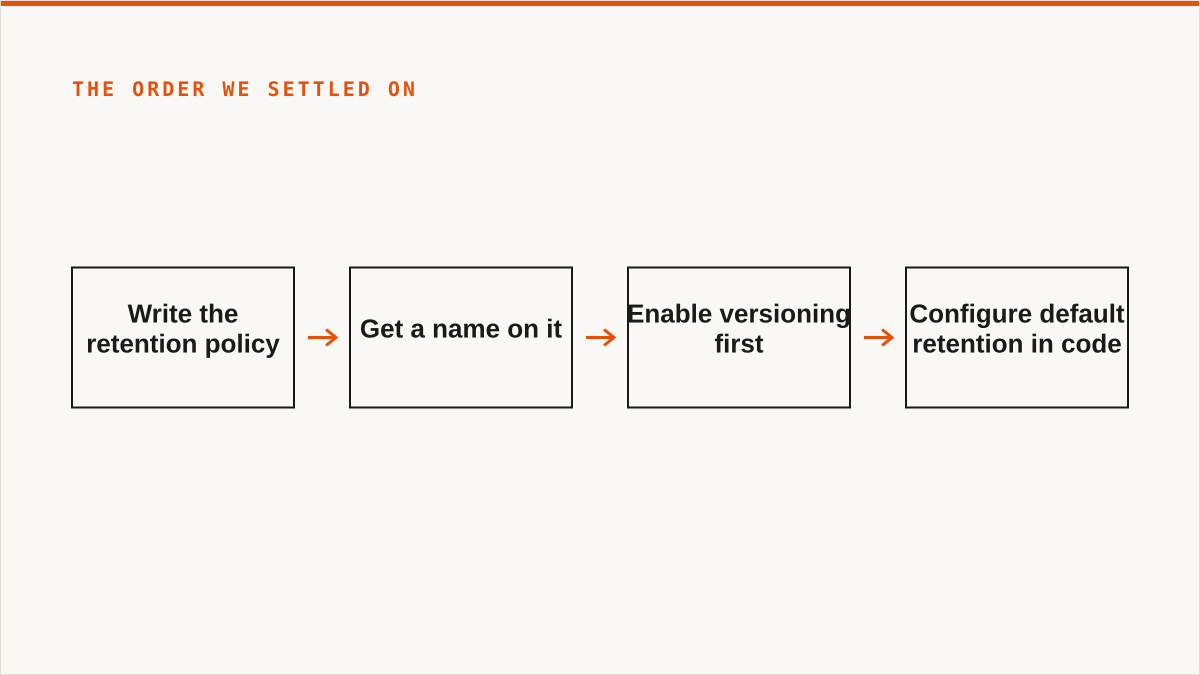
The practical order we settled on:
- Write the retention policy. Get a name on it.
- Enable versioning first. Object lock depends on it.
- Configure the bucket with a default retention in code, and test on a scratch bucket you are willing to lose.
- Only then put real data in, and only in governance mode unless the policy genuinely demands compliance.
- Move to compliance mode as a deliberate, separate, announced step.
Public access is a property of the bucket policy, not the bucket ACL
The final migration step is the one that most often goes wrong quietly: blocking public access. People audit ACLs, breathe out when the ACLs look private, and miss the bucket policy that grants s3:GetObject to *. The ACL was never the whole story.
"Block public access" means different things depending on who you ask. Some providers have a single block-public-access switch. Some have the four-part semantics you get on AWS, where BlockPublicAcls, IgnorePublicAcls, BlockPublicPolicy and RestrictPublicBuckets each do something slightly different. Some default new buckets to private and some do not. Some quietly ignore the header you sent and return 200 anyway, which is the worst behaviour of all because your audit says "hardened" and the bucket is open.
Never trust a 200 from a block-public-access call. Read the state back and check the policy yourself. That is the only audit that means anything across a mixed fleet. The check we run before we call a bucket hardened looks roughly like this:
import json
import boto3
from botocore.exceptions import ClientError

def audit_bucket(s3, bucket):
    findings = []

    # 1. Block public access: read it back, do not assume the PUT stuck.
    try:
        pab = s3.get_public_access_block(Bucket=bucket)[
            "PublicAccessBlockConfiguration"
        ]
        for key in (
            "BlockPublicAcls",
            "IgnorePublicAcls",
            "BlockPublicPolicy",
            "RestrictPublicBuckets",
        ):
            if not pab.get(key, False):
                findings.append(f"public-access-block: {key} is off")
    except ClientError as e:
        if e.response["Error"]["Code"] == "NoSuchPublicAccessBlockConfiguration":
            findings.append("public-access-block: not configured")
        else:
            raise

    # 2. Bucket policy: look for a wildcard principal with a read grant.
    try:
        policy = json.loads(
            s3.get_bucket_policy(Bucket=bucket)["Policy"]
        )
        for stmt in policy.get("Statement", []):
            principal = stmt.get("Principal")
            is_open = principal == "*" or (
                isinstance(principal, dict)
                and principal.get("AWS") == "*"
            )
            if is_open and stmt.get("Effect") == "Allow":
                actions = stmt.get("Action", [])
                if isinstance(actions, str):
                    actions = [actions]
                if any(a in ("s3:GetObject", "s3:*", "*") for a in actions):
                    findings.append("bucket-policy: public read grant")
    except ClientError as e:
        if e.response["Error"]["Code"] != "NoSuchBucketPolicy":
            raise

    # 3. ACL: the old surface, still worth checking on older buckets.
    acl = s3.get_bucket_acl(Bucket=bucket)
    for grant in acl.get("Grants", []):
        grantee = grant.get("Grantee", {})
        if grantee.get("URI", "").endswith(
            ("AllUsers", "AuthenticatedUsers")
        ):
            findings.append("acl: public grant present")

    return findings
Run that against every bucket, every provider, on a schedule, and store the output. The audit is the hardening. The switch is just the fix for what the audit found. A bucket you configured once and never re-checked is a bucket you do not actually know the state of, because providers change defaults and people change policies.
The provider console will lie to you, and it will not mean to. It can show "private" while the underlying policy is open, or the reverse, because the console renders its own interpretation of the state. When the console and the API disagree, trust the API and read the raw policy. This is exactly why we keep the check in script rather than clicking through dashboards.
Where we are the wrong tool, and what to use instead
We should be honest about what this post has been. It is a company that sells a control plane for object storage telling you that the real hardening work is scriptable, auditable, and mostly about sequencing and rollback. If you read that and think "then I will just script it," you are not wrong, and for a lot of teams that is the correct call. Here is where we lose, plainly.
If your budget for this is zero, the conversation is over and rclone wins. It is free, permanently, with no account and no vendor. It supports far more backends than we do, it mounts, it is scriptable, it runs inside your own security boundary, and it has been maintained for over a decade. On the question "will this still exist in five years," rclone has a better answer than we do, and we are a small team that started in 2026. We will not pretend otherwise. The audit_bucket function above plus a cron entry and rclone check covers most of what this post is about, for nothing.
If your credentials must never leave hardware you control, rclone is the stronger answer. Your credentials sit encrypted in our database (AES-256-GCM, per-namespace keys), and AWS can be connected keylessly by IAM role assumption, but "the keys never left my laptop" is a cleaner guarantee than ours and it would be dishonest to blur that.
If you need remote buckets to appear as a local drive, we cannot help and we will not pretend to. There is no FUSE surface in Storafleet. Use rclone mount, Mountain Duck or ExpanDrive. If you are a single person managing a few buckets and you want no subscription, a desktop client like Cyberduck or S3 Browser is genuinely better than us. If your job involves Google Drive, Dropbox, OneDrive or SFTP, we do not touch those backends at all. Use rclone or MultCloud. And if everything lives in one cloud and always will, that provider's own console is free and more current than we are.
If your workflow is entirely code and always will be, a CLI composes and a console does not. We are a web console. We do not slot into cron, systemd, CI or a Makefile the way a binary does. If the hardening lives in your pipeline, keep it there. The audit_bucket function above is the whole idea; wrap it in your scheduler and you have most of what we sell for this particular job. A plain shell loop over rclone lsf and a policy dump will get you the rest.
So who is this for? Teams running buckets across several providers, who want the audit, the migration, the lifecycle and object-lock configuration, and the per-bucket cost visibility in one place, and who would rather pay a flat subscription than wire all of it by hand. We never charge per gigabyte to move data, migrated bytes are unmetered on every tier including Free, and the tiers differ on concurrent jobs and scheduled sync. That is the trade. If it does not fit you, the alternatives above are not consolation prizes. They are the right answer for your case, and we would rather you used them than forced our shape onto your problem.
The order still matters more than the tool. Rollback plan first. Versioning with lifecycle rules, not alone. Object lock only after a written retention policy. Public access audited against the policy, not the ACL, and re-audited on a schedule. Do that and the bucket is hardened. Skip any step and you have a bucket that merely looks hardened, which is the most dangerous state of all.