
Oracle Cloud Infrastructure Storage: S3-Compatible Connection Guide
October 2026 · 31 min read · Surya
Which partner do I talk to about connecting Oracle Cloud Infrastructure Object Storage to the rest of my estate?
That question, almost word for word, lands in our inbox about once a week. People search for an oracle cloud infrastructure storage partner expecting a phone number, a partner directory, a badge, maybe a reseller with a slide deck. There isn't one to join. OCI exposes an S3-compatible endpoint, and any control plane that speaks the S3 API can talk to it. Storafleet connects to OCI with a Customer Secret Key, a namespace and a region. That is a form with five fields, not a procurement exercise.
So let us be flat about it: the answer to "who is the partner" is "nobody, and you don't need one." What you need is the right key type, the right namespace, the right region string, and a clear idea of which buckets you actually want to move.
Here is what this post covers, in order:
- Why there is no partner program, and what the connection actually is
- Where OCI's S3 compatibility is real and where it quietly is not
- The pre-flight checklist before you connect anything
- Creating a Customer Secret Key, and why your API signing key fails
- What a first migration looked like, and the buckets we left alone
- Object lock and WORM, honestly
- Why S3 Intelligent-Tiering does not follow you to OCI
- What cloud waste actually looks like in an object storage estate
- Duplicate detection, and why it belongs before the migration
- Where rclone genuinely beats us
- An illustrative OCI-in, R2-out walkthrough
- Who should not use us for this, and what to use instead
Long post. We earned it the hard way, one failed sync at a time.
The question you typed was about a partner, and here is the honest answer
There is no partner program to join, because connecting OCI Object Storage to another system is a wire protocol, not a business relationship. OCI ships an S3-compatible gateway in front of Object Storage. Any tool that can sign an S3 request can use it. That includes rclone, s3cmd, the AWS CLI pointed at a custom endpoint, Cyberduck, and us.
People search for a partner because the big clouds train you to. AWS has a partner network. Azure has one. GCP has one. Oracle has one too, but it is not what you need here. The thing you need is an endpoint URL, a key pair, and a region string. Everything else is paperwork.
Storafleet is an S3-compatible control plane. You bring the storage, we never hold your bytes. We connect to 50+ S3-compatible providers plus any custom endpoint, and OCI is one of them. When you add an OCI connection you are not "onboarding a partner." You are pasting five values into a form and hitting save. The rest of this post is about those five values and the four things that go wrong after you save them.
We have hit our share of those four things. One was a signature error that read like a credentials failure and was actually a region mismatch. We'll get there.
OCI Object Storage is S3-compatible in the way that matters and not in the way that doesn't
OCI's S3 compatibility layer is genuine. It is also a second product wearing the same name as the OCI console, and it has its own rules. If you've spent time in the OCI web UI, you already know the console. The S3 API is a different surface on top of the same buckets, and the two do not always agree on how things are described.
Endpoint URLs follow this shape, per Oracle's documentation:
https://<namespace>.compat.objectstorage.<region>.oraclecloud.comRead that carefully. Three variables sit inside it: the namespace, the region, and the bucket's actual home region. Not a region you like better. Not the region your tenancy was created in. The bucket's home region.
What works
Core object operations work. PutObject, GetObject, HeadObject, DeleteObject, ListObjectsV2, CopyObject, multipart upload, presigned URLs, bucket-level lifecycle configuration, versioning, and object lock. That is the surface we use for migrations and it is enough. Our connect flow for OCI is documented at storafleet.com/docs/connect/oracle, and it maps exactly onto those calls.
What doesn't
Treat every S3-compatible provider's compatibility layer as imperfect until you have tested the specific calls you depend on. If you have code that pattern-matches on NoSuchBucket or AccessDenied and expects AWS semantics, port it carefully and test against the real endpoint. Error codes and messages on a compat layer are not guaranteed to match AWS, and the OCI docs are the place to confirm what a given call returns.
The bigger trap is conceptual. The OCI console and the S3 API are two different products that share buckets. Things you configure in the console (like some retention settings) do not all surface through the S3 API in the same shape. Things you configure through the S3 API (like certain lifecycle rules) render in the console in OCI's own vocabulary. If a setting looks "missing" from one side, check the other before you assume it didn't take.
This is not unique to OCI. Every S3-compatible provider has a compatibility layer that is mostly faithful and partly its own thing. The gap is where migrations break. Plan for it.
Before you connect anything: find your namespace, region and the bucket's real name
The five fields the connection form wants are: access key, secret key, namespace, region, and endpoint. Two of those (namespace, region) you cannot guess. You have to look them up in the OCI console before you start. Do that first. It saves twenty minutes of staring at a red error.
Finding the namespace
In the OCI console, go to Object Storage, then open any bucket, then look at Bucket Details. The namespace is shown there. It is a short alphanumeric string assigned to your tenancy, and it is the same for every bucket in that tenancy. Copy it exactly. It is case-sensitive.
You can also get it from the CLI with oci os ns get if you have the CLI configured. Same string.
Finding the region
Region strings use OCI's short form in endpoint URLs (for example us-ashburn-1, uk-london-1, ap-sydney-1). The bucket details page and the console's region selector at the top of the page both show it. If the region in your endpoint does not match the bucket's home region, you will get a signature error that reads like a credentials problem and is not.
We have hit this on an OCI connection. The access key was right. The secret was right. The namespace was right. The region was the region of a different bucket in the same tenancy. The error came back as a signature mismatch, which sent us down a thirty-minute path checking the secret, re-pasting it, and checking for trailing whitespace. The actual fix was changing one string.
If you get a signature error on OCI and your keys look correct, check the region before you check anything else. It is the most common cause and the least obvious.
Finding the bucket name
The bucket name alone is not enough to address a bucket over the S3 API. You need namespace + bucket name. The namespace is part of the hostname in the endpoint, so the full address is implicit, but if you are hand-constructing a request or debugging a failed call, remember that my-bucket in OCI means namespace/my-bucket, not just my-bucket. Storafleet handles this for you once the connection is saved, but it matters when you are troubleshooting.
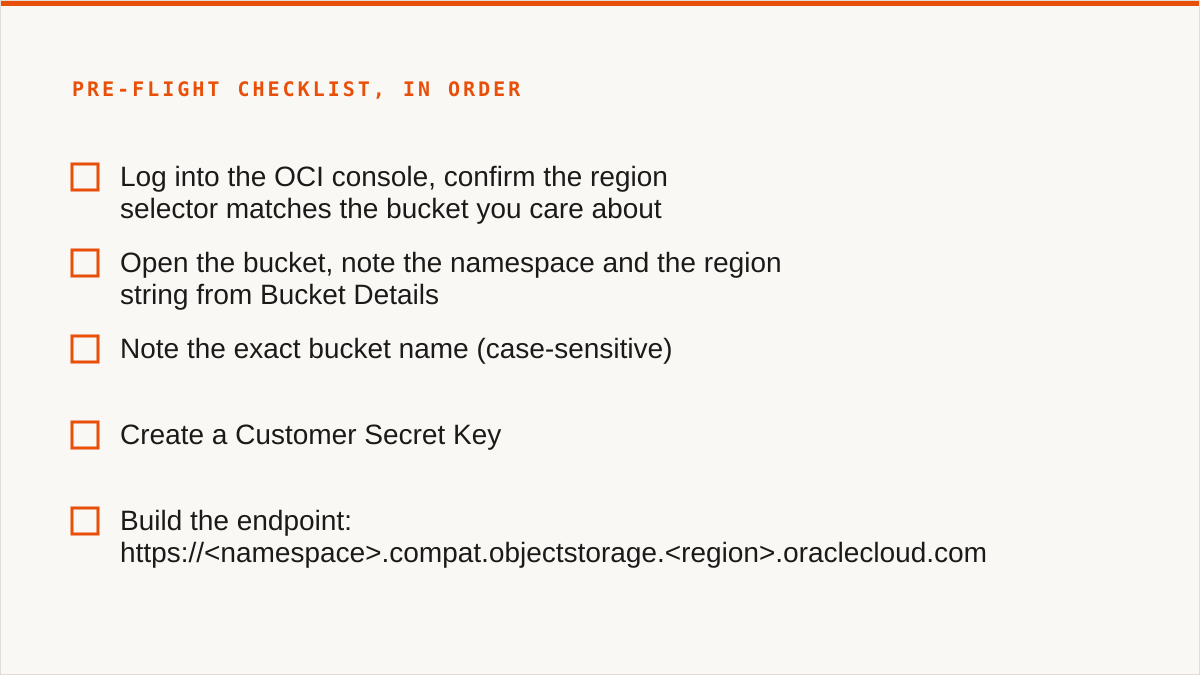
The checklist, in order
- Log into the OCI console, confirm the region selector matches the bucket you care about.
- Open the bucket, note the namespace and the region string from Bucket Details.
- Note the exact bucket name (case-sensitive).
- Create a Customer Secret Key (next section).
- Build the endpoint:
https://<namespace>.compat.objectstorage.<region>.oraclecloud.com. - Paste all five into the connection form and save.
- Run a list operation on a small bucket first, not the big one.
That last step is not paranoia. It is the difference between finding a permissions problem in thirty seconds and finding it forty minutes into a copy.
Creating a Customer Secret Key, and why your API signing key will not work here
This is the single most common failure we see with OCI connections. People paste their API signing key, it fails, and they assume the connect flow is broken. It isn't. There are two different key pairs in OCI and they do different jobs.
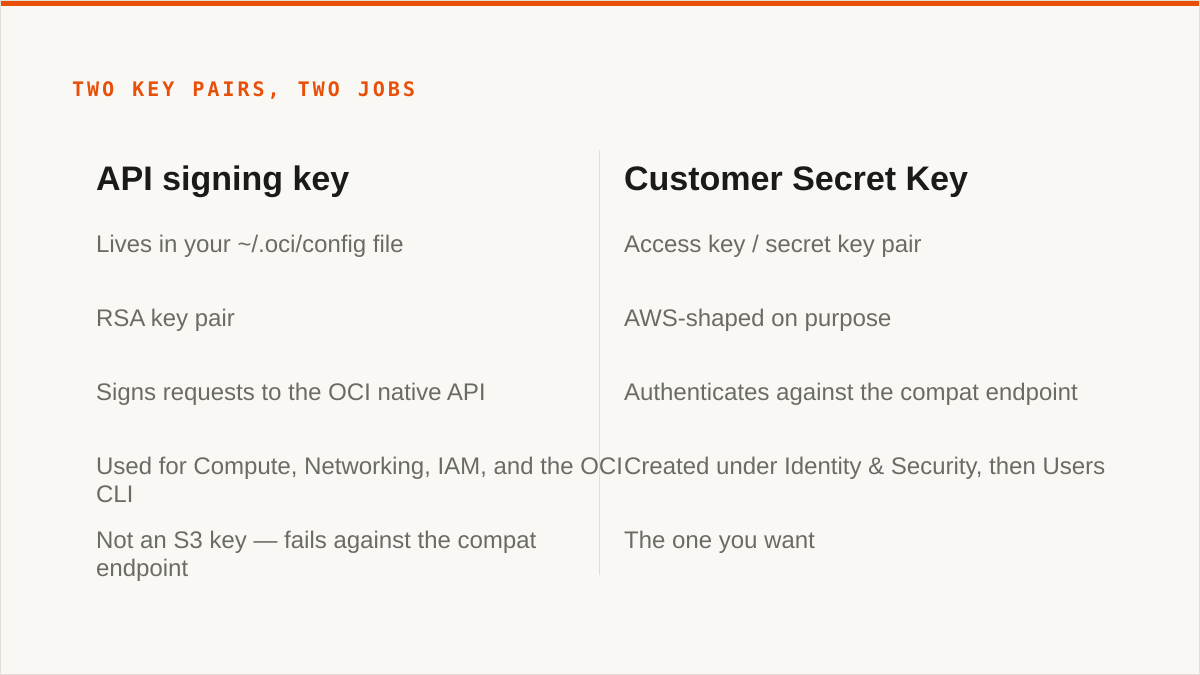
The API signing key is the one in your ~/.oci/config file. It is an RSA key pair used to sign requests to the OCI native API (the one you use for Compute, Networking, IAM, and the OCI CLI). It is not an S3 key. It will not authenticate against the S3-compatible endpoint. If you paste it, you get a signature error, and you will spend time wondering why the keys "look right" when they are the wrong kind of key entirely.
The Customer Secret Key is the one you want. It is an access key / secret key pair, AWS-shaped on purpose, and it is what authenticates against the compat endpoint. Here is how to create one:
- In the OCI console, go to Identity & Security, then Users.
- Open the user that will own the connection. This can be your own user or a dedicated service user. A dedicated user is the better call, because you can scope its group permissions and revoke it independently.
- In the user's detail page, find Customer Secret Keys.
- Click Generate Secret Key. Give it a name that tells you where it is used.
- The console shows you the secret once. Copy it now. There is no second chance. If you lose it, you delete the key and generate a new one.
The secret is shown once and never again. We cannot stress this enough. We have watched people generate a key, get distracted, and come back to a screen with no secret on it. Delete and start over. It costs thirty seconds and saves a support ticket.
Scoping the key
A Customer Secret Key inherits the permissions of the user that owns it. If you create it on your admin user, it has admin scope. Don't do that. Create a dedicated user, put it in a group with a policy that grants exactly the bucket operations you need, and generate the key on that user. The most common cause of a "permission denied" during a migration is a policy scoped too narrowly (usually missing OBJECT_INSPECT or BUCKET_READ on the right compartment), and the second most common is scope too wide because nobody bothered to create the group.
Connecting
With the access key and secret in hand, the connection form takes the five fields: access key, secret key, namespace, region, endpoint. The full walkthrough with screenshots is at storafleet.com/docs/connect/oracle. If you are sitting there with the key on your clipboard, go there now and skip the rest of this section. The rest of the post is about what happens after you connect.
One more thing about the key: Storafleet stores your credentials encrypted at rest with AES-256-GCM and per-namespace HKDF-derived keys. That is real encryption and it is what we would want a vendor to do. It is also not the same as "the key never left my laptop." If that property is a hard requirement for you, we are not the right tool and we say so later in this post.
The first sync: what a migration looks like, and the buckets we deliberately left alone
The estate we migrated on our own account looked like this: four buckets in one OCI tenancy, roughly two terabytes total, spread across three years of use. Round numbers, because we are describing a real migration and not a benchmark.
| Bucket | Contents | Approx size | Decision |
|---|---|---|---|
db-exports |
Nightly database dumps, three years | ~1.4 TB | One-time migrate, scheduled sync after |
app-assets |
Static assets, images, fonts | ~120 GB | One-time migrate |
logs-archive |
Old application logs | ~300 GB | Left in place, lifecycle to archive tier |
compliance-records |
Signed records under retention | ~200 GB | Left in place, untouched |
That's four buckets, not the three the heading says. The fourth (logs-archive) is a different kind of "left alone" and we'll get to it. The buckets we deliberately did not migrate are logs-archive, compliance-records, and a fifth bucket that held a copy of db-exports from before a cleanup. More on that in the duplicate detection section.
What we synced, and how
db-exports went first, as a one-time migration. Roughly 1.4 TB across a few thousand objects. That is not a large migration by object count, but it is a large migration by byte volume and it is the kind of thing that takes hours regardless of provider. We set it running and went to lunch. It finished. No drama. That is the good case and it is most cases.
app-assets we synced once and then set a scheduled sync on, because the source bucket is still written to by an application that we were not ready to cut over. The scheduled sync runs on a cadence and copies new objects to the destination. This is the "migrate in place, cut over later" pattern and it is the right pattern for most production moves. You do not get a maintenance window. You get a sync job that runs until the application is ready to point at the new bucket.
What broke
The first sync of db-exports failed partway through with a permission error on a subset of objects.
Not all of them. A subset. Which is worse, because the first thousand objects copied fine and then the job started throwing 403s on a specific prefix. The prefix was created by a different team, and the bucket policy granted our user read access to the bucket but not OBJECT_INSPECT on every object, and the objects under that prefix had been written with a different compartment association. The fix was a policy change: add OBJECT_INSPECT on the compartment, not just BUCKET_READ on the bucket.
If a migration fails partway through with 403s on a prefix, check the compartment-level policy, not just the bucket policy. The bucket-level policy was correct. The compartment policy was not. That is the OCI-specific version of this problem, and it is worth writing down.
The rerun picked up where it stopped. That is the whole point of a sync job that compares source and destination rather than blindly re-copying everything. Still, the failure cost us a working day, and that day was spent on a policy that looked fine at the bucket level and was not fine at the compartment level.
The buckets we left alone
compliance-records stayed where it was, and it will stay where it is. Object lock and retention were already configured, already audited, already working. The bucket had been through a compliance review. Moving it would have meant recreating the lock configuration on the destination, re-validating retention dates, and re-running the audit. The migration would have gained us nothing and risked the one thing you cannot risk in a compliance bucket: the retention guarantee itself.
This is the decision that made the whole migration smaller. Half the work is finding out which buckets should never move.
logs-archive stayed because it is a cold bucket with a lifecycle rule already pointed at OCI's archive tier. Moving it would have reset the clock on the minimum storage duration for those objects and cost more than leaving it. We added a lifecycle rule to expire the oldest objects instead.
The fifth bucket (the old db-exports copy) stayed until we confirmed the new one was good and the retention window on the originals had closed. That is the honest answer: we did not delete it, we queued it for deletion.
Object lock and WORM: configuring it is a checkbox, deciding to use it is not
Object lock is a per-bucket setting that prevents an object from being deleted or overwritten until a retention date passes, or until a legal hold is removed. That is the whole mechanism. It is not magic and it is not a backup. It is a promise enforced by the storage layer.
Two modes, and the difference matters:
- Governance mode lets a user with the right IAM permission (usually
OBJECTSTORAGE_OBJECT_OVERRIDEor its equivalent) shorten or remove a retention date. Useful for testing, and dangerous for actual compliance because the permission exists. - Compliance mode does not. Once a retention date is set in compliance mode, it cannot be shortened by anyone, including the tenancy administrator. When the date passes, the object becomes deletable. Until then, it does not.
A legal hold is a separate flag that prevents deletion independent of the retention date, and is removed by a user with the right permission. It is the "we are in a legal matter, freeze this" switch.
On most providers, including OCI, object lock must be enabled at bucket creation time. You cannot turn it on later for an existing bucket. That is a real constraint and it is the one people discover after they have already written the objects. If you think you might need WORM, enable it when you create the bucket. If you have already created the bucket and it does not have object lock, you cannot add it. You create a new bucket and copy, and the copy is a new object with a new creation date.
This is why the worm compliant cloud storage search is a trap. People search for it expecting a feature they can turn on. It is a bucket-creation decision, and it is a promise you make to an auditor, not a toggle you flip on a Friday.
What we can and cannot do
Storafleet can configure object lock on a bucket (at creation, where the provider supports it) and can inspect existing lock configuration and retention state. We cannot un-expire a retention date for you. Nobody can, in compliance mode. That is the point of compliance mode. If you are looking for a tool that will "help you manage" a retention date that has not passed, the tool you are looking for does not exist and you should be suspicious of anyone who says it does.
The honest position: object lock is a checkbox and a date. The decision to use it is a conversation with your auditor about what records you have, how long you must keep them, and who is allowed to override. We can help you execute the decision. We cannot make it for you, and we should not pretend the tooling is the hard part. The policy is the hard part.
S3 Intelligent-Tiering is an AWS product, and it does not follow you to OCI
S3 Intelligent-Tiering is an AWS storage class with its own monitoring fee and its own automatic movement rules. It is not a portable concept and no control plane can port it across providers. If you searched for s3 intelligent tiering or aws s3 intelligent tiering and landed here hoping for a cross-provider equivalent, the answer is that there isn't one.
Here is why. Intelligent-Tiering is a storage class in S3, and it works by monitoring access patterns per object and moving the object between tiers (frequent access, infrequent access, archive instant access, and deeper archive tiers) without you writing lifecycle rules. It charges a monitoring fee per object per month on top of storage. It is convenient and it is AWS-specific.
OCI has its own tiering model. Object Storage in OCI has Standard, Infrequent Access, and Archive, and they have different rules, different retrieval costs, and different minimum storage durations. The tiers do not map one-to-one to S3's tiers. An S3 "Intelligent-Tiering" policy has no direct translation to an OCI lifecycle rule, because the tier that AWS would pick automatically is a decision OCI makes you make explicitly via a lifecycle rule.
No control plane can port a tiering policy across providers because the tiers do not map. That is not a gap in our product. It is a property of the problem. Anyone who tells you their tool will port your tiering policy is either confused or selling something.
What Storafleet does instead
We show you per-bucket size and cost, so you can see which buckets are actually cold. That is the information you need to write a lifecycle rule, and it is the information the console does not give you across providers. Then we let you set lifecycle rules per provider, in that provider's own vocabulary. On OCI you write OCI lifecycle rules (Standard to Infrequent Access after N days, to Archive after M days). On S3 you write S3 lifecycle rules or use Intelligent-Tiering if you want to. On R2 you write R2 lifecycle rules.
The value is not "we translate the tiers." The value is "we show you which buckets are warm and which are cold across your whole estate, and then we let you act on it in each provider's terms." That is a smaller claim and a true one.
The intelligent tier 0 storage search is a variant of this. There is no universal "tier 0." Every provider has its own top tier and its own name for it. If you are on one provider, use its console and its tiers. If you are on several, use a control plane to see them side by side and configure each in its own language.
What cloud waste actually looks like in an object storage estate
Cloud waste in object storage is almost always a lifecycle rule someone did not write. Not a misconfigured VM, not an idle load balancer. A bucket that keeps every version of every object forever, or a multipart upload that was abandoned in 2023, or three copies of the same dataset because someone was nervous during a migration and nobody deleted the extras.
Here are the usual suspects, with the rule shapes that fix them in the provider's own terms.
Versioning on with no noncurrent-version expiry
Versioning is a safety feature and it is the right default for buckets that get overwritten. It is also a bill multiplier if you never expire old versions. A bucket where an object is rewritten daily and versioning is on with no expiry accumulates versions forever.
The rule, on any S3-compatible provider:
NoncurrentVersionExpiration:
  NoncurrentDays: 30
Thirty days is a reasonable default. Adjust to your restore window. The point is that the rule exists. If versioning is on and this rule is not, you are paying for versions you will never restore.
Incomplete multipart uploads sitting forever
Multipart uploads that are initiated and never completed leave parts in the bucket. You cannot see them in a normal object listing. You pay for them. They accumulate silently.
AbortIncompleteMultipartUpload:
  DaysAfterInitiation: 7
Seven days is generous. If a multipart upload has not completed in a week, it is not going to. This is the single cheapest lifecycle rule to add and the one most often missing.
Three copies of the same dataset
This one is a migration artifact. Someone copied a bucket to a new provider "just in case," the migration succeeded, and nobody deleted the original. Or they copied it to two destinations because they were not sure which one they would keep. Six months later the original is still there, still billed, and the only person who knew why has left the company.
There is no lifecycle rule for this. The fix is duplicate detection (next section) and a decision about which copy is canonical. The rule shape is not the answer. The answer is knowing which one you actually need.
Archive-tier objects younger than the minimum duration
Every provider's archive tier has a minimum storage duration. If you move an object to archive and delete it before that duration passes, you are billed as if it had been there for the full duration. On some providers this is 30 days, on some 90, on some 180. It is a per-provider number and it is in the provider's docs.
The trap is a lifecycle rule that moves objects to archive too aggressively, followed by a deletion policy that removes them too soon. The object was never going to be read, so archiving it looked free. It wasn't, because it was deleted before the minimum duration passed and the full duration was billed anyway.
The rule shape depends on your provider and your retention policy. The point is to know your provider's minimum storage duration before you write the archive rule. On OCI it is in the Object Storage lifecycle documentation. On S3 it varies by archive tier. On R2 it is different again.
Every one of these is a lifecycle rule someone didn't write. Store that sentence somewhere.
We surface per-bucket size and cost so you can see which of these is happening in your estate. We do not automatically fix them, because "fix" means deleting objects and that should be your decision. What we do is make the problem visible and give you the controls to write the rule.
Duplicate detection belongs before the migration, not after
Before you migrate anything, scan the estate for duplicate objects. In our own estate, the same 300 GB database export archive was sitting under three different names across two buckets. Round numbers again. The point is that the number was large enough to change what we migrated.
The three copies were named db-exports/full-2023-06-01.tar.gz, db-exports/archive/full-2023-06-01-copy.tar.gz, and db-backups/full-2023-06-01.tar.gz. Three names, two buckets, same bytes. Someone had made a copy during a provider incident, someone had made another copy during a migration, and neither copy had been cleaned up.
We migrated one copy. We left the originals in place until the retention window on the source bucket closed, then queued them for deletion. That is the pattern: migrate the canonical copy, leave the duplicates until you are sure, delete on a schedule.
What duplicate detection is and is not
Duplicate detection is content hashing to identify identical objects. It is not deduplication on write. We hash objects and compare hashes to find identical content under different names or in different buckets. We do not store your bytes, so we cannot dedupe them. There is no "we store one copy and reference it three times" magic here. The bytes live in your buckets, on your providers, and we never hold them.
That distinction matters because "deduplication" in the storage-vendor sense means the storage layer stores one copy and charges you for one. We are not the storage layer. We are the thing that tells you where the duplicates are so you can delete the ones you don't need. The savings come from your provider's bill, not from us.
The scan itself is cheap because it is metadata and hashing, not a full re-download. On a two-terabyte estate it took a few hours. It found the three-way duplicate above, plus a handful of smaller ones (an old logo directory that had been copied into three buckets, a test fixture that had been copied with every deploy). The smaller ones were not worth acting on individually. The 300 GB one was.
Without the scan, we would have migrated all three copies. That is 900 GB of transfer and 900 GB of destination storage for 300 GB of data. On a flat subscription we do not care about the bytes, but you do, because you are paying the destination provider for them. Finding duplicates before a migration is the highest-leverage thing you can do and it is the step everyone skips.
Where rclone genuinely beats us, and we will say it out loud
rclone is better than us for a large number of people, and we are going to describe exactly who. Not as a token concession before a pivot. As the actual answer.
rclone is free. Permanently. No account, no vendor, no subscription, no tier that adds scheduled sync. It supports 70+ backends, including the consumer clouds we deliberately do not touch (Google Drive, Dropbox, OneDrive, Box). It mounts remote storage as a local filesystem. It runs inside your own security boundary, so your credentials never leave hardware you control. It composes with cron, systemd, CI pipelines, shell scripts, Makefiles. It has been maintained for over a decade, and on the question "will this still exist in five years," a decade-old open-source project has a better answer than a company started in 2026.
We started in 2026. We are a small team. We have no published case studies and no named customers to point at, and we will not invent them. rclone has a decade of production use behind it. If your workflow is a shell script, rclone is the right tool and we are not.
The honest framing is this: rclone is a binary and we are a console. If you are comfortable in a terminal, rclone does more than we do and costs nothing. The place we win is when you have many buckets across several providers and a small team that does not want to write the tooling. That is a real case. It is not the only case, and it is not the majority case.
Cyberduck and Mountain Duck
For the single operator with a few buckets who wants no subscription, Cyberduck (free) and Mountain Duck (paid, one-time licence) are better than us. Files stay on your machine, they mount, they handle the common providers, and they are mature. If you are one person managing a handful of buckets on a laptop, the honest answer is a desktop client, not a web console.
S3 Browser is the same story on Windows.
The providers' own consoles
If everything lives in one cloud and always will, that provider's console is free, always current with the provider's newest features, and authoritative. We are a control plane across providers. If you have one provider, you are paying for a cross-provider view you do not need. Use the console.
MultCloud and CloudFuze
If you need Google Drive, Dropbox, OneDrive, or SFTP in the same workflow as your buckets, we cannot connect them. MultCloud and CloudFuze cover the consumer clouds we deliberately do not. That is a real gap and we are not going to pretend it isn't.
We connect the S3-compatible family and any custom S3 endpoint. That is 50+ providers and it is the majority of object storage by volume. It is not everything, and the things it is not are the things you need if your data lives in Drive.
An illustrative walkthrough: OCI in, R2 out, with the credentials problem in the middle
The scenario, invented to show the shape of the problem: move a bucket from OCI Object Storage to Cloudflare R2, using credentials from a different account than the one that owns the destination. This is the case behind the cloudflare containers r2 fuse mount with s3 credentials from another account search, and it is a normal thing to want to do. No real customer, no real incident. Just the steps and the places they snag.
Cross-account S3 credentials are not a hack. They are the standard way to grant a tool or a team access to a bucket without sharing the account's root credentials. R2 has an S3-compatible API and issues its own access key / secret key pairs, scoped to a specific account. You generate an R2 API token, it gives you an access key ID and a secret access key, and you use those as the credentials for the destination connection. That is it. The fact that the credentials come from a different account than the one that owns the bucket is a feature, not a problem.
The sequence
- In OCI: create the Customer Secret Key as described above. Note the namespace, region, and bucket name. Build the endpoint URL.
- In Cloudflare R2: create a bucket. Note the account ID and the bucket name. The R2 endpoint is
https://<account-id>.r2.cloudflarestorage.com. The region string for R2 isauto. - In Cloudflare R2: create an API token scoped to that bucket with Object Read and Object Write. The token gives you an access key ID and secret access key. Copy the secret now; it is shown once, same as OCI.
- In Storafleet: add both connections. OCI as source, R2 as destination. Each has its own five fields.
- Run a sync from the OCI bucket to the R2 bucket. Start with a small prefix, not the whole bucket.
- Verify by listing the destination and spot-checking a few objects. Then run the full sync.
Six steps, and four of them are copy-paste. The failure modes are all in step 3.
Where it stalls
The migration stalls at token scoping on the R2 side. An R2 API token that is scoped to the account but not to the specific bucket will fail with a permission error on the destination. An R2 token that has Object Read but not Object Write will fail on the first PutObject. An R2 token that was generated for a different bucket than the one you are targeting will fail with a bucket-not-found error that looks like a credentials problem.
Same lesson as the OCI region mismatch: the error message points at the credentials and the fix is in the scoping. Check the token's bucket scope before you check the secret.
The other stall is the region string. R2 wants auto for the region. If you paste a real region (or the endpoint's hostname as the region), the connection fails. R2 is not OCI and it does not want OCI's region string.
What we do not do
If you want R2 mounted as a FUSE filesystem inside a container, that is rclone mount or s3fs, and we do not do it. We have no FUSE surface. We move bytes between buckets. We do not make a bucket look like a disk.
We know this is the question behind the search because people search for "fuse mount with s3 credentials from another account" and land on migration tools. The two jobs are different. A migration tool copies bytes once and verifies. A mount presents a bucket as a filesystem and handles read/write/locking semantics on every operation. We do the first. rclone does both. If you need the second, use rclone.
The OCI-to-R2 migration is a good example of where we are the right tool: two providers, a bucket each, a scheduled sync after the initial copy, and a small team that does not want to maintain a script. It is also a good example of where we are the wrong tool: the moment you want that R2 bucket mounted in a container, the job changed and the tool should change with it.
Who should not use Storafleet for this, and what to use instead
We would rather lose the sale than sell you a tool that does not fit. Here is the list, plainly.
- Your budget is zero. Use rclone. The conversation is over and rclone wins. It is free, it works, and it is maintained.
- You need storage mounted as a filesystem. rclone mount, Mountain Duck, or ExpanDrive. We do not have a FUSE surface and we are not going to add one by pretending.
- You need Google Drive, Dropbox, OneDrive, or SFTP. rclone or MultCloud. We connect the S3-compatible family and nothing else.
- Credentials must never leave hardware you control. rclone, or our IAM-role connect if you are AWS-only. Our credentials sit encrypted in our database. The encryption is real (AES-256-GCM, per-namespace HKDF keys) and AWS can be connected keylessly via IAM role assumption, but "the keys never left my laptop" is a stronger answer than ours and we are not going to pretend otherwise.
- Everything lives in one cloud and always will. That provider's console is free and more current than we are. Use it.
- Your workflow is entirely code and always will be. A CLI composes with cron, systemd, CI, and Makefiles. A console does not. Use rclone.
That is a lot of people. We know.
The case where we are the right answer is narrower: many buckets across several providers, a small team, and a need for one place to see and move them without writing the tooling. If you have OCI and R2 and S3 and a MinIO box in the closet, and the person who wrote the rclone scripts left, and the next person needs to see the whole estate in one screen and move a bucket without reading a man page, that is us. Per-bucket cost visibility, duplicate detection, lifecycle rules in each provider's own vocabulary, scheduled sync, and a flat subscription that does not charge per gigabyte for migration. Migrated bytes are unmetered on every tier, including Free. That is the product.
If that is your situation, the OCI connection is five fields and the docs are at storafleet.com/docs/connect/oracle. If it isn't, the alternatives above are genuinely better and we would rather you used them.
The thing we learned migrating our own estate is that the technical work is small and the decisions are large. Which buckets move. Which buckets never move. Which copies are canonical. Which retention dates are promises and which are just dates. The five-field form takes ten minutes. The decisions take longer, and they are the part no partner program will help you with.