GCS public access prevention: bucket IAM and org policy guards
October 2026 · 18 min read · Surya
An inventory pass on a GCS estate turned up dozens of buckets where 'inherited' meant 'nobody had decided'
Guard one: uniform bucket-level access first, because public ACLs cannot exist where ACLs cannot exist
Guard two: public access prevention enforced at the bucket, and what 'enforced' actually blocks
The callout: retroactive removal is the step everyone skips, and it is a separate command
Guard three: org policy constraints are the only guard a tired engineer cannot undo
What it costs: broken integrations, a late-night hotfix, and a stretch of nobody trusting the console
Where Storafleet fit, where it did not, and the honest concession: rclone does the audit pass better than we do
Who should not use Storafleet for this, and what they should run instead
An inventory pass finds dozens of buckets where 'inherited' meant 'nobody had decided'
Dozens of buckets. That is the count you get on a mid-sized GCS estate where every single one of them has public access prevention set to inherited rather than enforced. The number is not the point. The point is that nobody can tell you which of them are dangerous without running the check, and that is the failure mode this whole migration is about.
Nobody runs this pass because something leaked. They run it because a security review asks a simple question, "which of our buckets can the internet read?", and the answer takes two days to produce. That is the real trigger for a lot of this work. Not a breach. An inability to answer.
The first command to run is this:
gcloud storage buckets list --format="table(name,iamConfiguration.publicAccessPrevention,iamConfiguration.uniformBucketLevelAccess.enabled)"
Output is a wall of inherited in the PAP column and a mix of True/False under UBLA. It reads like a status report. It is not. inherited on GCS is not a safety setting. It is a deferral. It means the bucket has no opinion, so it inherits from the project or org level, and if nothing up the chain has an opinion either, the effective state is "public access is allowed."
That is the trap. The default is not "closed." The default is "nobody has decided," and "nobody has decided" resolves to "open is permitted."
On a bucket with uniform bucket-level access turned off, "open is permitted" means exactly one thing: someone with storage.buckets.setIamPolicy or the object-level equivalent can add allUsers in one IAM edit, and the bucket is world-readable. No second approval. No confirmation dialog that matters. One binding. That is the distance between a private bucket and a public one: one line in a policy, typed by anyone with the role.
Run this inventory on an estate with a handful of buckets and on one with hundreds. It doesn't matter. The failure mode is identical. You cannot tell the dangerous buckets from the boring ones without looking, and the console will happily show you a padlock icon that means less than you think it means.
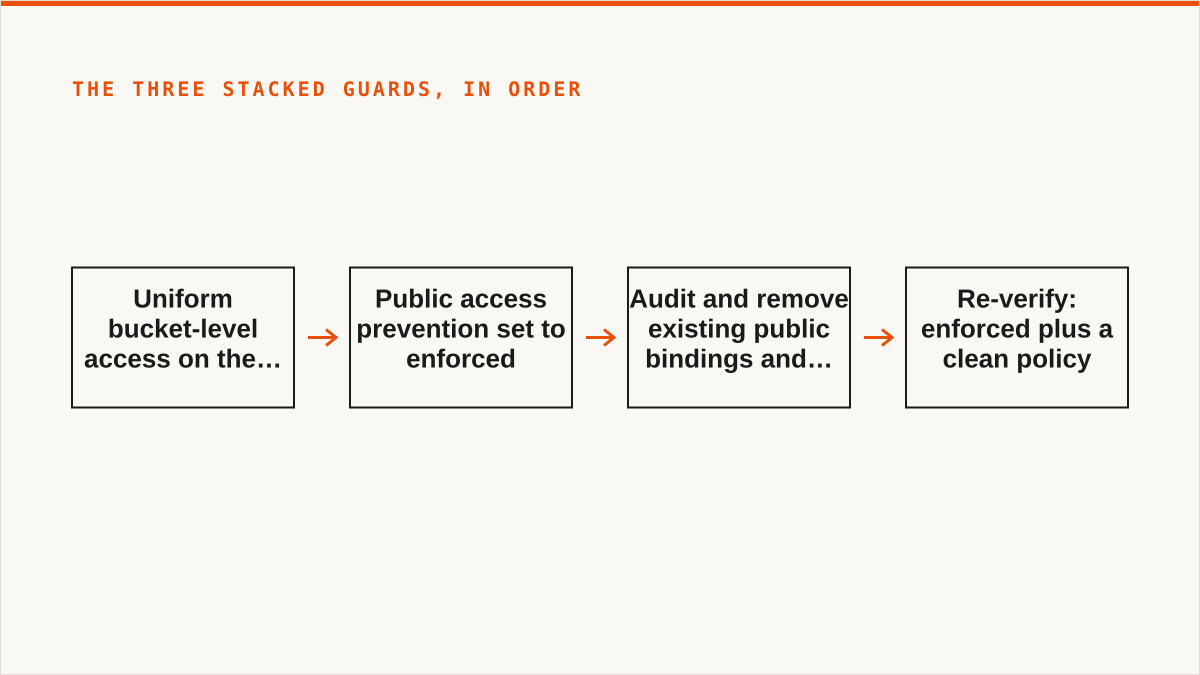
What follows is the shape of the migration, from "public by accident is one IAM edit away" to "public is impossible by construction." Three stacked guards. Only one of them actually holds when a tired engineer is typing at 6pm on a Friday. We will get to which one.
Guard one: uniform bucket-level access first, because public ACLs cannot exist where ACLs cannot exist
Uniform bucket-level access has to land before anything else. This is not a stylistic preference. It is a hard ordering constraint, and doing it the other way around means spending a week chasing a category of public exposure you thought you had eliminated.
The reason is simple: PAP protects against public IAM bindings. It is much weaker against public object ACLs. UBLA is what deletes the concept of the object ACL entirely. If object ACLs still exist, then a bucket can have public access prevention enforced and still serve a publicly-readable object, because that object's ACL says allUsers:READER and PAP, depending on how it is configured, does not retroactively reach into every object ACL that already exists.
Run UBLA per bucket. Not all at once. The sequence that works: set UBLA on a canary bucket, watch the error logs for a day, then a batch of ten, then the rest.
Then the fun starts, because UBLA breaks things. It always breaks things. Three categories, in the order you hit them.
Legacy signed URLs break. Not all of them. Specifically, the ones generated against objects where the signing principal relied on object ACLs being evaluated at request time. When object ACLs stop existing, the signature's authorization model changes underneath it, and requests that used to succeed start returning 403. These surface when a partner's nightly export job fails and their on-call pages you. The fix is to regenerate the URLs with the correct service account and the correct storage.objects.get grant at the bucket level. That is a twenty-minute fix that takes a day because nobody can find which process is still minting the old URLs.
Internal tools that rely on per-object ACLs break. One common shape is a document previewer that sets object ACLs to grant a specific group read on a specific object, per request. Another is a small upload service that assigns owner ACLs on write. Both are the kind of thing built years ago by someone who read one tutorial and then moved teams. Neither is documented. You find them by turning on UBLA and watching the 403s.
And then there is the script that sets allUsers on an object rather than a bucket. This is the one that still makes us wince. The script's job is to publish a nightly report to a public URL. It does this by setting an object ACL granting allUsers:READER on the object it has just written. It has been doing this for years. It is, functionally, a public bucket with extra steps, and it is invisible to every bucket-level audit you will run because the bucket's IAM policy is clean.
That script is the reason to say the quiet part out loud: a bucket-level audit does not find object-level public exposure. UBLA is the only thing that makes the two categories collapse into one.
The migration pain lives here, in guard one. Not in the org policy, not in the enforcement flag. In the discovery that your estate has public exposure in two different places and you have been auditing one of them. Budget the time for this. Budget three days and expect nine.
Guard two: public access prevention enforced at the bucket, and what 'enforced' actually blocks
With UBLA on, PAP becomes meaningful. Setting it is one command:
You want that to print enforced. Not inherited. If it prints inherited, you haven't set anything; you've merely not forbidden anything.
Now the semantics, because this is where people get burned and where we got burned.
enforced blocks new allUsers and allAuthenticatedUsers bindings. Try to add one and the IAM write fails. That is the guard working. It also blocks new public ACLs, which is table stakes once UBLA is on.
enforced does not, in every case, retroactively strip an existing public binding. This is the sentence to read twice. The flag changes what is permitted going forward. It does not always reach backwards and remove what is already there. So a bucket can report enforced and still be serving public objects, because there is a live allUsers binding that was created before the flag went on.
This happens. One bucket, migrated early in the batch, PAP reports enforced, UBLA on, everything looks correct in the console. Run a public-object check as part of the re-verification and there is a live public object. The binding is years old. PAP was set on top of it and did nothing to it, because PAP is a constraint on new writes, not a janitor.
That near-miss is the entire reason guard three exists and the reason the callout below exists. Setting enforced and walking away is the most common way to believe you are done when you are not.
The callout: retroactive removal is the step everyone skips, and it is a separate command
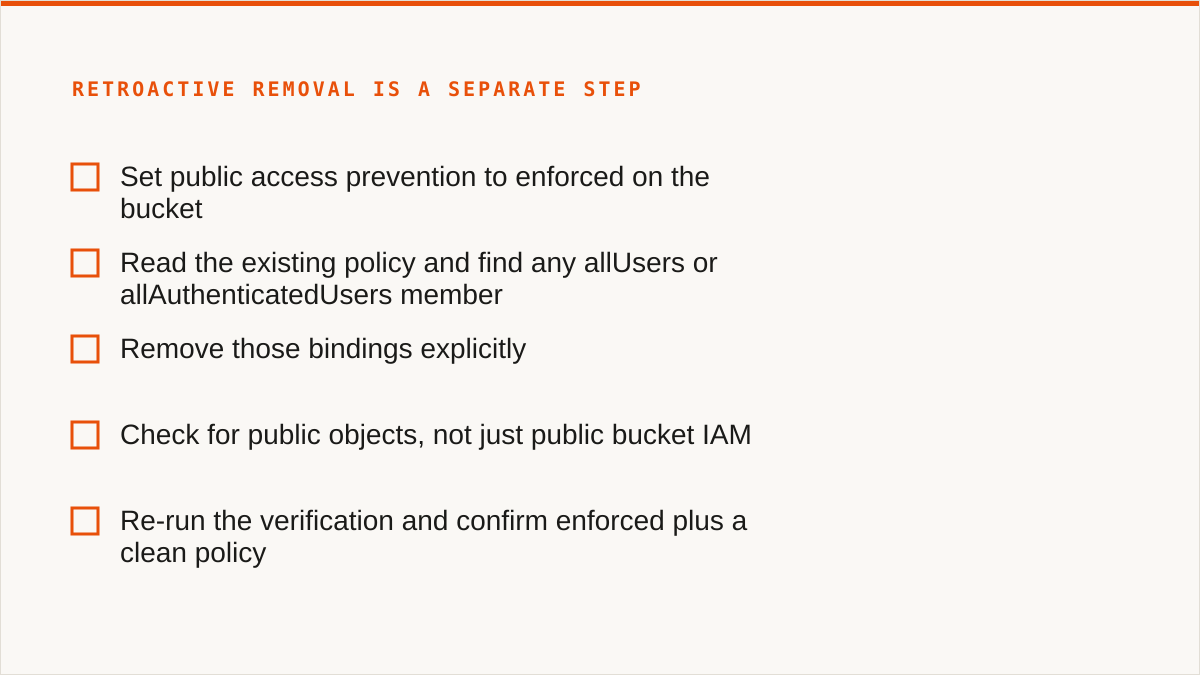
Ordering warning: set enforced, then audit and remove existing public bindings and object ACLs, then re-verify. These are three separate steps and the middle one does not happen by itself.
The sequence that works:
Set public access prevention to enforced on the bucket.
Read the existing policy and find any allUsers or allAuthenticatedUsers member. Do not assume there are none.
Remove those bindings explicitly.
Check for public objects, not just public bucket IAM.
Re-run the verification and confirm enforced plus a clean policy.
The commands, in order:
# 1. Enforce
gcloud storage buckets update gs://example-bucket --public-access-prevention

# 2. Look at what is actually in the policy
gcloud storage buckets get-iam-policy gs://example-bucket

# 3. Remove a public binding you found (repeat per role/binding)
gcloud storage buckets remove-iam-policy-binding gs://example-bucket \
  --member=allUsers --role=roles/storage.objectViewer

# 4. Hunt for objects that are public regardless of bucket IAM
gcloud storage objects list gs://example-bucket --recursive \
  --format="table(name,acl)" | grep -i allUsers

# 5. Re-verify
gcloud storage buckets describe gs://example-bucket \
  --format="value(iamConfiguration.publicAccessPrevention)"
gcloud storage buckets get-iam-policy gs://example-bucket | grep -i allUsers
Step 3 is the one people skip. They run step 1, see enforced, feel the dopamine hit of a completed ticket, and close it. The public binding from years ago is still there. The bucket is still public. The dashboard says you are safe.
Picture the bucket that reports enforced for over a week while serving a public object. You only catch it because the re-verification pass runs the object-level check as well as the bucket-level one. Trust the bucket describe output alone and it stays public. That is the whole lesson. The flag is a constraint on the future. The cleanup is a job on the past. They are different jobs.
Guard three: org policy constraints are the only guard a tired engineer cannot undo
Here is the part where we stop being polite about the first two guards. Bucket-level UBLA and bucket-level PAP are good. They are necessary. They are not sufficient, because both of them are settings on the bucket, and anyone with the right role on the bucket can change them back. A tired engineer at 6pm on a Friday, trying to unblock a partner, can flip PAP from enforced to inherited and be done in ten seconds. The first two guards are guardrails that the car itself can remove.
Org policy is the guardrail that the car cannot remove. It is the only layer that survives a mistake made by someone who has the permissions to make it.
Two constraint strings matter here:
constraints/storage.publicAccessPrevention enforces public access prevention across the org or folder, so a bucket cannot have it turned off beneath that scope.
constraints/iam.allowedPolicyMemberDomains restricts which identity domains can appear in IAM policy bindings at all, which stops allUsers and any external-domain principal from being added in the first place.
Apply these at the org or folder level, and the configuration is written as a policy document. We are not going to paste a full org policy JSON here because it depends on your hierarchy, but the shape is: attach constraints/storage.publicAccessPrevention with an enforcement rule at the folder that holds the buckets, and attach constraints/iam.allowedPolicyMemberDomains with an allow-list that includes only your own domains.
Be honest about the cost of this layer, because it is real.
Org policy needs the right role. It cannot be set with the bucket-level permissions a service account usually has. It requires an org or folder level role, held by someone in the platform team, which means the change goes through a review and a change window. That is correct and it is also friction. If you're a small team without an org admin, you may not have this layer available at all, and you should know that going in.
Org policy blocks legitimate exceptions. Picture a partner integration that genuinely needs a public bucket. Not a bug, not a misconfiguration, a contractual requirement: they fetch a manifest from a public URL on their schedule. Org policy at the folder level refuses it. Do not disable the constraint org-wide. Carve out an exception at the folder level and put that single bucket in a folder where the constraint is scoped differently. That is the correct pattern and it takes a conversation, a ticket, and about a week of back-and-forth.
And this is the layer that actually holds. The Friday-afternoon mistake that flips bucket PAP back to inherited will fail, because the org policy above it does not care what the engineer typed. The engineer can flip the bucket setting, get an error, and go home. The bucket stays closed. That is the difference between a guardrail and a suggestion.
Three guards, stacked: UBLA removes the second category of public exposure entirely. Bucket PAP blocks new public bindings on the bucket. Org policy makes the bucket-level PAP flag impossible to remove. Only the third one holds when someone with the permissions is having a bad day.
What it costs: broken integrations, a late-night hotfix, and a stretch of nobody trusting the console
Expect roughly five weeks of elapsed time and a lot more human attention than the command count suggests. Here is where it goes.
The signed URL breakage is the first hotfix. A partner's nightly export fails when UBLA lands on their bucket. Their job uses URLs minted by a service account whose authorization relied on object ACL evaluation. The fix itself is small: re-grant at the bucket level and regenerate the URLs. The cost is the day spent finding which process is still minting them, because the error surfaces in the partner's logs, not yours. One late-night hotfix, roughly a day of two engineers' time, and a very polite email.
The partner exception negotiation is the slowest part. A public bucket that has to stay public, a folder-level org policy carve-out, a review, and a change window. Roughly a week of calendar time for a change that touches one bucket. That is the price of the third guard. It is worth paying and it is not free.
The internal script rewrite is the small one on paper and the annoying one in practice. The script that sets allUsers on an object needs to stop doing that. It now writes to a bucket whose public access is deliberate and documented, with the org policy exception covering it, and the script no longer sets object ACLs at all. Maybe half a day of engineering, plus the cross-team conversation about who owns it, which is always the real cost.
And then there is the stretch where nobody trusts the console. This is the cost nobody puts in the retro. Once you have found one bucket that reported enforced while serving a public object, every green checkmark in the console starts to look like a lie. People run the same commands twice. The team stops trusting the UI, so they trust the CLI, and then they stop trusting the CLI output either because maybe the format filter was wrong. That period is real and you should plan for it. The way out is not a better dashboard, it is a re-verification script that anyone can run and that prints the same answer every time.
Write that script. It runs the bucket list, the PAP describe, the IAM policy read, and the object-level public check, in sequence, and exits nonzero if anything is public or inherited. That script is the actual deliverable of this migration. The flags are easy. The script is what makes the team believe.
Where Storafleet fit, where it did not, and the honest concession: rclone does the audit pass better than we do
We have to say this plainly, because it is true and because the alternative is a post that lies by omission.
For the read-only inventory and the scripted re-verification, rclone and gcloud in a shell script beat us. Not narrowly. Clearly. A shell script composes with cron and with your CI pipeline. It runs inside your own security boundary, using your own service account, with credentials that never leave your hardware. It costs nothing. rclone in particular has been maintained for over a decade, supports more backends than we do, and is the right tool for a job that is fundamentally "walk a list and print what is wrong."
We used rclone and gcloud for the audit. We're not going to pretend otherwise. If the job is to produce a list of public buckets and re-check it on a schedule, the honest answer is a script, and the honest answer is that the script is better than a console for that.
So what does the Storafleet console actually do on this project? Two things, and they are the two things a shell script does badly.
The per-bucket public-access configuration view. When you have a hundred buckets and you need to see, at a glance, which ones have UBLA on, which have PAP enforced versus inherited, and which have a policy that still contains allUsers, a terminal table is not the right reading surface. The console gives you one row per bucket with the three states side by side, and it makes the stragglers obvious. That is a presentation problem, and a UI genuinely solves it.
The cross-bucket search for the stragglers. When the script says "dozens of buckets, some of which are still inherited," you need to find the ones that were missed across a large list without re-running the whole thing and eyeballing it. Searching across buckets for a configuration state is the kind of thing a console does in a way a shell pipeline does not. Use it to drive the second and third cleanup passes.
That is the honest split. The audit and the re-verification: rclone and gcloud, running in your boundary, costing you nothing. The reading and the searching across many buckets: us. If you take nothing else from this section, take that the audit belongs to the script and we are not going to fight you for it.
Who should not use Storafleet for this, and what they should run instead
We would rather you used the right tool than used ours badly. So here is the plain version.
If your budget for this is zero, the conversation is over and rclone wins. rclone is free, permanently, with no account and no vendor. It will walk your buckets, it will print the public ones, and it will run on a schedule inside your own boundary. For a lot of teams that is the whole solution and there is no reason to pay us.
If everything lives in one cloud and always will, use that provider's own console. The GCP console is free, always current with GCS's newest features, and authoritative in a way a third-party control plane is not. It knows about the feature that shipped last week because it is the feature that shipped last week. We do not, and we will not.
If your credentials cannot leave hardware you control, use rclone or gcloud with your own service account. Our credentials sit encrypted in our database, with AES-256-GCM and per-namespace keys, and AWS can be connected keylessly by IAM role assumption. But "the keys never left my laptop" is a stronger answer than ours, and it would be dishonest to pretend otherwise. This is the concession people skip past: our architecture requires us to hold a credential you minted, and for some security postures that alone is disqualifying, no matter how well we encrypt it.
If the workflow is code and always will be, use a CLI. A binary composes with cron, systemd, CI pipelines, shell scripts and Makefiles. A web console does not. If your cleanup runs as a pipeline step, the pipeline step should be a command, not a click. We have no scripting surface that composes the way a shell does, and we're not going to invent one to win this argument.
If you need storage mounted as a filesystem, we cannot help and rclone mount or Mountain Duck can. We have no FUSE surface. Remote buckets will not appear in Finder or Explorer.
So who is this post's approach for, and where does the Storafleet console earn its keep?
This is for the team with many buckets across more than one provider, where the audit is one job and the reading of the result is another. The audit is a script. The reading is a hundred rows of public-access state that somebody has to actually look at, and a console that shows PAP, UBLA and policy state per bucket across providers in one place is worth a flat subscription to a team that would otherwise build a dashboard. We do not charge per gigabyte to move data, on any tier including Free, so cleaning up across providers does not bill you by the byte while you work.
And if you are reading this with dozens of buckets and no script yet, start with the script. Run it today. You will find the inherited ones, and then you will find the one that reported enforced while serving a public object, and then you will understand why there are three guards and not one.
Your storage estate deserves a control plane.
Join the DevOps teams and founders who run every cloud's buckets from one control plane.