
Enforcing S3 Object Lock retention policies: legal hold vs governance
October 2026 · 13 min read · Surya
Should I use governance mode or compliance mode, and where does legal hold fit in?
That is the question. Here is the short answer. Governance mode is for when you trust your own team not to delete things they should not. Compliance mode is for when you do not. Legal hold is for when you do not yet know how long you will need to keep something, and you refuse to guess.
We are Storafleet. We are a control plane for object storage you already own, which means we sit in front of buckets on S3, R2, B2, Wasabi, MinIO and a few dozen other S3-compatible providers. Object Lock configuration is one of the things we do. It is also one of the things people get wrong most often, usually because they read the AWS docs for five minutes and conclude the two modes are a dial with "mild" and "spicy" settings. They are not. They fail in opposite directions.
Two modes, opposite failure modes: governance is a speed bump, compliance is a one-way door
Governance mode is a speed bump with a sign on it. An object under governance retention cannot be deleted or overwritten by a normal s3:DeleteObject call. But any principal holding s3:BypassGovernanceRetention can delete it anyway, with a single extra header on the request. That is the entire protection: an attacker in your account doesn't need to be clever, only privileged. The point of governance mode is to stop accidents and to make deliberate deletion a visible act, not to stop a determined insider.
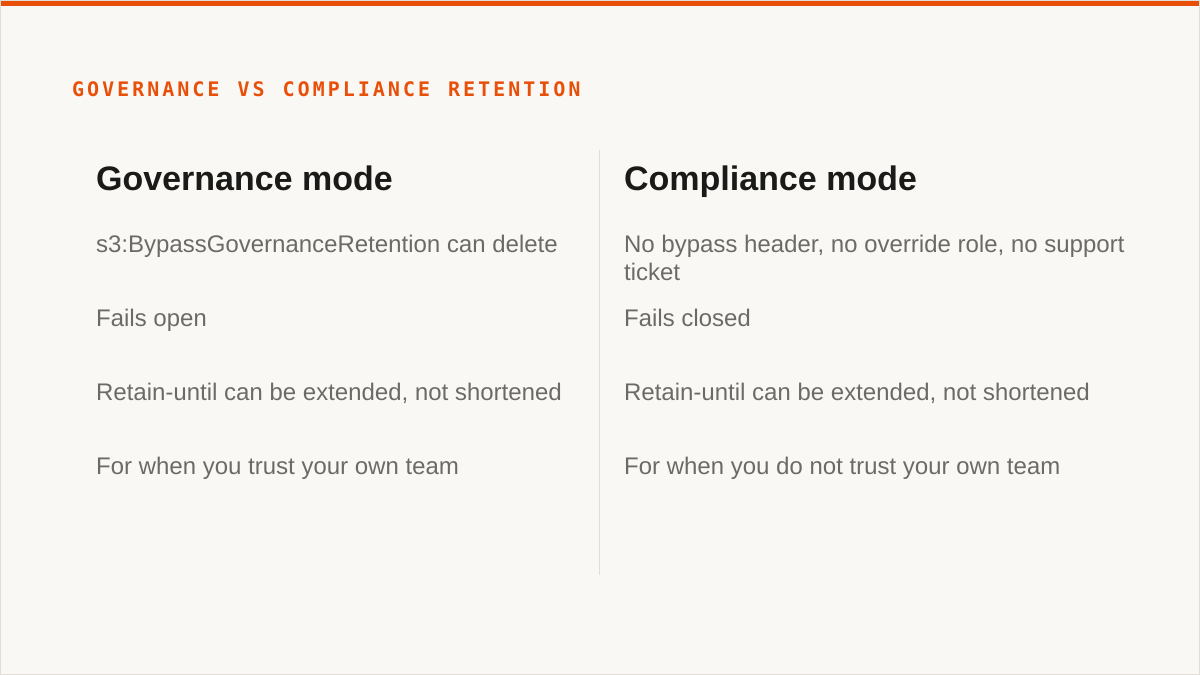
Compliance mode is a one-way door. Once an object is under compliance retention, nobody deletes it. Not you. Not the root account. Not AWS support. Not a court order, in practice. There is no bypass header, no override role, no support ticket. The object stays until the retain-until date passes, and if that date is wrong, you get to explain to your CFO why a bucket you do not need is billing you for four more years.
That asymmetry is the whole decision. Governance mode fails open, in the sense that someone with the right permission can always get the data out. Compliance mode fails closed, in the sense that nobody can, including you, including when you are right.
The mistake we see most is people reaching for compliance mode as a "stronger" governance mode. It is not stronger. It is different. Stronger implies you can dial it back. You cannot. If you are not legally required to hold data in a way that survives your own attempts to destroy it, compliance mode is the wrong tool, and it will hurt you the first time a retain-until date is computed from a bug.
Retention periods are per-object and can be extended but not shortened. Governance retain-until can be pushed further out. Compliance retain-until can also be pushed further out. Neither can be pulled in. Choose the date too far out and you have made a decision you cannot undo. Choose it too short and the object falls out of retention on schedule, which is usually fine, because you can always extend before it expires.
Our default advice: governance mode plus a short retain window, extended deliberately, unless a policy or a lawyer tells you otherwise. Compliance mode only when the answer to "what happens if we lose this object early" is "we are in legal trouble", not "we are annoyed".
The steps: turning Object Lock on at bucket creation (and why you cannot retrofit it)
Object Lock is not a feature you enable on a bucket you already have. It is a property of the bucket that must be set when the bucket is created. If you are reading this because you want to lock down an existing bucket, you will not be able to, not without copying every object into a new bucket that was created with Object Lock enabled. That is the first thing to internalise.
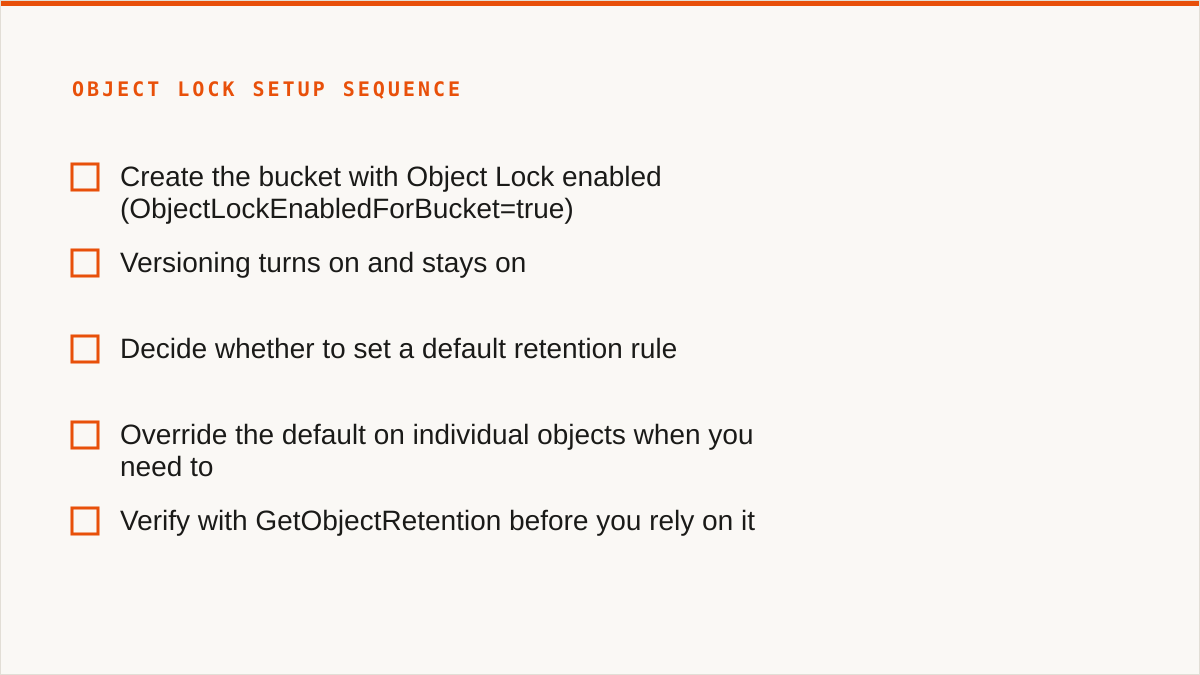
Here is the sequence we walk people through.
- Create the bucket with Object Lock enabled. In the AWS console this is a checkbox on the create-bucket form, under "Advanced settings". It is not modifiable afterward. In the API it is the
ObjectLockEnabledForBucket=truerequest header. If the bucket already exists, stop, because you have to create a new one. - Versioning turns on and stays on. Object Lock requires versioning, and once you enable versioning to support it, you cannot suspend it on that bucket. Every overwrite creates a new version. Every delete creates a delete marker. Your storage bill will grow in ways the naive estimate does not account for, and you should plan for that.
- Decide whether to set a default retention rule. A bucket-level default retention applies to every new object put into the bucket after the rule is set. You choose the mode (governance or compliance) and the period (days or years). Existing objects are not covered. Objects put in before the rule was set are not covered. This is not retroactive.
- Override the default on individual objects when you need to. Any
PutObjectcan carry anx-amz-object-lock-modeandx-amz-object-lock-retain-until-dateheader, which takes precedence over the bucket default. This is how you keep a specific contract for seven years while the bucket default is one year. It is also how you shoot yourself in the foot if the date is computed wrong. - Verify before you rely on it. A
GetObjectRetentioncall returns the mode and the retain-until date. If you do not see them, the object is not protected, regardless of what the bucket policy says.
The default retention rule is the part people misread. It does not apply to the bucket, it applies to new objects. It does not apply to old objects. It does not apply to objects that arrive via replication from another bucket unless you set that up deliberately. If you turn on a default rule and assume everything in the bucket is now protected, you are wrong, and you will find out at the wrong moment.
We surface all of this in the console. Bucket creation with Object Lock on, default retention rule, per-object retention on upload. The five-minute setup is genuinely five minutes when you do it in the UI.
Legal hold is a separate switch, and that is the whole point
Legal hold is not a retention mode. It is an orthogonal flag on an object. It has no date. It has no period. It is either on or off, and while it is on, the object cannot be deleted or overwritten, regardless of what retention mode is set, regardless of whether the retention window has expired, regardless of who you are.
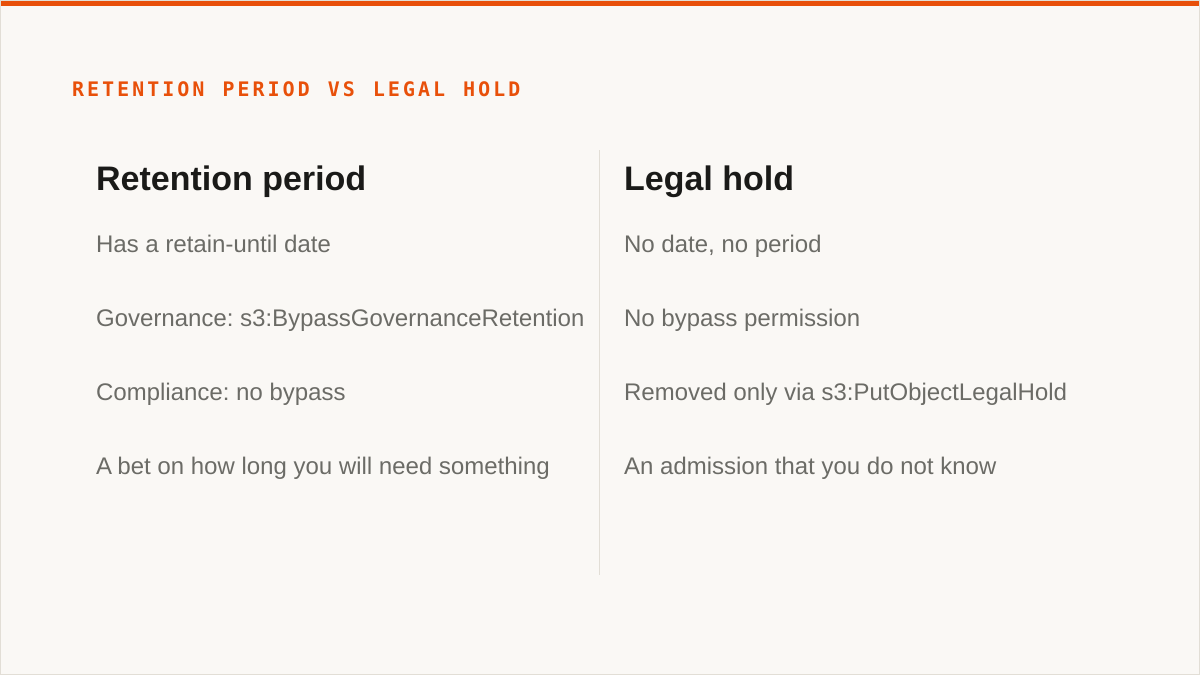
That orthogonality is the design. A retention period is a bet on how long you will need something. A legal hold is an admission that you do not know. Litigation is the canonical case. You get a preservation notice, you do not know how long the matter will run, you cannot commit to a retain-until date that is either safe or honest, so you put a hold on the object and you leave it on until counsel tells you otherwise.
Legal hold has no bypass permission. Governance mode has s3:BypassGovernanceRetention. Compliance mode has nothing. Legal hold also has nothing. The only way out is to remove the hold, which requires s3:PutObjectLegalHold on the object, and then delete normally.
Legal hold also survives an expired retention period. If an object is under a 30-day governance retention and someone puts a legal hold on day 10, day 31 does not free the object. The retention window closes, the legal hold does not, and the object is stuck until someone with the right permission explicitly clears the hold. This is how you end up with an object that has been "not under retention" for two years and still cannot be deleted, and it is correct behaviour, and it will confuse whoever is looking at the console without the full picture.
We have seen teams try to model legal hold as a very long compliance retention period instead. Do not. The failure mode is that you cannot release the object when the case closes, because compliance retention does not have a release. Use the tool that was built for the problem.
What we actually see in the console, and what still needs the AWS CLI
Our console covers the configuration. It does not yet cover every operation. We are honest about the split because pretending otherwise wastes your afternoon.
What you can do in Storafleet today:
- Create a bucket with Object Lock enabled, across the S3-compatible providers that support it.
- Set, inspect and change the bucket default retention rule (mode and period).
- Set per-object retention mode and retain-until on upload.
- Browse objects and see their retention state and legal hold state at a glance.
- Configure versioning, lifecycle, CORS and public access on the same bucket.
What still lands in the AWS CLI, or whatever provider CLI you are using, for now:
- Bulk legal hold toggling across many objects. If you need to put a hold on 40,000 objects in one go, you are scripting
aws s3api put-object-legal-holdin a loop, not clicking through our UI. We know this. It is on the list. - Bulk retention changes. Same shape. Extending retention on a set of objects matched by prefix or tag is a scripted job.
- Programmatic workflows generally. If your retention logic is a function of a contract management system, you are going to write code that calls the S3 API, and Storafleet is not in that path.
There is a real limitation here and we should name it plainly. We are a console, not a command. A console does not compose with cron, systemd, CI pipelines or a Makefile. If your workflow is code, a CLI fits it natively and a web UI never will. For the person who needs to configure a bucket once and check on it occasionally, we are a good fit. For the person whose retention policy is generated by an application, the CLI or an SDK is the right answer and we are not.
Governance needs s3:BypassGovernanceRetention, and that permission lives in the wrong hands
Governance mode's protection is only as good as the permission model around it. We keep seeing the same pattern.
A team turns on governance retention, feels good about it, and then attaches s3:BypassGovernanceRetention to a role that is used for everything. The deployment role. The data pipeline role. The backup role. The "just give it admin for now" role. Every one of those roles can now delete objects that were supposedly protected. The protection is real on paper and absent in practice.
Compliance mode has no equivalent problem, which is exactly why it is a one-way door. The permission does not exist, so it cannot be misused. If your threat model is "an insider with a normal admin role might delete records", compliance mode is the only mode that actually addresses it. Governance mode does not, and it is a mistake to design around it as if it does.
What we suggest, and what we do ourselves:
- Do not attach
s3:BypassGovernanceRetentionto any role that does routine work. The deployment role does not need it. The data pipeline role does not need it. If a request fails because of governance retention, that is the system working, not a bug to be worked around by widening the role. - Give the bypass permission to a single break-glass role that requires MFA and that alerts when it is assumed. If you cannot name the last person who used it, you cannot name the next one either.
- Separate the retention-setting permission from the retention-bypassing permission.
s3:PutObjectRetentionands3:BypassGovernanceRetentionare different. Most teams grant them together because they sound similar. They are not similar. One extends protection, the other removes it. - Audit both. CloudTrail records both
PutObjectRetentionand theBypassGovernanceRetentionheader on delete events. If you are not alerting on the second, you have a governance mode deployment that is governance in name only.
The failure mode we see most is silent. A team believes objects are protected. A junior engineer with the deployment role deletes a folder during a cleanup. Nothing alerts. Nobody notices for six months. The governance retention was real, the permission was real, and the protection was not.
There is a second-order version of this worth naming. Object Lock is per-object, and a delete of a versioned object without a version ID creates a delete marker rather than removing data. So a naive "delete the folder" can appear to succeed, the object appears gone from a listing, and the data is still there under the version. If your incident response assumes the data is destroyed, you may be wrong. And if it assumes the data is safe, you may also be wrong, depending on what was actually called. Read the CloudTrail event.
Where we are not the right tool
If your budget for this is zero, the conversation is over and rclone wins. rclone is free, permanently, with no account, no vendor and no subscription. It supports more backends than we do, it mounts, it is scriptable, and it runs inside your own security boundary. It has been maintained for over a decade. For a large number of readers of this post, the honest answer is: use rclone.
And rclone handles Object Lock natively, which is the part we have to say out loud. The rclone backend commands and the S3 backend options cover retention mode, retain-until date and legal hold on upload, and the same goes for the AWS CLI and every provider SDK. You get governance mode, compliance mode, per-object retention and legal hold, at no cost, without a second control plane in the path. If your retention logic is already code, or if you are comfortable writing a shell script and a cron entry, the CLI and rclone are not a compromise. They are the correct tool, and adding us to that stack buys you a web page you did not need.
Three more cases where we are the wrong answer, and we will say so:
If your credentials must never leave hardware you control, use rclone. Your credentials sit encrypted in our database. The encryption is real, AES-256-GCM with per-namespace HKDF keys, and for AWS you can connect keylessly via IAM role assumption so no long-lived key ever touches us. That is a good answer. It is not as strong as "the keys never left my laptop", and we are not going to pretend otherwise. If that sentence is a requirement, run rclone on your own machine and keep the keys there.
If everything lives in one cloud and always will, use that provider's own console. It is free, it is always current with that provider's newest Object Lock features, and it is authoritative in a way we are not. Our value is when you have buckets in three providers and want one place to reason about them.
If you need to mount storage as a filesystem, we cannot help. There is no FUSE surface in Storafleet. rclone mount, Mountain Duck and ExpanDrive do that and we do not. Similarly, if you need Google Drive, Dropbox, OneDrive or SFTP, we do not connect them. rclone does, and MultCloud covers the consumer clouds we deliberately skip.
And one more, less about features and more about us. We are a small team and Storafleet started in 2026. If "will this still exist in five years" is a load-bearing question for your retention strategy, a decade-old open-source project has a better answer than we do, and you should weigh that honestly. We do not have published case studies and we are not going to invent them.
What we are is a console that connects the S3-compatible providers you already pay for, configures Object Lock correctly the first time, and does not charge you per gigabyte for the privilege. The retention modes themselves are the same everywhere. The question is whether you trust your future self, and that is a question only you can answer.