
Bucket creation and IAM policy setup for S3-compatible providers
October 2026 · 10 min read · Surya
Bucket creation and IAM policy setup is the part of S3-compatible storage where the abstraction stops being abstract. You create a namespace, you hand out a credential with a precise set of verbs, and then you find out whether the provider actually honors the policy language it claims to speak. Most guides describe it as a two-click step. It is not. The gap between what the console shows you and what the policy actually permits is where people get burned, usually at 2am, usually with a 403 on a PutObject that worked fine last week.
So let us be precise about what "the setup step" means. It is two operations: creating a bucket (a globally unique name in a region, with a default ACL, a versioning state and a lifecycle rule attached to it) and minting a principal (an access key, a token, a role) that can act on that bucket and almost nothing else. On AWS this is IAM. On everyone else it is a different thing wearing the same name.
Every provider says 'S3-compatible' and then means something slightly different
"S3-compatible" is a claim about the data plane, not the control plane. The verbs GetObject, PutObject, ListObjectsV2 and the signature scheme V4 are broadly interchangeable. The way you create a bucket and the way you write an access rule are not. This is the leak, and it is wider than the marketing suggests.
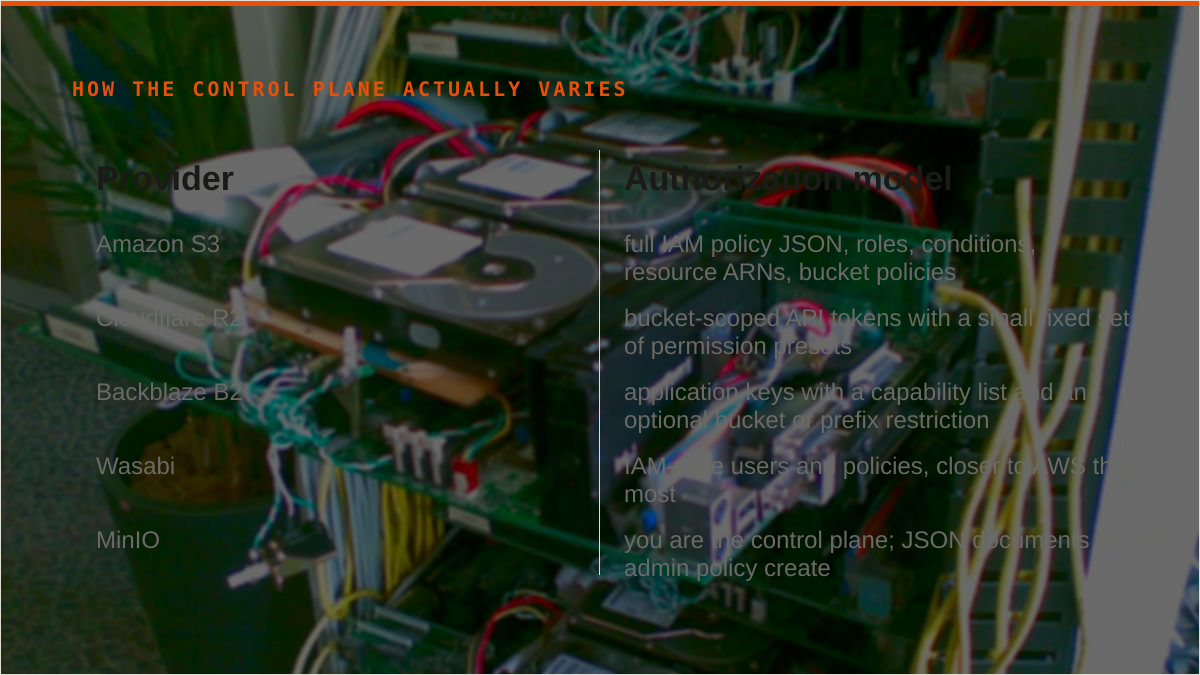
Here is how the surface actually varies across providers we connect:
- Amazon S3: full IAM policy JSON, roles, conditions, resource ARNs, bucket policies. The real thing. Also the most complex thing.
- Cloudflare R2: bucket-scoped API tokens with a small fixed set of permission presets (Object Read, Object Write, Admin Read & Write). You do not write a policy document; you pick a preset and bind it to buckets. Close to IAM, not IAM.
- Backblaze B2: application keys, each with a capability list and an optional bucket or prefix restriction. Capabilities are named differently (
listFiles,readFiles,writeFiles) and the B2 native API is not S3, so you are often using the S3-compatible endpoint AND the native console to manage keys. - Wasabi: IAM-style users and policies, closer to AWS than most, with its own console quirks around root credentials.
- MinIO: you are the control plane. Policies are JSON documents you
mc admin policy createagainst a local server, and the identity model is yours to run. - Oracle Cloud (OCI): policies are written in OCI's own IAM language, scoped to compartments and tenancy, with statements like
Allow group X to manage objects in compartment Y. This is not S3 policy JSON at all. It is a different language that happens to authorize the same buckets.
The correct mental model: S3 compatibility guarantees the wire format, not the authorization language. If you assume a policy document you wrote for AWS will paste cleanly into R2 or OCI, you will be wrong in a way that returns AccessDenied and no explanation. The setup step is the tell. If bucket creation and key minting in a provider's console is a five-field form, that provider is probably not giving you a real policy language, and you should not plan around one.
This is the fork in the road. Either you accept the provider's simplified model and live inside it, or you need a script that talks to each provider's actual control plane. There is no third option where one policy document works everywhere.
A least-privilege policy for a bucket that holds actual data
Start from the shape, not the syntax. A bucket that holds real data needs a policy that answers four questions: who can list, who can read, who can write, and who can destroy. The default answer to the last one should be nobody.
On a provider that speaks S3 policy JSON (AWS, Wasabi, MinIO, and mostly R2 if you squint), the shape is this:
{
  "Version": "2012-10-17",
  "Statement": [
    {
      "Sid": "ListPrefixOnly",
      "Effect": "Allow",
      "Action": ["s3:ListBucket"],
      "Resource": "arn:aws:s3:::my-bucket",
      "Condition": { "StringLike": { "s3:prefix": ["app/*"] } }
    },
    {
      "Sid": "ReadObjects",
      "Effect": "Allow",
      "Action": ["s3:GetObject"],
      "Resource": "arn:aws:s3:::my-bucket/app/*"
    },
    {
      "Sid": "WriteObjects",
      "Effect": "Allow",
      "Action": ["s3:PutObject"],
      "Resource": "arn:aws:s3:::my-bucket/app/*"
    },
    {
      "Sid": "DenyDestructive",
      "Effect": "Deny",
      "Action": ["s3:DeleteBucket", "s3:PutBucketPolicy", "s3:DeleteObjectVersion"],
      "Resource": ["arn:aws:s3:::my-bucket", "arn:aws:s3:::my-bucket/*"]
    }
  ]
}
The explicit Deny is the load-bearing line. An allow-only policy is a policy that grows accidentally. The deny on DeleteBucket and PutBucketPolicy means a compromised key cannot erase the namespace or lock you out of your own bucket. It also means an operator who fat-fingers a delete gets a 403 instead of a support ticket.
The conditional prefix matters more than people expect. ListBucket on the whole bucket leaks the shape of your data to any key that has it. Scoping to app/* means a read key cannot enumerate the backups/ prefix by accident. It is one condition and it removes a whole class of surprise.
Use separate keys for read and write, even when one key would do. A read path (a CDN, a reporting job, an analytics worker) should never hold a PutObject credential. A write path (an uploader, an ingest job) should not be able to read back what it wrote if it does not need to. Two keys, two policies, two rotation schedules. It is more work at setup and less work at incident response.
Now the divergence, which is where the abstraction leaks again:
- R2: you do not paste this JSON. You create an API token, tick Object Read & Write, and bind it to one bucket. There is no conditional prefix in the token model, so "read only
app/*" is not expressible at the token layer. You enforce it in the client or you accept the broader grant. - B2: an application key with capabilities
listFiles,readFiles,writeFiles, optionally restricted to a bucket and a file name prefix. The prefix restriction is real and useful. The capability names are not S3 verbs and the S3 endpoint maps onto them. - OCI: policies are
Allow group app-readers to read objects in compartment prod where target.bucket.name='my-bucket'. You are writing OCI's language, and the S3 compatibility layer sits underneath it. A policy document from AWS is not portable here. - MinIO: you run the IAM.
mc admin policy createtakes the JSON above andmc admin user addbinds it. If your MinIO instance is not backed up, your IAM is not backed up.
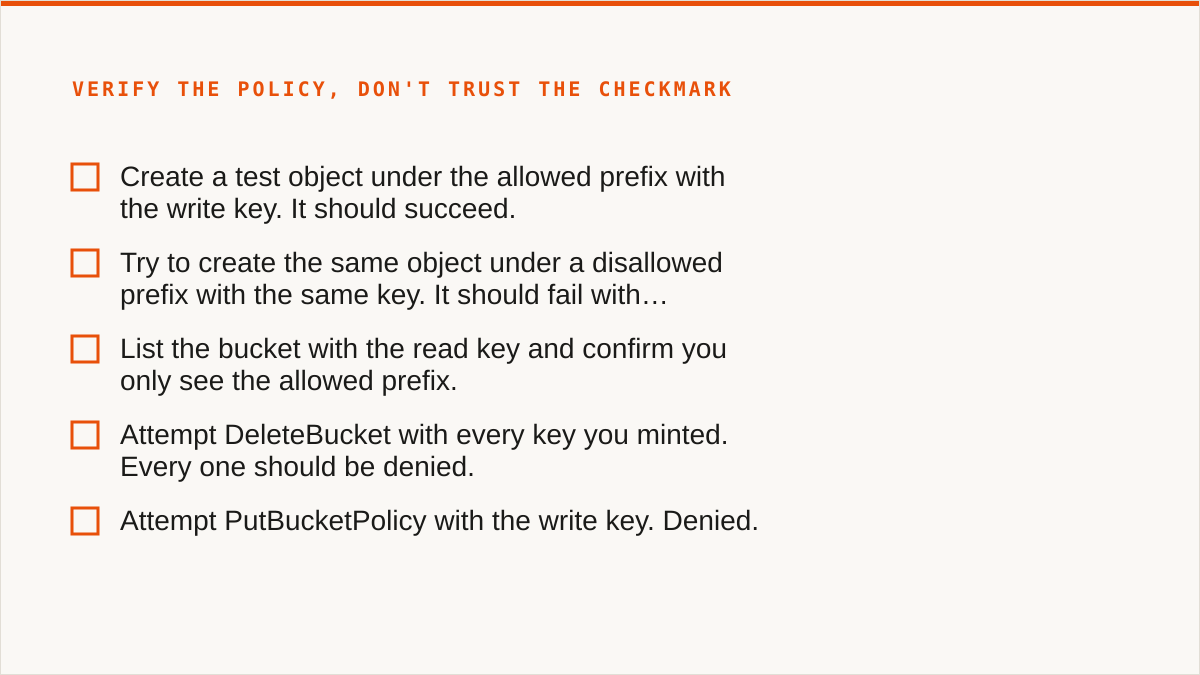
After you apply the policy, verify it. Do not trust the console's green checkmark. The checklist we run every time, and the one we would hand to anyone setting this up by hand:
- Create a test object under the allowed prefix with the write key. It should succeed.
- Try to create the same object under a disallowed prefix with the same key. It should fail with
AccessDenied, notNoSuchBucket(the latter means your resource ARN is wrong). - List the bucket with the read key and confirm you only see the allowed prefix.
- Attempt
DeleteBucketwith every key you minted. Every one should be denied. - Attempt
PutBucketPolicywith the write key. Denied. - Confirm the read key cannot
PutObject. Confirm the write key cannotGetObjectif that was the intent. - Check the bucket's public access setting is off unless you deliberately turned it on.
- Check versioning state matches what you planned (an unversioned bucket with a deny on
DeleteObjectVersionis a false sense of safety). - Rotate one key and confirm the old one stops working within the provider's propagation window.
- Record which key belongs to which workload somewhere that is not a Slack thread.
An afternoon of care here is the difference between a bucket you can hand to a contractor and a bucket you are afraid of. There is no console setting that does this for you, on any provider.
The setup step is where you find out you might not need us
Here is the concession, and we mean it. If your setup is one provider, a handful of buckets, and a policy you write once, you do not need a control plane. You need rclone and discipline. The tool is free, permanently, with no account and no vendor. It supports more backends than we do, it mounts, it scripts, it runs inside your own security boundary, and it has been maintained for over a decade. On the question "will this still exist in five years", rclone has a better answer than we do and we will not pretend otherwise.
It beats us on more than longevity. Mounting storage as a filesystem is something we cannot do. There is no FUSE surface in Storafleet. If you want buckets in Finder or Explorer, rclone mount, Mountain Duck or ExpanDrive are the answer, not us. Keeping credentials on your own hardware is a stronger guarantee than ours. We encrypt them in our database: AES-256-GCM with per-namespace HKDF keys, and AWS can be connected keylessly by IAM role assumption. But "the keys never left my laptop" is a better answer than "the keys are encrypted at rest in someone else's database", and if that is your requirement, use rclone.
If the workflow is code and always will be, a CLI composes and a console never will. Cron, systemd, CI pipelines, Makefiles: a binary fits natively. We are a web UI. We will not out-compose a shell script and we are not going to try.
Desktop clients deserve their own nod. Cyberduck and S3 Browser are free or cheap one-time licences, files stay on your machine, and they mount. For one person managing a few buckets who does not want a subscription, a desktop client is better than us. Mountain Duck is the paid version of the same idea and it is good. The providers' own consoles are free, always current with that provider's newest features, and authoritative. If everything lives in one cloud and always will, the console is more current than we are and costs nothing.
So who should not use Storafleet for this? Plainly:
- Budget is zero. The conversation is over and rclone wins.
- You need storage mounted as a filesystem. rclone mount, Mountain Duck, ExpanDrive.
- You need Google Drive, Dropbox, OneDrive, SFTP, WebDAV or Box. We connect the S3-compatible family and any custom S3 endpoint, and nothing else. rclone or MultCloud cover the consumer clouds we deliberately do not.
- Credentials must never leave hardware you control. rclone, or our IAM-role connect if it is AWS only.
- Everything lives in one cloud and always will. That provider's console is free and more current.
- The workflow is entirely code and always will be. A CLI composes, a console does not.
We have no published case studies and no named customers. We will not invent them for a blog post. We are a small team and Storafleet started in 2026.
What we do add, once the bucket and policy exist, is the thing a single provider's console cannot give you: a view across providers. Fifty-plus S3-compatible endpoints plus custom, browsable from one place. Migration and sync between them, one-time or scheduled, with migrated bytes unmetered on every tier including Free. Global cross-bucket search. Lifecycle, CORS, versioning, object-lock and public-access configuration without remembering which provider hides it behind which menu. Duplicate detection. Per-bucket cost visibility. Credentials encrypted at rest. AWS connectable by IAM role assumption.
That is a control plane. It is worth a subscription when you have crossed from one bucket to many, from one provider to several, from a person to a team, or from ad hoc to scheduled. Below that line, the honest answer is rclone, a text file of policies, and a calendar reminder to rotate keys. We would rather tell you that than sell you a console you do not need.