
Egress Costs AWS: What You Pay to Move Data Out
October 2026 · 31 min read · Surya
- The egress line item on your AWS bill, and why it is not one number
- S3 egress cost is the one people mean, and it is priced per gigabyte
- Free egress exists, and AWS is not hiding it
- The four ways people actually try to reduce egress charges
- Where Storafleet fits: a control plane for a move you already decided to make
- The checklist before you migrate anything out of AWS
- What we do not do, and who should not use us for this
- The worked example: moving a terabyte out of S3 without a surprise bill
- The bill after the move: what you are actually paying for now
The egress line item on your AWS bill, and why it is not one number
What does AWS charge to move data out? A rate per gigabyte, applied to bytes that leave the AWS network, appearing on your bill as data transfer out. That is the whole idea. It is also useless as an answer, because there is no single egress rate. There are a dozen of them, and which one you pay depends on three things: which service the bytes are leaving from, where they are going, and how much you move in a month.
That is why "egress costs aws" is such a frustrating search. People want a number. What they get is a table, and the table has footnotes, and the footnotes have exceptions.
Egress is priced per gigabyte, by the provider, at rates the provider sets and can change. We are not going to quote you AWS's current rates, partly because they move, and partly because a blog post is a terrible place to look up a price. What we can do, and what this post is for, is explain the mechanism precisely enough that you can read your own bill and know exactly which line you are looking at.
The mechanism, in order:
- Service of origin. Bytes leaving S3, bytes leaving an EC2 instance, bytes traversing a NAT gateway, and bytes served by CloudFront are four different products with four different price lists. S3 data transfer out is not the same line as EC2 data transfer out, even when the destination is identical.
- Destination. The internet is the expensive destination. Another AWS region is cheaper. Another AWS account in the same region is usually free. A VPC endpoint in the same region is free. Same-region traffic between availability zones has its own small charge, which is not egress in the usual sense but shows up near it.
- Volume tier. Almost every AWS data transfer rate is tiered. The first slab of gigabytes each month costs the most per gigabyte. Everything above it costs less. This is why small bills look disproportionately brutal and large bills look surprisingly linear.
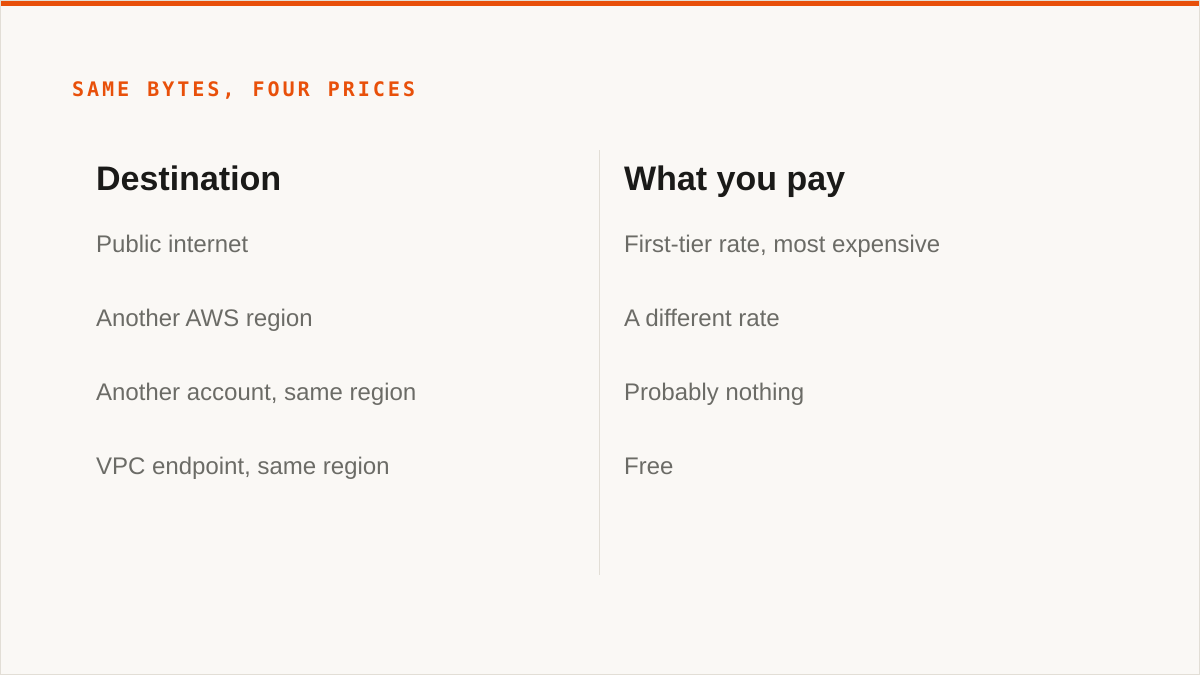
The core question, answered plainly: if you move a terabyte from S3 to a server on the public internet, you will pay AWS for that terabyte, at the first-tier rate, on the first slab of that month's transfer. If you move the same terabyte from EC2 instead, you pay a different rate for the same bytes. If you move it to another region, you pay a third rate. If you move it to another account in the same region, you probably pay nothing.
Same bytes. Four prices. That is the entire confusion in one sentence.
One more piece of mechanism worth internalising, because it explains a lot of surprising bills: NAT gateway data processing is not egress, but it feels like it. If your private subnet instances pull from S3 through a NAT gateway instead of a VPC gateway endpoint, you pay a per-gigabyte processing charge, in both directions, and it is not called "data transfer out" anywhere on the bill. People hunting for egress charges miss it constantly. If your bill has a NAT gateway line that is larger than your instance spend, you have found a problem you did not know you had, and it has nothing to do with leaving AWS.
We will come back to that. It is a good example of the general principle: the expensive bytes are usually the ones you did not think of as moving.
S3 egress cost is the one people mean, and it is priced per gigabyte
When someone searches "s3 egress cost" they are usually asking one of two things. Either "why is my S3 bill so much bigger than my storage line", or "what will it cost me to get my data out". Both have the same answer shape: S3 charges for bytes transferred out to the internet, priced per gigabyte, tiered by monthly volume, and it lands on the bill as its own line separate from storage and requests.
The first tier is the most expensive. That is not a trick, it is just how tiered pricing works. If you move 100 GB out in a month, all 100 GB sits in the cheapest-to-describe, most-expensive-to-pay slab. If you move 100 TB out in a month, the first chunk of it still costs the first-tier rate, and the rest is progressively cheaper. The discount is real, and it is also a commitment in disguise: you only get the better blended rate by moving a lot of data, which means the discount mostly rewards people who were already spending a lot.
There are a few structural things about S3 egress worth knowing, because they change the arithmetic:
- Bytes in are free. Uploading to S3 costs nothing for transfer. This matters enormously later, when we talk about moving out and then moving back.
- Same-region, cross-account transfer is free. Bucket-to-bucket within a region, across accounts, has no transfer charge. If your problem is "we have three accounts and data is scattered", your fix is cheap and it is not a migration.
- Cross-region replication has a transfer component. If you run CRR, you are paying to move bytes between regions, continuously. People turn this on for durability and then are surprised by a line that grows with their write rate.
- CloudFront changes the shape, not the existence. Origin fetches from S3 to CloudFront are cheaper than S3-to-internet, and then CloudFront charges you for its own egress. You have moved the cost, and possibly reduced it, but you have not deleted it.
An illustrative example, with round numbers that are not a quote from anyone's price list. Suppose you store 5 TB in S3 and serve 2 TB a month to the internet. Your storage line is whatever it is. Your egress line is 2 TB at the first-tier rate, because 2 TB is nowhere near the volume where tiers start helping. If that rate is on the order of a few cents per gigabyte, you are paying somewhere in the low hundreds of dollars a month, forever, for the privilege of your own data leaving.
Now suppose you serve 50 TB a month. The blended rate improves, the absolute number is much larger, and you are now deeply motivated to find something else. That is the shape of the problem: it is not that any single gigabyte is expensive. It is that the bill scales linearly with your success and never goes down.
S3 egress is a variable cost attached to your traffic, and traffic is the thing you are trying to grow. That is the real complaint. Not the rate. The direction of the curve.
There is a second-order effect people miss. Because egress is billed separately from storage, teams optimise storage and ignore transfer. They enable versioning, they keep old objects, they run analytics jobs that scan everything, they replicate across regions for safety, and none of it shows up in the number anyone is watching. Then the bill arrives and there is a line item nobody owns.
Egress has no owner in most organisations. That is the actual problem. The rate is just the mechanism that surfaces it.
Free egress exists, and AWS is not hiding it
Before this turns into a rant, let us be fair. AWS does not charge you for everything, and several of the free cases are genuinely generous. A post that pretends otherwise is not worth reading, and we would rather you trust the parts of this that matter.
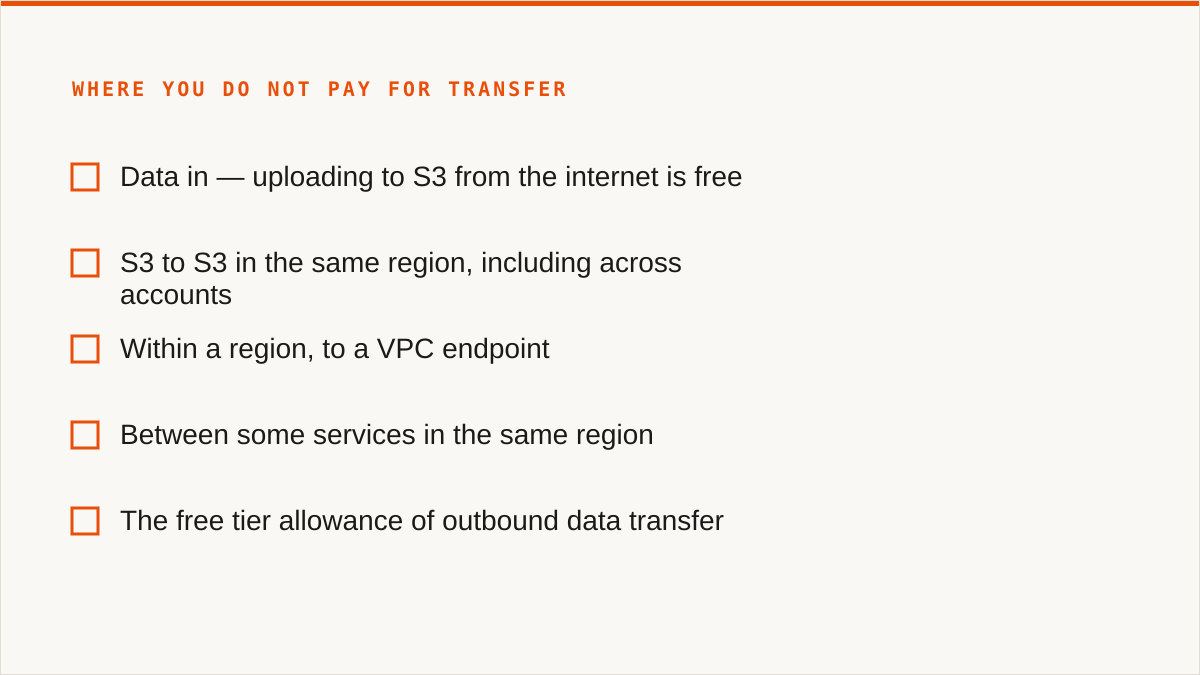
Where you do not pay for transfer:
- Data in. Uploading to S3 from the internet is free. No ingress charge. This is true across the major object storage providers and it is the reason migrations out of AWS are one-way expensive rather than two-way expensive.
- S3 to S3 in the same region. Copying between buckets in one region, including across accounts, has no data transfer charge. You pay for the requests and for the storage in both places, but not for the bytes moving.
- Within a region, to a VPC endpoint. If you set up an S3 gateway endpoint, traffic from your VPC to S3 stays on the AWS network and avoids both NAT processing and internet egress. This is one of the highest-leverage, lowest-effort fixes in all of AWS billing, and it is boring, which is why people do not do it.
- Between some services in the same region. Certain service-to-service paths are free or reduced. The details change, and the honest advice is to read the current documentation rather than trust a blog, including this one.
- The free tier. AWS includes an allowance of outbound data transfer in its free tier. It is small, it is monthly, and it is real. If your workload is tiny, you may genuinely be paying nothing.
The free egress cases are structural, not charitable. AWS is not being generous when it makes same-region transfer free. It is making it expensive to leave and cheap to stay. That is a coherent business decision and it is not dishonest, but it is worth naming, because it explains why the free cases are exactly the ones that keep your data inside AWS.
Which brings us to the concession this post needs to make, early, so the rest reads honestly.
AWS is not the villain of this story. The egress pricing model is legible, documented, predictable, and the free cases are real. If your data lives in AWS, stays in AWS, and is accessed from AWS, you may be paying almost nothing in transfer, and every alternative provider's cheaper egress is irrelevant to you. The people who get hurt are the ones whose architecture sends bytes to the public internet at volume. If that is not you, the cheapest move is to change nothing.
We would rather say that now than sell you a migration you do not need.
The four ways people actually try to reduce egress charges
There are four real options. Everything else is a variation.
Option one: keep data in one cloud and accept the cost
This is the correct answer more often than the industry admits. If your egress is a few hundred dollars a month and your engineers cost more than that per day, a migration project is a bad trade. Optimise the free things instead: gateway endpoints for S3, CloudFront in front of anything public, lifecycle policies to delete what you do not need, and a look at whether your NAT gateway is doing work a VPC endpoint should do.
That last one is worth repeating. NAT gateway processing charges are frequently larger than S3 egress charges and completely invisible to anyone searching for "data egress fees". Fix the NAT before you fix the egress. It is cheaper, faster and reversible.
The mechanism here is simple: you are not reducing the rate, you are reducing the bytes. Fewer bytes over the wire, fewer dollars. Boring, effective, and it needs no migration.
Option two: put a CDN in front, usually CloudFront
A CDN changes the shape of the bill, not the existence of it. Here is the mechanism. S3 to CloudFront origin fetches are priced lower than S3 to internet. CloudFront then charges its own egress rate, which is generally lower than S3's, and cheaper again if you commit to a volume plan. Caching means repeat requests never touch S3 at all, so the origin fetch volume drops.
For a public website serving the same assets to many users, this is a large, real win. Cache hit ratio is the whole game. If 90 percent of requests are served from cache, you are paying origin fetch on 10 percent of the traffic and CDN egress on all of it, and the total is well under what you were paying.
Where it does not help: private data. If every request is for a different object, or objects are behind signed URLs that vary per user, or the content is large files downloaded once, cache hit ratio is near zero and you have added a layer without removing a cost. You still pay the origin fetch, and you still pay the CDN.
CDNs are also not free of complexity. Cache invalidation, signed URL configuration, origin access control, and the fact that your egress bill now has two providers on it. For the right workload, worth it. For the wrong one, a net loss.
Option three: move to a provider with cheaper or free egress
This is the option most people searching "egress cost aws" are actually circling. The pitch from the alternatives is straightforward: they charge for storage and operations, and they either do not charge for egress or charge dramatically less.
The candidates, described by pricing model rather than by number, because numbers change and we are not going to pretend otherwise:
- Cloudflare R2. S3-compatible API, no egress charge to the internet, charges for storage and operations. The compatibility is good enough that most S3 tooling works against it. This is the single most common destination for people leaving S3 for cost reasons.
- Backblaze B2. S3-compatible, historically free egress up to a multiple of your stored bytes, with partnerships that make egress free to certain CDNs. Charges for storage and transactions.
- Wasabi. Flat-rate storage with a minimum retention period, no egress charges under normal use, and a policy about deleting too early that you should read before you sign. The minimum retention is the thing people get caught by.
- The hyperscaler alternatives. OCI, IBM, Scaleway and others all have their own transfer pricing. Some are cheaper. None are free across the board. Read the specific list.
What these have in common: the bill moves from a variable that scales with traffic to a fixed cost that scales with stored bytes. For a workload with high egress and modest storage, that is a large win. For a workload with huge storage and low egress, it can be a loss, especially with minimum retention terms.
And the migration itself costs money. You pay AWS to move the data out, once. That number is knowable in advance and it is the first thing to calculate, before you get excited about the ongoing saving.
Option four: build your own exit
Some people run their own object storage and stop renting egress entirely. MinIO on your own hardware, Ceph, or a colo rack with disks in it. The pitch is that egress costs you the price of the port, which is a fixed monthly number, and nothing else.
This is real and it works. It is also a different job. You now own durability, replication, hardware replacement, capacity planning, and the pager. The egress saving is genuine; the operational cost is also genuine, and for most teams it is larger. We are not going to pretend otherwise.
Where it wins: very large, very predictable workloads, especially ones where the data is already generated on-premises and the cloud is only a distribution channel. Where it loses: everything else.
Where Storafleet fits: a control plane for a move you already decided to make
Here is our position, stated plainly so you can decide whether it is useful to you.
We do not store your data. Storafleet is a control plane for object storage you already own. You connect providers, we give you one place to browse, migrate, sync, search and configure them. The bytes go from your source to your destination; they do not sit on our infrastructure.
We never charge per gigabyte to move data. Our pricing is a flat subscription. Migrated bytes are unmetered on every tier, including the free one. If you move 40 TB between two providers using Storafleet, the transfer cost to us is zero dollars on top of your subscription. This is deliberate. A tool that helps you escape per-gigabyte egress and then charges per gigabyte would be a joke, and we would deserve the mockery.
We connect 50+ S3-compatible providers plus any custom endpoint. S3, R2, B2, Wasabi, MinIO, DigitalOcean Spaces, OCI, IBM Cloud Object Storage, Scaleway, Linode, Vultr, Storj, IDrive e2, Hetzner. If it speaks the S3 API, or you can point us at an endpoint, we can talk to it. That is the whole compatibility surface: the S3-compatible family, and nothing else.
What that buys you, concretely: one place to see all your buckets across providers, a migration job that runs server-side or client-side depending on the pairing, scheduled sync so the two sides stay in step while you cut over, global cross-bucket search so you can find an object without knowing which provider holds it, and per-bucket cost visibility so you can see what the move is actually saving.
The credentials situation, honestly: they are encrypted at rest in our database with AES-256-GCM, per-namespace HKDF-derived keys. AWS specifically can be connected keylessly by IAM role assumption, so no long-lived AWS key exists at all. That is a real security posture and we are not embarrassed by it.
It is also not the strongest possible answer, and we will get to that in a moment, because it is the single most important thing for a certain kind of team to know before they sign up.
If you have already decided to move data off AWS and you want one console instead of four sets of credentials and a pile of scripts, that is what we are for. The page for that is storafleet.com/migrate-off-aws, and it is the honest description of the product rather than a landing page with a stock photo of a data centre on it.
Now the concession. This is the part where a lot of posts would say "of course, rclone is great for simple cases" and then spend three paragraphs explaining why it is not really suitable. We are not going to do that.
rclone genuinely beats us, and for a large number of people it is the correct answer. Specifically:
- It is free, permanently, with no account and no vendor. There is no subscription, no tier, no seat count, and no company that has to still exist next year for it to keep working.
- It supports far more backends than we do. 70+ at last count, including the consumer clouds we deliberately do not touch. If your job involves Google Drive, Dropbox, OneDrive, Box, SFTP or WebDAV, we cannot do it and rclone can.
- It mounts.
rclone mountmakes a remote bucket appear as a filesystem. We have no FUSE surface at all. If you want buckets in Finder or Explorer, we are the wrong tool and there is nothing to discuss. - It is scriptable and it composes. It is a binary. It goes in a Makefile, a cron job, a systemd unit, a CI pipeline. We are a web console and we will never compose the way a command does.
- It runs entirely inside your security boundary. Your credentials never leave your machine. Ours are encrypted in our database, which is a good answer, but "the keys never left my laptop" is a better one and it would be dishonest to pretend otherwise.
- It has been maintained for over a decade. On the question "will this still exist in five years", a decade-old open-source project has a better answer than a company that started in 2026. That is simply true.
Mountain Duck and Cyberduck beat us on the desktop, and we should say so. If what you want is a bucket that behaves like a drive in Finder or Explorer, with files that live on your machine and a one-time licence instead of a subscription, Mountain Duck is the better product for that job. It mounts. It integrates with the operating system in ways a web console never will. The same goes for Cyberduck and S3 Browser for a single operator with a handful of buckets. A console is not a desktop client and we are not going to pretend otherwise.
If you read that list and thought "that is my situation", close this tab and go install rclone, or buy Mountain Duck. We mean it. We would rather you use the right tool and remember us as honest than use the wrong one and remember us as the vendor who oversold.
Where a console earns its place is when there are several people, several providers, scheduled syncs, and a need to see state without reading a log file. That is a smaller population than rclone's, and we are fine with that.
The checklist before you migrate anything out of AWS
This is the part of the post we would want if we were on your side of the table. Work down it in order. Each line is something you can actually go and check.
- Inventory every bucket, and its size. Not an estimate. Get the actual byte count per bucket, including all versions. If versioning is on, the number is larger than the number you think it is. Use the S3 Inventory report or
aws s3 ls --recursive --summarizeagainst the bucket, and write the totals down. - Confirm whether versioning is enabled, and how many non-current versions exist. A bucket with versioning on and no lifecycle rules can be several times larger than the visible object set. Migrating only current versions loses history you may be legally required to keep. Decide deliberately.
- Look for object lock and retention policies. If a bucket has object lock in governance or compliance mode, objects cannot be deleted before their retain-until date, even by the root account in some configurations. This changes what "delete after copy" means and it can block the cleanup half of your migration entirely.
- Read the lifecycle policies on both sides. A lifecycle rule on the source that transitions objects to Glacier will make your migration read slower and more expensive. A lifecycle rule on the destination that expires objects at 30 days will quietly delete what you just moved. Read both.
- Establish the destination's ingress policy and its own egress policy. Ingress is usually free, but not always, and not always unlimited. More importantly, check what the destination charges for egress later, because that is the number you are actually buying. A provider with free ingress and expensive egress is a trap.
- Read the destination's minimum retention and deletion terms. Some providers charge you if you store data for less than a minimum period, or if you delete before a threshold. If your workload is bursty, this can wipe out the saving.
- Find every hardcoded endpoint in your codebase. Grep for
s3.amazonaws.com,s3.us-east-1.amazonaws.com, region-specific hostnames, and any bucket-name-plus-region construction. Every one of these is a place your application breaks at cutover. This is usually the longest item on the list. - Work out how credentials are supplied. IAM roles and instance profiles are easier to move than static access keys, because there is nothing to rotate. If you are on long-lived keys, decide now whether the destination supports role assumption or whether you are introducing a new secret to manage.
- Test whether anything depends on S3-specific features. S3 Select, event notifications to Lambda, batch operations, access points, Object Lambda. S3-compatible is not S3-identical, and the gaps are exactly in the newer, fancier features. Anything you rely on that is not core GET/PUT/LIST needs verifying against the destination.
- Map your DNS and any CDN in front. If a custom domain points at CloudFront or at an S3 website endpoint, the cutover involves DNS, and DNS involves TTLs. Lower the TTL a day before, not five minutes before.
- Plan the delete-after-copy step as a separate, deliberate action. Do not delete the source in the same job that copies it. Verify the destination first. Count objects on both sides. Spot-check a random sample by checksum. Only then delete, and only after you have confirmed the bill for the final month does not contain something you did not expect.
- Budget for the egress charge you pay on the way out. This is the one unavoidable cost. Calculate it before you start, at the first-tier rate, on the full byte count including versions. If the number is large enough to change your mind, better to know now.
- Audit the final AWS bill after the move for stragglers. NAT gateway still running. A CloudFront distribution still enabled. Cross-region replication still on. Old access keys still active. The migration is not finished when the bytes move; it is finished when the old bill stops.
Thirteen items. Most migrations fail on seven and eleven, not on the transfer itself.
What we do not do, and who should not use us for this
This is the section that costs us sales, which is exactly why it is here.
If your budget for this is zero, the conversation is over and rclone wins. It is free, it is maintained, it does everything we do and more. There is no version of this where we talk you out of that, and we are not going to try.
If you need storage mounted as a filesystem, we cannot help. There is no FUSE surface in Storafleet. If you want a bucket to appear as a drive letter or a mount point, use rclone mount, Mountain Duck, or ExpanDrive. Those are built for exactly that and we are not.
If you need Google Drive, Dropbox, OneDrive, Box, SFTP or WebDAV, we are the wrong tool. We connect the S3-compatible family and any custom S3 endpoint, and nothing else. That is a deliberate scope decision and it means Drive-to-bucket jobs are out of scope. Use rclone, or MultCloud or CloudFuze if you want a web interface for the consumer clouds.
If your credentials must never leave hardware you control, use rclone. Our encryption is real, and AWS can be connected by IAM role assumption with no long-lived key at all, but the strongest version of that requirement is satisfied by a local binary and not by a hosted console. If that is your policy, honour it. Use rclone.
If everything lives in one cloud and always will, use that provider's own console. It is free, it is always current with that provider's newest features, and it is authoritative in a way we never will be. We are useful when you have more than one provider. With one, we are overhead.
If your workflow is entirely code, the CLI wins and you should use it. A console does not compose with cron, systemd, CI, or a Makefile. If your migration is a step in a pipeline, rclone in a container is the right shape and a web UI never will be. There is no console feature that fixes that, and we are not going to build one that pretends to.
And the one that matters most for a certain kind of buyer: we are a small team and Storafleet started in 2026. We have no published case studies and no named customers we can point at, and we are not going to invent them. On the question of whether the company will still be here in five years, the honest answer is that a decade-old open-source project has a better one than we do. If vendor longevity is a hard requirement for you, that is a legitimate reason to choose differently, and we would rather you know it now.
If you want a desktop client for one person managing a few buckets, Cyberduck, Mountain Duck or S3 Browser will serve you better and cost you less. They mount, they keep files on your machine, and they are a one-time licence rather than a subscription. That is a better fit for a solo operator and we are not going to pretend a console is.
Who is left? Teams with more than one provider, more than one person touching the buckets, scheduled sync requirements, and a need to see the state of the whole estate in one place. That is a narrower market than "everyone with an S3 bucket" and it is the one we can actually serve well.
The worked example: moving a terabyte out of S3 without a surprise bill
Round numbers throughout. These are illustrative, not quotes from anyone's price list, and your actual rates will differ. The shape is what matters.
The situation. A terabyte in S3, spread across a handful of buckets. Versioning is on for two of them, which means the real byte count is more like 1.3 TB. The workload serves a few hundred gigabytes a month to the public internet, and the egress line has been growing. Nobody owns it. The team decides to move to Cloudflare R2, because the egress is the problem and R2's model removes it.
First, get the real number. Run an inventory. Discover the versioned buckets push the total to roughly 1.3 TB. This matters, because it is 30 percent more egress than the naive estimate and it changes nothing about the decision but everything about the surprise.
Second, calculate the exit cost. 1.3 TB out to the internet, at the first-tier rate, is the one unavoidable charge. Work it out from your own bill's rate for data transfer out to the internet, applied to the full byte count. Round, illustrative, and knowable in advance. That is the price of leaving. Everything after this is comparison.
Note what is not in that number. Reading the objects inside AWS is free. Listing is a request charge and it is negligible at this scale. The only real cost is the bytes crossing the boundary, once.
Third, verify the destination's terms. R2 has no egress charge to the internet, charges for storage and for operations, and has no minimum retention period that would bite a workload like this. Confirm the operations pricing against your request pattern, because a workload with millions of tiny objects can have an operations bill that dwarfs a transfer bill. This is the step people skip and then regret.
Fourth, run the migration. Copy everything, including non-current versions. Do not delete anything on the source. Verify by counting objects and spot-checking checksums on a random sample. Keep the source running and serving traffic the whole time.
Fifth, cut over. Find the hardcoded endpoints (there are always some). Update credentials. Lower DNS TTLs a day ahead if a custom domain is involved. Move traffic in stages if you can, so a problem affects a fraction of requests rather than all of them.
Sixth, wait, then delete. Not immediately. Wait long enough that you are confident nothing is reading from S3. Then remove the objects, remove the replication if it exists, disable the old CloudFront distribution, and stop the NAT gateway if it was there for this.
The arithmetic, in round numbers. One-time exit cost: on the order of a hundred dollars, computed from your own first-tier rate on 1.3 TB. Ongoing saving: whatever the monthly egress line was, now zero. If the source workload was serving 300 GB a month to the internet, you were paying for 300 GB a month, forever, at the first-tier rate, which is somewhere in the low tens of dollars a month. Over a year, that is a few hundred dollars.
Which means: at a terabyte, the move pays for itself in somewhere between a few months and a year, depending on your traffic. That is not a dramatic number. It is a real one.
Here is the part most posts skip. At this scale, the move might not be worth doing at all. If your egress bill is twenty dollars a month and the migration is two engineer-days plus a hundred dollars of exit cost plus the ongoing risk of a cutover, you are trading a real project for a rounding error. The honest advice for the terabyte case is often: fix your NAT gateway, put CloudFront in front of the public assets, turn on lifecycle policies, and leave the data where it is.
The move pays for itself when the egress line is large enough that it shows up in a budget conversation. Where that threshold sits depends entirely on your traffic, and you should compute it rather than take a blog's word for it.
Now scale it. At 10 TB stored and 5 TB a month served, the exit cost is on the order of a few hundred dollars and the ongoing saving is on the order of a few hundred dollars a month. The payback period is a month or two and the decision is obvious. At 100 TB served a month, the exit cost is real but the saving is enormous, and the migration is a project with a schedule and a rollback plan.
The economics flip at a specific, computable point, and that point is different for every workload. Compute it. Do not guess.
One more case worth naming, because it is common and it does not fit the template: the workload where the data is generated in AWS and consumed in AWS. Egress is near zero, the migration is pure cost, and the correct answer is to change nothing. We have said this before in this post and we will say it again, because it is the single most useful thing we can tell a portion of the people who found this page.
The bill after the move: what you are actually paying for now
After the move, the bill looks different in a specific way. The variable that scaled with traffic is gone, and what remains is a fixed cost that scales with stored bytes. That is the trade, and it is worth being precise about it.
What you pay for at R2, B2, Wasabi and their peers:
- Storage, per gigabyte per month. This is now your dominant line. It scales with what you keep, not with what you serve. If your data grows and your traffic does not, your bill grows anyway.
- Operations, per request class. PUTs, GETs, LISTs, and in some cases lifecycle transitions. A workload with millions of small objects can have an operations bill larger than its storage bill. Check this before you commit, not after.
- Egress, usually zero, sometimes not. The exceptions are the thing to check. Some providers are free to the internet but charge to specific destinations, or free up to a multiple of stored bytes, or free only in partnership with particular CDNs. Read the specific list for the specific provider. "Free egress" is a headline, not a specification.
- Minimum retention penalties. Wasabi's model includes a minimum storage duration. Delete before it and you pay anyway. If your workload is bursty or short-lived, this can be the entire cost.
And the things that do not disappear:
- Your CDN bill, if you have one. CloudFront or Cloudflare in front of the new origin still charges for egress to users. You have moved the origin, not the edge.
- Your DNS, your monitoring, your backup, your replication. None of that was ever AWS egress and none of it goes away.
- Your engineer time. Console subscriptions, migration tooling, the cutover, the verification. This is a real cost and it is usually the largest one in the first year.
The cheapest egress is the one you do not generate. That is the honest summary of everything above. A CDN with a high cache hit ratio beats a migration. A VPC endpoint beats a NAT gateway. A lifecycle policy beats both. Do those things first, and only migrate if the number that remains is still large enough to matter.
And the best tool is the one that fits your team, not our revenue. If that is rclone and a cron job, use it. If it is a provider console, use it. If you have several providers and several people and you want one place to see all of it, that is what we built, and the migration page describes it without the usual nonsense.
Egress costs what it costs. The question was never how to make it cheaper. It was which bytes you actually have to move, and which tool fits the shape of the exit. Answer those two and the bill takes care of itself.