
Creating S3 buckets with the AWS CLI: naming rules and regions
October 2026 · 10 min read · Surya
You typed aws s3api create-bucket and got a rejection. The name you picked looks completely normal. Then you tried the same command in a different region and it worked, or it worked in us-east-1 and failed everywhere else. So what is going on?
Two different rules are tripping you up. The name either broke a global-namespace rule or collided with a bucket someone already owns, and bucket names are unique across every AWS account on the planet, not just yours. The region failure is the us-east-1 LocationConstraint quirk: the one region that rejects the parameter every other region demands. Everything below is the rules behind those two answers, stated precisely, because half-knowing them is what produces these errors.
And the honest verdict up front: if all you need is to create buckets and set their policies, use the CLI or rclone and skip us. We do not provision buckets. We browse, sync and search across buckets that already exist. The rest of this post is the rules, because getting them right matters whichever tool you use.
Bucket names are a global namespace, and every rule follows from that
A bucket name is a DNS label, not a local identifier. That single fact explains every naming rule AWS enforces. mybucket.s3.amazonaws.com has to resolve, has to work as a virtual host, and has to be valid in a TLS certificate. Names therefore live in one shared namespace across all accounts and all regions. You are not naming a folder on your disk. You are claiming a hostname.
Here is the rule set, and each line is a consequence of that DNS-style namespace:
- 3 to 63 characters. The lower bound is a DNS label minimum in practice, the upper bound is the DNS label maximum. No exceptions.
- Lowercase letters, digits, hyphens and dots only. No uppercase, because DNS is case-insensitive and two buckets calling themselves the same thing would be a disaster. No underscores, because underscores are not valid in hostnames and would break virtual-hosted-style URLs.
- Must start and end with a letter or digit. A leading or trailing hyphen or dot is not a legal label boundary.
- No IP-address form. A name like
192.168.1.1is rejected because virtual-hosted requests to it would be ambiguous with an actual address. - No
xn--prefix. That prefix is reserved for internationalised domain names, and AWS will not let you squat it. - No two adjacent dots.
my..bucketproduces an empty label, which DNS forbids. - No
-s3aliassuffix. That suffix is reserved for S3 access point aliases.
Here is the command most people run first:
aws s3api create-bucket --bucket My_Bucket_NameAnd the error, roughly as it comes back:
An error occurred (InvalidBucketName) when calling the CreateBucket operation:
The specified bucket is not valid.
Two rules broken there at once: uppercase letters and an underscore. Note that InvalidBucketName is a different error from BucketAlreadyExists. If your name passes every rule above but someone on the other side of the world registered it in 2014, you get BucketAlreadyExists and there is nothing to fix except the name. That is the global namespace biting, and no amount of retrying helps.
us-east-1 throws away the region you passed, and other regions do not
The --region flag tells the CLI which endpoint to call. The LocationConstraint tells S3 where to put the bucket. People conflate them constantly, and us-east-1 is where the confusion becomes an error.
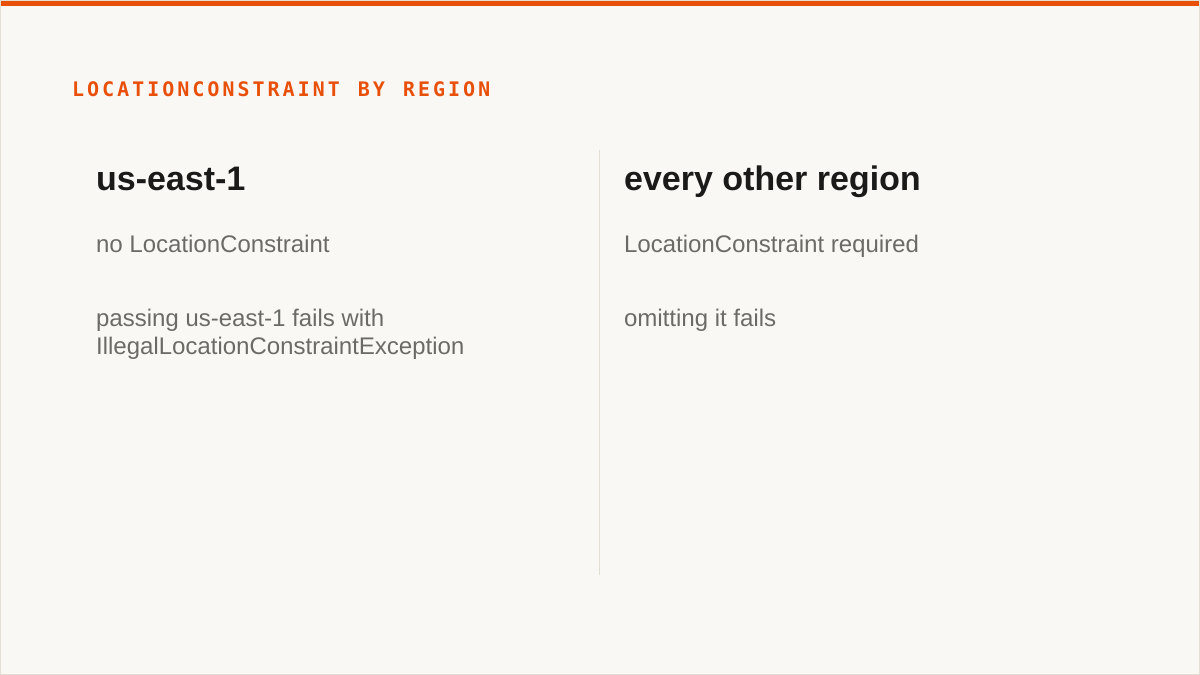
S3 was born in us-east-1 before there were other regions. Creating a bucket there requires no location parameter, because for a while there was nowhere else to create it. When AWS added regions they made LocationConstraint the way to say "not here," and they left us-east-1 behaving as it always had. So in us-east-1, passing an explicit LocationConstraint of us-east-1 fails with an IllegalLocationConstraintException. In every other region, omitting it does not default sensibly, it just fails.
Two working invocations, side by side. First, us-east-1, no constraint:
aws s3api create-bucket \
  --bucket my-unique-bucket-name \
  --region us-east-1
Then any other region, constraint required:
aws s3api create-bucket \
  --bucket my-unique-bucket-name \
  --region eu-west-1 \
  --create-bucket-configuration LocationConstraint=eu-west-1
Notice the two regions are named twice in the second command, and both are necessary. The --region sends the request to the eu-west-1 endpoint. The LocationConstraint is the body of the request telling S3 to create the bucket there. Get them out of sync, say --region us-east-1 with LocationConstraint=eu-west-1, and you will create a bucket in eu-west-1 through the wrong endpoint and spend ten minutes wondering why your subsequent commands are slow.
What decides the default if you pass neither? Two keys in ~/.aws/config under your profile:
[profile work]
region = eu-west-1
output = json
If region is unset and no --region is passed, the CLI falls back to us-east-1. That is the classic silent surprise: a developer with a bare profile creates a bucket expecting it in Europe and it lands in Virginia, and nobody notices until a data residency review. Set region per profile and use --profile work explicitly.
Our checklist before you run aws s3api create-bucket
This is the pre-flight we use internally. Every item is a command or a config key, not a vibe.
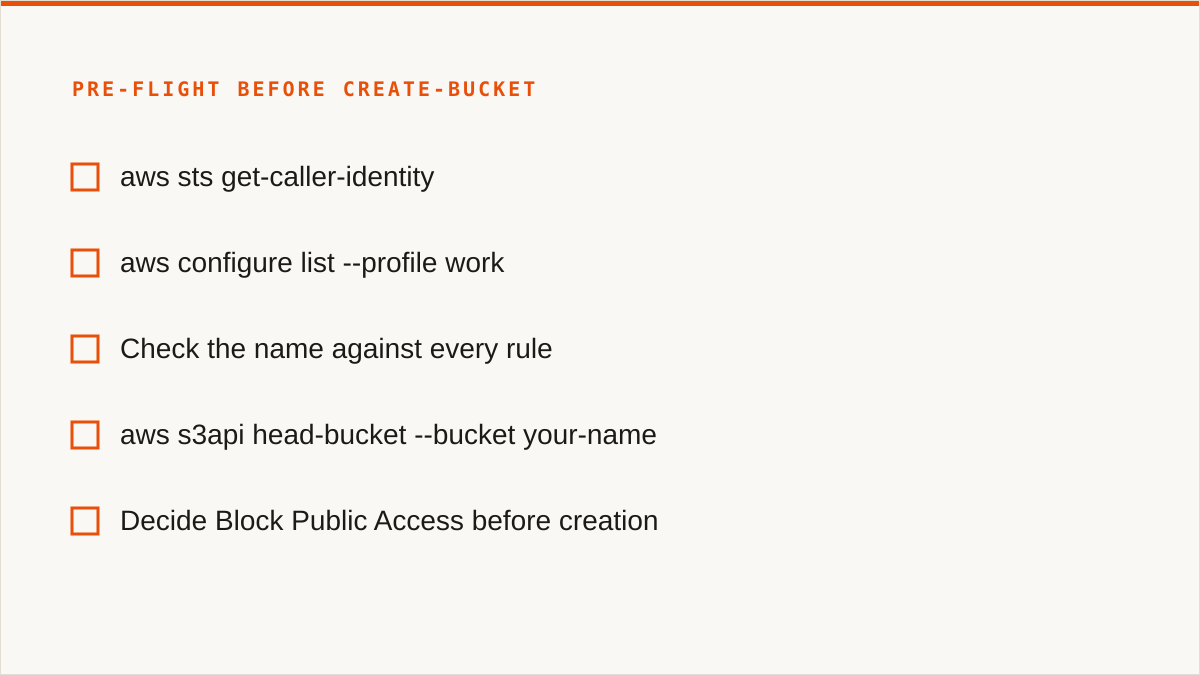
- Confirm which account and identity you are.
aws sts get-caller-identity. If it returns an account you did not expect, stop. Bucket creation against the wrong account is a support ticket, not a typo. - Verify the profile and region.
aws configure list --profile work. Check the region line. This is the item that prevents the Virginia surprise. - Check the name against every rule above. Lowercase, digits, hyphens, dots, 3 to 63 characters, no leading or trailing separators. If it has an underscore or a capital letter, fix it now, not after the
InvalidBucketName. - Test the name for a collision before you build automation around it.
aws s3api head-bucket --bucket your-name. A403means someone owns it and you cannot see inside. A404means it is free. Do this before your script relies on the name. - Decide Block Public Access before creation. S3 now enables all four public-access blocks by default. Keep them on unless you can articulate exactly why not. Changing them later is one API call, but leaving a bucket open is a headline.
- Decide versioning at creation, not later. You can enable it afterwards with
put-bucket-versioning, but anything uploaded before that call has no history. If the bucket is for anything you might need to undelete, enable it in the same script.aws s3api put-bucket-versioning --bucket name --versioning-configuration Status=Enabled. - Object Lock cannot be added afterwards.
--object-lock-enabled-for-bucketmust be passed at creation, and it also requires versioning. If you need WORM retention for compliance, this is the one item with no second chance. Get it right the first time or recreate the bucket empty. - Set default encryption at creation. SSE-S3 is the default now, but if compliance wants SSE-KMS with a specific key, pass
--create-bucket-configurationwith the encryption settings or set it immediately after. The default is fine for most; the point is that you chose it.
Of those eight, exactly one is genuinely irreversible: Object Lock. Everything else can be changed later, at the cost of whatever data arrived before the change. That asymmetry is worth internalising, because people treat all bucket settings as permanent and they are not.
Where we honestly lose: rclone, the provider console, and the keys question
If your budget for this is zero, the conversation is over and rclone wins. It is free forever, has no account, no vendor and no subscription. It supports 70-plus backends, including the consumer clouds we deliberately do not touch. It mounts. It is scriptable down to the flag. It runs entirely inside your own security boundary. And it has been maintained for over a decade, which means when you ask "will this still exist in five years," rclone has an answer and we, a company that started in 2026, do not. That is not a marketing caveat. If a zero-cost, scriptable, self-hosted tool covers your job, use it and do not read further.
The provider's own console beats us too, in a specific case. If everything you will ever store lives in one cloud and always will, the AWS console is free, always current with the newest S3 features on the day they ship, and authoritative in a way a third party can never be. We are current, but AWS ships a feature and we add provider-aware support after. For a single-cloud shop, that lag is a real cost with no offsetting benefit.
And the credentials question is where our answer is genuinely weaker, so let us not dress it up. Your credentials sit encrypted in our database. The encryption is real: AES-256-GCM with per-namespace HKDF keys, and for AWS specifically you can connect keylessly by IAM role assumption so no long-lived key is stored at all. But that is still our database, on our servers, reachable by our process. "The keys never left my laptop" is a stronger security posture than "the keys are encrypted on someone else's server," and no amount of cipher detail changes that sentence. If your threat model or your compliance regime requires that credentials never leave hardware you control, rclone running on that hardware is the correct answer and we are not. We will not pretend a key-at-rest story is the same as a key-you-never-handed-over story.
We are not going to walk any of that back. Those are the trade-offs, stated plainly, and they are why the next section exists.
Who should not use Storafleet for bucket provisioning, and what to use instead
Budget zero goes to rclone. No subscription, no account, and it does the job. We are not going to argue with free.
You need storage mounted as a filesystem goes to rclone mount, Mountain Duck or ExpanDrive. We have no FUSE surface. Remote buckets will not appear in Finder or Explorer through us, and they never will, because that is not what we are.
You need Google Drive, Dropbox, OneDrive or SFTP goes to rclone or MultCloud. We connect the S3-compatible family and any custom S3 endpoint, and nothing else. If the job is Drive-to-bucket, we are the wrong tool.
Credentials must never leave hardware you control goes to rclone, or to our IAM-role connect if AWS is the only provider in play. Otherwise, rclone.
Everything lives in one cloud and always will goes to that provider's own console. It is free and more current than we are.
The workflow is entirely code and always will be goes to the CLI. A command composes with cron, systemd, CI pipelines and Makefiles. A console does not, and never will. And for provisioning buckets specifically, the verdict is the same: if what you need is to create buckets and set their policies, use aws s3api create-bucket (or rclone's mkdir) and skip us entirely. We do not provision buckets. We browse, sync and search across buckets that already exist. If the job ends when the bucket is created, the CLI finished it and you should go no further.
So who are we actually for? Teams running many providers, with several people who need to touch the same buckets. The person who has S3 for one thing, R2 for the egress-free stuff, B2 for cold storage, and a MinIO instance on a box in the office, and who needs one place to browse all of it, schedule a sync between two of them, and search across every bucket without remembering which provider holds what. That is a job a CLI makes you script and a console makes you switch tabs for. It is the job we built for, and if it is not your job, the list above tells you where to go.