
Modeling S3 request costs: PUT, GET, and LIST at scale
October 2026 · 12 min read · Surya
AWS Cost Explorer, monthly line items are grouped by usage type:
  Requests
  DataTransfer-Out-Bytes
  TimedStorage-ByteHrs
Request charges are not storage. They are the cost of asking S3 questions. Nobody puts them in the capacity plan, because capacity plans are about gigabytes, and gigabytes are the cheap part. Request charges are what arrives after the migration finishes, or after someone ships a search box and the object count stops being a number you can hold in your head.
We are Storafleet. We sell a console for object storage you already own, and we have a stake in you understanding this line item properly, which sometimes means pointing you at tools we do not sell. So let's model it honestly, and let's be clear about which tool fits which job.
That line item is not storage, it is requests
S3 bills you separately for keeping an object, moving it, and looking at it. The first is storage, charged per gigabyte per month. The second is data transfer, charged per gigabyte of egress. The third is requests, charged per operation, and it is the one that hides, because it's billed in units that are almost invisible at small scale and then suddenly are not.
The structure is simple and unforgiving. Every PUT, every GET, every LIST, every HEAD, every multipart part upload is an operation. AWS prices them in tiers, and the tier you pay depends on the operation class. The exact numbers live on the pricing page and change, so we are not going to quote them as gospel here. What matters is the shape: PUTs cost more per operation than GETs, LISTs are priced with GETs, and all of them are cheap per unit and expensive in aggregate.
The bill does not tell you which workload caused the spike. It tells you total request count by region and operation class. It will not tell you that the sync job enumerating a bucket with 40 million objects every hour is responsible for most of it. Figuring that out is the actual work, and it is the reason the tooling question matters more than the arithmetic.
Start with a rough model. Take a bucket with 10 million objects. One full listing of that bucket, done properly with pagination at a thousand keys per page, is 10,000 LIST requests. That is nothing. Do it once a day and it is still nothing. Do it every five minutes because some tool defaults to polling, and now you have 2.9 million LIST requests a month from a single job that is doing no useful work between polls. That is a real cost for literally nothing.
Now run four such jobs across three buckets and you have a line item.
LIST is the quiet one: why pagination and inventory jobs blow up your bill
Every tool that "sees" a bucket has to enumerate it, and enumeration is a LIST storm. The sync you schedule. The migration you run. The search feature that walks the bucket to build an index. The duplicate detector. The lifecycle audit. Each one paginates, and each page is a billed request.
The multiplication is what gets people. LIST cost scales with object count, not with bytes. A bucket full of tiny objects costs far more to enumerate than a bucket full of large ones, and nothing in the console makes that obvious. You cannot shrink a LIST by sampling. There is no partial listing. If you want to know what is in the bucket, you ask about all of it.
A common shape, and an entirely self-inflicted one:
# scheduled every 5 minutes by a cron someone forgot about
rclone sync s3:production-assets ./local-mirror --fast-list=false
That job lists the source and the destination on every run. Twice the enumeration, every five minutes, forever. It is doing real work the first time and burning money on LIST requests every time after that, because nothing changed. A sync that runs hourly instead of every five minutes cuts that cost by an order of magnitude and nobody notices the difference.
Migrations are worse, because they're unavoidable. A move from one provider to another means listing the entire source, and depending on how the tool batches, listing the destination too for conflict checks. A one-time migration of a large bucket can generate more LIST requests in an afternoon than the bucket has generated in a year. That is fine, it is the cost of the move, but it needs to be in the estimate alongside the egress bill. Teams budget for egress and get surprised by the request side, which is the smaller number and the more annoying one.
There are real mitigations. S3 Inventory gives you a scheduled, cheap, structured report of bucket contents instead of a live LIST crawl, and for anything above a few million objects it is the right answer. Cloud providers also offer per-request logging through server access logs or CloudTrail data events, which cost money themselves but let you find the offending job. If you are building an index, incremental approaches keyed on object timestamps beat full re-enumeration.
But the cheapest fix is knowing which job is doing it. That is a visibility problem, not a pricing problem, and it is where the tool you pick actually matters.
PUT and GET: the cost of moving data versus the cost of asking for it
PUTs and GETs are different workloads with different cost drivers, and conflating them is how estimates go wrong. A PUT moves bytes in and records an object. A GET moves bytes out and records a read. The request charge is per operation, and the transfer charge is per byte, and they scale in opposite directions depending on what you are doing.
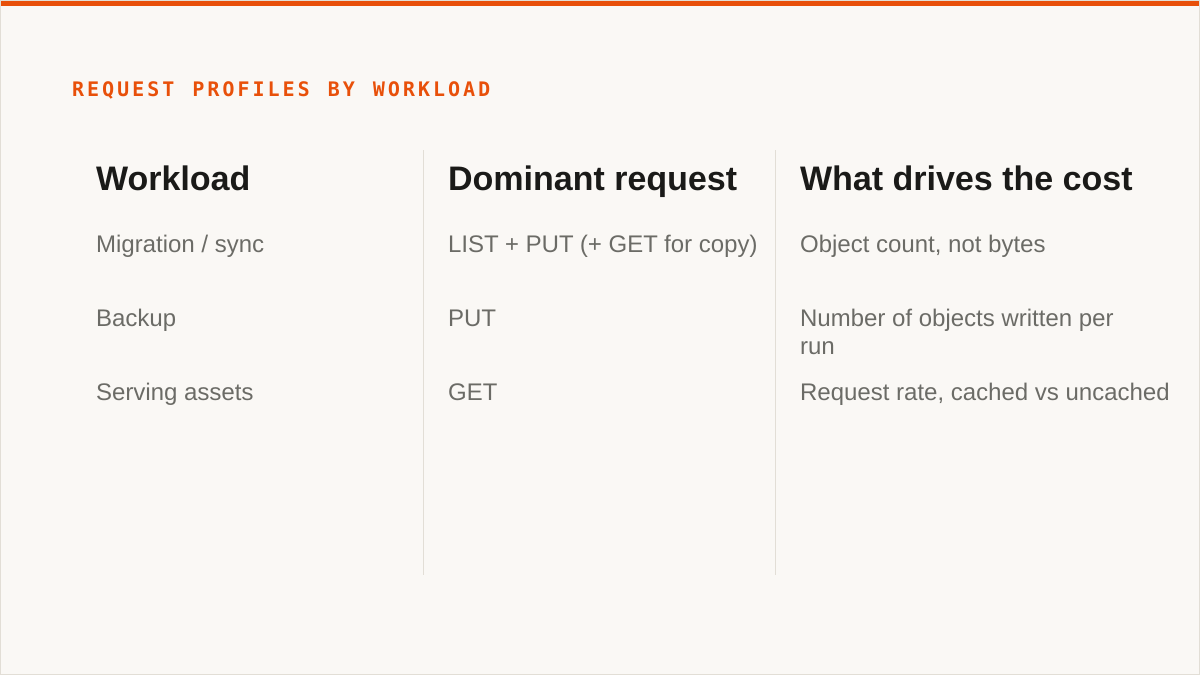
Consider three common workloads and how their request profiles differ:
| Workload | Dominant request | What drives the cost | Volume driver |
|---|---|---|---|
| Migration / sync | LIST + PUT (+ GET for copy) | Object count, not bytes | One-time, or per scheduled run |
| Backup | PUT | Number of objects written per run | Small files are expensive, large files cheap |
| Serving assets | GET | Request rate, cached vs uncached | Traffic, and how well your CDN absorbs it |
The counterintuitive part is that small objects cost more than large ones. A backup of 10 million 4KB files is 10 million PUT requests. The same 40GB as a thousand 40MB archives is a thousand PUTs. The bytes are identical. The request bill is four orders of magnitude apart. If your backup tool writes one object per file, and it almost certainly does, you're paying for object count, and the fix is to batch or archive before writing rather than to compress harder.
On the GET side, the lever is caching and the CDN. Every request served from cache does not hit the bucket and does not get billed as a request. A well-configured CDN turns a traffic spike into a flat cost. A misconfigured one, with a short TTL or the wrong cache keys, turns it into a request bill that scales with your users.
Migration sits awkwardly between the two. A server-side copy within a provider is cheap on transfer and still bills requests. A cross-provider migration pays egress, transfer, and requests, and the request portion is the one people forget because it is buried under the egress line. Estimate migration cost as bytes times egress rate plus objects times request rate. Two terms, not one.
Three ways to see request costs: provider console, rclone, and Storafleet
There is no universal "best" here. There is the tool that fits your workflow and the tool that fights it. Three options, and they're genuinely different in what they give you.
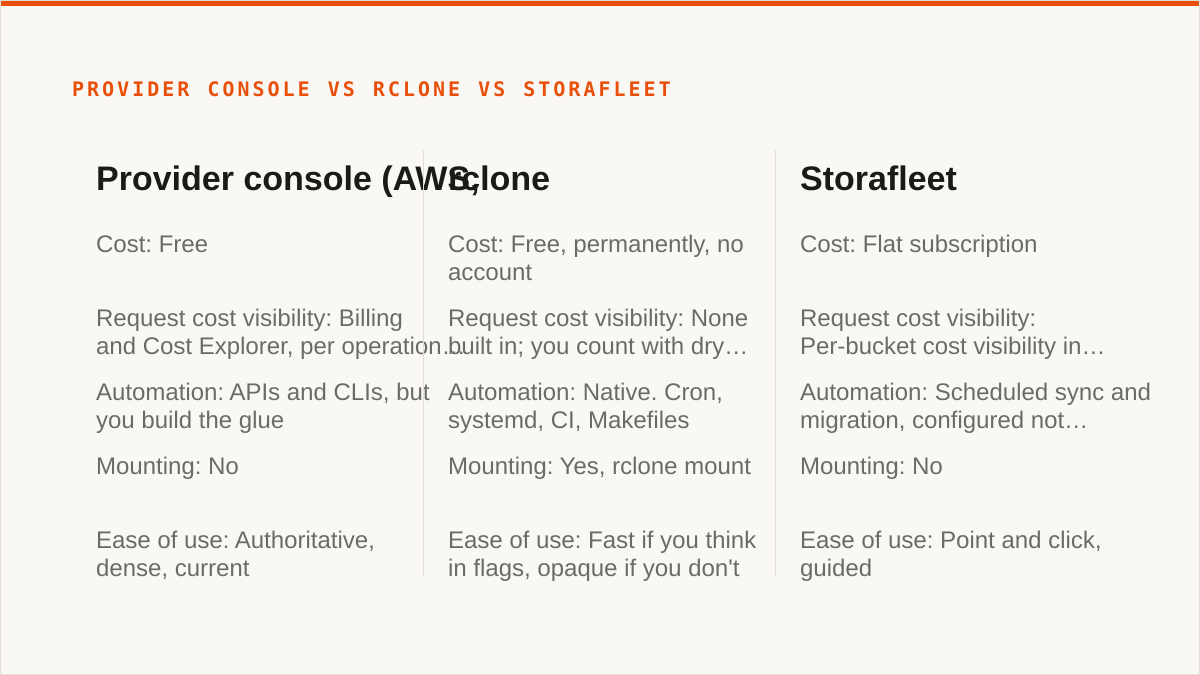
| Provider console (AWS, etc.) | rclone | Storafleet | |
|---|---|---|---|
| Cost | Free | Free, permanently, no account | Flat subscription |
| Request cost visibility | Billing and Cost Explorer, per operation class, after the fact | None built in; you count with dry runs and logs | Per-bucket cost visibility in the console |
| Automation | APIs and CLIs, but you build the glue | Native. Cron, systemd, CI, Makefiles | Scheduled sync and migration, configured not scripted |
| Backends | That provider only | Wide, including consumer clouds | S3-compatible providers, custom endpoints |
| Mounting | No | Yes, rclone mount | No |
| Where credentials live | In the provider, obviously | On your machine, in your config | Encrypted in our database (AES-256-GCM); AWS can be keyless via IAM role |
| Ease of use | Authoritative, dense, current | Fast if you think in flags, opaque if you don't | Point and click, guided |
Provider console: authoritative, and free
If everything you have lives in one cloud and always will, the provider's own console beats us and it is not close. Cost Explorer will show you request charges by operation class, broken down by region and tag. It is always current, it knows about features the day they ship, and it costs nothing. For a team that is 100% on S3, the answer to "how do I see my request costs" is already in the account. Go use it.
What it will not do is tell you which job caused the spike. It gives you the total and the class, not the culprit. You end up enabling access logging and querying it yourself, which is a fine afternoon's work and a bad way to spend every month.
rclone: scriptable, free forever, and it wins a lot
rclone is the right answer for a large number of people reading this, and we will say so. It is free, permanently, with no account and no vendor. It supports more backends than we do, including Google Drive, Dropbox and OneDrive, which we deliberately do not touch. It mounts. It composes with cron, systemd, CI and Makefiles the way a binary does and a web console never will. It has been maintained for over a decade, which matters when you are deciding what to put in a production pipeline.
On request cost visibility specifically, rclone gives you less. --dry-run and -vv will tell you what it did, and you can count operations from logs, but there is no bill view. If your question is "what will this sync cost in requests", rclone answers with your own arithmetic. That is not a knock. It's just what a CLI is.
Storafleet: a console with the cost context built in
Where we earn the subscription is the moment the job spans two providers or the question is "which bucket is costing me". We connect S3-compatible providers plus any custom endpoint, and we show per-bucket cost visibility in the console rather than making you assemble it from billing exports. Migrate and sync run one-time or scheduled. Global cross-bucket search means one query across buckets instead of a separate enumeration per bucket, which is precisely the LIST storm described above, collapsed into one job.
We never charge per gigabyte to move data. Migrated bytes are unmetered on every tier including Free. That is the pricing model, and it is the model rather than a discount: a flat subscription against per-byte transfer pricing.
And here is where we lose, plainly. We do not mount storage as a local drive. There is no FUSE surface. If you want buckets in Finder or Explorer, rclone mount or Mountain Duck is the answer. We connect the S3-compatible family and nothing else. No Drive, Dropbox, OneDrive, SFTP, WebDAV or Box. If your job is Drive-to-bucket, we are the wrong tool and will be no help at all. Your credentials sit encrypted in our database, not on your hardware. AES-256-GCM with per-namespace HKDF keys is real encryption and AWS can be connected keylessly by IAM role assumption, but "the keys never left my laptop" is a stronger answer than ours and it would be dishonest to pretend otherwise. We are a console, not a command. We do not compose with your CI pipeline. And we are a small team; Storafleet started in 2026. On whether we will still exist in five years, a decade-old open-source project has a better answer than we do.
Who should not use Storafleet for this, and what to use instead
If your budget for this is zero, the conversation is over and rclone wins. Not a trial, not a freemium tier, zero. rclone does the migration, does the sync, runs on your hardware with your credentials, and costs nothing forever. Use it.
If you need storage mounted as a filesystem, we cannot help and rclone mount, Mountain Duck or ExpanDrive can. We have no FUSE surface and we are not building one.
If you need Google Drive, Dropbox, OneDrive or SFTP, use rclone or MultCloud. We connect the S3-compatible family and any custom S3 endpoint, and nothing else. That is a deliberate boundary, not a gap we are about to close.
If credentials must never leave hardware you control, use rclone. Our encryption is real, but it is our database. If you are on AWS only, the IAM-role connect is the next best thing and it is genuinely keyless. If you are not, rclone is the honest answer.
If everything lives in one cloud and always will, that provider's console is free, more current, and more authoritative than we are. Cost Explorer and S3 Inventory will answer the request cost question without a subscription.
If your workflow is entirely code and always will be, use a CLI. A console does not compose with a Makefile.
So who is left? The team running S3-compatible storage across two or three providers, who needs to know which bucket and which job is generating the request bill, who wants migration and scheduled sync without writing and maintaining the glue, and who is fine paying a flat subscription instead of metering every byte they move. If that is you, we are built for exactly that and we will show you the cost. If it's not, the tools above are better at the job than we are, and we would rather tell you than sell you.