
Configuring an AWS S3 endpoint and boto3 client for a custom region
October 2026 · 21 min read · Surya
- One flag is not the whole configuration: three settings must agree or boto3 fails
- Reading the endpoint URL correctly: virtual-hosted against path-style
- The region that does not exist: why us-east-1 is the SDK's deliberate lie
- Building the client: a boto3.Client call that actually works against a custom endpoint
- The step where people get stuck: it works for ListBuckets and fails for everything else
- Where Storafleet fits and where it does not: honest capability boundaries
- When the answer is rclone, not boto3 and not us
- Verifying the configuration before you ship: five checks in order
One flag is not the whole configuration: three settings must agree or boto3 fails
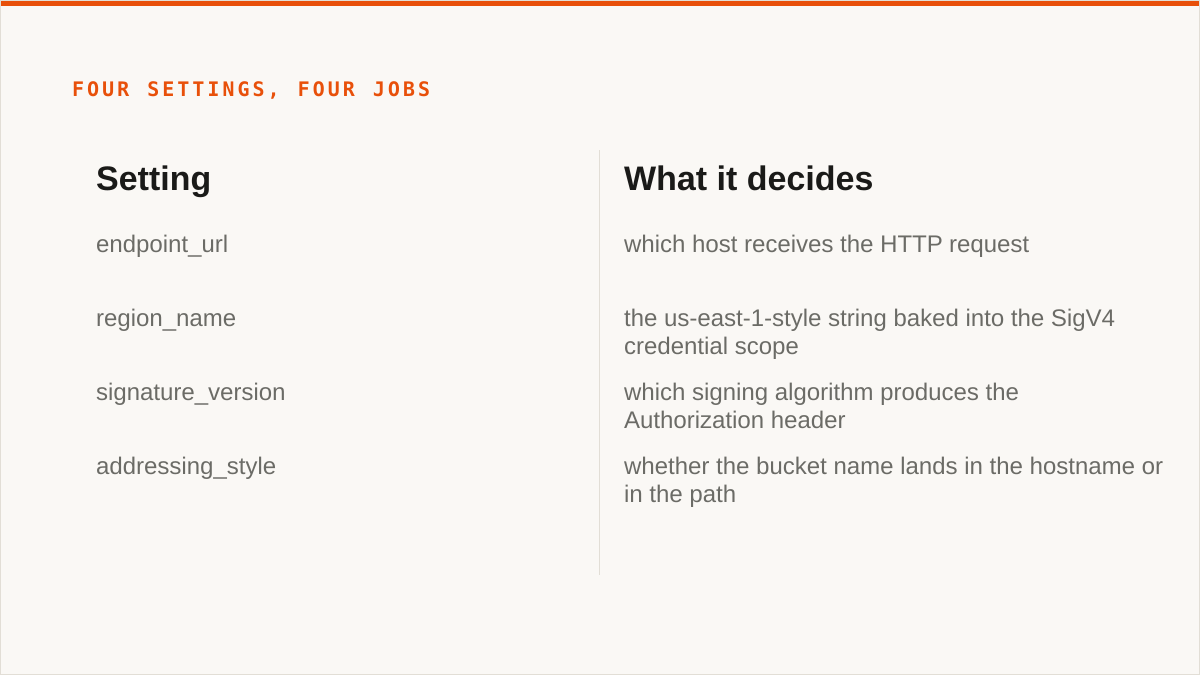
Start with the number 4, because that is how many independent settings boto3 needs before it will talk to a custom S3 endpoint: endpoint_url, region_name, signature version, and addressing style. Miss any one and the SDK does not warn you. It signs the request with defaults you did not choose and returns a 403 that points at the wrong thing.
People treat endpoint_url as the whole configuration. It is one quarter of it. The other three are not derived from it. boto3 does not look at your endpoint, notice it looks like MinIO, and adjust. It does not know what MinIO is. It has a hardcoded map of AWS regions and a default signing behaviour, and if your endpoint does not match that map, the defaults are wrong for you.
Here is the failure mode in the order you will actually meet it. You set endpoint_url to your custom host. You leave region_name alone. The client constructs fine, because client construction does no network I/O. You call list_buckets(). It works, sometimes, because some endpoints are permissive about the region in the credential scope. Then you call put_object() and get SignatureDoesNotMatch. Nothing changed. Nothing is wrong with your credentials. What changed is that the request now has a body, and the body is in the signature, and the signature includes the credential scope, and the credential scope includes a region you never set.
Three of the four settings are independent inputs with no cross-validation:
endpoint_urldecides which host receives the HTTP request.region_namedecides theus-east-1-style string baked into the SigV4 credential scope.signature_versiondecides which signing algorithm produces theAuthorizationheader.addressing_styledecides whether the bucket name lands in the hostname or in the path.
Get the endpoint right and the region wrong and you get a signature error from the endpoint. Get the region right and the addressing style wrong and you get a DNS failure or a redirect. Get all four right and it just works, which is the problem: there is no positive signal. Silence is success. The only feedback loop is the error you get when one of them is wrong, and those errors are written by the server, not the SDK, so the SDK cannot translate them for you.
The single most useful mental model: boto3 is a signing library with an HTTP transport bolted on, not a service-aware client. Everything it knows about S3 comes from a static JSON blob of endpoint rules shipped inside botocore. Custom endpoints are outside that blob. When you're outside the blob, you are responsible for all four values, and no one will tell you when one is missing.
Reading the endpoint URL correctly: virtual-hosted against path-style
boto3 takes your bucket name and your endpoint URL and produces one HTTP host. There are two ways to combine them and they are not interchangeable.
Virtual-hosted style puts the bucket in front of the host: bucket reports plus endpoint https://s3.example.com becomes https://reports.s3.example.com. Path-style keeps the host and puts the bucket in the path: https://s3.example.com/reports.
AWS defaults to virtual-hosted for most regions. Almost every custom endpoint you will meet wants path-style. MinIO, Ceph RGW, most appliance vendors, most internal gateways. If you point virtual-hosted style at an endpoint that has no wildcard DNS, you get NXDOMAIN or a TLS certificate mismatch, because reports.s3.example.com does not resolve and no certificate covers it.
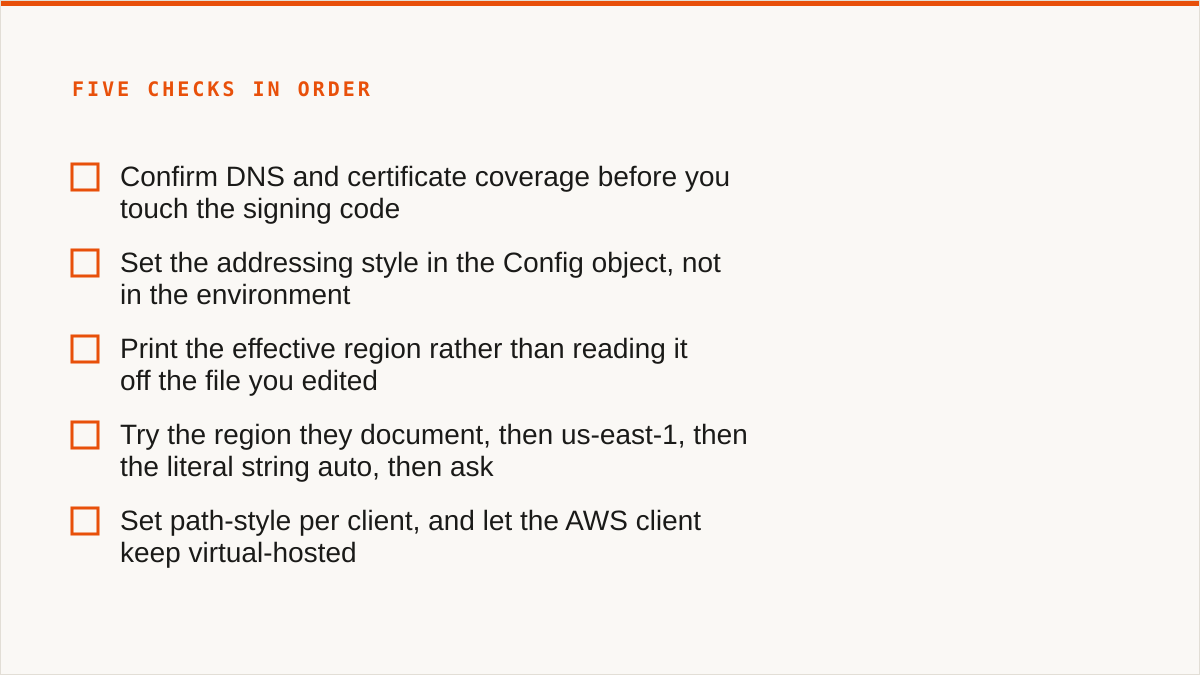
Set it in the config object, not in the environment:
import boto3
from botocore.config import Config

cfg = Config(
    signature_version="s3v4",
    s3={"addressing_style": "path"},
)

client = boto3.client(
    "s3",
    endpoint_url="https://s3.example.com",
    aws_access_key_id="...",
    aws_secret_access_key="...",
    region_name="us-east-1",
    config=cfg,
)
The key is s3.addressing_style, nested under the s3 key of Config. Not addressing_style at the top level. Not an environment variable that botocore will read reliably across every code path. The nested dictionary is the only place that always applies.
There is a third value, auto, which is the botocore default. auto is worse than either explicit choice for a custom endpoint, because it means "use virtual-hosted unless the bucket name is not DNS-compatible". Your bucket names are DNS-compatible. So auto silently resolves to virtual-hosted, and you are back to the wildcard DNS problem with no indication that a decision was made on your behalf.
Two details that bite people:
First, AWS has been steering clients away from path-style for years, and a code path you write for a custom endpoint is not automatically safe to point at AWS. If you are writing one code path for both AWS and a custom endpoint, do not set path globally forever. Set it per client, and let the AWS client keep virtual-hosted. This is the single strongest argument for a factory function rather than a module-level global client.
Second, if your endpoint is behind a TLS-terminating proxy with a certificate for the base host only, virtual-hosted style fails at the TLS handshake, before signature verification, so the error you get is a connection error, not a 403. People spend hours on credentials for what is a certificate problem. DNS and certificate coverage are worth confirming before you touch the signing code.
The region that does not exist: why us-east-1 is the SDK's deliberate lie
us-east-1 is the default region in boto3 and it is a lie in the sense that it is not derived from anything you provided. If you do not set region_name, and no AWS_DEFAULT_REGION or AWS_REGION is set in the environment, and no region is in ~/.aws/config, botocore picks us-east-1 and carries on. It does not error. It does not mention it.
That default is fine for AWS and wrong for almost everyone else, because the region string is not just a label: it is an input to the signature. SigV4 builds a credential scope like this:
20250115/us-east-1/s3/aws4_requestThe date, the region, the service, the terminator. The endpoint receives that string, compares the region against whatever it expects, and rejects the request if they disagree. Some S3-compatible servers ignore the region entirely. Some accept a configured set. Some accept us-east-1 specifically for compatibility. And some are strict, because the operator set a real region and expects clients to send it.
So you get three behaviours from the same code:
- Endpoint ignores region: everything works, and you learn nothing.
- Endpoint accepts
us-east-1as a compatibility shim: everything works, and you learn nothing. - Endpoint is strict:
ListBucketsmay work (some servers do not verify the scope on certain operations) andPutObjectfails withSignatureDoesNotMatch.
The third case is the one that generates support tickets, and the reason is that it is not deterministic across operations. A server that validates the credential scope on writes but not on reads will let you enumerate buckets and then refuse to accept data. From the client side that looks like a permissions problem. It is not. It is a string in a header.
What region should you use for a custom endpoint? Whatever the operator tells you. If they do not tell you, try these in order: the region they document, then us-east-1, then the literal string auto if the provider documents it (some do, as a signal to derive the region from the endpoint), then ask. Do not guess more than twice. The region is a fixed configuration value and the operator knows it.
One more trap. region_name passed to boto3.client() and region_name in ~/.aws/config can disagree, and the precedence rules are not obvious when profiles and environment variables are also in play. If you're debugging a signature mismatch, print the effective region rather than reading it off the file you edited:
print(client.meta.region_name)That single line resolves more arguments than any amount of staring at config files.
Building the client: a boto3.Client call that actually works against a custom endpoint
Here is the whole thing. Five keys in the Config and the client call, each explained in one line below.
import boto3
from botocore.config import Config

config = Config(
    signature_version="s3v4",
    s3={"addressing_style": "path"},
    retries={"max_attempts": 5, "mode": "standard"},
    connect_timeout=10,
    read_timeout=60,
)

client = boto3.client(
    "s3",
    endpoint_url="https://s3.example.com",
    region_name="us-east-1",
    aws_access_key_id="AKIA...",
    aws_secret_access_key="...",
    config=config,
)signature_version="s3v4"pins SigV4 and stops botocore from negotiating SigV2 with endpoints it thinks are old, which some custom servers accept and then verify incorrectly.s3={"addressing_style": "path"}forces the bucket into the path so you do not depend on wildcard DNS.retries={"max_attempts": 5, "mode": "standard"}stops the default legacy retry behaviour from retrying a signature failure five times before surfacing it, which makes logs noisy and slow.connect_timeoutandread_timeoutmatter because custom endpoints are frequently behind a corporate proxy or a self-signed appliance, and the defaults are long enough that a hung connection looks like a hang in your application.endpoint_urlandregion_namego on the client, not the config, because that is where botocore reads them and consistency beats cleverness.
Wrap this in a factory function, not a module-level global. You will need a second client for AWS proper, with a different addressing style, and possibly a third for a different endpoint. A global client forces you to mutate config at runtime, which is how people end up with a client built for one endpoint signing requests for another.
Two things not to do. Do not put credentials in the source file; use the standard chain (AWS_ACCESS_KEY_ID, AWS_SECRET_ACCESS_KEY, profile, or an instance role) and let boto3 resolve them. And do not set verify=False to get past a self-signed certificate, unless you genuinely intend to disable TLS verification in production, which you do not, and if you do, write it in a comment so the next person knows it was a decision.
If you take one thing from this post: endpoint_url alone is not a configuration. It is a quarter of one.
The step where people get stuck: it works for ListBuckets and fails for everything else
This is the classic. The client initialises. list_buckets() returns a list. put_object() returns SignatureDoesNotMatch. Nothing was changed between the two calls. This is the point where people start rotating credentials, which is the wrong move, and then rewriting the whole client, which is also the wrong move.
The diagnostic sequence, in order. Do them in this order because each one eliminates a class of cause.
1. Clock skew
SigV4 signs a timestamp. The server allows a window, typically fifteen minutes, sometimes five. If your host's clock is wrong, every signature fails, and the error is SignatureDoesNotMatch or RequestTimeTooSkewed depending on the server. Rule it out first, because it is the cheapest thing to eliminate and it produces the most confusing symptoms.
date -u
timedatectl status
In a container, the host clock usually propagates, but not always, and a VM that was suspended and resumed will be wrong by exactly the length of the suspension. If your CI runner drifts, this will fail intermittently and you will blame the endpoint.
2. The payload hash
SigV4 signs the body. For a PUT, the body is the object. If anything modifies the bytes between the moment the signature is computed and the moment they go on the wire, the signature fails. Re-encoding a string, changing a content type that alters the encoding, or a proxy that rewrites the body will do it.
ListBuckets has no body. That is precisely why it succeeds when everything else fails. There is nothing to hash, so an entire category of mismatch disappears. This is the single most useful clue in the whole diagnosis: if reads and writes with bodies fail while operations without bodies succeed, you are looking at something body-related, and clock skew, region, and addressing style are all still on the table but the body is now the leading candidate.
For large uploads, boto3 switches to multipart and the signature applies per part. A part-level mismatch looks the same at the top level. If small objects work and large ones fail, that is the multipart boundary, and it usually means a proxy is buffering and rewriting chunks.
3. The credential scope region
Print the effective region and compare it against what the operator told you.
print(client.meta.region_name)
print(client.meta.endpoint_url)
print(client.meta.config.s3)
If client.meta.region_name is us-east-1 and you never set it, that is your answer. Set it explicitly and retry. If the operator says the region is eu-central-1 and you are sending us-east-1, a strict endpoint will reject every signed request that includes a credential scope, which is all of them, but some servers only check on writes.
4. The signing algorithm
Look at whether the server expects SigV4 and whether botocore is actually sending it. Inspect the Authorization header on the wire. It starts with AWS4-HMAC-SHA256 for SigV4. If it says something else, signature_version did not take effect, which usually means it was set somewhere botocore ignores, such as a top-level key that got overridden by a profile.
5. The actual request
Turn on botocore debug logging and read the request, not the response.
import logging
logging.basicConfig(level=logging.DEBUG)
logging.getLogger("botocore").setLevel(logging.DEBUG)
You want the host, the path, the region in the credential scope, and the Authorization header. Nine times out of ten, the host is wrong (addressing style), or the region in the scope is wrong, and you can see both in one screen of output. The response body is a red herring; the server is telling you the signature did not match, and the reason is always in the request you sent.
If you get through all five and it still fails, the answer is usually that the endpoint expects a signing behaviour botocore does not implement, and the honest move is to stop and test with aws-cli or curl against the same endpoint. If those work and boto3 does not, you have a client bug. If they also fail, you have an endpoint problem and no amount of Python will fix it.
Where Storafleet fits and where it does not: honest capability boundaries
Everything above is the work you do when you are writing code against a custom endpoint. There is a second question underneath it: does this job need code at all.
Storafleet is a control plane for object storage you already own. You connect an S3-compatible endpoint, and we give you a console: browse, upload, download, migrate and sync between providers, cross-bucket search, lifecycle and CORS and versioning and object-lock configuration, duplicate detection, per-bucket cost visibility. We connect 50+ S3-compatible providers plus any custom endpoint. We never store your file contents. Credentials are encrypted at rest with AES-256-GCM under per-namespace HKDF keys, and AWS can be connected keylessly via IAM role assumption.
Relevant to this post: we do the capability detection so you do not have to. When you connect an endpoint, we work out what that endpoint genuinely supports and only offer those actions. That is the part of the four-flag problem that is not about signing at all. It is about knowing that this particular MinIO build does not do object lock, or that this provider's versioning behaves differently, or that this endpoint's region string is non-standard. We encode that. You do not.
Now the boundaries, and they are real.
We do not mount storage as a local drive. There is no FUSE surface. If you want a bucket to appear in Finder or Explorer as a folder, we cannot do it. rclone mount and Mountain Duck can. That is not a small gap; for a lot of people it is the entire requirement.
We speak the S3-compatible family and any custom S3 endpoint, and nothing else. No Google Drive, no Dropbox, no OneDrive, no SFTP, no WebDAV, no Box. If your job is Drive to bucket, we are the wrong tool and we will say so.
Your credentials sit encrypted in our database, not on your hardware. The encryption is real and the AWS keyless path via IAM role assumption is real. But "the keys never left my laptop" is a stronger answer than ours, and pretending otherwise would be dishonest. If that requirement is non-negotiable, the tool that satisfies it is one that runs on your machine.
We are a console, not a command. We do not compose with cron, systemd, CI pipelines, shell scripts, or Makefiles the way a binary does. If your workflow is code, a CLI fits it natively and a web UI never will, no matter how good the UI is.
And the one we cannot argue away: we have no published case studies and no named customers, and we will not invent them. We are a small team and Storafleet started in 2026. On the question "will this still exist in five years", a decade-old open-source project has a better answer than we do. That is a genuine risk and you should weigh it.
One concession, stated plainly, with no walk-back: for anyone whose requirement is a mounted filesystem, rclone mount genuinely beats us and it is not close. It is free, it is permanent, it runs inside your own security boundary, it has been maintained for over a decade, and it does the one thing we have decided not to build. If that is your requirement, close this tab and go read the rclone docs. We would rather tell you that than have you find out after a subscription.
When the answer is rclone, not boto3 and not us
This section is the verdict and it costs us sales. Read it anyway.
If your budget is zero, the conversation is over and rclone wins. Not "rclone is a good option to consider". It wins. It is free permanently, with no account, no vendor, and no tier that removes a feature you need. We charge a flat subscription and we are not going to pretend that is the same thing as free.
If you need the storage mounted as a filesystem, use rclone mount, Mountain Duck, or ExpanDrive. We have no FUSE surface. This is a decision we made and we are not reversing it this quarter, so do not buy us hoping.
If your sources or destinations include Google Drive, Dropbox, OneDrive, or SFTP, use rclone or MultCloud. rclone supports 70+ backends including the consumer clouds we deliberately do not touch. MultCloud and CloudFuze cover the consumer cloud migrations specifically. We cover S3-compatible and nothing else, on purpose, because "S3-compatible" is a capability boundary we can actually reason about and "everything" is not.
If your credentials must never leave hardware you control, use rclone. Our encryption is real, but local is a stronger guarantee than encrypted-at-rest on someone else's disk. If you are on AWS only and your organisation is comfortable with IAM role assumption, our keyless connect is a genuine middle path. Otherwise, run the binary yourself.
If everything lives in one cloud and always will, use that provider's own console. It is free, it is always current with that provider's newest features the day they ship, and it is authoritative in a way a third party never is. We are better when you have more than one provider, or when you need cross-provider search and migration. If you have one provider, you do not have that problem.
And the one that matters most for the rest of this post: if your workflow is scripted, scheduled, or driven from a CLI, use rclone. Not boto3, not us. rclone copy, rclone sync, rclone check compose with shell, run in CI, fit inside a Makefile, and return exit codes you can branch on. aws s3, s3cmd, and mc for MinIO are the same story. A console cannot be piped into anything, and a hand-rolled boto3 script is a worse rclone with more bugs. If the job is "move these objects on a schedule", the binary is the answer and we are not part of it.
Where we are the right answer: you have more than one S3-compatible provider, or a custom endpoint you did not build, and you want to browse, migrate, sync, search across buckets, configure lifecycle and versioning and object lock without writing the four-flag client every time, and you want the capability detection done for you. Also, when the person doing the work is not the person who wrote the code. A console is a real answer for that, and a CLI is not.
And for the specific problem in this post: if you are writing the boto3 client because you need an application to talk to a custom endpoint, you need boto3, and we are not part of that. If you are writing the boto3 client because you need to move data between two providers once, you probably do not need boto3 at all, and you might not need us either. Try rclone first.
Verifying the configuration before you ship: five checks in order
Do not ship a client you have only tested with list_buckets. That call exercises almost nothing. Here is a sequence that isolates each of the four settings, in an order where the first failure tells you which setting is wrong.
Check 1: ListBuckets
client.list_buckets()Proves the endpoint URL resolves, TLS works, and credentials are accepted at all. It does not prove the region is right, because this call has no body and some servers do not verify the credential scope on it. If this fails, the problem is the endpoint or the credentials, not the region or the addressing style. Stop here and fix it before moving on.
Check 2: HeadBucket
client.head_bucket(Bucket="your-bucket")Proves the bucket name is being routed correctly, which is the addressing style check. If ListBuckets works and this returns a 404 or a DNS error, your addressing style is wrong: you are sending your-bucket.s3.example.com and the endpoint only answers on s3.example.com. Set s3={"addressing_style": "path"} and retry. A 403 here instead of a 404 means routing is fine and permissions are the issue.
Check 3: PutObject with a small body
client.put_object(Bucket="your-bucket", Key="probe.txt", Body=b"hello")This is the first call with a body, and therefore the first real test of the signature end to end. If checks 1 and 2 pass and this fails with SignatureDoesNotMatch, the cause is one of exactly three things: clock skew, the region in the credential scope, or the payload hash. Work through them in that order, using the section above. This is the single check that catches the region bug, and it is the one people skip because ListBuckets already "worked".
Check 4: GetObject round trip
obj = client.get_object(Bucket="your-bucket", Key="probe.txt")
assert obj["Body"].read() == b"hello"
Proves the write and the read agree, which catches a class of problem where a proxy or gateway accepts writes but returns different bytes, or where a lifecycle rule moves the object to a storage class your read path does not handle. If the bytes differ, you have an infrastructure problem, not a client problem, and it will not show up in any of the checks above.
Check 5: A presigned URL
url = client.generate_presigned_url(
    "get_object",
    Params={"Bucket": "your-bucket", "Key": "probe.txt"},
    ExpiresIn=300,
)
print(url)
This is the check that catches the addressing style bug in its most annoying form. A presigned URL embeds the host and the signature. If the client is generating virtual-hosted URLs against an endpoint with no wildcard DNS, the URL looks fine in your terminal and fails in the browser, and it fails for the person you sent it to, not for you. Fetch the printed URL with curl and confirm a 200. If it 403s, look at whether the host in the URL matches the endpoint you actually configured. If it DNS-fails, your addressing style is virtual-hosted and it should be path.
Run all five in a single script and keep it in the repo. It takes thirty seconds and it turns "the endpoint is broken" into "check 3 fails, so it is the region" without a debugging session. Configuration that is only tested by hand is configuration that breaks silently the next time someone edits a config file.
Four settings, no cross-validation, and silence on success. If you take nothing else: endpoint_url is not the configuration, it is a quarter of it, and the other three quarters will not announce themselves when they are wrong.
That is the whole trap. It is not a hard problem once you know the four names. It is a hard problem to discover, because boto3 will happily sign your request with a region you never chose, against a host you did not intend, in a style you did not select, and then hand you a 403 that blames your credentials.
Read the clock. Read the region. Read the addressing style. Then read it again with a body.