
Amazon S3 Transfer Acceleration: How It Works and What It Costs
October 2026 · 23 min read · Surya
Here is a line from a config file we set on a Thursday, and a line from a bill that arrived about six weeks later:
aws configure set s3.use_accelerate_endpoint trueDataTransfer-Accelerated: a few hundred GB
DataTransfer-Out-Bytes: a few hundred GB, plus changeOne line moves your requests off s3.us-east-1.amazonaws.com and onto s3-accelerate.amazonaws.com, which routes them through CloudFront's edge network instead of the public internet. The other line is the part most teams discover last, usually on a Friday, usually while someone is asking why storage spend went up.
Amazon S3 Transfer Acceleration is not a magic switch. It is a paid reroute, and whether it earns its money depends entirely on where your packets were going before you turned it on.
Contents:
- What the
x-amz-accelerateheader actually changes, and the requests that never benefit - What a long-haul sync looks like, and where the crossover point sits
- How s3 accelerated transfer pricing works, including the part nobody quotes
- What "file transfer acceleration" accelerates, and what it does not
- CLI flags, SDK settings, and where a console fits
- The checklist we wish we had before enabling it on 14 buckets
- Where rclone genuinely beats us
- Who should not pay Storafleet for this
The x-amz-accelerate header, and the requests that never benefit
When you enable acceleration on a bucket, AWS gives you a second hostname: bucket.s3-accelerate.amazonaws.com. Requests to that hostname do not go straight to the bucket's region. They enter the CloudFront edge network at the POP nearest your client, travel over AWS's private backbone to the bucket's region, and come back the same way.
That is the whole feature. An endpoint change plus a network path change.
The client signals its intent in one of two ways. The CLI and SDKs set s3.use_accelerate_endpoint and rewrite the hostname for you. If you are signing requests by hand, you set the header yourself:
x-amz-accelerate: trueor you just point at the accelerate hostname directly. Same result. There is no separate "acceleration service" to provision, no capacity to reserve, no per-bucket toggle that does anything on the data plane other than change where the DNS resolves. You flip it in the bucket properties, and from that moment the accelerate endpoint works for that bucket.
The first thing to understand is that acceleration is a network-path optimisation, and network-path optimisations only pay when the path was bad.
If your client is in Ashburn, Virginia and your bucket is in us-east-1, you are a few milliseconds away from the region already. CloudFront cannot beat the laws of physics, and it cannot beat a hop that short. What it can do is take a long intercontinental round trip and knock it down, because the long haul over the public internet is where the variance lives.
Amazon's own comparison tool has always been blunt about this. You upload a test object from your location to your bucket, with and without acceleration, and it tells you the delta. If the delta is negative, you turn it off. Plenty of people never run it.
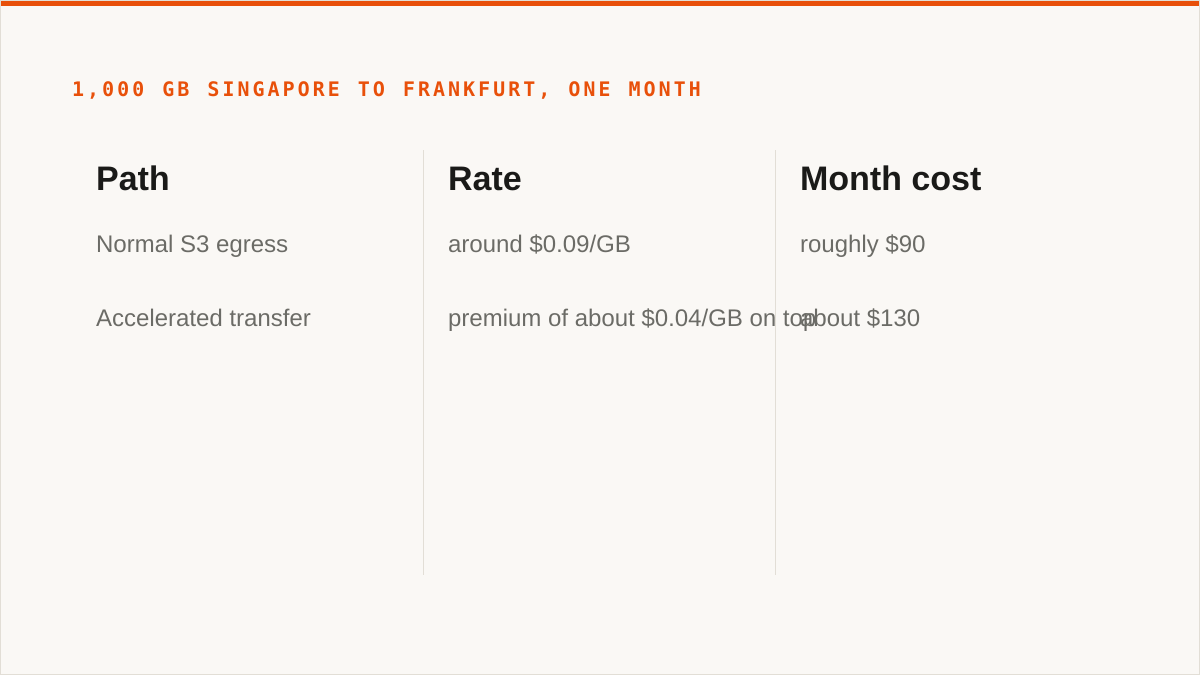
Now the worked example, deliberately round. Say you move 1,000 GB in a month from a client in Singapore to a bucket in Frankfurt. Normal S3 egress to the internet is billed around $0.09/GB at that volume, so roughly $90. Accelerated transfer is billed at a premium on top of that, and the premium has historically landed in the region of $0.04/GB, so roughly $40 more. Your month costs about $130 instead of $90.
You did not save 30% by not using acceleration. You spent roughly 44% more by using it.
That framing is why the feature is misunderstood. There is no "free speedup" hiding in the console. There is a surcharge, and the question is whether the time you buy back is worth more than the surcharge. For a nightly backup that finishes at 04:00 either way, the answer is no. For a media team in Singapore pushing rushes to a European post house before an edit session starts, the answer is often yes.
And then there is the part in the heading: the requests that never benefit at all. Acceleration applies to the data path, and it is only meaningful when the client is far from the bucket. If you have a fleet of EC2 instances in the same region as the bucket, those requests were never crossing the public internet. You have paid a premium to route traffic through an edge POP that was, functionally, a detour. We have seen this on 14 buckets at once, which is a story for later in this post.
Distance matters more than file size, and a long-haul sync shows you why
We ran a live sync of a working set from a Singapore data centre to Frankfurt over about three weeks. Not a one-off migration, a live sync: hundreds of thousands of objects, mostly in the low single-digit megabytes, total somewhere around 6 TB, with a steady trickle of new writes every day. The source was a MinIO cluster in Singapore. The destination was an S3 bucket in eu-central-1.
The first night we ran it without acceleration. We did not run it without acceleration on purpose. We ran it without acceleration because we forgot, and the job told us so at about hour nine.
Throughput wobbled. Not a smooth line. Bursts, then long flat stretches. Average object time for the small ones was ugly. A small object has almost no time to amortise a round trip, so hundreds of thousands of them, each paying a long intercontinental round trip, divided across a modest concurrency pool, is a wall you can see from space.
We turned acceleration on for the destination bucket and re-ran the same job from the same host.
Throughput moved up, and the wobble shrank. Small-object time dropped noticeably, because the private backbone cut the round trip and, more importantly, cut the variance. The tail was the thing that changed most, and the tail is what makes a migration estimate lie to you.
Round numbers, because these were observations and not a benchmark: a job we projected at around 30 hours finished in about 18. Call it a 40% improvement, which is in the normal range for a long-haul, small-object workload.
Here is where it paid for itself. The sync ran for 21 days. Accelerated transfer on roughly 6 TB of egress plus the incremental writes came to something in the low hundreds of dollars. The client's engineering time to babysit a flaky 30-hour job, twice, cost more than that. The decision was easy and we would make it again.
Here is where it did not. The same bucket also received a nightly backup from a server in the same Frankfurt region. Same-region traffic. That backup was already fast, already cheap, and had no long haul to optimise. Acceleration on it was pure waste, and it took us weeks to notice because the bill line is aggregated across the bucket.
Two more things went wrong, because migrations always have two more things.
First, we enabled acceleration on the destination bucket and forgot the source. For about a day we were reading from Singapore over the public internet and writing to Frankfurt over the backbone. Half-accelerated is a real configuration and it is worse than either extreme, because it makes you think you measured the feature when you measured half of it.
Second, one of the transfer hosts was behind a corporate proxy that did not have the accelerate hostname allowlisted. The errors were not obvious. They looked like timeouts, and we spent an afternoon blaming the bucket before someone checked the proxy logs. If your clients egress through anything with a hostname allowlist, add s3-accelerate.amazonaws.com and the regional accelerate variants before you flip the switch.
The crossover point, if you want it in one line: acceleration pays when the round trip is long, the objects are small enough that round trips dominate, and the job has a deadline. It does not pay when the client is close to the bucket, when the objects are huge and bandwidth-bound, or when nothing is waiting on the result.
The pricing model behind s3 accelerated transfer pricing (and the part nobody quotes)
Three things are true about AWS's data transfer acceleration pricing model, and the third is the one that surprises people.
One: the premium is per gigabyte, charged on transfer, above normal rates. It is not a flat subscription, not a per-request fee, not a per-bucket fee. It scales with bytes moved and nothing else. Move nothing and you pay nothing, which is genuinely a nice property and one we like.
Two: there is a free trial, and it is bucket-scoped. AWS has historically offered a trial allowance for qualified buckets, on the order of a few hundred gigabytes per month for a limited number of months, so you can test whether the speedup is real before committing. It applies per bucket, it has conditions, and it expires. Do not build a cost model on top of it. Build the model on the paid rate and treat the trial as a discount on the test.
Three, and this is the one nobody quotes: you pay for acceleration and you still pay for egress. Acceleration is a premium layered on top of the normal data transfer charge, not a replacement for it. If your traffic was leaving AWS to the internet, it was already billable, and it is still billable, and now there is a surcharge sitting on it. Teams that model acceleration as "the cost of the feature" get a number that is too low by the size of the egress bill they were already paying.
There is a fourth thing, which is really a category error. Intra-region traffic and traffic between regions have their own rates, and acceleration interacts with them differently. If your source is EC2 in the same region as the bucket, you were never paying internet egress, and turning on acceleration does not just add a premium, it can move a free-ish path onto a paid one. We have done that. It was a mistake and it was ours.
We are not going to print a rate table here. Rates change, they vary by destination, they have free tiers attached, and any number we write down today is a liability by next quarter. Use the AWS pricing calculator and the S3 pricing page for your region, and compute two scenarios: current, and accelerated. A blog post is the wrong place to get a number you are going to put in a budget. The model is what matters: per-gigabyte premium, on top of egress, scaled by bytes, with a bucket-scoped trial at the front.
One practical note. If you are moving between two S3 buckets, or between S3 and another provider, the acceleration premium applies to the S3 side of the transfer and the other provider's egress applies to theirs. Two bills, two models, one job. This is exactly the kind of thing a calculator handles better than a spreadsheet somebody built in a hurry.
What 'file transfer acceleration' actually accelerates, and what it does not
People search for "file transfer acceleration" and land on five different things. Let us separate them, because conflating them is how you buy the wrong one.
Network-path acceleration is what Amazon S3 Transfer Acceleration is. The bytes are the same bytes, the protocol is the same protocol, the client is the same client. The path changes. You enter the cloud earlier, over a shorter and better-provisioned hop, and travel the long distance inside a network that AWS operates.
It is not protocol acceleration. S3 does not switch to a faster protocol when you enable it. It is still HTTPS, still the same API, still the same multipart semantics.
It is not application acceleration. Your client does not get smarter, your concurrency does not go up, your retry logic does not improve. If your transfer tool is single-threaded and your objects are small, acceleration shortens each round trip and you still spend most of your wall clock waiting on one request at a time.
It is not compression. Accelerated transfer does not deduplicate, compress or otherwise shrink your payload. A 6 TB move is a 6 TB move, and you will pay the premium on 6 TB.
It is not multipart tuning. Chunk size, part count, concurrency limits: all of those live in your client, all of them matter enormously, and none of them change when you set s3.use_accelerate_endpoint. We have watched a team enable acceleration on a job that was bottlenecked on max_concurrent_requests = 2. They got a modest improvement and concluded the feature was overhyped. They were wrong about the feature and right about their config.
So here is the checklist we actually use to decide whether to turn it on.
Acceleration helps when:
- The client is geographically far from the bucket region (think intercontinental, not cross-country)
- The workload is dominated by round trips rather than raw bandwidth: many small objects, or chatty multipart with small parts
- The public internet path between client and region is genuinely bad, which you can measure rather than guess
- There is a deadline attached to the transfer and the deadline costs more than the premium
- The client's egress goes through a network with poor peering to the bucket's region
Acceleration is a waste of money when:
- The client is in the same region as the bucket, or in the same continent with good connectivity
- Objects are large and the transfer is bandwidth-bound rather than latency-bound
- The job has no deadline and no one is watching it
- Your client config is the actual bottleneck (low concurrency, small multipart parts, no retries)
- You are moving between two non-S3 endpoints, in which case the feature does not exist for you at all
The honest summary: acceleration fixes a network problem. If you do not have a network problem, you are buying a solution to nothing.
The s3 transfer acceleration tool question: CLI flags, SDK settings, and where a console fits
The "s3 transfer acceleration tool" search usually means one of three things, so let us answer all three with actual commands.
You want the CLI to use it. One setting, and it applies to all subsequent aws s3 and aws s3api calls:
aws configure set s3.use_accelerate_endpoint trueTo turn it back off:
aws configure set s3.use_accelerate_endpoint falseYou can also set it per-profile, which is what we do, because we want acceleration on exactly one profile and never on the one that talks to a same-region bucket:
aws configure set s3.use_accelerate_endpoint true --profile sg-to-fraYou want to force it without touching config. Point the client at the accelerate hostname directly:
aws s3 cp ./data s3://my-bucket/prefix/ \
  --endpoint-url https://my-bucket.s3-accelerate.amazonaws.com
Careful with this one. When you override the endpoint URL you own the hostname, including the bucket-in-hostname form, and you own the region resolution. Get it slightly wrong and you will sign a request for one host and send it to another, which produces signature errors that read like credential problems. We have lost an hour to this. The config setting is the safer path.
You want the SDK to use it. The shape varies by language but the concept does not. In boto3 it is a config flag on the client, not a per-call argument:
from botocore.config import Config
import boto3

s3 = boto3.client(
    "s3",
    config=Config(s3={"use_accelerate_endpoint": True}),
)
In the Java SDK v2 it is S3Configuration.builder().accelerateModeEnabled(true) on the client builder. The AWS SDKs generally set the x-amz-accelerate behaviour for you once the client is configured, which is the point: the feature is a client-side endpoint decision, and every SDK exposes it in roughly the same place.
Under the hood, all of these do the same thing. They change the hostname your requests resolve to. Nothing else about the request changes.
You do not live in a shell. This is where we come in, and we will be precise about what we are. Storafleet is a control plane for object storage you already own. We connect to 50+ S3-compatible providers plus any custom endpoint, and we let you browse, upload, download, migrate and sync between them without writing a script or keeping a terminal open.
For Amazon S3 Transfer Acceleration specifically, what we give you is a place to turn it on per connection, see which of your buckets have it enabled, and, more usefully, see the transfer volumes per bucket so you can judge whether the premium is buying you anything. We do not charge per gigabyte to move data. Migrated bytes are unmetered on every tier including Free, and tiers differ on concurrent migration jobs and scheduled sync rather than on volume. If you want to see how that fits a cross-region move, the transfer acceleration feature page lays out the model.
What we are not is a transfer engine that magically beats the CLI. If you are comfortable in a shell and your job is scripted, the CLI is better than we are at that job and we will say so again in a moment.
The checklist we wish we had before enabling it on 14 buckets
We enabled acceleration on 14 buckets in one afternoon. It took two months to work out that four of them should never have had it. Here is the list, in the order it should be worked through.
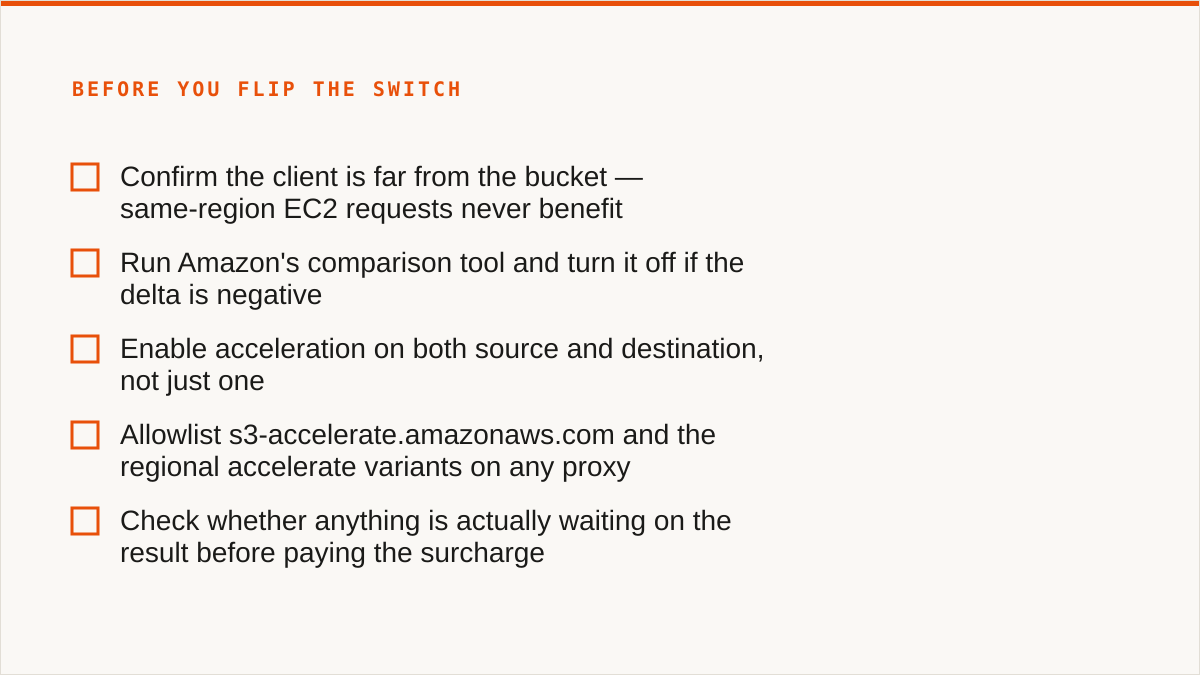
- Measure the baseline first, from the client that will actually run the job. Not from your laptop on office wifi, not from a bastion in a different country. Run the AWS acceleration comparison against the real host, with the real object sizes, at the real time of day. Write the number down. If you cannot state the current throughput, you cannot evaluate the change.
- Confirm the client path. Where does this host's traffic actually go? Through a corporate proxy? A VPN concentrator? A NAT gateway with its own limits? Any hostname allowlist needs
s3-accelerate.amazonaws.comadded before you start, or you will debug the wrong layer. - Check the bucket region against the client region. Same region means do not enable it. Same continent usually means do not enable it. Intercontinental with a bad path is the case that pays. This one step would have saved us four buckets.
- Confirm free-trial eligibility for this bucket before you assume it. The trial is bucket-scoped with conditions, and a bucket that already has heavy transfer history may not qualify. Check it, then model the paid rate anyway.
- Calculate the crossover point, in both directions. Not just "is it faster" but "how many hours does it save, and what is an hour of the thing that is waiting worth". If the job has no waiter, the crossover point is infinite and the answer is no.
- Fix the client config before you blame the network. Concurrency, multipart part size, retry counts. If
max_concurrent_requestsis 2, acceleration is treating a symptom you created. - Monitor the bill line, not the bill.
DataTransfer-Acceleratedis a separate line item fromDataTransfer-Out-Bytes, and they are the two numbers you need side by side. If you only look at the total, you cannot tell which bucket is burning the premium. Tag your buckets and use Cost Explorer filters, or use per-bucket cost visibility in a console, but look at the accelerated line specifically. - Know the rollback before you need it. Turning it off is
aws configure set s3.use_accelerate_endpoint falseon the client, or removing the bucket-level setting, or both. Decide in advance which one you will do and who does it. Half-reverted is a configuration where some clients use the accelerate endpoint and some do not, and it will make your next measurement meaningless.
Two additions to that list, because they bit us and they are not obvious.
Do not enable it fleet-wide from a script without the measurement in step one. That is exactly how we got to 14. A one-line change across every bucket is easy to write and hard to reason about, because the buckets are not the same. Different regions, different clients, different access patterns. The feature is per-bucket for a reason.
Re-measure after a few months. Network paths change. Your client moves. A new peering arrangement or a new region can make a path that was bad into a path that is fine, and an acceleration setting that paid for itself in March can be pure overhead by September. We now re-check the long-haul jobs quarterly. It takes an hour.
Where rclone genuinely beats us, and why we tell people to use it
This is the part where we are supposed to list a competitor's weaknesses. We are not going to, because on a lot of the axes that matter, rclone wins and pretending otherwise would cost us the only thing we actually have, which is that people believe what we write.
rclone is free, permanently, with no account, no subscription and no vendor relationship. That is not a pricing tier. That is a different category of thing. If your budget for this problem is zero, the conversation is over, rclone wins, and no amount of console polish on our side changes that arithmetic.
rclone mounts. It can present a remote bucket as a filesystem, which we cannot do at all. We have no FUSE surface. If you want your bucket to appear in Finder or Windows Explorer, that is rclone mount or Mountain Duck, and we are simply not in that market.
rclone supports far more backends than we do. Around 70, including the consumer clouds we deliberately do not touch. We connect the S3-compatible family plus any custom S3 endpoint, and nothing else. No Google Drive, no Dropbox, no OneDrive, no SFTP, no WebDAV, no Box. If your job is Drive-to-bucket, we are the wrong tool and we will tell you so on the first call.
rclone runs inside your security boundary. Your credentials stay on your own hardware. Ours do not: your credentials sit encrypted in our database. The encryption is real, AES-256-GCM with per-namespace HKDF keys, and for AWS you can connect keylessly by IAM role assumption so no long-lived key ever reaches us. But "the keys never left my laptop" is a stronger answer than "the keys are encrypted at rest on someone else's server", and it is dishonest to pretend otherwise. Some organisations have a policy that only the first answer satisfies, and for those organisations rclone is correct.
rclone composes. It is a binary. It drops into cron, systemd, CI pipelines, shell scripts and Makefiles like it was born there, because it was. We are a console. A web UI does not compose with a build system, and no amount of automation features changes the fundamental shape of the thing.
rclone has been maintained for over a decade. We started in 2026. We are a small team. If the question is "will this still exist in five years", a decade-old open-source project with a large contributor base has a better answer than we do, and anyone who tells you differently about a young company is selling.
So who are we for? The person who owns object storage across three providers, does not want to maintain a config file per provider, wants to see what is in every bucket in one place, wants scheduled sync without writing a systemd unit, and wants per-bucket cost visibility without building a Cost Explorer dashboard. That is a real job and it is the job we do. It is not everyone's job.
And the verdict, since we have earned the right to give one: if you are moving data between S3-compatible endpoints across regions and you already live in a terminal, rclone beats us on cost, on composability and on where your credentials live. Use it. We are not the better answer there and we are not going to pretend the console is worth a subscription you do not need.
Who should not pay Storafleet for this, and what to use instead
We would rather lose the sale now than have you churn in three months because we were the wrong shape of tool. So, plainly.
If your budget is zero, use rclone. Not a trial, not the Free tier, just rclone. It is free forever, it does the transfer, and it will still be here. There is no version of this where we beat free.
If you need storage mounted as a filesystem, use rclone mount, Mountain Duck or ExpanDrive. We do not mount. We will never mount in the sense you mean, because we have no FUSE surface. If your workflow is "the bucket appears as a drive letter", we are not a worse option, we are not an option.
If you need Google Drive, Dropbox, OneDrive or SFTP, use rclone or MultCloud. We connect S3-compatible storage and custom S3 endpoints. That is the whole list. MultCloud and CloudFuze cover the consumer clouds and we deliberately do not, because supporting them well is a different product and we would rather not do it badly.
If everything lives in one cloud and always will, use that provider's own console. It is free, it is authoritative, and it is always current with that provider's newest features, including the ones that ship next Tuesday. We will lag on provider-specific features because we have to support 50+ providers, and that is a structural disadvantage we cannot engineer away.
If your credentials must never leave hardware you control, use rclone. Or, if it is AWS only, connect us via IAM role assumption, which means no long-lived key sits with us at all. But if the policy is absolute, rclone is the answer and it is a good answer.
If the workflow is entirely code and always will be, use a CLI. A CLI composes with your build system, your scheduler and your incident runbooks. A console does not. If you are the kind of team that would rather write the script than click the button, you already know which one you want, and you are right.
And if you want a single desktop client for a handful of buckets with no subscription, look at Cyberduck, S3 Browser or Mountain Duck. One-time licence or free, files stay on your machine, and they mount. For one person managing three buckets, that is a better fit than anything we sell.
Where we are genuinely useful: many buckets, multiple providers, a team rather than an individual, a need for scheduled sync and cross-bucket search and per-bucket cost visibility without anyone maintaining the glue. That is the case we built for. If that is not your case, take one of the recommendations above and go and do your migration.
What we would do differently, and what we did
The 14-bucket afternoon is the lesson we keep coming back to. The setting is one line. The consequences are spread across a bill, a network path and a client config, and none of those three things is visible from the console where you flip the switch.
What we do now, every time: measure from the real host, check the bucket region against the client region, fix the client config before touching the network, calculate the crossover, watch DataTransfer-Accelerated as its own line item, and write down the rollback command somewhere a person under pressure will find it.
Amazon S3 Transfer Acceleration is a good feature. It is a paid reroute into CloudFront's edge network, it does exactly what it says, and it is worth the premium on the workloads that have the problem it solves. It is worth nothing on the workloads that do not.
The setting takes four seconds. Knowing whether you should have set it takes an afternoon and a baseline measurement. Do the afternoon first.