
S3 Compatible Storage Providers: A Guide to Object Storage
October 2026 · 33 min read · Surya
- Your provider choice is not the decision you think it is
- What "S3 compatible" actually promises, and what it quietly does not
- The compatibility matrix is smaller than the marketing implies
- Cloud object storage providers split into three tiers, and the pricing model matters more than the price
- A multi-provider setup is easy to start and miserable to run
- Bring-your-own-storage is a real architectural position, not a marketing line
- Credentials, IAM role assumption, and where the honest answer stops being ours
- What a migration between two S3 providers actually looks like
- A console and a command are not the same tool, and pretending otherwise is how teams get stuck
- Cross-bucket search and duplicate detection are the features you miss only after the third provider
- Lifecycle, CORS, versioning and object lock are configuration, and configuration drifts
- Who should not use Storafleet, and what they should use instead
Your provider choice is not the decision you think it is
Every article about S3 compatible storage providers starts in the same place. Which one should you pick? Compare the table. Weigh the egress. Choose.
We think that framing is wrong, and it is wrong in a way that quietly compounds. Not in a single dramatic bill, but in the slow accumulation of operational surface nobody signed up for.
The protocol is the easy part. It's settled, boring, and mostly identical across every provider worth considering. If you send a well-formed PutObject to Amazon S3, Cloudflare R2, Backblaze B2, Wasabi or a MinIO server in a rack in your office, you get a 200 and an ETag back. That's not a coincidence and it is not a favour. It is the entire point of compatibility, and it has been true for years.
So the search results that rank for "s3 compatible storage providers" are answering a question that was already answered. They're comparing commodities on the axes that commodities stopped differing on.
The problem nobody names is the one you create for yourself. You will end up with buckets in three providers. It will not be a plan. It will be an accretion. Someone put the marketing site's images in R2 because egress was the line item that scared finance. Someone else left the backups in B2 because it was cheap and the lifecycle rules were already written. The data warehouse team kept everything in S3 because that is where the compute lives.
Now you have three consoles, four sets of access keys, two migration scripts that somebody wrote at 11pm, and no single place that can answer a simple question: where is this file, and why is it there?
That is the actual decision. Not which provider. What control plane sits above all of them. Compatibility got you the ability to move between providers, which is genuinely valuable, and then handed you the problem of managing a fleet of them.
This post is about that second problem. It is also, fairly early, going to tell you that our answer to it is not always the right one, and name the tools that beat us at specific things. If you want the list of providers we connect before reading the argument, it is at storafleet.com/providers, and it's not going anywhere.
What "S3 compatible" actually promises, and what it quietly does not
Let us define the term properly, because "what is s3 compatible storage" is a real search and it deserves a real answer rather than a vendor's reassurance.
S3 compatible means a service implements the Amazon S3 REST API closely enough that clients written against S3 work against it, usually after changing the endpoint URL and the credentials. That's it. That is the whole promise. There is no certification body, no conformance suite everyone runs, and no enforcement. It is a convention held together by the fact that breaking it costs a provider customers.
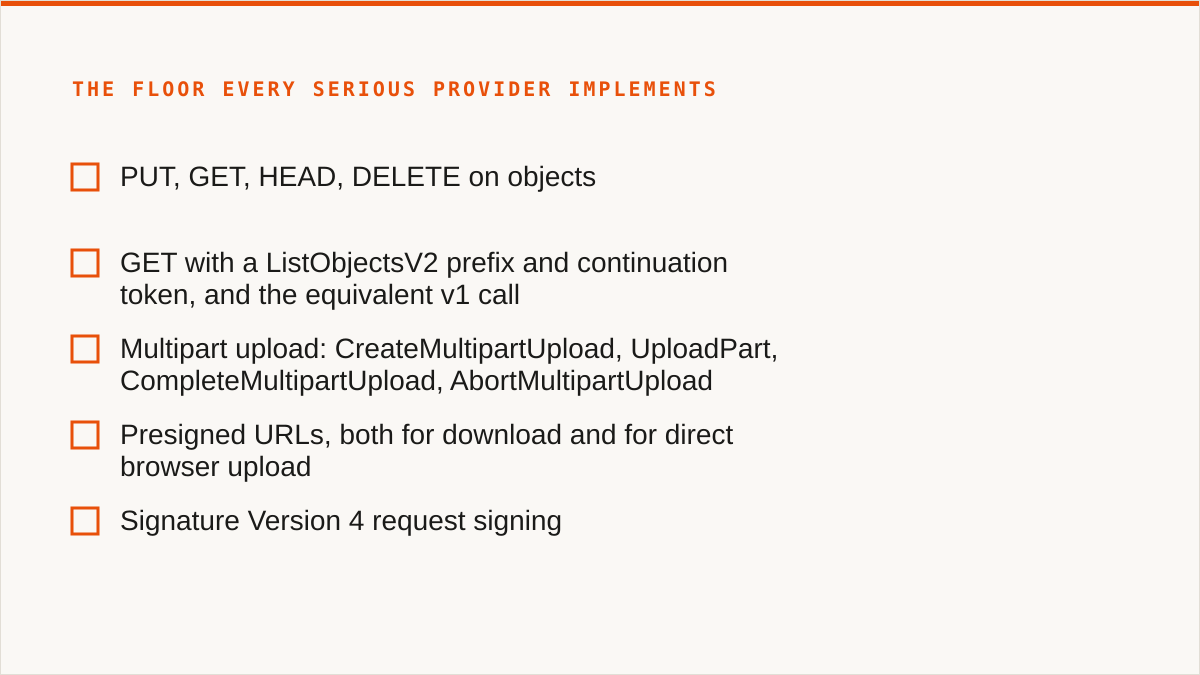
The table stakes, the part every serious provider implements, is small and well understood.
PUT,GET,HEAD,DELETEon objectsGETwith aListObjectsV2prefix and continuation token, and the equivalent v1 call- Multipart upload:
CreateMultipartUpload,UploadPart,CompleteMultipartUpload,AbortMultipartUpload - Presigned URLs, both for download and for direct browser upload
- Signature Version 4 request signing
- Bucket creation and deletion, and basic ACL or policy attachment
If a provider cannot do those, it is not S3 compatible and you should not be reading its pricing page. This is the floor. It has been the floor for a long time.
The long tail is where "compatible" starts to mean "compatible if you do not look too closely", and the long tail is long.
Here are the things that vary, in rough order of how often they cause trouble in the wild:
- Object lock and retention. WORM storage, legal hold, governance versus compliance mode. Some providers implement the full thing, some implement a subset, some call it "immutability" and mean something adjacent. If you are storing records under a regulatory retention rule, this is the difference between compliant and not.
- Versioning semantics. Delete markers, non-current versions, what happens to a versioned object when you delete the bucket. Providers differ on how aggressively they garbage collect and on whether suspended versioning behaves the way S3 behaves.
- CORS. Browser uploads need
PUTin the allowed methods, the right exposed headers, and a wildcard that actually means wildcard. Some providers apply CORS rules asynchronously, and some apply them to the bucket in ways that surprise you after a config change. - Lifecycle transitions. S3 can move objects to
STANDARD_IA,GLACIER,DEEP_ARCHIVE. A provider with one storage class does not have anywhere to transition to, so it either ignores the rule or rejects it. Same key, different outcome. - Conditional writes.
If-None-Match: *on aPUT, which gives you a lock-free way to avoid overwriting. Support is genuinely uneven, and it is the kind of feature you discover you need at the exact moment two workers race. - Checksum headers.
x-amz-checksum-sha256,x-amz-checksum-crc32, the newer trailing checksum formats. Verify-on-transfer is not universal, and if you assume it is, you will one day find out that your "verified" copy was verified by nobody. - Batch operations. S3 has
S3 Batch OperationsandDeleteObjectswith a large key list. Some providers cap the list length well below the S3 limit. Your bulk delete script works in staging and times out in production.
None of this is fraud. It is just that "S3 compatible" is a claim about the common path, and the uncommon path is where your interesting problems live.
The honest mental model: S3 compatibility gets you a client library that compiles and a first request that succeeds. Everything after that is a provider-by-provider conversation.
The compatibility matrix is smaller than the marketing implies
Let us make this concrete instead of hand-wavy. Here is a request that works against every provider worth the name.
curl -X PUT "https://s3.us-east-1.amazonaws.com/my-bucket/hello.txt" \
  --aws-sigv4 "aws:amz:us-east-1:s3" \
  --user "$AWS_ACCESS_KEY_ID:$AWS_SECRET_ACCESS_KEY" \
  -H "x-amz-content-sha256: UNSIGNED-PAYLOAD" \
  -H "Content-Type: text/plain" \
  --data-binary "hello from a control plane"
Change the host to <accountid>.r2.cloudflarestorage.com, or s3.us-west-004.backblazeb2.com, or s3.eu-central-1.wasabisys.com, or minio.internal:9000, and it still works. The signing is the same. The verb is the same. The response is the same.
Now do a multipart upload and watch the differences crawl out. A multipart upload is the operation where compatibility claims go to be tested, because it is stateful and it involves several round trips that a provider has to keep consistent.
# 1. Start the upload. Note the UploadId in the response.
aws s3api create-multipart-upload \
  --bucket my-bucket \
  --key bigfile.bin \
  --endpoint-url https://s3.us-west-004.backblazeb2.com

# 2. Upload each part. Minimum 5 MiB except the last. Keep the ETags.
aws s3api upload-part \
  --bucket my-bucket \
  --key bigfile.bin \
  --part-number 1 \
  --body part-0001 \
  --upload-id "$UPLOAD_ID" \
  --endpoint-url https://s3.us-west-004.backblazeb2.com

# 3. Complete it with the manifest of parts.
aws s3api complete-multipart-upload \
  --bucket my-bucket \
  --key bigfile.bin \
  --upload-id "$UPLOAD_ID" \
  --multipart-upload file://parts.json \
  --endpoint-url https://s3.us-west-004.backblazeb2.com
Every provider handles that sequence. What they disagree about is the edges around it.
- How long an incomplete multipart upload hangs around before it is garbage collected, and whether you can list them.
- Whether the minimum part size is enforced at
UploadParttime or atCompleteMultipartUploadtime. The second one means you discover the problem after uploading 40 GB. - Whether the ETag of a completed multipart object is the S3-style
<md5-of-md5s>-<partcount>or something provider-specific. If your verification step compares ETags across providers, this will produce a false mismatch and send someone on a hunt. - How many parts you may have in flight, and whether the provider rate-limits part uploads per bucket.
SigV4 is where the "compatible" claim earns its keep, and it is also where a single character error produces an error message that tells you nothing. The signature is a chain: canonical request, hashed, signed with a key derived from your secret and the date and the region and the service name. Get the region wrong and you get a signature mismatch, not a "wrong region" message. Get the service name wrong and the same. This is the debugging tax everyone pays once and then never thinks about again.
Here is the shape of the derivation, so the next time it fails you know where to look:
kDate    = HMAC("AWS4" + secret, "20260115")
kRegion  = HMAC(kDate,  "us-east-1")
kService = HMAC(kRegion, "s3")
kSigning = HMAC(kService, "aws4_request")
signature = HEX(HMAC(kSigning, stringToSign))
The region in that chain has to match the region the provider expects, and providers that run a single global endpoint sometimes expect a specific placeholder region string. us-east-1 is the usual safe answer. It is not always the right one. This is a two-hour problem that presents itself as a five-minute one.
So when you read a comparison table that says "S3 compatible: yes" for five providers, understand what you are reading. You are reading that the core verbs work. You are not reading that object lock behaves identically, that lifecycle transitions exist, that conditional writes are supported, or that the checksum headers mean what you think they mean.
The matrix you actually need is smaller than the marketing implies, and it is specific to your workload. If you only ever PUT and GET and LIST, every provider is fine and the choice is purely economic. If you use versioning with delete markers, object lock for compliance, and lifecycle rules to age data out, you are down to a much shorter list, and you should be testing rather than reading.
Cloud object storage providers split into three tiers, and the pricing model matters more than the price
Ask "what are the cloud object storage providers" and you get a list. Ask "how do they charge" and you get the thing that actually determines your bill in year three.
Tier one: the hyperscalers. Amazon S3, Google Cloud Storage, Azure Blob. Enormous surface area, every feature, every region, every integration, and a pricing model where storage is cheap and getting data out is not. Egress is metered, per gigabyte, and it is the line item that turns a comfortable architecture into a finance conversation. Their real advantage is not the storage. It is everything around it: IAM, VPC endpoints, the fact that your compute is already there, the fact that a new S3 feature ships everywhere on day one. If your workload lives inside one of these clouds, the integration is worth more than the egress costs, and no challenger is going to change that.
Tier two: the zero-egress challengers. Cloudflare R2, Backblaze B2, Wasabi, IDrive e2. Their pricing models differ from each other but they share a shape: they compete on the exit. R2's model is to not charge for egress at all. B2's model is inexpensive egress with a free allowance. Wasabi's model is a flat rate with a minimum retention period, which is a genuinely different structure and worth understanding before you sign, because the retention commitment is where the model bites. IDrive e2's model is a low headline rate with a minimum term. If your workload is read-heavy and egress-dominated, this tier is where the arithmetic changes completely, and the model matters more than the number.
Tier three: self-hosted and boutique. MinIO and Ceph on your own hardware. Storj and the various decentralised options. Hetzner Object Storage and Scaleway in Europe. This tier is where the interesting trade-offs live. Self-hosted MinIO gives you total control, no egress concept at all because it is your network, and a hardware bill instead of a service bill. It also gives you the pager. Ceph gives you the same with more operational weight and more flexibility. Storj gives you a distributed model with its own economics. Hetzner and Scaleway give you European residency and European pricing with a much smaller feature surface than the hyperscalers.
Our own model, stated plainly because hiding it would be worse: Storafleet is a flat subscription. We do not charge per gigabyte to move data, on any tier including Free. Migrated bytes are unmetered. What the tiers differ on is concurrent migration jobs and whether scheduled sync is available. That is a deliberate choice and it is not a moral position. It is a bet that the people who need to move a lot of data between providers do not want to do arithmetic about it first, and that a predictable line item is worth more to them than a per-byte one.
It is also a model that only makes sense because we do not store your data. We are not paying for disks. We are paying for a control plane and some metadata. If we were storing bytes we would be charging for bytes, and we would be a tier-two provider rather than a control plane above all three tiers.
Which brings us to the part that the provider comparison articles skip entirely.
A multi-provider setup is easy to start and miserable to run
Here is how it actually goes.
You start with S3 because everything starts with S3. The application is in us-east-1 and latency is good and nobody has to think about it.
Then the marketing team's images get served a few million times a month and someone does the egress arithmetic and it is uncomfortable, so those move to R2. The migration is an afternoon of rclone copy and a DNS change and a sed on the CDN config. Fine.
Then compliance says the old contracts need to be retained for seven years and the finance team sees the S3 storage bill for data nobody has read since 2019, so that goes to B2 with a lifecycle rule that transitions it down. Also fine. Also an afternoon.
Each individual decision was correct. Every one of them saved money or solved a real problem. You now have a fleet.
And now the misery, which arrives slowly and in small pieces.
- Duplicate detection becomes impossible by inspection. The same logo is in S3 under
assets/logo.pngand in R2 understatic/brand/logo-2024.png, and nobody knows if they are the same bytes or an older revision, and the only way to find out is to download both and compare. Multiply by a few thousand assets that accumulated over four years. Nobody does this, so the duplicates stay, and the storage bill quietly carries a few percent of pure waste forever. - Lifecycle rules drift. You set a 90-day transition to cold storage on the S3 bucket in 2023. In 2024 you added a prefix for a new feature and forgot the rule only covers the old prefix. In 2025 you set up the equivalent rule on B2 with a different window because the numbers looked different. There is no place where these two policies are visible side by side, so the drift is invisible until an audit or a bill spike.
- Access keys multiply. Four consoles, four sets of keys, four rotation schedules, four places someone who left the company might still have a key. Rotation is the thing everyone agrees to do quarterly and nobody does quarterly.
- Cost visibility fragments. Four dashboards, four billing cycles, four different ways of expressing the same number. Nobody can answer "what are we spending on object storage" without exporting four CSVs and doing it in a spreadsheet, and the spreadsheet is stale the moment it is finished.
- The one-off scripts rot. The migration script from 2023 still exists, has hardcoded keys in it, and nobody wants to delete it because it might be needed again. It will not work if it is needed again, because the API surface it used has moved on.
None of this is a disaster. That is the point. It is a slow accumulation of small operational debt that never triggers an incident, and therefore never gets prioritised. It just makes every question about your storage take an hour to answer instead of a minute.
That hour is the thing a control plane is for. Not the transfers. The answer to "where is it, what does it cost, and who can reach it" across a fleet you built by accident.
Bring-your-own-storage is a real architectural position, not a marketing line
We should explain what we actually are, because "control plane for object storage" is the kind of phrase that can mean anything.
Storafleet connects to object storage you already own and never stores your file contents. That is the architectural fact everything else follows from. Your buckets stay in your accounts, under your provider agreements, subject to your regions and your compliance posture. We hold connection metadata and credentials. We do not hold bytes.
Concretely, that means:
- You connect 50+ S3-compatible providers, plus any custom endpoint that speaks the protocol. Amazon S3, Cloudflare R2, Backblaze B2, Wasabi, MinIO, DigitalOcean Spaces, Oracle Cloud, IBM Cloud Object Storage, Scaleway, Linode, Vultr, Storj, IDrive e2, Hetzner Object Storage, and the long tail of regional providers and on-prem MinIO deployments.
- You browse, upload and download through one interface regardless of which provider a bucket lives on.
- You migrate and sync between providers, either as a one-time job or on a schedule.
- You search across every bucket on every connected provider from one place, which is the feature that only becomes obviously valuable after the third provider.
- You set lifecycle, CORS, versioning, object lock and public access configuration from one console, and see the differences between providers side by side.
- You get duplicate detection across buckets and per-bucket cost visibility.
The bring-your-own-storage position is not just a data-residency argument, although it is that too. It is an argument about leverage. If your data is in your accounts, changing your control plane is a config change. If your data is in our accounts, changing your control plane is a migration. We think the second one is a bad deal for you and we are not going to pretend otherwise just because the first one is harder for us to build.
It also means our incentives are aligned in a specific way. We do not make more money when you store more data, because we are not charging for storage. We make money when the control plane is worth the subscription. That is a cleaner relationship than a provider that charges per gigabyte and would prefer you never leave.
The full list is at storafleet.com/providers, including the custom-endpoint path for providers we have not explicitly named. If yours is missing, the custom endpoint is how you add it.
Credentials, IAM role assumption, and where the honest answer stops being ours
This is the section where we have to be careful, because it is easy to describe our credential handling in a way that sounds better than it is.
What we do: credentials are encrypted at rest with AES-256-GCM, using per-namespace keys derived via HKDF. In plain terms, each namespace's secrets are encrypted with a key that is derived for that namespace rather than shared globally, and the encryption is authenticated, so tampering with the stored ciphertext is detected rather than silently accepted. For AWS specifically, you can connect keylessly via IAM role assumption, which means no long-lived access key is stored on our side at all. We think that is the right default for AWS and we would rather you used it.
That is a real security posture and we're not going to be coy about it.
Now the concession, and it is not a small one.
Your credentials sit encrypted in our database. Not on your hardware. Our encryption is real, the per-namespace key derivation is real, and the IAM role path means AWS customers can avoid storing a secret entirely. But "the keys never left my laptop" is a stronger statement than "the keys are encrypted at rest in a database I do not control", and it is dishonest to pretend those are equivalent.
If your threat model includes the vendor, we lose. Full stop. A tool that keeps credentials on your own machine, runs inside your own security boundary, and never talks to a third party about your buckets beats us on exactly this axis, and no amount of AES-256-GCM changes that. rclone running from a cron job on a box you control is a better answer to "where do the keys live" than a web console is, and it will be for as long as we are a hosted service.
The IAM role path narrows the gap for AWS-only setups. It does not close it for anyone with buckets outside AWS, and it does not help at all if the concern is the control plane itself rather than the keys it holds.
We could soften this. We could say "defence in depth" and talk about the encryption again. We're not going to, because the people who care about this care about it precisely, and they will find out we were being evasive, and then nothing else in this post is worth anything.
So: if keys must never leave hardware you control, use rclone, or use our IAM-role connect if your storage is AWS-only and that satisfies the requirement. If it does not satisfy it, use rclone.
What a migration between two S3 providers actually looks like
Let us walk through a real one, because "we support migrations" is meaningless without the shape of the thing.
Say you are moving 2 TB of assets from S3 to R2 because the egress bill has become a recurring conversation. Roughly 2 TB. Round numbers, illustrative, do not benchmark your provider against this.
The rclone version, which is what most people do first and what we would tell you to do if your budget is zero:
# One-time copy, with verification and a bounded parallelism.
rclone copy s3:my-bucket r2:my-bucket \
  --transfers 16 \
  --checkers 32 \
  --s3-chunk-size 16M \
  --s3-upload-concurrency 4 \
  --checksum \
  --progress \
  --log-file /var/log/migrate.log
Then a second pass with --dry-run to see what is left, and then a cutover where you point the application at the new endpoint and re-run with --checksum to catch anything that changed during the window.
The flags that matter, and why:
--checksummakes rclone compare hashes rather than size and modification time. Slower, correct. Without it you are trusting metadata, and metadata lies after a migration that touched the file's timestamps.--transfersand--checkerscontrol parallelism. Too low and a 2 TB job takes a week. Too high and you get throttled by the provider and spend the time on retries instead.--s3-chunk-sizeand--s3-upload-concurrencycontrol the multipart behaviour. These are the flags you tune when the provider's part size expectations differ from the default.--log-filebecause a migration without a log is a migration you will run twice.
The things that go wrong on a real run, in the order they usually go wrong:
- Rate limiting. Providers throttle by request rate, not just by bytes. A high transfer count against a provider that counts requests per second produces a wall of 503s and a run that appears to stall. Back off the concurrency and it completes.
- Multipart part size. If a part is below the provider's minimum, the upload fails at completion time, after the bytes have been sent. You find out late. Tune the chunk size up.
- ETag mismatch on verification. Multipart ETags are not plain MD5s. If your verification step compares ETags between providers, expect false failures and use checksums instead.
- Objects that changed during the run. Someone writes to the source bucket while you are copying. The first pass misses it, the second pass catches it if it ran after the write. This is why the cutover includes a final pass rather than a single command.
- Interrupted runs. A dropped connection mid-part is fine, the part is retried. A dropped connection mid-run is fine if you resume with the same command, because rclone skips what is already there. It is not fine if someone deleted the partial state and started over.
The scheduled version is different in kind, not just in frequency. A one-time migration is a project with a start and an end. A scheduled sync is an ongoing operational commitment, and the questions change. What happens when the sync fails at 3am? Who gets paged? Is the schedule aligned with the write pattern on the source, or is it running while the application is writing and producing inconsistent snapshots? Is there a lag budget, and does anyone monitor against it?
Every provider's console will let you set up a one-time copy. The scheduled version, with concurrency limits and failure handling and a place to see whether last night's run succeeded, is the part that needs a control plane rather than a script.
A console and a command are not the same tool, and pretending otherwise is how teams get stuck
Here is a concession that costs us, and it is a bigger one than the credentials section because it applies to a much larger group of people.
A binary composes. A web console does not.
rclone is a single executable. That means it goes in a cron job. It goes in a systemd timer. It goes in a CI pipeline, in a Makefile, in a shell script that some other shell script calls. It returns an exit code, which means the thing that called it can branch on whether it worked. It writes to stdout and stderr, which means it pipes into grep and tee and your logging system. It has a --dry-run flag, which means it fits into a change-management process that requires a preview before a destructive operation.
None of that is true of a web console, and it is not a failing we can fix. It is the nature of the two things. A UI is for a human looking at a problem. A binary is for a machine executing a workflow. If your workflow is entirely code, and it always will be, a CLI fits it natively and a console never will, no matter how good the console is.
We built a console because the problems we are aimed at are ones where a human needs to see across providers and make a judgement: which of these three buckets has the stale copy, what does this lifecycle rule actually do, why is this file in two places. Those are visual problems. A terminal is a bad interface for comparing four configurations side by side.
But we are not going to claim the console is a substitute for a binary, because the first time someone tries to put a Storafleet sync in a CI pipeline and discovers it does not fit, the credibility is gone. If your storage operations are code, use rclone. If they are a person looking at a dashboard and occasionally moving data between providers, the console is the better tool. Those are different jobs and the industry's habit of pretending one tool does both is how teams end up with a fragile script that shells out to a web API.
We do have scheduled sync, which is the console's answer to "run this regularly". It is not the same as a cron job with an exit code, and if you need the exit code, you need rclone.
Cross-bucket search and duplicate detection are the features you miss only after the third provider
These two features sound like nice-to-haves in a feature list. They are not. They are the answer to the question that made you read this far.
Cross-bucket search, concretely. A customer emails and says the PDF they downloaded last month is broken. You know the filename pattern, roughly, and you know it was generated by the reporting service. Which bucket is it in? On a single-provider setup you open the console and search. On a fleet you open four consoles and search four times with four different search implementations, two of which do not support prefix search the way you expect, and one of which requires you to know the exact key.
One place that searches every bucket on every connected provider turns a twenty-minute hunt into a ten-second one. That is the whole value proposition and it does not need embellishing.
Duplicate detection, concretely. You are doing a storage review because the bill went up. You have four buckets on three providers, some of which were created by copying from others. How much of what you are paying for is the same file stored twice?
You cannot answer that by looking at names, because logo.png is not logo-final-v2.png is not brand/logo-2024.png, and they might all be the same bytes. You cannot answer it by looking at sizes, because plenty of different files are the same size. You answer it by hashing, which means downloading, which means egress, which on a metered provider is the thing you were trying to reduce.
Duplicate detection done properly uses the metadata the provider already has where it can, and hash comparison where it cannot. The point is not to be clever. The point is to give you a list of "these 400 objects are byte-identical to those 400 objects, here is the storage cost of each copy, here is which one is referenced by what" so that a human can decide, and so the decision is recorded somewhere rather than lost in a Slack thread.
Neither of these features is exciting. Both of them are the reason a fleet becomes manageable instead of merely large. And both of them require a view above the providers, which is the entire argument of this post.
Lifecycle, CORS, versioning and object lock are configuration, and configuration drifts
This is the section where the "S3 compatible" claim does the most quiet damage, because these are the settings that determine what your storage does over time, and they are the settings that differ most between providers while using identical key names.
Lifecycle. A rule has a filter (prefix or tag), a status, and a set of transitions and expirations. On S3 you might transition to STANDARD_IA at 30 days and GLACIER at 90 and expire at 2555. On a provider with one storage class, the transitions have nowhere to go, so the rule either errors or is silently ignored, and the object stays in the expensive class forever. Same JSON. Different behaviour. Nobody notices until the bill.
CORS. Browser uploads need a rule that allows PUT, exposes the right headers, and has an origin that matches. Providers differ on whether a rule change applies immediately or after a propagation delay, on whether * in AllowedOrigins means what you think, and on whether the console shows you the effective rule or the configured one. The failure mode is a browser upload that works in staging and fails in production because the origin is different and the rule was never updated.
Versioning. Enabling versioning is easy. Understanding what it costs is not, because every version is a stored object. Suspending versioning is where semantics diverge: what happens to delete markers, whether non-current versions are still retained, whether you can restore a version after suspension. Providers implement this differently and the documentation does not always say so clearly.
Object lock. The one where getting it wrong has legal consequences rather than financial ones. Compliance mode versus governance mode, retention periods that cannot be shortened, legal holds that can be applied independently. Some providers implement the full S3 semantics. Some implement governance mode only. Some implement a retention feature that is not the same thing and is named similarly. If you are storing records under a retention rule, this is the setting you must verify per provider rather than assume.
Public access. Block-public-access settings exist at the account level and the bucket level on S3, and the interaction between them is subtle. On other providers the equivalent setting may be bucket-only, or may be expressed as a policy rather than a toggle. The failure mode is a bucket that is public when you believed it was not, which is the kind of failure that makes the news.
Why a single place to set and compare these matters: because the failure mode of drift is not an error. It is silence. A lifecycle rule that stopped applying does not tell you. A CORS rule that is subtly wrong does not tell you until a browser tries. A versioning setting that differs from what you assumed does not tell you until you try to restore. The only way to catch drift is to look at all of them together, on a schedule, and compare. That is a feature a single provider's console cannot have, because it only knows about itself.
And we will say the obvious thing: a provider's own console is always current with that provider's newest features, and ours is not. If a provider ships a new storage class tomorrow, their console knows about it first. That is a real advantage, and it is one of the reasons the next section exists.
Who should not use Storafleet, and what they should use instead
This is the section that decides whether the rest of the post was worth reading. If we are only willing to sell, nothing we said about compatibility or credentials or CLI composition means anything.
If your budget for this is zero, the conversation is over and rclone wins. rclone is free, permanently, with no account and no vendor. It supports more backends than we do, over 70 of them, including the consumer clouds we deliberately do not touch. It mounts. It is scriptable. It runs inside your own security boundary. It has been maintained for over a decade. For a large number of people the honest answer is: use rclone, and do not think about this again. We would rather say that than have you sign up, discover the free tier is not the thing you needed, and conclude we oversold.
If you need storage mounted as a local filesystem, we cannot help and you should not read further. Storafleet has no FUSE surface. Remote buckets will not appear in Finder or Explorer. rclone mount does this. Mountain Duck does this and does it with a nicer desktop experience. ExpanDrive does this. Pick one of those. This is a hard limitation, not a roadmap item we are hinting at.
If you need Google Drive, Dropbox, OneDrive, Box, SFTP or WebDAV, we are the wrong tool. We connect the S3-compatible family and any custom S3 endpoint, and nothing else. If the job is Drive-to-bucket or bucket-to-Dropbox, rclone covers it and MultCloud or CloudFuze cover it with a UI. Those are genuinely better than us for that job because they do the job and we do not.
If your credentials must never leave hardware you control, use rclone. As covered above. Our IAM-role connect is a real mitigation for AWS-only setups and it is not a general answer. If the requirement is absolute, a hosted control plane is disqualified, and we are a hosted control plane.
If everything lives in one cloud and always will, that provider's own console is free and more current than we are. It knows about new features on day one. It is authoritative. It is already open in a tab. We are a control plane for a fleet, and if you do not have a fleet, we are overhead. This is the single most common case and we are not going to pretend it is not.
If your workflow is entirely code and always will be, use a CLI. rclone composes with cron, systemd, CI and Makefiles. We do not. If the storage operations are steps in a pipeline, a binary is the right shape and a console never will be.
If you are a single person managing a few buckets and you want no subscription, look at Cyberduck, Mountain Duck or S3 Browser. Desktop clients, files stay on your machine, one-time licence or free, and they mount. That is a better fit for that job than a subscription control plane.
And the concession we have to make about ourselves, which is the hardest one to write.
We are a small team. Storafleet started in 2026. We have no published case studies and no named customers to point at, and we are not going to invent them. On the question "will this still exist in five years", a decade-old open-source project has a better answer than we do, and pretence to the contrary would be an insult to anyone who has watched a startup-shaped dependency turn into a migration project.
That is a real risk and you should weigh it. The mitigations are honest but modest: your data is in your own accounts, so if we disappear you have lost a control plane rather than a storage provider. Your buckets stay where they are. The credentials you gave us are revocable. The exit is a config change rather than a migration, which is the entire point of bring-your-own-storage and the reason we chose it.
But "the exit is easy" is not the same as "we will be here", and if longevity is the deciding factor, an older project wins and you should use it.
So here is the short version, and it is the verdict, not a summary.
- Budget zero: rclone.
- Need a mounted filesystem: rclone mount, Mountain Duck or ExpanDrive.
- Need Drive, Dropbox, OneDrive or SFTP: rclone or MultCloud.
- Keys must never leave your hardware: rclone, or our IAM-role connect if it is AWS only.
- One cloud forever: that provider's console.
- Workflow is entirely code: a CLI.
- Need an older, more established project: the decade-old open-source option is the safer answer.
Use Storafleet if you have buckets in three providers, you are the person who has to answer questions about all of them, and you want one place to see what is where, what it costs, and what the configuration actually does. That is a narrow case and it is the one we built for. If it is your case, the list of what we connect is at storafleet.com/providers, and the free tier is enough to find out whether the control plane is worth the subscription.
If it is not your case, we have just spent several thousand words telling you which tool to use instead. That is deliberate. The alternative is a company that sells to everyone, and you have met those companies.