
S3 Compatible Storage Providers: What to Compare
October 2026 · 24 min read · Surya
- What "S3 compatible" actually promises, and what it does not
- The five questions that separate providers, and why price per gigabyte is not one of them
- Egress: the line item that decides your architecture before you write a line of code
- Why "S3 compatible block storage" is a phrase that costs people weeks
- Multi-cloud is a credentials problem wearing a storage costume
- What Storafleet actually is, and the one thing we will never do
- A real sync config, and the honest limit of a console
- Where rclone, Mountain Duck and the provider consoles genuinely beat us
- Who should not use Storafleet, and what they should use instead
S3 compatible means the HTTP API answers, not that the marketing page says S3
S3 compatible storage providers are services whose HTTP API answers to the S3 request verbs and signatures. That is the whole definition. You take a tool written against Amazon S3, change the endpoint URL and the access key, and the tool talks to a different server. The request shape is the same. GET /bucket/key with an Authorization: AWS4-HMAC-SHA256 ... header means the same thing on Backblaze B2 as it does on S3.
That is it. That is the promise.
"Compatible" does not mean "identical", and the gap between those two words is where entire weekends go to die. The S3 API is enormous. Nobody implements all of it. Every provider picks a subset, and the subset they picked is almost never printed on the pricing page where you would find it before signing up.
Here is what that looks like in practice. You write a job that calls ListObjectsV2 with a delimiter and a continuation token, and it works everywhere because that is the single most-implemented call in the family. Then you add object lock for a compliance requirement, and one provider returns NotImplemented while another returns a 200 that quietly does nothing. Both look fine in your logs. One of them is a compliance finding waiting to happen.
Or you lean on x-amz-checksum-crc32c headers. Or you use If-None-Match on PutObject for conditional writes. Or you depend on strongly consistent ListObjects after a write, which is a real thing on modern S3 and a coin flip on providers built on eventually consistent metadata stores.
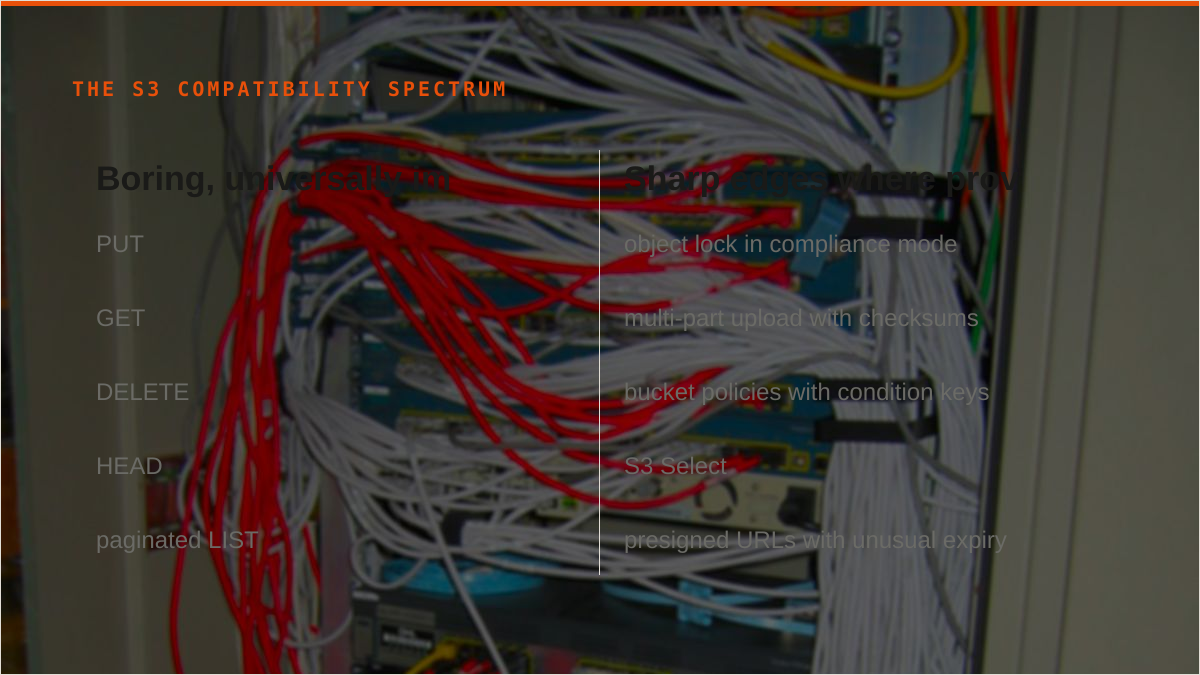
The correct mental model is a spectrum, not a checkbox. At one end you have the boring, ancient, universally implemented core: PUT, GET, DELETE, HEAD, and a paginated LIST. At the other end you have the sharp edges: object lock in compliance mode, multi-part upload with checksums, bucket policies with condition keys, S3 Select, presigned URLs with unusual expiry, replication configuration, request payer. Providers cluster heavily at the boring end and thin out fast as you move up.
So when someone searches "best s3 compatible storage" they are asking the wrong question. There is no best. There is only the best fit for the specific verbs your tooling actually calls, and the only honest way to find that out is to test the calls you depend on against the provider before you migrate a terabyte onto it.
We built Storafleet around this fact, which is why connecting a provider is not just "paste a key". The console probes the endpoint and tells you which capabilities answered. You find out that object lock is missing while you are still in the setup screen, not three weeks later when legal asks.
The five questions that actually separate providers, and none of them is price per gigabyte
Price per gigabyte is the number everyone compares and the number that matters least. It's the sticker on the car. Here is what actually decides whether a provider works for you.
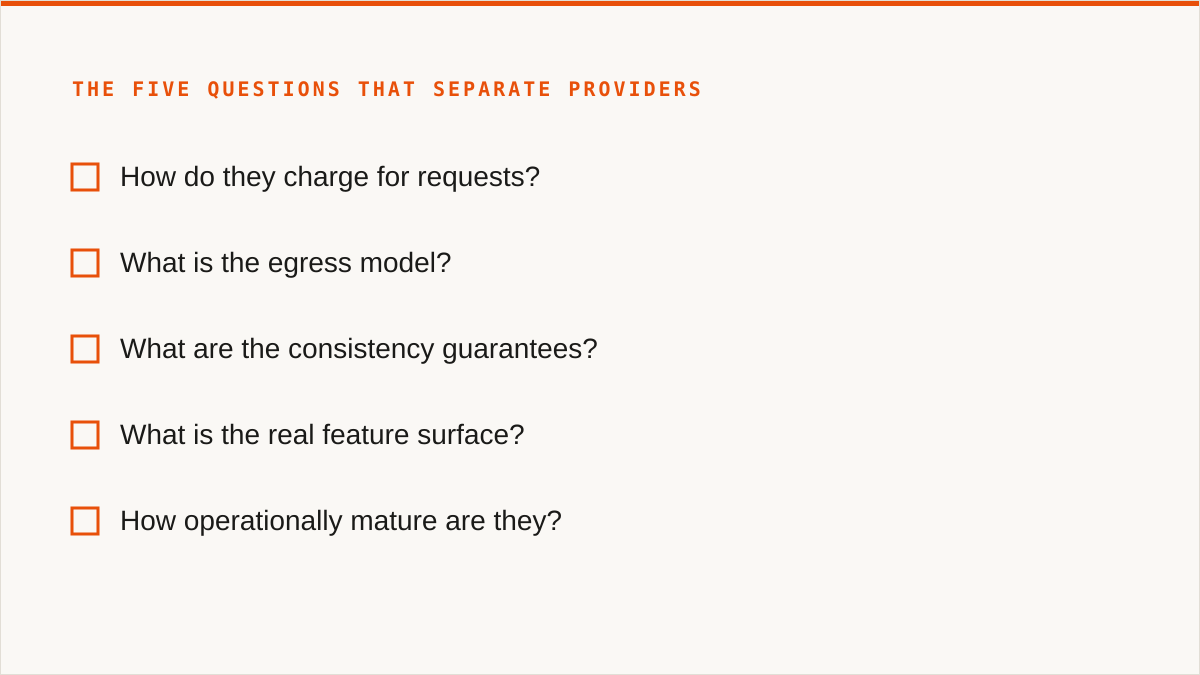
1. How do they charge for requests?
Every provider meters storage per gigabyte-month. That part is boring and similar. What differs wildly is the request model. Some providers charge per thousand PUTs and per thousand GETs. Some charge only for writes. Some charge a flat rate and never look at your request count at all.
Request-heavy workloads exist, and per-request billing destroys them. If you're running a backup tool that does a HEAD before every upload, or a sync job that lists aggressively, or anything with a high small-object count, your request bill can exceed your storage bill. We have seen it happen to people, and the surprise always arrives the same way: an invoice with a line item nobody modelled.
The comparison question is not "what do you charge per GB". It is "what is my access pattern, and does this provider's request model punish it".
2. What is the egress model?
Covered fully in the next section because it deserves its own. Short version: free egress versus metered egress is the single biggest architectural fork in this whole space.
3. What are the consistency guarantees?
Some providers give you strong read-after-write consistency for new objects, overwrites, and deletes, plus strong list consistency. Others do not, or match it only for object reads and not for listings.
If your application writes an object and immediately lists the bucket to confirm it landed, you have just built a dependency on a guarantee that is not universal. The failure mode is intermittent and therefore awful: it works in testing, it works on Tuesday, it fails at 3am under load, and the error message says nothing useful.
Ask before you build. "Is ListObjectsV2 strongly consistent after a PutObject returns 200" is a question a provider's sales team may not be able to answer, but their engineers can, and the answer will save you a support ticket you cannot reproduce.
4. What is the real feature surface?
Versioning. Object lock in governance and compliance modes. Lifecycle rules with transitions and expiration. Bucket policies with condition keys. CORS configuration. Public access blocks. Server-side encryption with customer-provided keys. Replication.
Each of these is a place where "S3 compatible" ranges from "fully implemented and tested" to "returns 501" to "accepts the configuration and then ignores it". That third case is the dangerous one. A loud failure is a gift. A silent no-op is a landmine.
The way to compare this is not to read the feature matrix on the marketing site. It is to configure the feature and then verify the behaviour. Create an object with a retention date, try to delete it, and see whether the delete is refused. If it succeeds, your object lock does not exist.
5. How operationally mature are they?
How long have they been running? What is their incident history? Does their status page show real outages or a wall of green regardless? When a request fails, does the error message tell you why, or does it return a generic 500 and a support form?
This is the question you cannot test in an afternoon and the one that bites hardest at scale. A provider that has been up for a decade has handled the weird failures. A provider that launched last quarter has not, and you will be the one discovering their edge cases.
None of these five questions is answered by comparing dollars per terabyte. The storage rate is the least differentiated number in the entire comparison and the one everyone leads with. That is not an accident, it is marketing, and it works because per-gigabyte pricing is easy to put in a table.
Egress pricing is the line item that decides your architecture
There are two models in this market and they produce completely different architectures.
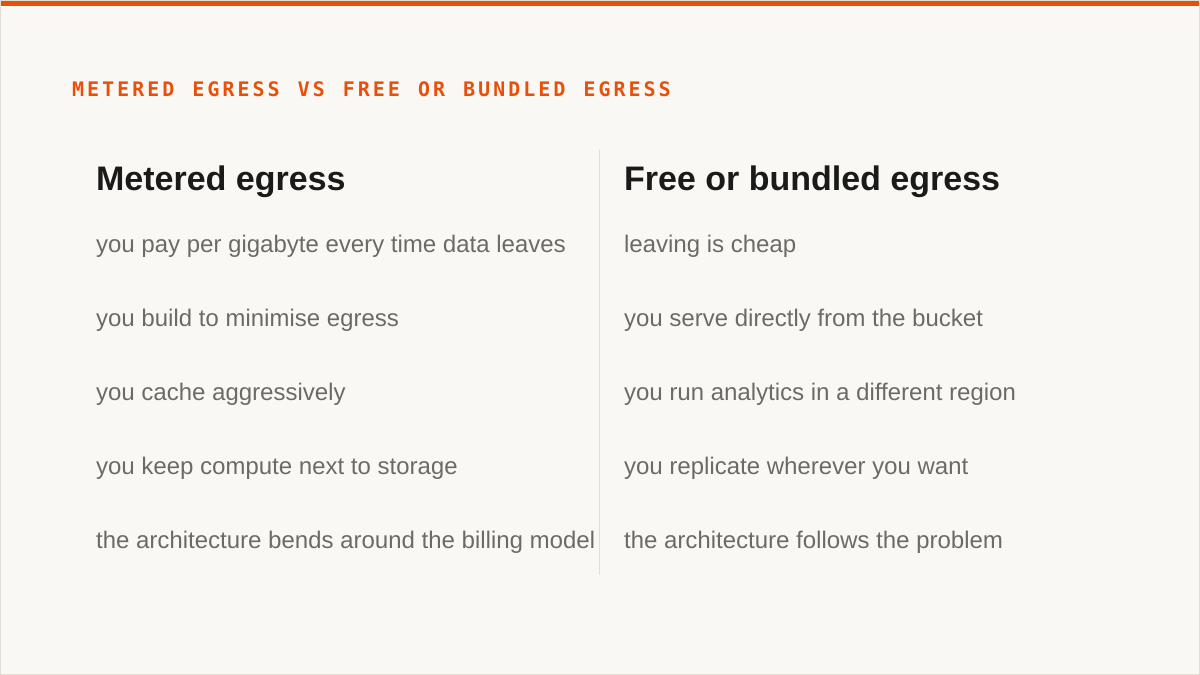
The first is metered egress. You pay per gigabyte every time data leaves the provider's network. This is the classic cloud model. It is how the big hyperscalers price, and it is the reason "egress fees" is a phrase that appears in so many angry blog posts.
The second is free or bundled egress. Several S3-compatible providers charge nothing to move data out. Cloudflare R2 is the famous example. Backblaze B2 has a generous free tier and then a per-gigabyte rate that is far lower than hyperscaler egress. Wasabi bundles a certain amount of egress with storage and charges only if you exceed it. The models differ but the direction is the same: leaving is cheap.
Why does this decide your architecture? Because of one word. Read replicas. CDN origins. Cross-region failover. Any design where data flows out regularly and in volume.
If egress is metered, you build to minimise egress. You cache aggressively. You keep compute next to storage so the data never crosses the boundary. You think hard before approving any design where a service pulls the same objects repeatedly. The architecture bends around the billing model, and it bends in ways you did not consciously choose.
If egress is free, you stop thinking about it. You serve directly from the bucket. You run analytics in a different region. You replicate wherever you want. The architecture follows the problem instead of the invoice.
Here is the concession, and it is a real one: metered egress is completely fine when you rarely leave the cloud. If your data goes in and essentially never comes out, if your compute lives in the same region as your storage, if your workload is archival or write-heavy, then egress pricing is close to irrelevant and you should optimise for something else. Hyperscaler egress rates are high, but a number you never trigger is a number you should not pay attention to.
The mistake is not choosing a metered provider. The mistake is choosing one without knowing which model you chose, and discovering it when a data migration or a new read-heavy service suddenly turns egress into your second-largest line item.
This is a big part of why Storafleet charges a flat subscription and never meters the bytes we move. Migrating 20 TB from one provider to another costs you the same as migrating 20 GB. Not because we are generous, but because metering bytes in a control plane would create a perverse incentive: we would profit from your data being in the wrong place, and we would rather you moved it to the right place cheaply.
S3 compatible block storage is not a thing, and the confusion costs people weeks
People search for "s3 compatible block storage". That phrase describes nothing. It is two incompatible ideas glued together, and the fact that it shows up in search results means enough people are confused that it is worth being blunt about.
There are three storage models and they answer different questions.
| Model | Unit | Access | Typical use |
|---|---|---|---|
| Block | Fixed-size blocks | Raw device, attached to one host | Databases, VM disks, boot volumes |
| File | Files in directories | Network share, POSIX | Shared documents, home dirs, app configs |
| Object | Objects in flat buckets | HTTP API | Backups, media, logs, static assets, data lakes |
S3 is object storage. It has no concept of a block device. You cannot format a bucket. You cannot mount it as a filesystem and expect POSIX semantics, which is a trap people fall into because tools like s3fs and rclone mount make it look like you can. They present a filesystem-shaped view over an object API, and the illusion holds until something does a rename or an append or an mmap, at which point it does not.
So when someone searches "s3 compatible block storage", one of two things is happening. Either they want block storage and they have heard the word S3 somewhere and assumed it is the same family, or they want object storage and they have used the word "block" because that is what they call storage in general.
If you actually need block storage, S3 compatibility is not a feature you should be comparing. You want EBS, or GCP Persistent Disk, or Azure Managed Disks, or a local NVMe array, or a provider offering iSCSI or NVMe-over-Fabric volumes. Look for IOPS guarantees, attachment limits, snapshot behaviour, and multi-attach support. None of those words appear in an S3 API.
The confusion costs weeks because it sends people down a path where they try to make object storage behave like a disk. They build a layer, it works at low load, it falls over when a database does random writes across a file, and they spend a fortnight debugging their own abstraction instead of buying the right product on day one.
If you need object storage and you said "block" by mistake, then everything else in this article applies to you and you can ignore the taxonomy lesson.
Multi-cloud means one namespace over many endpoints, not three consoles open in three tabs
Here is the search query that tells us someone is about to have a bad time: "object storage solutions providing integration with aws, azure, and gcp and implementation support".
That query assumes multi-cloud is a storage problem. It is not. It is an operational problem, and storage is the easy part.
The easy part is that all three hyperscalers speak S3. Well, mostly. AWS invented it. GCP has an S3-compatible XML API alongside its native JSON API. Azure Blob Storage has an S3-compatible layer that is functional but not the same thing as its native API. So in principle you can point an S3 tool at all three.
In practice, "multi-cloud" means you now have three sets of credentials, three endpoint URLs, three region taxonomies, three IAM models, three billing consoles, and three different answers to the question "where is that file".
That is the real problem. Not moving bytes. Finding them.
Consider a simple question: do we have a copy of customer-exports/2024-q3.tar.gz anywhere? On a single cloud you open one console and search. Across three clouds you open three consoles, run three searches, and then reconcile the results by hand. Do that twice a week and you have built a process that will eventually produce a duplicate or a gap, and you will not know which until it matters.
The other operational problems are just as unglamorous and just as expensive:
- Credentials. Three providers, three key rotations, three sets of secrets in your config management. Rotate one and forget to update a sync job, and the job fails silently at 2am.
- Search. No provider knows what is in another provider's buckets. Cross-cloud search does not exist at the storage layer. It has to be built above it.
- Sync. Keeping a bucket on provider A in step with a bucket on provider B is not something either provider will do for you. Someone has to run the job.
- Cost attribution. Three invoices, three pricing models, three sets of line items. Working out what a single application costs you across all three is a spreadsheet exercise, and the spreadsheet goes stale the moment anyone changes a lifecycle rule.
So the honest framing for multi-cloud is this: it is an inventory and credentials problem first, and a data movement problem second. Solve the inventory and the credentials and the movement becomes routine. Solve the movement and leave the inventory unsolved and you have built a faster way to create confusion.
This is the problem Storafleet actually addresses. One console, one credential store, one search index across every connected endpoint. You connect S3, R2, B2, Wasabi, Azure's S3 layer, GCP's S3 layer, MinIO, and a dozen others, and you get a single view of what exists where. The bytes stay on the providers you chose. We just remember what is where and let you act on it.
What Storafleet actually is: a control plane over storage you already own
Storafleet is a control plane for object storage you already own. That sentence is the whole product. Everything else follows from it, including the things we cannot do.
You bring the storage. You keep the storage account, the billing relationship, the data residency, and the contract. We connect to it over the S3 API and give you a console that spans all of it.
What we do:
- Connect 50+ S3-compatible providers plus any custom S3 endpoint. Amazon S3, Cloudflare R2, Backblaze B2, Wasabi, MinIO, DigitalOcean Spaces, Oracle Cloud, IBM Cloud Object Storage, Scaleway, Linode, Vultr, Storj, IDrive e2, Hetzner. If it speaks S3, we can talk to it.
- Browse, upload and download across every connected bucket from one interface.
- Migrate and sync between providers, one-time or on a schedule.
- Search globally across buckets and providers from a single query.
- Configure lifecycle rules, CORS, versioning, object lock, and public access settings.
- Detect duplicates and show per-bucket cost visibility so you can see what you are actually paying for.
What we never do: we do not store your file contents. Not as a cache, not as a staging area, not ever. Data moves between your providers and, at no point, lands on our infrastructure. That is not a policy we could change with a terms update. It is the architecture.
The credentials you give us are encrypted at rest with AES-256-GCM using per-namespace keys derived via HKDF. If you are connecting AWS, you can skip the keys entirely and connect keylessly using IAM role assumption, so no long-lived secret exists on our side at all.
Pricing is a flat subscription. We never charge per gigabyte to move data, and migrated bytes are unmetered on every tier including Free. Tiers differ on concurrent migration jobs and whether you get scheduled sync automation. That is the whole pricing model. No egress line item, because we are not the one holding your data.
If you want the provider list and what connecting to each one involves, that lives at storafleet.com/providers.
Now the parts we are less comfortable saying but are going to say anyway.
We are a console. We are not a command. We do not mount anything. We do not speak to Google Drive, Dropbox, OneDrive, SFTP, WebDAV or Box, and we are not going to. Our credentials sit encrypted in our database, which is a good answer, but "the keys never left my laptop" is a stronger one and we will not pretend otherwise. We are a small team and Storafleet started in 2026, which means on the question "will this still exist in five years", a decade-old open-source project has a better answer than we do.
More on all of that in the concession section below. It is long and we mean it.
Here is a real sync config, and here is where a console loses to a CLI
This is the part where we show the work, and then admit where the work is better done somewhere else.
A scheduled sync in Storafleet is a configuration, not a script. You pick a source, a destination, a direction, a schedule, and a conflict policy. Something like this:
{
  "name": "nightly-b2-to-r2",
  "source": {
    "provider": "backblaze-b2",
    "bucket": "prod-backups",
    "prefix": "db/"
  },
  "destination": {
    "provider": "cloudflare-r2",
    "bucket": "prod-backups-dr",
    "prefix": "db/"
  },
  "direction": "source-to-destination",
  "schedule": "0 3 * * *",
  "conflict": "newer-wins",
  "delete_orphans": false,
  "verify": "checksum",
  "concurrency": 8
}
Read it and you know exactly what happens. Every night at 03:00, everything under db/ in the B2 bucket is compared against the R2 bucket, and anything newer at the source is copied over. Deletions at the source do not propagate. Checksums are verified after transfer. Eight files move at once. The job runs on our infrastructure, not yours, which means it does not need a server, a cron daemon, or a VM that someone has to remember to keep alive.
That last property is the real value of a console for this job. A scheduled sync that lives in someone's infrastructure is a scheduled sync that breaks when that infrastructure is rebuilt, and nobody notices for three weeks because the failure is silent.
Now the honest comparison. Here is the same job as an rclone invocation:
rclone sync b2:prod-backups/db r2:prod-backups-dr/db \
  --checksum \
  --transfers 8 \
  --update \
  --log-file /var/log/rclone-nightly.log \
  --log-level INFO
And the crontab line that runs it:
0 3 * * * /usr/bin/rclone sync b2:prod-backups/db r2:prod-backups-dr/db --checksum --transfers 8 --update --log-file /var/log/rclone-nightly.logTwo lines, and it does the same thing. It runs inside your security boundary. It composes with everything: systemd timers, CI pipelines, Makefiles, shell scripts, Ansible playbooks. It logs wherever you want. It has been maintained for over a decade by people who know this problem better than we do. It costs nothing.
If your workflow is code, rclone is the better tool and it is not close. A binary composes. A console does not. You cannot pipe our output into grep. You cannot call us from a Makefile. You cannot have a CI job trigger a Storafleet migration and wait for the exit code, because there is no exit code, because we are a web application. We can schedule a sync on a cron expression, and that is genuinely useful for people who do not want to run a server. It is also strictly less flexible than a cron job that calls a binary, and pretending otherwise would be insulting to anyone who has ever written a shell script.
The reason to use the console version is not capability. It's that the console version is a thing you configure once and forget, and the rclone version is a thing you own forever. Both are legitimate. Pick based on whether you want to own it.
Where rclone, Mountain Duck and the providers' own consoles genuinely beat us
This section is long because the honest version of it is long. Every one of these tools beats us at something real, and most of them are free.
rclone beats us at almost everything that involves a command line, and it is free forever. Not freemium. Free, with no account, no vendor, and no company that has to still exist in five years for your scripts to keep working. It supports over 70 backends, which is roughly 20 more than we do, and the extra ones include the consumer clouds we deliberately do not touch. It mounts. It is scriptable in any language that can call a subprocess. It runs inside your own security boundary, so your credentials never leave hardware you control, which is a categorically stronger security posture than ours no matter how good our AES-256-GCM implementation is. It has been maintained for over a decade by a community that has already hit the edge cases you are about to hit. For a large number of people reading this, the honest answer is: use rclone. We are not going to pretend a web console is a better fit for someone who lives in a terminal.
Cyberduck, Mountain Duck and S3 Browser beat us on the desktop. These are native applications that run on your machine. Mountain Duck mounts remote storage as a drive letter or a Finder volume, which is the single most requested thing we cannot do. Cyberduck is free and handles a huge range of protocols. S3 Browser is a one-time licence with no subscription. Your files stay on your machine, your credentials stay on your machine, and there is no monthly bill. If you are one person managing a handful of buckets and you want them to appear in Finder like a network drive, these tools do exactly that and we do not.
MultCloud and CloudFuze beat us at the consumer clouds. They connect Google Drive, Dropbox, OneDrive, Box and a long list of others. We do not, and we are not planning to. If your job is moving files between a personal Drive account and an S3 bucket, these services do it, and we are simply the wrong tool. We made that choice deliberately, because supporting consumer OAuth for a dozen providers is a different product with a different support burden, and doing it badly would be worse than not doing it.
The providers' own consoles beat us at their own product. This one is easy to forget. The Cloudflare R2 dashboard knows about every R2 feature the day it ships. The Backblaze console knows about Backblaze-specific behaviour. The AWS console is authoritative for AWS and always will be. We are a third party reading a public API. When a provider ships a new capability, we find out when the docs update, and they find out when they build it. If everything you have lives in one cloud and always will, that cloud's console is free, current, and better informed than we are. Use it.
Here is what none of them do, and it is the gap we exist to fill.
None of those tools give you one search index across every provider. rclone can list a remote. It cannot answer "where does this filename exist across all six of my providers" without you running six commands and reading six outputs. The provider consoles cannot see each other at all. Desktop clients see one connection at a time.
We are not claiming that is worth a subscription to everyone. For a lot of people it is not. But for someone running production data across B2, R2 and a MinIO cluster, the question "do we have this file and where" is asked daily, and answering it by hand is a tax that compounds.
Who should not use Storafleet, and what they should use instead
This is the section that costs us sales and we are writing it anyway, because a company that will not tell you when to walk away is a company whose recommendations you cannot trust.
If your budget for this is zero, the conversation is over and rclone wins. Not "rclone is a good alternative". Rclone is the answer. It is free, it is more capable than us in most dimensions, and there is no version of this where you should pay us instead. Go install rclone.
If you need storage mounted as a filesystem, use rclone mount, Mountain Duck or ExpanDrive. We have no FUSE surface. We are not building one. If the requirement is that a remote bucket appears as a drive letter so that Photoshop or Excel or a legacy application can open files from it, we cannot help you and those tools can.
If you need Google Drive, Dropbox, OneDrive, SFTP or WebDAV, use rclone or MultCloud. We connect the S3-compatible family and any custom S3 endpoint, and nothing else. This is a deliberate boundary, not a gap we are working to close. If your data lives in consumer clouds, we are not your tool.
If your credentials must never leave hardware you control, use rclone. Our encryption is real. AES-256-GCM with per-namespace HKDF-derived keys, and keyless IAM role assumption for AWS so no long-lived secret exists on our side at all. That is a good answer. It is not as strong as "the keys never left my laptop", and if your threat model requires that, no amount of encryption on our side changes the fact that your credentials transit our infrastructure. The exception is AWS with IAM role assumption, where the security posture is genuinely closer to equivalent. For everything else, rclone running on your own machine is the stronger choice and we will not argue otherwise.
If everything lives in one cloud and always will, use that provider's own console. It is free. It is always current with that provider's newest features, because the provider builds them. It is authoritative in a way a third party API client can never be. We are better than a single provider console at exactly one thing: seeing across multiple providers. If you only have one, that advantage is worth nothing to you.
If your workflow is entirely code and always will be, use a CLI. A binary composes with cron, systemd, CI pipelines, shell scripts and Makefiles. A web console does not, and never will. If you would rather write the job than configure it, rclone fits your hands and we do not.
If you are choosing a vendor on the basis of longevity, note that we started in 2026. We are a small team. On the question "will this still exist in five years", rclone has a better answer, and so do Cyberduck and S3 Browser and every provider's own console. We would rather you know that now than discover it in a procurement review.
And if none of those describe you, if you have object storage spread across two or more S3-compatible providers, if you are tired of opening three consoles to answer one question, if you want a scheduled sync that does not depend on a server someone has to maintain, then the thing we built is for you and the provider list is where to start.
One more thing worth saying, since the search results for this topic are full of it. Nobody in this market, including us, has a benchmark that will tell you which provider is fastest for your workload. Latency depends on where you are, what you are doing, and how the provider has provisioned that day. Run your own test. Copy a representative chunk of your data, measure it yourself, and trust your numbers over anyone's marketing page, including ours.