
Egress Costs AWS: What They Are and How to Reduce Them
October 2026 · 25 min read · Surya
- What egress actually is, in one paragraph
- The AWS egress cost per GB, and why nobody can quote it at you
- The four line items on your bill that only look like egress
- Why S3 egress cost is usually a query problem wearing a network costume
- The cheap wins, in the order to apply them
- The checklist we now run before blaming the cloud
- Moving the bytes: the sequence, and the failure modes to expect
- The providers people move to, and the models behind them
- Where rclone genuinely beats us, and we are not going to pretend otherwise
- Who should not use Storafleet for this, and what to use instead
What egress actually is, in one paragraph
Egress is bytes leaving a provider's network and arriving somewhere else. That is all it is. Ingress is bytes arriving from outside, and on nearly every major object storage provider ingress is free, which is why nobody writes blog posts about it. Storage charges are rent on bytes sitting still, billed per GB per month regardless of whether anyone reads them. Request charges are a toll on the API calls themselves, per thousand GETs or PUTs or LISTs. Egress is the one that scales with behaviour rather than capacity, which is why it's the one that surprises people: you can triple your read traffic without adding a single byte of stored data, and the egress line will triple while storage stays flat.
The distinction matters because the four charges have four completely different fixes. You reduce storage by deleting things or tiering them. You reduce request charges by batching and caching. You reduce egress by changing where the bytes go and how often they move. Conflating them means you optimise the wrong number.
The AWS egress cost per GB, and why nobody can quote it at you
Here is the honest answer to "aws egress cost per GB": AWS publishes a rate for data transfer out to the internet, and that rate is tiered, meaning the per-GB price drops as your monthly volume grows. There is a free allowance each month, and the first chunk of transfer beyond that sits at a higher rate than the hundreds-of-terabytes tier. The published internet transfer-out number has historically been somewhere in the region of nine cents per GB for the low tiers, and cheaper as you scale, but you should not take that from us.
We are not going to quote you a per-GB figure as fact, because the number moves. It moves by region. It moves by agreement. It moves when you have a private pricing arrangement, an enterprise discount program, or a commitment. It moves when the traffic goes to CloudFront instead of straight to the internet, because CloudFront origin fetches are billed differently from viewer egress, and the two interact in ways that make the naive multiply-by-nine-cents arithmetic wrong in both directions.
So the right move is not to memorise a number. It's to read your own bill. Go to the Cost Explorer, filter to Data Transfer, and break it down by usage type. The usage types are the whole story: DataTransfer-Out-Bytes, DataTransfer-Regional-Bytes, NatGateway-Bytes, CloudFront-Origin-Shield-Bytes. If you cannot name which usage type is biggest, you cannot fix this, and neither can we.
One more thing about the free tier allowance. It is per month, it is small relative to production workloads, and it resets. People plan around it as if it were a budget line. It is not. The moment your monthly transfer clears the allowance you are paying full rate on everything above it, and the allowance does not roll over, so a quiet month does not buy you a cheap one later.
The four line items on your bill that only look like egress
This is where the "data egress fees" search usually lands, and where most teams misdiagnose. Four distinct charges get lumped together as egress because they all involve bytes crossing a network boundary. They have different causes and different fixes.
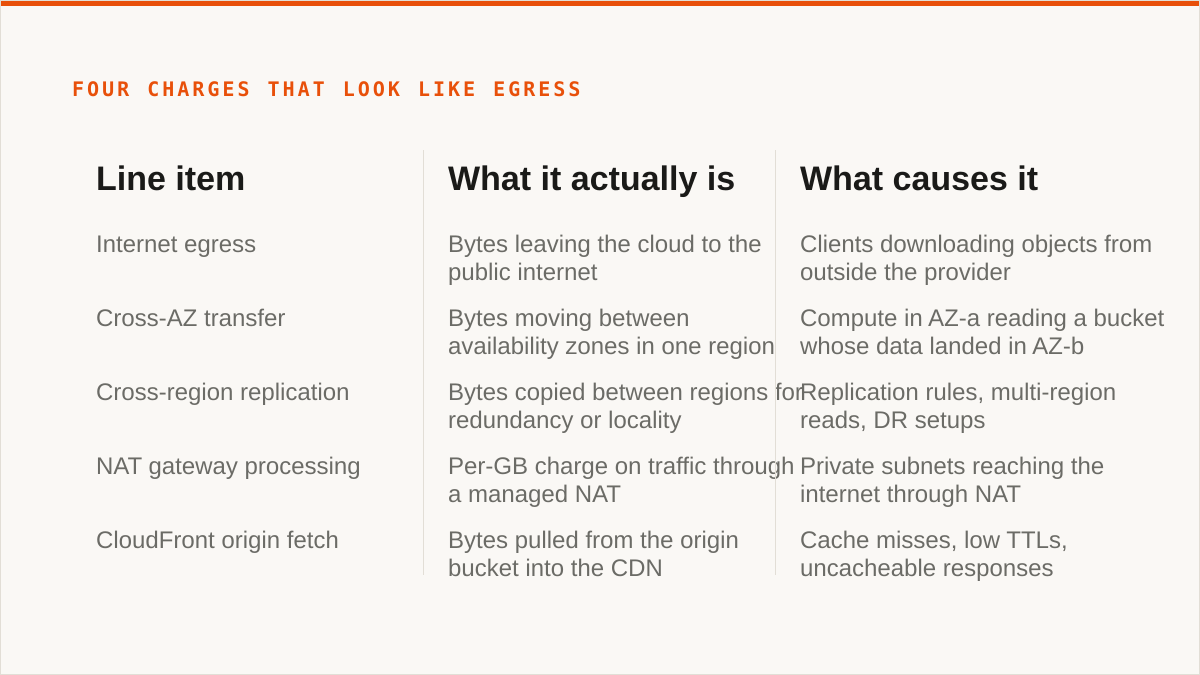
| Line item | What it actually is | What causes it |
|---|---|---|
| Internet egress | Bytes leaving the cloud to the public internet | Clients downloading objects from outside the provider |
| Cross-AZ transfer | Bytes moving between availability zones in one region | Compute in AZ-a reading a bucket whose data landed in AZ-b |
| Cross-region replication | Bytes copied between regions for redundancy or locality | Replication rules, multi-region reads, DR setups |
| NAT gateway processing | Per-GB charge on traffic through a managed NAT | Private subnets reaching the internet through NAT |
| CloudFront origin fetch | Bytes pulled from the origin bucket into the CDN | Cache misses, low TTLs, uncacheable responses |
Cross-AZ transfer is the one that catches people, because it's invisible from the outside. You do not see a network hop happen between two zones in the same region. You see a bill line that says DataTransfer-Regional-Bytes and no obvious cause. The cause is almost always topology: your compute runs in three zones, your bucket's requests land in one, and every read from the other two zones pays a small per-GB toll. At low volume it is noise. At petabyte scale it is a salary.
NAT gateway processing is the other quiet one. It is not egress in the classic sense, but it is billed per GB processed, and it is the reason a chatty service in a private subnet can run up a bill larger than its actual outbound traffic would suggest. Every health check that leaves the VPC, every metrics push, every package pull goes through the NAT and gets counted.
And CloudFront origin fetches are the trap in the opposite direction. People move to a CDN specifically to cut egress, and it works, but only if the cache hit ratio is high. A CDN in front of a cache-busting API is a CDN that pays origin fetch on every request and then pays viewer egress on top. You have added a hop and a bill.
Separate these four before you do anything else. Fixing the wrong one is how teams spend a quarter and save nothing.
Why S3 egress cost is usually a query problem wearing a network costume
Most S3 egress cost is not a topology problem. It's a read-pattern problem. Here is the argument.
S3 has no query planner. There is no index, no statistics, no cost-based optimiser deciding to skip a partition. Every read is a key lookup or a prefix listing, and you pay for what you ask for. If your key layout puts everything under one prefix, then listing "all objects for tenant X" means listing everything and filtering client-side, and every one of those list calls is a billed request even when it returns nothing useful.
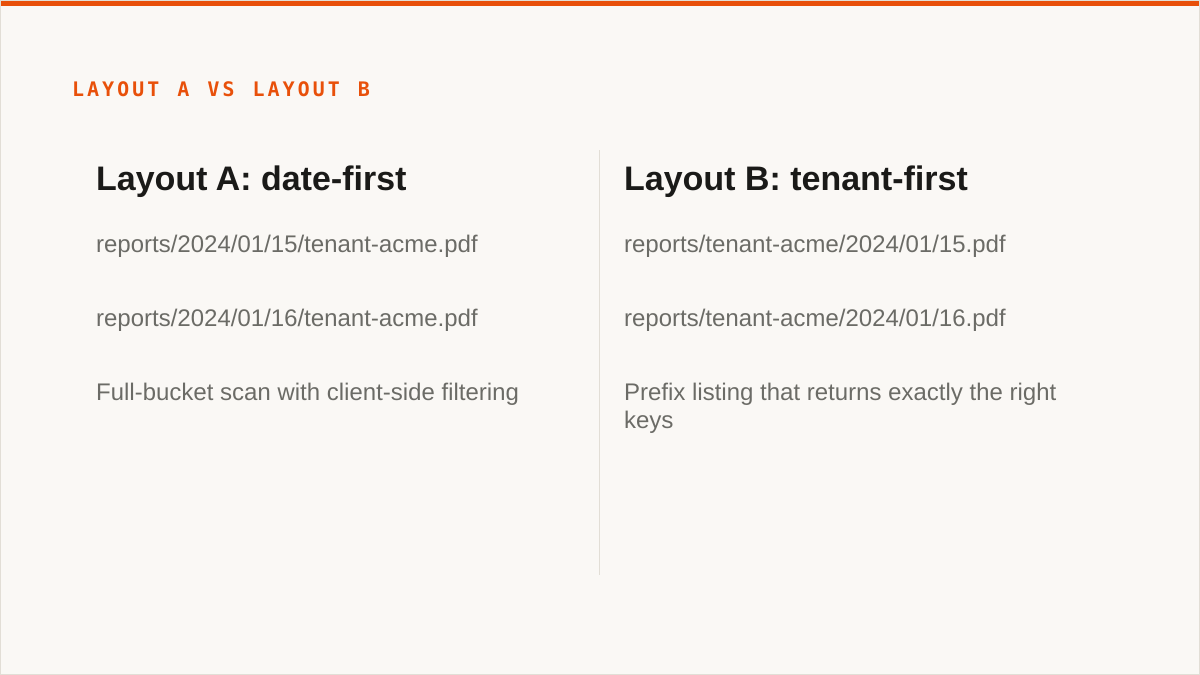
Bad key layouts are the root cause more often than anything else. Consider two layouts for the same data:
# Layout A: date-first
reports/2024/01/15/tenant-acme.pdf
reports/2024/01/16/tenant-acme.pdf

# Layout B: tenant-first
reports/tenant-acme/2024/01/15.pdf
reports/tenant-acme/2024/01/16.pdf
Same bytes. Same object count. Completely different cost profile. Layout A makes "give me everything for tenant-acme" a full-bucket scan with client-side filtering. Layout B makes it a prefix listing that returns exactly the right keys. If you do that operation ten thousand times a day, layout A costs you orders of magnitude more in requests and, because the client then fetches the objects it found, more in egress when the filter is wrong.
Missing prefixes compound it. A bucket with a million objects under a single flat prefix cannot be listed efficiently at all; the listing operation itself becomes the bottleneck and eventually a throttling problem. Prefix partitioning is not an optimisation you add later. It is a schema decision you make on day one, and if you got it wrong, you are paying for it every month in ways that look like network cost.
Repeated full scans are the second cause. A nightly indexer that reads everything to find out what changed, when a listing of keys and ETags would have told it the same thing for a fraction of the bytes, is the canonical example. If your pipeline is written as "download all, compare locally, keep what is new," you are paying egress to do a diff that S3 could have done for you with a ListObjectsV2.
Chatty clients are the third. A service that fetches a config file on every request instead of caching it, a health check that reads a status object every second, a dashboard that polls a metrics bucket on a timer for a graph a human looks at once an hour. Each one is a small number. Ten thousand of them is a line item.
The topology matters, but it is downstream of the read pattern. If you move the bucket to a provider with free egress and keep the full-scan indexer, you have moved the problem and stopped paying for it, which is a win, but you have not fixed it. The indexer still wastes compute and time. Fix the read pattern and the provider choice becomes a smaller decision.
There is a fourth cause that gets skipped: versioning. Turn on bucket versioning and every overwrite becomes a new object, every delete becomes a delete marker, and the prefix listing you wrote on day one now returns twice the keys it used to. The bytes billed as egress do not change, but the LIST volume does, and if you are reconciling source against destination by counting keys you will spend an afternoon chasing a discrepancy that is really just an old version sitting there. Lifecycle rules that expire noncurrent versions are not housekeeping. They are part of your read pattern.
And a fifth, which is the one nobody wants to hear: multipart uploads that were never completed. An aborted multipart upload leaves parts sitting in the bucket, invisible to a normal listing, billed as storage, and enumerated separately by ListMultipartUploads. Teams hunting an unexplained storage line will look at egress for a week before someone remembers to check. A lifecycle rule with AbortIncompleteMultipartUpload costs nothing and removes the whole category.
The cheap wins, in the order to apply them
Before touching providers, fix everything that is free to fix. This order matters because each step makes the next one easier to measure.
First, conditional requests. This is the single highest-leverage change and it costs nothing. S3 supports If-None-Match with ETags. A client that sends the ETag it already has gets a 304 Not Modified and pays a request charge but no egress. For a client pulling identical reports every night, this alone removes the majority of the bytes. The client code change is a few lines.
If you are using the CLI or an SDK, this is not automatic. You have to send the header. Most naive download loops do not, which is why they are expensive.
Second, compression. If your data is text, logs, JSON, CSV or XML, and it is not compressed, you are paying to move bytes you did not need to move. Compress before you upload. It costs CPU on the write and saves on every read forever. Already-compressed formats like PDF and JPEG gain nothing here, so check before you spend the afternoon on it.
Third, request shape. A config file hit tens of thousands of times a day for the same three keys is not a storage problem. The fix is not caching at the client, though that helps too. The fix is recognising that the config should not live in object storage being fetched per-request at all. It should be fetched once at startup and cached in memory for the process lifetime. That is a code change, not a storage change, and it removes an entire request-charge line.
For a full-scan indexer, the fix is to stop reading objects and start reading keys. ListObjectsV2 plus a modification-time comparison tells you what changed without downloading anything. The indexer goes from reading the whole bucket nightly to reading a listing and fetching only the changed objects.
Fourth, keep traffic in-region. This is architecture, not code, and it is the one that requires a real decision. If your compute is in three AZs and the bucket's requests land in one, your options are: pin the compute to one AZ (loses redundancy), replicate the hot objects to all three (pays replication), or accept the cross-AZ cost and design around it. A single-AZ hot bucket with a replicated copy for durability, plus pinning the readers that can tolerate it, is a common middle path. It does not get the cross-AZ line to zero. It gets it to a number that makes sense.
Fifth, dashboards that stop polling. Internal dashboards refreshing on a timer, each reading from S3 every thirty seconds, all day, for a graph nobody watches except during incidents. Move them to on-demand refresh. This is the least glamorous fix and it's often the easiest money.
Sixth, caching where it belongs. For a client on the wrong continent reading immutable, versioned objects, a CDN with a cache keyed on object version works. The hit ratio goes high and origin fetches drop to near zero. Viewer egress from the CDN is cheaper than S3 egress to the internet, and origin fetches only happen on cache miss. This is the one place where adding a component reduces the bill, and it works because the objects are immutable and cacheable. It would not work for a config bucket.
Seventh, and only now, consider the provider. After all of the above, what remains is the honest cost of moving bytes from one region to a client who genuinely needs them elsewhere. That is the part a migration can fix. Everything before it, a migration cannot.
The checklist we now run before blaming the cloud
We run this before every migration conversation. It takes half a day and it has saved us from proposing a migration that would not have fixed anything.
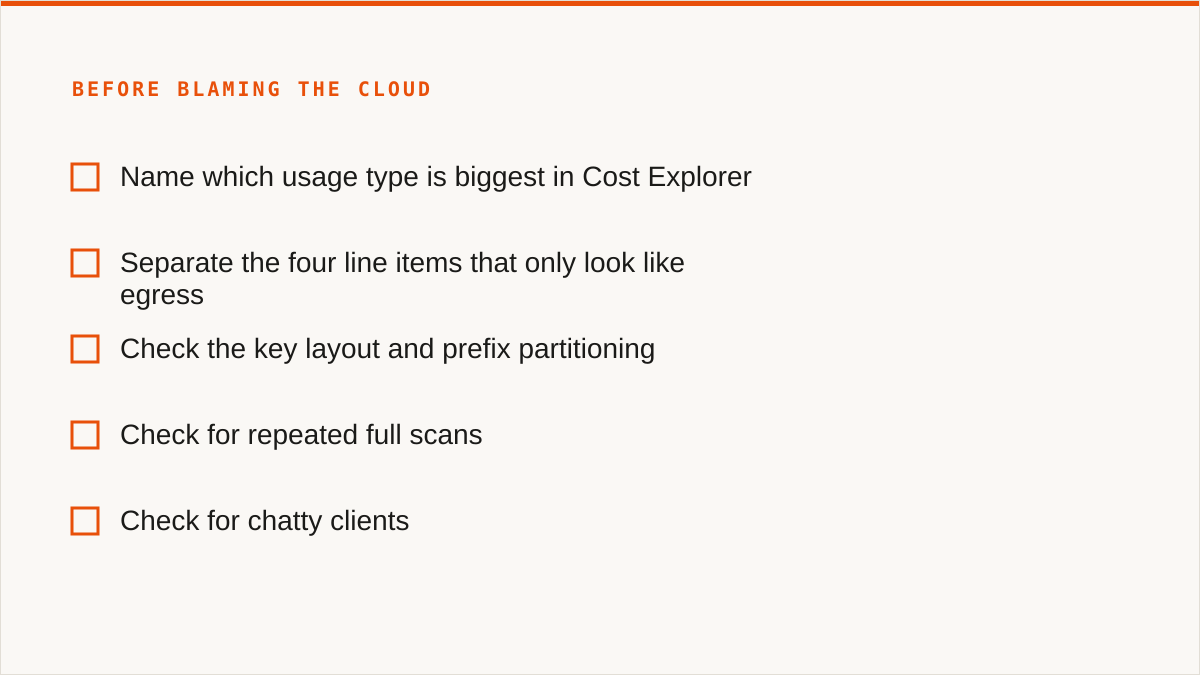
- What is leaving? Enable request metrics and access logging on every bucket. Break bytes down by prefix. If you cannot name the top five prefixes by egress, you are not ready to migrate.
- Who is reading it? For each hot prefix, name the client. Service, user, job, dashboard, third party. If the answer is "we think it's the reporting pipeline," find out.
- How often? Daily, hourly, per-request, on a timer. Frequency times bytes is the bill. A small object read a million times beats a large object read once.
- From where? Region, AZ, VPC, on-prem, other cloud. Cross-region and cross-AZ traffic is invisible until you map it.
- Does it need to move at all? Conditional requests, caching, compression, and in-region reads. This is where most of the saving lives.
- Is the read pattern sane? Check key layout, prefix partitioning, list-vs-get ratios. A bucket with more LIST than GET is usually a schema problem.
- Is the request charge bigger than the byte charge? If yes, you have a chatty-client problem, not an egress problem, and moving providers will not fix it.
- What is the cross-AZ number? Pull
DataTransfer-Regional-Bytesfrom Cost Explorer and graph it. If it is growing faster than your traffic, topology is the cause. - What is the NAT gateway number? Same exercise for
NatGateway-Bytes. It is not egress but it behaves like it on the bill. - What is the CDN hit ratio? If you have a CDN and the origin fetch volume is high, your cache is not working and the CDN is a cost, not a saving.
- What is the same data being fetched twice? Compare request counts to unique object counts. A ratio above two means clients are re-fetching, and conditional requests are the fix.
- Are there orphaned multipart uploads? Run
ListMultipartUploadsagainst every bucket. Unfinished uploads bill as storage and never appear in a normal listing. - Is versioning on, and is anything expiring the old versions? A noncurrent-version lifecycle rule is the difference between a listing that returns what you expect and one that returns double.
- What would the bill be if nothing left the region? This is the number that tells you how much of your cost is geography and how much is behaviour. If it is close to the real bill, migration will not help you.
Run it. If steps one through thirteen produce nothing, the problem is the provider's pricing and migration is the answer. If they produce a list, fix the list first, because you will pay the same behaviour cost at the new provider eventually.
Moving the bytes: the sequence, and the failure modes to expect
The remaining problem after the cheap wins is real: a client on the wrong continent reading bytes that genuinely have to cross an ocean. Free egress at the destination fixes that. Here is the sequence, including the parts that go wrong.
Bucket one is always the hot prefix. Do not migrate the whole bucket at once. Migrate the hot prefix first, using a one-time sync job, then set up a scheduled sync to keep it current while the old bucket stays live. Move the hot path, prove it works, then move the rest. Anything large should follow this pattern.
The first thing that breaks is source-side permissions. A source credential that allows GetObject on the prefix but not ListBucket on the whole bucket will let the initial sync run and will make the incremental sync fail partway through, because the incremental sync cannot enumerate what has changed. This is the single most common failure. Your source credentials need list permission on the scope you are syncing, not just read on the objects.
Bucket two is the cold history. Read almost never, but occasionally wanted by someone doing an audit. Migrate it in one pass, no schedule, because it never changes. This is the easy case and it is worth doing separately so it does not slow down the hot path.
Bucket three is the one you should not migrate. A tiny config bucket with a request-charge problem is not an egress problem, and caching already fixed it. Migrating it moves a problem instead of solving one. Leave it.
The second thing that breaks is the half-finished copy. A long-running historical migration plus a cutover started before verifying object counts gives you a destination bucket that is short by a few thousand objects, all in a prefix that was added mid-migration by an automated process. Nothing is lost, because the source is untouched, but the first audit query comes back incomplete and someone spends a day reconciling counts. Always compare object counts and total bytes between source and destination before you cut over. A migration is not done when the job reports success. It's done when the numbers match.
The third thing that breaks is the wrong region. The destination provider has multiple regions. You pick one that is geographically right for the client but has a different latency profile than expected for the sync itself. The transfer takes longer than projected because you are pushing from us-east-1 to a region that is not the provider's best-connected endpoint. Not a failure, but a surprise. Check the network path between source and destination, not just the geography of the destination.
The fourth thing that breaks is the client that cached its old endpoint. After cutover, a client keeps hitting the old bucket. Not because the config is wrong, but because the process cached the endpoint at startup and has not been restarted. It runs for three days against the old location, paying egress the whole time, before anyone notices. Your cutover plan needs a step that verifies the old endpoint is actually quiet. Watch the old bucket's request metrics after cutover. If they do not drop to zero, something is still pointed at it.
The fifth thing that breaks is the scheduled sync you forgot to turn off. You set up a scheduled sync to keep source and destination in step during the transition. After cutover, it keeps running for a week. It copies nothing, because nothing changed, but it lists both buckets on a schedule and generates request charges. Small, but it's the kind of thing that makes a migration look like it did not save what it should have.
Once the fixes are in, the migration itself is measured in days of actual work spread over a couple of weeks of elapsed time. The egress line drops to roughly the cost of the sync transfer itself, paid once, and then to near zero for ongoing client reads.
If you are at the point where the checklist says the provider is the problem, the migration workflow we use for this is the one we built into Storafleet, and it is the same sequence described above: hot prefix first, verify counts, cut over, watch the old endpoint go quiet.
The providers people move to, and the models behind them
The migration only makes sense if the destination's pricing model is different in the way you need. Here are the models, not the prices, because prices change and models are what you are actually choosing between.
Cloudflare R2 prices egress at zero for the public internet and charges for storage and operations. That is the whole model: no egress fee, and the storage and request rates are in the same range as everyone else. The catch is the operational model, not the pricing: R2 is S3-compatible but not identical, and some S3 features behave differently or are absent. Read the compatibility notes before you commit.
Backblaze B2 has a free egress allowance each month and charges above it, and it has partnership arrangements with CDNs that zero out egress when traffic goes through them. The model is "some free egress, cheaper above," not "free egress always." It is a good fit for workloads with moderate outbound and a CDN in front, and a worse fit for a workload that ships terabytes to the internet directly every day.
Wasabi charges no egress fee but has a minimum storage retention period, meaning objects deleted before the minimum are still billed as if they had been stored for it. The model is "no egress, but we are not the place for data you churn." If your workload is write-once, read-many, archival, it fits. If you are constantly deleting and rewriting small objects, the minimum retention will cost you more than the egress you saved.
The self-hosted options (MinIO, Ceph, and similar) have no egress fee because there is no provider. The cost is the hardware, the bandwidth from your own datacentre, and the operational burden. This is a real answer for some teams and a trap for others. The egress line disappears and the staffing line grows.
The other S3-compatible providers (DigitalOcean Spaces, Oracle, IBM, Scaleway, Linode, Vultr, Storj, IDrive e2, Hetzner) each have their own twist: some bundle a transfer allowance into the storage price, some charge a lower rate than the hyperscalers, some have regional or minimum-retention constraints. The thing they have in common is that they are all S3-compatible, which means the migration is mostly a matter of endpoints and credentials rather than rewriting your application.
The model to look for is not "cheapest storage." It is "the charge that hurt me is structured differently." If your bill was dominated by internet egress, you want free or cheap egress. If it was dominated by cross-region, you want a single-region footprint or cheap inter-region. If it was dominated by request charges, no provider will save you, because you have a client problem.
We connect to all of these and any custom S3 endpoint. We do not store your file contents; Storafleet is a control plane over storage you already own, and the bytes move between your providers, not through us. We charge a flat subscription and never per gigabyte, so a migration that moves tens of terabytes costs the same at the subscription level as one that moves a few megabytes. That is a deliberate pricing choice and it is the reason we can serve the migration case at all.
Credentials are encrypted at rest with AES-256-GCM using per-namespace HKDF keys, and for AWS specifically you can connect keylessly via IAM role assumption, so no long-lived access key is stored at all. That is the strongest thing we can say about credentials. It is not the strongest thing that can be said, and we will get to that.
Where rclone genuinely beats us, and we are not going to pretend otherwise
This is the section we write first and the one most of our competitors would cut.
rclone is free, permanently, with no account, no vendor and no subscription. Not free tier, not free trial. Free. If your budget for this problem is zero, that is the end of the conversation and rclone wins. We cannot compete with free and we are not going to try.
rclone supports more backends than we do, by a wide margin. We connect the S3-compatible family and custom S3 endpoints, which covers the providers listed above and any S3-compatible store. rclone supports that plus Google Drive, Dropbox, OneDrive, Box, SFTP, WebDAV, FTP, Google Photos, and dozens more. If your job involves moving data out of a consumer cloud, we are the wrong tool and rclone is the right one. We made that scope decision deliberately, and it costs us work. We are not going to add a half-working Drive integration to pretend otherwise.
rclone mounts. It can present a remote bucket as a local filesystem via FUSE, which means ls, cp, rsync, and every tool that expects a path just work against remote storage. We have no FUSE surface at all. If you want your buckets in Finder or Explorer, or you want to run a legacy tool that only understands filesystem paths, rclone does this and we do not. Mountain Duck and ExpanDrive do it too, with a GUI, and for a single user who wants no command line they are better than both of us.
rclone is scriptable and composes. It is a binary. It goes in a cron job, a systemd timer, a CI pipeline, a Makefile, a shell script. It returns exit codes you can branch on. It has a config file you can generate and version. Our console is a web UI and an API, and while the API is real, it does not compose the way a binary does. If your workflow is code, a CLI fits it natively and a web UI never will.
rclone runs inside your own security boundary. Your credentials stay on your machine. Nothing is sent to a vendor. Our credentials are encrypted at rest, and the encryption is real, but "the keys never left my laptop" is a stronger answer than "the keys are encrypted in our database with per-namespace keys." We will not pretend those are equivalent. For some organisations, the first is the only acceptable answer, and those organisations should use rclone.
rclone has been maintained for over a decade. Storafleet started in 2026. We are a small team. On the question "will this still exist in five years," a decade-old open-source project with a large contributor base has a better answer than we do, and it would be dishonest to argue otherwise. If longevity is your primary concern, use rclone.
We also have no published case studies and no named customers. We will not invent them. If you need to see who else uses a tool before you trust it, we cannot help you yet, and that is a legitimate reason to choose something else.
Where we think we are worth the subscription: when the job is ongoing rather than one-off, when there are multiple providers to keep in sync, when the person doing it is not the person who wrote the script, and when a browser-based console with per-bucket cost visibility, duplicate detection, global search and scheduled sync is worth more than a shell script that only the author can safely run. That is a real category of work. It is not everyone's work.
Who should not use Storafleet for this, and what to use instead
Plain verdicts. We would rather you leave with the right tool than subscribe to the wrong one.
- Your budget is zero. Use rclone. It is free, it is excellent, and the conversation is over.
- You need storage mounted as a filesystem. Use
rclone mount, Mountain Duck or ExpanDrive. We have no FUSE surface and adding one is not on the roadmap. - You need Google Drive, Dropbox, OneDrive, Box or SFTP. Use rclone or MultCloud. We speak S3-compatible and custom S3 endpoints, and nothing else. That is a deliberate boundary, not a gap we are about to close.
- Credentials must never leave hardware you control. Use rclone. If the workload is AWS-only, our IAM role assumption path means no long-lived key is stored, but the role is still assumed by us, and for some threat models that is not good enough. Those threat models should use a local tool.
- Everything lives in one cloud and always will. Use that provider's own console. It is free, it is always current with the provider's newest features, and it is authoritative in a way a third-party tool cannot be.
- Your workflow is entirely code and always will be. Use a CLI. It composes with cron, systemd, CI and Makefiles in a way a web console does not, and no amount of API work on our side changes that.
- You need to see named customers before you buy. We do not have them. Use a tool that does.
- You need a vendor with a decade of history. Use rclone. Or a provider's own console. We started in 2026 and we are a small team.
Who should use us: teams running multi-provider object storage who need to move and keep in sync tens of terabytes across S3-compatible endpoints, who want the migration to be a scheduled job rather than a shell script, who want per-bucket cost visibility and duplicate detection without building it, and who are comfortable with a console and an API rather than a binary. If that is you, the flat subscription means the size of the migration does not change the price, and the credentials are encrypted at rest with the option of keyless AWS connection.
Start with the checklist. Enable request metrics. Break the bytes down by prefix. Find out who is reading what, how often, and from where. In our experience most of the bill is behaviour, and behaviour is free to change.